You just bought a Brother embroidery machine. You’re ready to stitch something beautiful — a floral pattern for a tote bag, maybe. But where do you get the designs? How do you transfer them? And which machine actually makes the process smooth instead of frustrating? Those questions stop more people from embroidering than any skill gap.
A great floral embroidery setup comes down to three things: reliable designs that stitch cleanly, a machine that handles them without fuss, and the right accessories to keep everything organized. Design files need to be in the correct format for your machine. The machine should offer enough hoop size and features for the projects you actually want to make. And a few extras — spare hoops, thread, or even a journal — can turn a one-time hobby into a lasting habit.
This roundup covers five different approaches. For design files, the YITU USB collection gives Brother 4×4 owners a huge floral library right out of the box. The Brother SE700 (both the base model and the accessory bundle) delivers a solid combo machine with wireless connectivity. The Skitch single-needle machine offers a compact alternative for embroidery-only use. And the Majosta journal helps you keep track of what you stitch. Prices vary, so check current Amazon pricing for your budget. Here’s how they compare.
Here’s a quick comparison of the key specs across these products.
| Features | YITU USB Designs | Brother SE700 Machine | Brother SE700 Bundle | Brother Skitch Machine | Majosta Journal |
|---|---|---|---|---|---|
| Type | Design collection (USB) | Sew & embroidery combo | Combo machine + accessories | Single-needle embroidery only | Project notebook |
| Designs included | 1000+ floral PES | 135 built-in | 135 built-in + 500 card designs | None (use Artspira app) | Not applicable |
| Hoop size | 4×4 only | 4×4 | 4×4 + extra hoops | 4×4 | Not applicable |
| Best for | Brother machine owners | Beginners wanting both sewing and embroidery | New users who want everything included | Small-space embroidery-only use | Organized record-keepers |
| Key differentiator | Video tutorial for beginners | Wireless LAN transfer | 40 thread spools + 4 hoops | Bluetooth, compact footprint | Floral-themed cover |
YITU Floral PES Designs
This is a USB drive loaded with over a thousand floral embroidery designs in PES format. It’s built for Brother machines that take a 4×4 hoop. If you already own a compatible Brother model and want a huge library of flower patterns without hunting online or paying per design, this USB is a solid shortcut.
The standout feature isn’t the file count — it’s the included beginner video tutorial. New embroiderers often struggle with hooping, stabilizer choices, and file transfer. That short walkthrough covers the basics. The designs themselves lean decorative: florals for towels, pouches, napkins, garment accents. You’ll find plenty of year-round options, not just seasonal blooms.
There’s a catch worth noting. This USB only works with PES files and Brother machines that accept them. If you own a different brand, or need larger hoop sizes, you’re out of luck. The 4×4 limitation means you can’t stitch big centerpiece designs without splitting them. Also, the USB drive is physical — no cloud backup. Lose it and the designs are gone.
- 1000+ floral PES designs on a single USB
- Includes video tutorial for beginners
- Compatible with Brother 4×4 machines (SE700, SE725, PE535, etc.)
- Designs suitable for home decor, clothing, and gifts
- No software installation needed; plug and stitch
Best for: Brother machine owners who want a ready-to-use floral design library with beginner-friendly guidance.
Brother SE700 Machine

Brother
Brother SE700 Sewing and Embroidery Machine, Wireless…
- Sewing and Embroidery in One: The SE700 Brother sewing and embroidery machine is the ideal machine to start your sewing and embroi…
- Wireless Lan Enabled: Transmit embroidery files from your PC to your embroidery sewing machine via the free downloadable software…
- Artspira Mobile App for Customization: Make custom embroidery patterns by drawing on your mobile device, or download patterns from…
The SE700 is a computerized combo machine that sews and embroiders. It’s aimed at people just starting their journey in either skill. With 135 built-in designs and 103 stitches, you can tackle basic sewing projects and then switch to embroidery mode for monograms or floral motifs. It’s a jack-of-all-trades in a single chassis.
Wireless LAN connectivity sets it apart from older models. You can send embroidery files from your computer using Brother’s free Design Database Transfer software, no USB cable required. The Artspira mobile app lets you draw custom patterns on your phone and beam them to the machine. The 3.7-inch color touchscreen makes editing and previewing your designs before stitching straightforward — you can rotate, resize, and even combine patterns on the fly.
The trade-off is the 4×4 hoop. It’s great for towels, small bags, and shirt pockets. For larger projects like pillowcases or quilts, you’ll have to re-hoop and align multiple times, which takes patience. The machine itself has a moderate learning curve; beginners should budget a weekend to get comfortable with thread tension and hoop setup. It’s not a machine you’ll master in an hour.
- 135 built-in embroidery designs, 103 sewing stitches
- Wireless LAN transfer from PC or mobile app
- 3.7-inch LCD color touchscreen with on-screen editing
- Embroidery arm and 4×4 hoop included
- 8 sewing feet included for various techniques
Best for: Beginners who want one machine for both sewing and embroidery with modern wireless convenience.
Brother SE700 Bundle

Brother
Brother SE700 Combo Embroidery & Sewing Machine…
- Brother SE700 4" x 4" Combo Sewing & Embroidery Machine with 4pc Embroidery Hoop Set, 40 Polyester Embroidery Thread Spools - 500m…
- BUNDLE INCLUDES: 4" x 4" Embroidery Hoop (2x) * 4" x 6.75" Embroidery Hoop * 1" x 2.5" Embroidery Hoop * 40 Polyester Embroidery T…
- BUNDLE INCLUDES: Zigzag foot “J” (on machine) * Monogramming foot “N” * Overcasting foot “G” * Zipper foot “I” * Blind stitch foot…
This is the exact same SE700 machine but wrapped in a substantial accessory package. Inside the box you get four embroidery hoops (two 4×4, one 4×6.75, one 1×2.5), 40 spools of polyester embroidery thread (500 meters each), eight sewing feet, and a small toolkit with bobbins, needles, scissors, and more. Brother also throws in 500 Sofontsy design cards for extra embroidery patterns.
The bundle solves a real problem: buying a machine and then realizing you need more hoops, thread, and feet. The 40-thread set alone saves you from making multiple trips to the craft store. The extra hoops allow you to work with different sizes without purchasing separately. The 500 design cards (each good for 30+ designs) extend your library far beyond the built-in 135.
The downside is the price. You’ll pay more than the standalone SE700. And some accessories you might not need — the small 1×2.5 hoop is niche, and the thread colors might not match your personal palette. The bundle is a time-saver for new embroiderers, but an experienced user might prefer to pick exactly which accessories they want.
- Same SE700 machine with 135 designs, 103 stitches, wireless
- 4 hoops: 4×4 (x2), 4×6.75, 1×2.5
- 40 polyester thread spools (500m each)
- 8 sewing feet + tool kit with bobbins and scissors
- 500 Sofontsy design cards with SVG/JPG/commercial use
Best for: First-time buyers who want a complete setup with hoops and thread included.
Brother Skitch Single-Needle

Brother
Brother Skitch Single-Needle Embroidery Machine Bluetooth |…
- ARTSPIRA CONNECTION: Draw your next embroidery project on the free and required Artspira(1) App and get ready to add a dash of you…
- NOW THERE IS EMBROIDERY FOR EVERYONE: New to embroidery The Skitch Embroidery Machine is a great way to start your embroidery jour…
- IMPORT YOUR OWN EMBROIDERY FILES: Users of the unpaid version of Artspira are able to import any PES, PHC, PHX, or DST embroidery…
The Skitch PP1 is a small, dedicated embroidery machine with no sewing capabilities. It connects to your phone or tablet via Bluetooth and works with the free Artspira app. You draw or select a design in the app, then send it to the machine. It stitches designs up to 4×4 at speeds up to 400 stitches per minute.
Its biggest strength is its size. The Skitch takes up very little space — you can set it on a desk corner and leave it ready. It’s designed for people who only want embroidery, not sewing. You can import your own PES, PHC, PHX, or DST files (up to 20 stored in the app at a time) and stitch them onto store-bought clothes, towels, or blankets. The Artspira app runs on both Apple and Android devices, so no computer is required.
The single-needle design is the main limitation. Each color change means you stop the machine, cut the thread, and rethread with a new color. That’s fine for small projects with 2-3 colors, but a complex floral with eight colors becomes tedious. Also, the machine is embroidery-only — if you need a sewing machine, this isn’t it. And Artspira is mandatory; you can’t just plug in a USB and stitch.
- Bluetooth connection to Artspira app (iOS/Android)
- Embroiders up to 4×4 at 400 spm
- Imports PES, PHC, PHX, DST files (20 designs in app)
- Compact footprint for small craft spaces
- Single needle, manual color change
Best for: Embroidery-only users who want a tiny, app-controlled machine for personalizing clothing and linens.
Machine Embroidery Journal
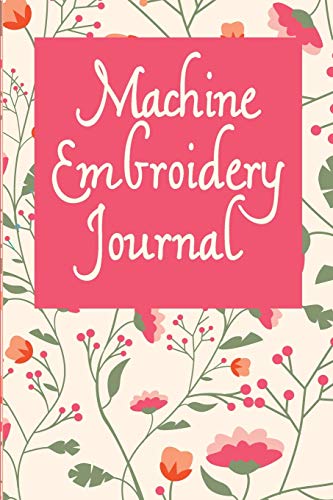
This is a simple 6×9-inch notebook with 110 pages. Each page has space to record project details: pattern name, designer, digital file number, thread brand, thread weight, color, tension settings, and notes. The cover has a floral print that matches the overall theme of this roundup.
Why would you need a journal? Because embroidery involves a lot of variables. Thread brand changes, tension adjustments, stabilizer choices — if you nail a perfect stitch out, you want to replicate it later. This journal gives you a dedicated spot to log those settings. It’s small enough to toss in a project bag.
The limitation is obvious: it’s a paper notebook. No search function, no photos, no digital backup. You’ll need a pen. The binding is glued, not spiral, so it won’t lie flat easily. For someone who keeps everything on their phone, this feels archaic. But for makers who prefer handwriting and sticky notes, it works fine.
- 110 pages with pre-printed fields for project details
- Fields for design name, designer, digital file, thread info, tension
- Floral-themed cover (matches the article theme)
- 6×9-inch size, portable for project bags
- Paper notebook — no digital integration
Best for: Embroiderers who like tracking settings and results by hand for consistent repeat projects.
How We Chose These Products
We started with a simple question: what does someone actually need to start or improve their floral machine embroidery? That led to three categories — design files, the machine itself, and supporting accessories. We looked for products that fill those roles without unnecessary complexity.
For designs, we prioritized immediate usability. A USB with a large collection and a tutorial beat a download with 50 files. For machines, we focused on the 4×4 hoop size because it’s the standard for beginners and fits most Brother models. The SE700 bundle earned a spot because it solves the “what else do I buy” problem. The Skitch made the list because it’s genuinely different — small, app-driven, and purely embroidery. The journal is an outlier, but a practical one for organized makers. We did not include machines over $1,000 or specialty software, because this guide aims at the realistic point of entry.
Buying Guide: What Really Matters
Hoop size is the first thing to decide. A 4×4 hoop works for towels, pockets, and most accessories. If you want to stitch a large floral centerpiece on a pillowcase, you’ll need to re-hoop and align sections, which is fiddly. Some machines offer 5×7 or larger hoops, but they cost more. Know your project size before you buy.
File format matters more than most people realize. Brother machines read PES. If you buy designs from an online shop, check they offer PES. The YITU USB gives you PES files, so it works. If you go with the Skitch, it also reads PES, plus DST and a few others. But if you ever borrow designs from a friend with a different brand, you may need conversion software. Stick with one format ecosystem to avoid headaches.
Accessories add up fast. The SE700 bundle’s 40 thread spools and extra hoops represent real value compared to buying separately. But if you already have a stash, the standalone machine plus the YITU USB might be smarter. Don’t pay for what you already own.
Our Top Recommendation
The Brother SE700 bundle is the most complete entry point. You get the machine, extra hoops, 40 thread spools, and hundreds of design patterns for under a reasonable price (check current Amazon pricing). It removes the guesswork of what to buy next. The wireless features and touchscreen make the actual embroidery process smoother than older models.
If you already own a Brother 4×4 machine, skip the bundle and grab the YITU USB. It gives you a massive floral library without buying a new machine. And if embroidery is your only interest and you’re tight on workspace, the Skitch offers something nothing else here does — a tiny footprint and a smartphone-based workflow. Choose based on where you are right now, not where you hope to be next year.
Frequently Asked Questions
Can I use YITU floral designs on a non-Brother machine?
Only if your machine accepts PES files. Some Janome, Bernina, and Singer models support PES, but check your manual. If your machine uses a different format (like JEF for Janome or DST for Tajima), you’ll need conversion software. The YITU USB is designed specifically for Brother PES compatibility.
Is the Brother Skitch good for large floral designs?
Not really. The 4×4 hoop is the maximum, and the single needle forces you to change thread manually for each color. A complex floral with 5+ colors will take a long time and require close attention. The Skitch works best for small monograms, simple two-color flowers, or adding a single motif to an existing item.
What’s the difference between the SE700 bundle and the standalone machine?
The bundle adds four hoops (including a 4×6.75 and a tiny 1×2.5), 40 thread spools, and a set of 500 design cards. The standalone comes with one 4×4 hoop and no thread. If you’re starting from zero, the bundle saves you about 30-40% compared to buying those extras separately. If you already own hoops and thread, the standalone is cheaper.
Do I need a computer for the Skitch embroidery machine?
No. The Skitch connects via Bluetooth to the Artspira app on your phone or tablet. You create or import designs on the device, then send them wirelessly. But you do need a mobile device running iOS or Android. There is no USB port for direct file transfer — it’s app-only.