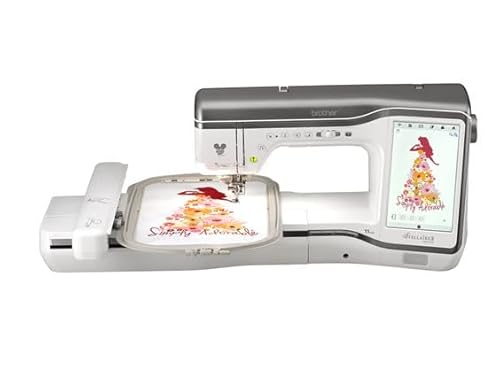
The Brother Stellaire sewing machine stands out in the world of sewing and embroidery, combining advanced technology with user-friendly features. Whether you’re a seasoned seamstress or a beginner just starting, this machine offers a plethora of options to elevate your projects. With its intuitive interface, high-quality stitch options, and robust embroidery capabilities, the Brother Stellaire is a top choice for anyone looking to enhance their sewing experience. In this article, we’ll delve into the features, advantages, and tips for maximizing the use of your Brother Stellaire sewing machine.
Features of the Brother Stellaire Sewing Machine
The Brother Stellaire sewing machine is packed with features that cater to both sewing and embroidery needs. Here are some key attributes:
Advanced Needle Threading System
This machine features an automatic needle threading system, allowing you to thread the needle with just the touch of a button, saving you time and frustration.
Large LCD Touchscreen
The large LCD touchscreen provides a user-friendly interface for navigating sewing and embroidery functions, adjusting settings, and previewing designs.
Built-in Designs and Fonts
The Brother Stellaire comes with a wide range of built-in embroidery designs and fonts. You can explore various themes and styles to personalize your projects effortlessly.
Stitch Options
With over 300 built-in stitches, the Brother Stellaire offers a variety of options, from basic to decorative stitches, ensuring you have the perfect stitch for every project.
Wi-Fi Connectivity
One of the standout features of the Brother Stellaire is its Wi-Fi connectivity, allowing you to download new embroidery designs directly from your computer or the internet.
Setting Up Your Brother Stellaire
Setting up your Brother Stellaire sewing machine is a straightforward process. Here’s a step-by-step guide to get you started:
Unboxing and Assembly
Carefully unbox your machine and check that all parts are included according to the manual. Assemble the machine by attaching the accessories and the foot pedal.
Powering Up
Plug the machine into a power source and turn it on. The LCD screen will light up, guiding you through initial settings.
Threading the Machine
Follow the threading diagram located on the machine or in the manual to thread the machine properly. Make sure to wind the bobbin correctly and insert it into the machine.
Sewing with the Brother Stellaire
Sewing with the Brother Stellaire is a seamless experience thanks to its advanced features. Here’s how to make the most out of your sewing sessions:
Choosing the Right Stitch
Select the stitch you want to use from the LCD touchscreen. The machine allows you to adjust stitch length and width to fit your project needs.
Using the Presser Foot
Different presser feet are designed for various sewing techniques. For instance, the zipper foot is perfect for installing zippers, while the walking foot is ideal for quilting.
Adjusting Tension Settings
Understanding how to adjust tension settings is crucial for achieving the best results. Refer to the fabric type and stitch selected for appropriate tension adjustments.
Embroidery Capabilities
The embroidery features of the Brother Stellaire are what truly set it apart. Here’s a closer look at what you can do:
Design Importing
Using the Wi-Fi connection, you can import your custom embroidery designs from your computer or download new ones from the internet. This feature opens a world of creative possibilities.
Editing Functions
Once you’ve imported a design, you can edit it directly on the machine. Adjust the size, rotate, or combine designs to create unique patterns.
Embroidery Area
The machine offers a generous embroidery area, allowing you to work on larger designs without needing to reposition your fabric frequently.
Customizing Stitches
You can customize the stitching density and other parameters to suit your fabric and design needs, ensuring high-quality finishes.
Maintenance Tips
Cleaning the Machine
Regularly clean the machine to remove lint and dust. Use a soft brush or a vacuum attachment to get into hard-to-reach areas.
Oiling the Machine
Consult the manual for guidance on where to oil the machine. Proper lubrication is crucial for smooth operation and preventing wear and tear.
Updating Software
Periodically check for software updates to enhance functionality and fix bugs. Connect to Wi-Fi and follow the prompts on the LCD screen to update.
Frequently Asked Questions
A: The Brother Stellaire typically comes with a limited warranty of 25 years for the machine and 1 year for parts and accessories.
A: Yes, the Brother Stellaire supports various file formats, allowing you to use third-party embroidery designs as long as they are compatible.
A: Absolutely! Its intuitive interface and helpful features make it an excellent choice for beginners and experienced sewers alike.
A: You can visit Brother’s official website to locate authorized service centers in your area or ask your local sewing store for recommendations.
In conclusion, the Brother Stellaire sewing machine is an exceptional tool for those looking to elevate their sewing and embroidery projects. With its advanced features, user-friendly interface, and robust capabilities, it caters to both beginners and seasoned sewists. Whether you’re sewing garments, quilting, or creating intricate embroidery designs, the Brother Stellaire has the versatility and functionality to meet your needs. Regular maintenance and exploration of its features will help you make the most out of this brilliant sewing machine, ensuring that every project is a success. For those interested in professional embroidery projects, consider checking out stylish options like the embroidered Grey’s Anatomy coat – Stylish & Professional: Embroidered Grey’s Anatomy Coat. Happy sewing!