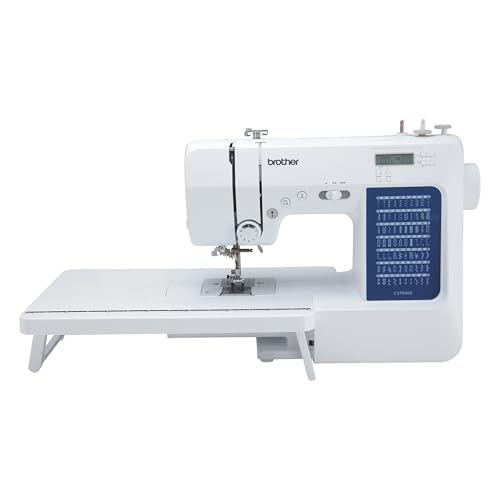
The Brother XL3500i sewing machine is an exceptional choice for both beginners and experienced sewists alike. With its user-friendly features, versatile functions, and reliability, it stands out as a top contender in the world of sewing and embroidery. Whether you are looking to create simple garments, intricate embroidery designs, or even home decor, this machine has got you covered. In this article, we will explore the remarkable features of the Brother XL3500i, its advantages, and some tips to maximize your sewing experience.
Features of the Brother XL3500i
The Brother XL3500i is packed with features that cater to both sewing and embroidery enthusiasts. Here’s a breakdown of its key features:
Built-In Stitches
This machine boasts an impressive selection of 35 built-in stitches, including utility stitches, decorative stitches, and even buttonhole stitches. This variety allows for creativity and functionality in your sewing projects.
Automatic Needle Threading
One of the standout features is the automatic needle threading system, which simplifies the threading process and saves time. This is particularly beneficial for beginners who may find manual threading challenging.
LCD Display
The XL3500i comes with an LCD display that makes it easy to select stitches and adjust settings. The user-friendly interface ensures that you can navigate through options without confusion.
Embroidery Capabilities
With its built-in embroidery features, the Brother XL3500i allows you to add intricate designs to your projects. You can utilize the provided embroidery designs or create your own using compatible software.
Sewing Feet
The machine includes various sewing feet, such as a zipper foot, buttonhole foot, and walking foot, enhancing its versatility and allowing you to tackle a wide range of sewing tasks.
Benefits of Using the Brother XL3500i
Investing in a Brother XL3500i sewing machine can greatly enhance your sewing experience. Here are some of the benefits you can expect:
Versatility
Whether you are sewing garments, home decor, or personal crafts, the Brother XL3500i can handle various fabrics and projects. Its combination of sewing and embroidery capabilities makes it a multifunctional tool for any sewing enthusiast.
User-Friendly Design
The machine’s intuitive design makes it accessible for beginners while still providing advanced features for experienced sewists. The easy-to-navigate controls and clear instructions contribute to a smooth learning curve.
Portability
Lightweight and compact, the Brother XL3500i is easy to transport, making it perfect for sewing classes or workshops. You can take your sewing projects wherever you go without hassle.
Affordability
Compared to other machines with similar features, the Brother XL3500i offers excellent value for its price. It provides a wide range of functions without breaking the bank, making it a great investment for your sewing journey.
Setting Up Your Brother XL3500i
Setting up your Brother XL3500i is a straightforward process. Follow these steps to get started:
Unboxing
Carefully remove the machine from the box, ensuring that all accessories and documentation are included. Refer to the user manual for a list of components.
Placement
Find a stable, flat surface to set up your sewing machine. Ensure that you have ample space for your fabric and tools. A well-lit area is recommended for better visibility.
Threading the Machine
Follow the threading diagram provided in the user manual. Start by placing the spool of thread on the spool pin and threading it through the guides as indicated. Don’t forget to use the automatic needle threading feature for ease.
Connecting to Power
Plug the machine into a power source and ensure that the foot pedal is connected securely. Give it a test run by turning on the machine and selecting a stitch to ensure everything is functioning properly.
Sewing Techniques with the Brother XL3500i
Now that your Brother XL3500i is set up, it’s time to explore some sewing techniques you can try:
Basic Stitching
Begin with basic straight stitches. Practice on scrap fabric to get comfortable with the machine’s speed and control. Adjust the stitch length according to the fabric type.
Decorative Stitching
Experiment with the decorative stitches available on the machine. These can be used to embellish garments or create unique designs on home decor items.
Buttonhole Creation
The Brother XL3500i simplifies the buttonhole process with its automatic feature. Select the buttonhole stitch, set the size, and let the machine do the work for you.
Embroidery Techniques
Utilize the built-in embroidery features by selecting a design from the machine’s library. Position your fabric in the embroidery hoop and follow the instructions to create stunning patterns.
Maintenance Tips for Longevity
Proper maintenance is crucial for the longevity and performance of your Brother XL3500i. Here are some essential maintenance tips:
Regular Cleaning
Keep your machine clean by regularly removing lint and dust from the interior and exterior. Use a soft brush or a vacuum attachment to gently clean the sewing area.
Oiling
Consult the user manual for specific instructions on oiling your machine. Regular oiling can help keep the moving parts lubricated and functioning smoothly.
Check Tension
Regularly check the tension of your threads to ensure consistent stitching quality. Adjust the tension settings according to the type of fabric you are using.
Storage
When not in use, cover your Brother XL3500i with a protective cover to prevent dust accumulation. Store it in a cool, dry place away from direct sunlight.
Frequently Asked Questions
A: Yes, the Brother XL3500i can handle various fabric types, including thicker materials like denim or canvas, as long as the correct needle and settings are used.
A: Yes, the Brother XL3500i typically comes with a limited warranty. Be sure to check the warranty details upon purchase for specifics.
A: The machine includes built-in embroidery designs, and you can also create custom designs using compatible software. Check for compatible formats in the user manual.
A: If you encounter bobbin issues, ensure that the bobbin is wound evenly and correctly inserted. Check for any tangles or jams, and refer to the manual for troubleshooting steps.
In conclusion, the Brother XL3500i sewing machine is an excellent investment for anyone interested in sewing and embroidery. Its user-friendly design, versatility, and affordability make it an ideal choice for beginners and experienced sewists alike. With proper setup, maintenance, and practice of various sewing techniques, you can unlock the full potential of this remarkable machine. Whether you’re creating your next fashion statement or crafting a unique gift, the Brother XL3500i is a reliable companion on your sewing journey.