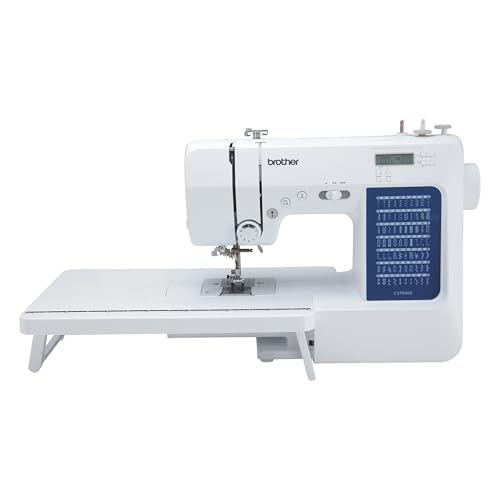
If you are venturing into the world of sewing and embroidery, the Brother XM1010 sewing machine is a fantastic choice for beginners and seasoned crafters alike. Combining ease of use with a variety of features, this machine allows users to explore their creativity while producing high-quality results. Whether you’re mending a simple hem or embarking on a more intricate embroidery project, the XM1010 offers versatility that caters to all skill levels.
Features of the Brother XM1010
The Brother XM1010 boasts a variety of features that enhance its usability and efficiency. Here’s a detailed look at what makes this machine special:
Stitch Options
The XM1010 comes equipped with 10 built-in stitches, including utility stitches, decorative stitches, and a one-step buttonhole. This variety enables you to tackle a range of sewing projects, from basic repairs to decorative embellishments.
Automatic Needle Threading
The automatic needle threading feature simplifies the sewing process, allowing you to thread the needle with just the push of a lever. This is particularly beneficial for those who may struggle with manual threading.
Drop-in Bobbin
The drop-in bobbin system is easy to use and ensures that the bobbin is correctly placed, reducing the likelihood of jams and errors during sewing.
Adjustable Stitch Length and Width
With adjustable stitch length and width, you can customize your stitches to suit your specific project needs, whether you’re sewing delicate fabrics or thicker materials.
Lightweight Design
The XM1010 is lightweight and portable, making it easy to transport for classes, workshops, or sewing groups.
Setting Up the XM1010
Getting your Brother XM1010 ready for use is straightforward. Here’s a step-by-step guide:
Unboxing and Assembly
- Carefully remove the machine from the box and remove any packing materials.
- Attach the power cord and foot pedal, ensuring a secure connection.
- Set up your machine on a flat, stable surface where you have ample lighting.
Threading the Machine
Follow these steps to thread your XM1010:
- Place your spool of thread on the spool pin.
- Follow the threading diagram printed on the machine to guide the thread through the necessary guides and tension discs.
- Use the automatic needle threading feature to complete this step.
Loading the Bobbin
To load the bobbin:
- Remove the bobbin cover.
- Place the bobbin in the designated area, ensuring it spins in the correct direction.
- Pull the thread through the slot and under the tension spring.
- Replace the bobbin cover.
Sewing Tips for Beginners
As a beginner, it’s essential to familiarize yourself with basic sewing techniques to enhance your skills and confidence. Here are some tips to get started:
Practice on Scrap Fabric
Before working on your main project, practice on scrap pieces of fabric. This will help you get comfortable with the machine’s controls and stitching options.
Use the Right Needles and Thread
Select the appropriate needle and thread for your fabric type. For example, use a universal needle for woven fabrics and a ballpoint needle for knits.
Maintain Even Tension
Keeping an even tension while sewing is crucial for achieving crisp, clean stitches. Adjust the tension dial on your machine as necessary to avoid loops or tight stitches.
Start Slow
When starting out, take your time and sew at a slower speed. This will give you better control, especially when navigating curves or corners.
Maintenance and Care
Regular Cleaning
Dust and lint can accumulate in your machine, affecting its performance. Regularly remove the needle plate and use a lint brush to clean out any debris.
Oil the Machine
Refer to your user manual for instructions on when and how to oil your machine. Keeping it lubricated will ensure smooth operation.
Check for Loose Screws
Periodically check for any loose screws or parts, as this can lead to operational issues. Tighten them as needed to maintain stability.
Accessories for the XM1010
Enhancing your sewing experience can be achieved through a variety of accessories designed for the Brother XM1010. Here are some essential items to consider:
Presser Feet
Investing in additional presser feet can expand your sewing capabilities. Consider acquiring:
- Zipper foot for installing zippers
- Walking foot for quilting
- Buttonhole foot for precise buttonholes
Additional Bobbins
Having extra bobbins on hand can save you time during projects, allowing for quick changes between thread colors.
Needle Sets
Purchase a variety of needle types (universal, ballpoint, quilting, etc.) to accommodate different fabric types and sewing techniques.
Storage Solutions
Organizing your sewing space can improve efficiency. Use storage bins or a sewing cart to keep your tools and materials neatly arranged.
Frequently Asked Questions
A: Yes, the XM1010 can be used for quilting, especially with the addition of a walking foot for better fabric control.
A: The XM1010 can handle a range of fabrics, including cotton, denim, and knits, making it a versatile choice for various projects.
A: While the XM1010 is primarily a sewing machine, it can handle basic embroidery tasks. For more advanced embroidery, consider a dedicated embroidery machine.
A: Common issues can often be resolved by checking the threading, bobbin placement, and tension settings. Refer to the user manual for specific troubleshooting tips.
Conclusion
The Brother XM1010 sewing machine is an excellent investment for anyone looking to dive into the world of sewing and embroidery. With its array of features, user-friendly design, and the ability to handle various fabrics, it serves as a reliable companion for crafting enthusiasts. By following the tips and recommendations outlined in this article, you can maximize your experience with the XM1010, ensuring that your sewing journey is both enjoyable and productive. Whether you’re working on a small project or a larger endeavor, this machine will help you achieve professional results.
As you explore your creative side with the Brother XM1010, don’t forget to check out other sewing and embroidery resources, such as our review of the Bai Vision embroidery machine, or discover the Naturally Perfect for Crafting: 2-Inch Hoop Delight! for your embroidery needs. For those interested in silk ribbon embroidery, our guide on the Top Silk Ribbon Embroidery Supplies for Creative Projects is a must-see! If you’re located in Long Island, NY, you can also discover the best embroidery services in your area. Lastly, don’t hesitate to consult our review on Brother embroidery machine repairs for any maintenance needs.