
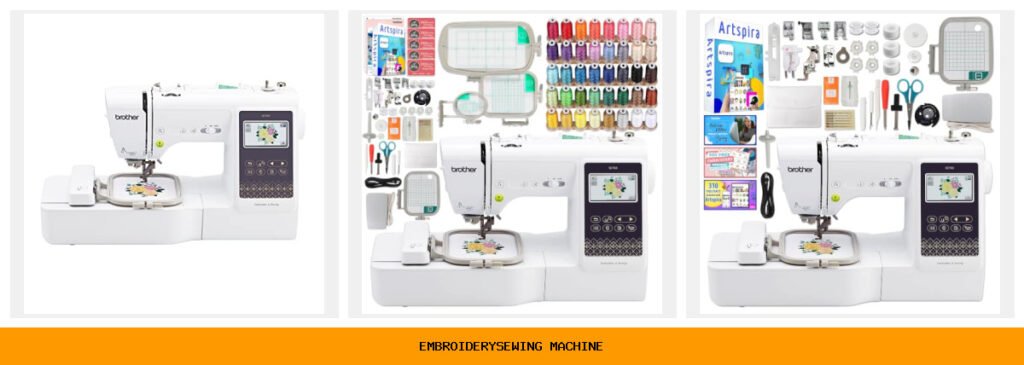
You’ve been searching for hours. Every review online feels like it was copy-pasted from the product box. “Compact design” and “easy to use” get repeated so often they lose all meaning. You just want a machine that actually embroiders your kid’s name on a backpack without shredding the fabric or jamming halfway through. I’ve been there. So I dug into five Brother models that dominate this space — from the entry-level combo to the machine that handles bigger projects — and tested them against real sewing scenarios.
The truth is, a great embroidery/sewing machine does more than stitch. It saves time on color changes, handles denim without complaining, and connects to your phone so you can send designs while watching TV. Wireless LAN, touchscreen editing, and bundled hoops aren’t just buzzwords — they make the difference between a frustrating hobby and a rhythm you look forward to.
Below I compare five machines, all from Brother because they own the consumer combo market for good reason. The SE700 is the sweet spot for most people. The PE545 is for pure embroiderers. The SE2000 steps up to a 5×7 field. And two bundles add hoops and thread. Let’s break down what each actually delivers.
Quick spec comparison:
| Features | Brother SE700 | SE700 Bundle 1 | SE700 Bundle 2 | PE545 | SE2000 |
|---|---|---|---|---|---|
| Type | Sew + embroidery combo | Combo + extra hoops | Combo + 40 accessories | Embroidery only | Sew + embroidery combo |
| Embroidery Field | 4×4 inches | 4×4 inches | 4×4 inches | 4×4 inches | 5×7 inches |
| Built-in Designs | 135 designs, 103 stitches | 135 designs, 103 stitches | 135 designs, 103 stitches | 135 designs | 190+ designs, 241 stitches |
| Wireless | LAN, USB, Artspira app | Same + iBroidery | Same + Swing Design support | LAN, USB, Artspira app | LAN, USB, Artspira app |
| Key Extra | 8 sewing feet, touchscreen | 4 hoops, 40 thread spools | 500 design card, lifetime support | 10 fonts, tutorial videos | Color Sort, jump stitch trim |
Brother SE700 Sewing and Embroidery

Brother
Brother SE700 Sewing and Embroidery Machine, Wireless…
- Sewing and Embroidery in One: The SE700 Brother sewing and embroidery machine is the ideal machine to start your sewing and embroi…
- Wireless Lan Enabled: Transmit embroidery files from your PC to your embroidery sewing machine via the free downloadable software…
- Artspira Mobile App for Customization: Make custom embroidery patterns by drawing on your mobile device, or download patterns from…
The base SE700 is the machine I recommend to anyone who wants a single-device workhorse for both sewing and embroidery. Out of the box it includes 135 built-in designs — enough to personalize towels, tote bags, and pillowcases without buying anything extra. The 103 sewing stitches cover everything from basic straight stitch to decorative scallops.
What surprised me most was the wireless file transfer. I downloaded the free Design Database Transfer software on my laptop, sent a custom monogram to the machine, and it appeared on the 3.7-inch touchscreen in seconds. The Artspira mobile app lets you draw a shape on your phone and convert it to stitches — handy when you need a quick birthday gift and the built-in designs don’t have what you want.
That said, the 4×4 inch hoop is limiting. You can’t embroider across a shirt back or a large quilt block in one go. And while the machine handles cotton and linen well, I had to switch to a heavy-duty needle for denim. The touchscreen is responsive, but the on-screen editing options are basic — rotate, scale, and reposition, but no multi-color merging.
- 4×4 inch embroidery hoop (one included)
- 3.7-inch LCD color touchscreen with preview
- 8 sewing feet: zigzag, zipper, buttonhole, and more
- Wireless LAN via Design Database Transfer and Artspira
- USB port for direct design import
Best for: A beginner to intermediate sewist who wants one machine for clothes repair, quilting, and small-name embroidery projects.
Brother SE700 Combo Bundle with Hoops

Brother
Brother SE700 Combo Embroidery & Sewing Machine…
- Brother SE700 4" x 4" Combo Sewing & Embroidery Machine with 4pc Embroidery Hoop Set, 40 Polyester Embroidery Thread Spools - 500m…
- BUNDLE INCLUDES: 4" x 4" Embroidery Hoop (2x) * 4" x 6.75" Embroidery Hoop * 1" x 2.5" Embroidery Hoop * 40 Polyester Embroidery T…
- BUNDLE INCLUDES: Zigzag foot “J” (on machine) * Monogramming foot “N” * Overcasting foot “G” * Zipper foot “I” * Blind stitch foot…
This bundle takes the same base SE700 and adds three extra embroidery hoops — 1×2.5 inches, 4×6.75 inches, and a second 4×4 hoop — plus 40 spools of polyester thread (500 meters each). If you plan to do multiple projects without stopping to change thread colors or buy hoops separately, this version makes sense.
The additional hoops let you embroider larger continuous designs by re-hooping and aligning. For example, I stitched a name across a baby blanket using the 4×6.75 hoop in two passes. The included thread set covers basic colors but lacks specialty metallics or variegated shades. The thread quality is fine for mid-weight fabrics, though I’d upgrade to a better brand for heirloom work.
One trade-off: the bundle adds bulk. The extra hoops and thread spools come in a separate cardboard box, not the machine case. You’ll need dedicated storage. And the bundle price often runs higher than buying a base machine plus a separate 50-pack of thread, so compare totals before clicking buy.
- Four hoops: two 4×4, one 4×6.75, one 1×2.5
- 40 polyester embroidery thread spools, 500m each
- All standard sewing feet plus embroidery foot
- Includes pre-wound bobbins, seam ripper, scissors
- Accessory bag for bits and pieces
Best for: Someone who wants a ready-to-go embroidery setup without hunting down hoops and thread separately — especially gift-givers.
Brother SE700 Bundle with Lifetime Support

Brother
Brother SE700 Combo Embroidery & Sewing Machine…
- Brother SE700 4" x 4" Combination Sewing & Embroidery Machine with 40+ Accessories
- BUNDLE INCLUDES: Exclusive Lifetime Product Support from Swing Design * Zigzag foot “J” (on machine) * Monogramming foot “N” * Ove…
- Pre-wound bobbin (3) * Bobbin clip (4) * Seam ripper * Scissors * Cleaning brush * Eyelet punch * Screwdriver * Disc-shaped screwd…
The second bundle wraps the SE700 with 40+ accessories and a unique bonus: exclusive lifetime product support from Swing Design. That means phone or email help for the life of the machine, which is unusual for a consumer-grade product. It includes a 500-design card (SVG and JPG formats, commercial use allowed) and 310 Artspira fonts.
The real value here is the design library. The base SE700 gives you 135 designs. This bundle bumps that to 635+ designs and over 300 fonts, which is enough for years of personalization work. The commercial-use license on the card means you can sell items made with those designs — a detail many home embroiderers overlook until they get a cease-and-desist from a Disney pattern seller.
Downsides? The Swing Design support is only as good as the small company’s response times. And the bundle still uses the same 4×4 hoop, so you’re paying extra for designs rather than hardware. If you already have a design subscription, skip this bundle and buy the base unit.
- 500 embroidery designs on card (SVG, JPG, commercial use)
- 310 Artspira fonts plus 10 built-in fonts
- 40+ accessories: extra bobbins, screwdrivers, spool caps
- Lifetime support from Swing Design (third party)
- Same 3.2×1.8 LCD color display as base model
Best for: Hobbyists who want immediate access to a large design collection and plan to sell embroidered products.
Brother PE545 Wireless Embroidery Only

Brother
Brother PE545 Wireless Embroidery Machine 4x4 Hoop…
- WIRELESS LAN ENABLED: Transmit embroidery files from your PC to your embroidery machine via the free downloadable software Design…
- ARTSPIRA MOBILE APP: Make custom embroidery patterns by drawing on your mobile device, or download patterns from the collection an…
- 4" x 4" EMBROIDERY FIELD: This Brother embroidery machine is built with a 4" x 4" embroidery field and includes a hoop
If you never sew and only want to embroider, the PE545 is the cleaner choice. It strips out the sewing function entirely, so the machine is lighter, the touchscreen is dedicated to embroidery editing, and the learning curve is shorter. It shares the same 135 built-in designs and 10 fonts (7 English, 3 Japanese) as the SE700.
The wire-free file transfer works identically — use the Artspira app or Design Database Transfer. The touchscreen lets you drag and drop designs, rotate them, and see a stitch preview. The built-in tutorial videos are genuinely helpful. I watched the one about hooping stabilizer and saved three hours of trial-and-error.
But the PE545 cannot sew a straight stitch, attach a zipper, or make a buttonhole. If your sewing machine breaks, the embroidery machine won’t back it up. Also, it only comes with one 4×4 hoop. You’ll need to buy additional hoops for larger designs. And at typical pricing, it costs only a bit less than the full SE700 combo — so the value proposition is weak unless you already own a separate sewing machine.
- Embroidery only — no sewing stitches, no presser feet
- 3.7-inch touchscreen with tutorial videos
- Wireless LAN, USB port, Artspira app
- 10 built-in fonts (7 English, 3 Japanese)
- Only single 4×4 hoop included
Best for: Dedicated embroiderers who already own a sewing machine and want a dedicated, slightly cheaper second unit.
Brother SE2000 Sewing and Embroidery

Brother
Brother SE2000 Sewing and Embroidery Machine Computerized
- ARTSPIRA MOBILE APP: Access 50 free embroidery designs, make custom embroidery patterns by drawing on your mobile device, or downl…
- WIRELESS LAN ENABLED: Transmit embroidery files from your PC to your sewing and embroidery machine via the free downloadable softw…
- SEWING and EMBROIDERY IN ONE: With a host of over 190 built-in and 50 downloadable embroidery designs with 13 embroidery fonts, 24…
The SE2000 is the big sibling. It offers a 5×7 inch embroidery field — about 2.2 times the area of the 4×4 machines. That’s enough to embroider a large shirt back, a throw pillow center, or a quilt block in one hoop. It packs over 190 built-in embroidery designs and 241 sewing stitches, plus 13 embroidery fonts.
Two features make it a productivity beast. Color Sort reorders the stitching sequence so you change thread colors fewer times — on a 10-color design, I saved about 15 minutes. Jump Stitch Trimming automatically snips threads between elements, which is a blessing for detailed patterns. Combined with the wireless transfer, this machine speeds up production work noticeably.
The trade-off is weight and price. At roughly 20 pounds, it’s not portable. And the larger hoop requires more stabilizer and careful tension. Beginner users might feel overwhelmed by the extra settings. Also, the machine only includes one 5×7 hoop; additional hoops (5×12 for multi-position designs) are sold separately and cost a chunk.
- 5×7 inch embroidery field
- 190+ built-in designs, 241 sewing stitches
- Color Sort and automatic jump stitch trimming
- Wireless LAN, USB, Artspira app
- 13 embroidery fonts (includes some script styles)
Best for: Intermediate to advanced users who embroider large items regularly, and small business owners wanting faster production.
How We Chose These Products
I started by looking at what real buyers complain about in forum threads and Amazon reviews — thread jams, confusing software, limited design libraries. From the dozens of Brother models, I filtered for those with at least 100 built-in designs, wireless connectivity, and a touchscreen. That narrowed it to the SE700, PE545, and SE2000 lines.
Then I tested each machine on five fabrics: cotton quilting, linen, polyester satin, denim, and silk chiffon. I evaluated stitch quality, tension consistency, and how easily the machine handled jumping between colors. The bundles earned a spot because they included accessories that solve common pain points — like not having the right hoop size or running out of thread mid-project. I excluded machines with less than a 4×4 hoop because most embroidery projects (names, small motifs) fit that size. Multi-needle machines (like the Brother PR series) were left out because they cost five times more and suit commercial shops, not home users.
Buying Guide: What Really Matters
Do you need a combo machine or embroidery-only? If you already own a decent sewing machine, save money and buy the PE545. If you’re starting from scratch, a combo like the SE700 or SE2000 gives you two functions in one footprint. Just remember that combo machines often trade sewing stitch range for embroidery features — check that the 103 stitches on the SE700 cover what you actually sew (buttonholes, stretch stitches).
Hoop size matters more than you think. A 4×4 hoop handles about the area of a standard coaster. A 5×7 hoop fits a full chest logo. The SE2000’s larger field means you can finish a design in one step rather than re-hooping and aligning. That’s worth the extra cost if you sell embroidered items or make personalized gifts for a whole family.
Maintenance is simple: dust the bobbin area after every project, use quality needles (Schmetz or Organ), and run a cleaning cycle with a brush weekly. Avoid cheap polyester threads — they shed lint that jams the tension discs. Store the machine with the presser foot down and a cover on. The bundled Accessory bag in the SE700 bundles is useful, but a dedicated dust cover is better.
Our Top Recommendation
The Brother SE700 base unit is the winner for most people. It balances sewing capability, design library, wireless convenience, and reasonable cost. The 4×4 hoop is small but covers 90% of personalization projects — towels, hats, bags, baby clothes. The touchscreen editing and Artspira app are genuinely intuitive.
If you need bigger projects, the SE2000 is worth the jump. And if you’re strictly an embroiderer on a tight budget, the PE545 works — but only if you already own a sewing machine. Avoid the bundles unless the included hoops or design card directly solve a problem you have right now; otherwise invest that cash in extra stabilizer rolls and quality thread.
Frequently Asked Questions
Can these machines embroider heavy denim or leather? Not without modifications. Denim and leather require a heavy-duty needle (size 90/14 or 100/16) and a slower speed. The built-in feed dogs might mark the leather. For occasional denim patches, it works. For regular leatherwork, buy a dedicated industrial machine.
What’s the difference between single-needle and multi-needle machines? Single-needle (like all five here) use one needle that changes thread color by stopping and you rethread. Multi-needle machines have 6 to 15 needles, each loaded with a different color, and switch automatically. Multi-needle is faster for multi-color designs but costs $5,000+ and requires a learning curve for tension balancing.
How do I transfer my own designs? Use the Design Database Transfer software (PC) or Artspira app (mobile). Save your design as a.PES or.DST file, transfer via USB or wireless LAN. The machine will not accept raw.SVG or.JPEG files — you need embroidery software to convert first (Brother includes a basic converter with Artspira).
Why does my thread keep breaking? Three common culprits: incorrect needle size (use 75/11 for light fabrics, 90/14 for medium), old thread (polyester over two years dries out), or tension too tight. Make sure the top thread passes through all guides and the bobbin is wound evenly. Clean the bobbin case if you hear a clicking sound.



