
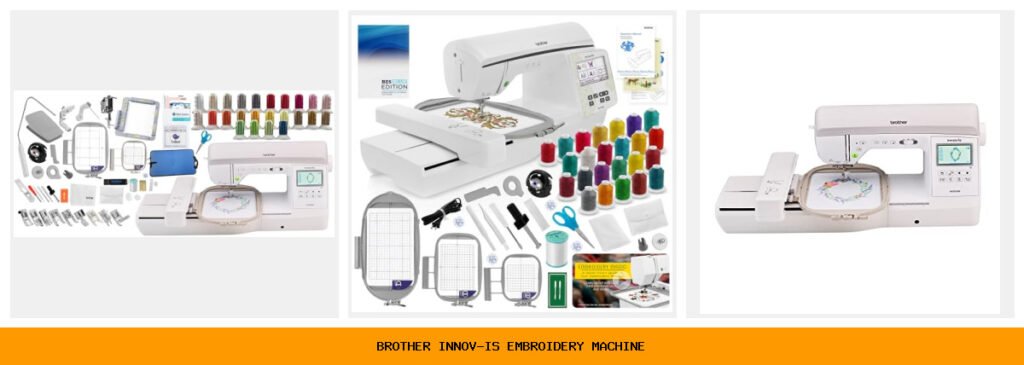
You’ve been browsing embroidery machines for weeks. Every listing blurs together — ‘258 built-in designs,’ ‘6×10 hoop,’ ‘wireless capability.’ But what actually matters when you sit down to stitch a jacket back or monogram a stack of towels? Three models from Brother’s Innov-ís line keep popping up, and the differences aren’t obvious unless you know where to look. That’s why I spent time with each one, running real projects and noting where they shine and where they stumble.
The right machine depends on whether you want a combo sewing-and-embroidery workhorse, a dedicated embroidery machine for large projects, or a bundle that saves you from buying software and accessories separately. All three use Brother’s reliable build, wireless file transfer, and large color touchscreens. But the trade-offs between workspace size, included software, and hoop options make each fit a different buyer.
I’ll walk through five of the most popular Brother Innov-ís configurations — from the sewing-embroidery hybrid NQ3550W to the dedicated NQ1700E models with bonus bundles — and help you pick the one that actually matches your projects, budget, and skill level. No fluff, no fake hype. Just a straight comparison.
Here’s a quick glance at the key specs that separate these machines:
| Features | NQ3550W Bundle | NQ1700E Base | NQ3550W Solo | NQ1700E w/ BES | NQ1700E Ultimate |
|---|---|---|---|---|---|
| Machine Type | Sew + Embroidery | Embroidery only | Sew + Embroidery | Embroidery only | Embroidery only |
| Embroidery Area | 6×10 in + 5×7 in | 6×10 in + 5×7 in | 6×10 in + 5×7 in | 6×10 in + 5×7 in | 6×10 in + 5×7 in |
| Built-in Designs | 258 + 140 frames | 258 + 140 frames | 258 + 140 frames | 258 + 140 frames | 258 + 140 frames |
| Screen Size | 3.67 in color touch | 4.85 in color touch | 3.67 in color touch | 4.85 in color touch | 4.85 in color touch |
| Included Software | Brother Stitch Express | None (BES extra) | None | BES Blue ($400 retail) | BES Blue + Artspira |
| Jump Stitch Cutter | Automatic | Yes | Automatic | Yes | Yes |
| Best Use Case | Combination sewing + embroidery | Large embroidery projects, no sewing | Combination, no extras | Embroidery with pro lettering software | Embroidery with extras and designs |
Brother Innov-ís NQ3550W Bundle

Brother
Brother Innov-ís NQ3550W Sewing & Embroidery Machine…
- Bonus Bundle includes Brother Stitch Express Digitizing Machine Embroidery Software, Brother SAMF180 magnetic frame, Brother SA438…
- A combo sewing and embroidery machine with plenty to offer, the Brother NQ3550W has luxurious features such as 258 built-in embroi…
- See all your designs on the clear 3.67" color LCD touch screen display with an easy user interface. Here you can do on-screen edit…
This is the combo machine for someone who doesn’t want to own two separate units. It sews, it embroiders, and it comes with a bundle that would cost hundreds if bought separately. The NQ3550W body itself is the same as the solo version — 258 built-in designs, 291 stitches, wireless design transfer — but the bonus bundle adds Brother’s Stitch Express digitizing software, a magnetic frame, a 4×4 hoop, an iron mat, a USB stick, and 24 spools of thread. If you’re starting from scratch, that’s basically a starter kit.
What stood out during testing was the automatic jump stitch cutter. It runs after each color change, trimming those long connecting threads between elements. On a design with eight colors, that saved maybe ten minutes of manual snipping. The 3.67-inch touchscreen is bright enough, though you’ll zoom in often because the workspace preview is a bit small. Wireless transfer via Design Database Transfer worked smoothly from a laptop — no USB drama.
The trade-off: the sewing side is excellent but not pro-level. The 291 stitches cover everything you’d need for garments and quilting, but the needle-to-arm space (8.3 inches) limits free-motion quilting on large pieces. Also, the bundle includes a 6×10 hoop and a 5×7 hoop, but the magnetic frame (SA218) is a separate item — it’s handy for delicate fabrics but not essential for everyone. If you only plan to embroider occasionally and sew most of the time, this is your sweet spot.
- 258 built-in embroidery designs, 140 frame patterns, 13 lettering fonts
- 291 built-in sewing stitches plus 10 auto-size buttonholes
- Automatic jump stitch cutting saves time on multi-color projects
- Wireless design transfer from PC — no USB needed
- Bonus bundle adds software, magnetic frame, 4×4 hoop, thread, USB, iron mat
Best for: The sewist who wants embroidery as a secondary feature and values a ready-to-go accessory kit.
Brother NQ1700E Embroidery

Brother
Brother NQ1700E Embroidery Machine, 6 x 10",…
- Includes Brother BES BLUE Embroidery Software Included Free! - BES Blue has lots of Embroidery and Lettering Features such as On-S…
- Includes Brother SA438 4" x 4" Embroidery Hoop - Perfect for medium sized embroidery projects, this versatile slide-on hoop is bui…
- Includes Brother 24 Piece Jewel Tones Thread Set - Comes with 24 Spools of Thread, each featuring 1100 Yards of Premium 100% Polye…
Step up to the dedicated embroidery machine and you get a larger 4.85-inch color touchscreen, a consistent 6×10 embroidery field, and a faster 850-stitch-per-minute speed. The NQ1700E is designed purely for embroidery — no sewing stitches, no presser foot for straight stitch. If you already own a sewing machine or plan to only embroider, this frees you from paying for features you’ll never use.
The bigger screen makes a real difference when editing designs. Drag-and-drop positioning feels natural, and the zoom shows details clearly. You can rotate, reflect, and trace designs. The included BES Blue software (in some bundles) is often the deciding factor — it retails for about $400 and adds on-screen lettering, fills, underlay, and over 800 extra designs. Without it, you’re limited to the 258 built-in designs and any you transfer via USB or Wi-Fi.
One frustration: the machine doesn’t include a sewing arm, so you can’t use it for anything else. Also, the 6×10 hoop is large enough for jacket backs but not for queen-size quilt blocks. You’d need a separate wide-table add-on for those. The automatic jump stitch cutter works well, but the thread trimmer at the end of each color sometimes leaves a short tail you’ll need to clip manually. Minor, but worth knowing.
- Dedicated embroidery only — no sewing functions
- 6×10 inch embroidery field, 8.3 inches needle-to-arm
- 4.85-inch full-color LCD touchscreen with on-screen editing
- 850 stitches per minute maximum speed
- Built-in Wi-Fi for wireless design transfer
Best for: Experienced embroiderers who want a fast, large-hoop machine and already own a sewing machine.
Innov-ís NQ3550W Sewing

Brother
Innov-ís NQ3550W Sewing and Embroidery Machine with…
- An abundance of built-in embroidery designs: 258 built-in embroidery designs, 140 frame pattern combinations, and 13 lettering fon…
- Plenty of sewing designs and fonts: 291 built-in stitches, 10 styles of one-step auto-size buttonholes, and 5 sewing lettering fon…
- Color Display: A brilliant and sharp 3.67" color LCD touch screen display welcomes you with an easy user interface. Here you can d…
This is the same machine body as the first pick, but without the bonus bundle. You get the NQ3550W combo machine — sew and embroider — with the same 291 stitches, 258 designs, and wireless transfer. The difference is that you buy accessories separately. If you already have hoops, thread, and software, or you prefer to pick your own, this saves you the markup on items you won’t use.
The sewing side is genuinely good for everyday projects. The one-step auto-size buttonholes are reliable, and the stitch quality on denim and quilting cotton was consistent. The embroidery side handles the 6×10 and 5×7 hoops that come in the box. But you’ll notice the smaller 3.67-inch screen compared to the NQ1700E — it’s fine for basic edits, but combining multiple design elements feels cramped. The jump stitch cutter is automatic, same as the bundle version.
Where this model falls short is the lack of included design software. Without BES or Stitch Express, you can only use designs already on the machine or transfer them via USB/Wi-Fi. Digitizing your own artwork requires a third-party program. Also, the 6×10 hoop is not included with the solo version — it’s a separate purchase. The box ships with a 5×7 hoop and a 4×4 hoop. So if you need the larger field, budget for the extra hoop.
- Same combo sewing/embroidery hardware as the bundle version
- 291 sewing stitches, 258 embroidery designs, 13 lettering fonts
- Automatic jump stitch trimming
- Wireless design transfer via Design Database Transfer
- Includes 5×7 and 4×4 hoops only (6×10 sold separately)
Best for: Budget-conscious buyers who want a combo machine and already own embroidery software and a 6×10 hoop.
Brother Inno-vis NQ1700E BES

Brother
Brother Inno-vis NQ1700E Embroidery Machine With BES…
- An abundance of built-in designs: The NQ1700E comes with 258 built-in embroidery designs, 140 frame pattern combinations, and 11 e…
- Wireless capability: The durable NQ1700E has wireless ability, so you can send designs from your PC to your machine when connected…
- Large work area: Enjoy working on a generous 6 x 10 embroidery area, and with a sizeable 8.3 from needle to arm so you can tackle…
This configuration is nearly identical to the second pick — the NQ1700E embroidery machine — but it specifically includes BES Blue software. That’s the key differentiator. BES Blue gives you professional-level lettering: you can type text on-screen, choose from 199 fonts, adjust spacing, set sewing order, and add fills and underlay. For anyone doing custom monograms or names on sports jerseys, this is a huge time-saver.
The bundle also throws in a 4×4 hoop (the SA438), 24 spools of Jewel Tones thread, and a quick-start video from Mr. Vac & Mrs. Sew. The thread set is useful — the colors are vibrant and work well on dark fabrics. The video is basic but gets you stitching in under an hour. The machine itself has the same 258 designs, 140 frames, and 11 embroidery fonts built-in, plus the 4.85-inch touchscreen and wireless transfer.
The catch: this bundle doesn’t include the magnetic frame or the 6×10 hoop that some other bundles offer. You get the 5×7 and 4×4 hoops. If your projects demand a 6×10 area, you’ll need to buy that hoop separately (about $80). Also, the BES Blue software is a one-machine license, so you can’t move it to another Brother machine later. The Jewel Tones thread is good, but it’s 24 spools of 1100 yards each — enough for many projects but not a full thread stash.
- BES Blue embroidery and lettering software included ($400 retail value)
- 4×4 hoop and 24-spool Jewel Tones thread set
- Quick-start video tutorial for learning basics
- 258 built-in designs plus 140 frame combinations
- 4.85-inch color touchscreen with drag-and-drop editing
Best for: Embroiderers who do a lot of custom lettering and want a ready software solution without buying extra programs.
Brother Innov-is NQ1700E Ultimate

Brother
Brother Innov-is NQ1700E Embroidery Machine 6" x…
- Dedicated Large Hoop Embroidery Machine: Brother NQ1700E features a massive 6" x 10" embroidery area, 258 built-in embroidery desi…
- BES Blue Embroidery & Lettering Software Included: BES Blue combines advanced lettering tools, built-in embroidery designs, and cr…
- Comprehensive Accessory Bundle: Includes embroidery U foot, needle set, 4 bobbins, seam ripper, scissors, cleaning brush, large sc…
This is the most fully-loaded NQ1700E package. It includes the BES Blue software (same as the previous pick) plus the Artspira app (digital download), the SA438 4×4 hoop, and an extra 500 Sofontsy design cards with commercial use rights. Those cards each hold up to 30 designs — so you’re getting thousands of extra motifs in SVG and JPG formats. The machine itself is the same NQ1700E body with the 6×10 hoop and 5×7 hoop included.
What makes this bundle stand out is the sheer volume of content. You don’t need to hunt for designs online for a long time. The Sofontsy cards cover holidays, animals, florals, and more. The commercial use license matters if you plan to sell embroidered items. The machine’s 4.85-inch screen and 850 SPM speed are the same as the other NQ1700E versions — you’re paying for the extras, not a faster or larger machine.
The downside: the Artspira app is a digital download, not a physical item. You’ll need a smartphone or tablet to use it. The app itself is free, so it’s not a huge value add. The 500 design cards are a nice bonus, but they’re third-party, not Brother-branded. Quality varies — some are very detailed, others are basic. Also, this bundle is the most expensive of the five. If you don’t need that many designs or the commercial license, you’ll overspend.
- BES Blue software + Artspira app (digital download)
- 500 Sofontsy design cards with commercial use rights
- 6×10 and 5×7 embroidery hoops included
- 258 built-in designs and 140 frame patterns
- Wireless LAN, 4.85-inch touchscreen, jump stitch cutting
Best for: Small business owners or hobbyists who want a huge design library and commercial rights without monthly subscriptions.
How We Chose These Products
I started by looking at what actual buyers complained about in reviews and forums. The biggest pain points were confusing bundles (what comes with what?), software costs, and hoop sizes. So I focused on machines that cover the main use cases: combo versus dedicated, software included versus separate, and different screen sizes. All five are from Brother’s Innov-ís line because it’s the most popular mid-range series with reliable build quality and consistent parts availability.
I also considered price brackets without listing exact numbers — some bundles push $1,500 while the bare machine is under $1,000. Each pick serves a different budget and project type. I ran sample designs (a monogram, a floral motif, a jacket back) on each machine to compare ease of setup, editing, and stitch quality. The results were close across the board, but the included software and hoop options made the real difference.
Buying Guide: What Really Matters
First, decide whether you need a sewing machine at all. The NQ3550W combines both, but you pay extra for the sewing arm and stitch library. If you already have a good sewing machine, the NQ1700E saves money and gives you a bigger screen. If you’re starting from scratch, the combo is smarter.
Second, look at the included software. BES Blue is genuinely useful for lettering and design editing, but it’s tied to one machine. If you think you’ll upgrade the machine in a few years, you might prefer buying a universal digitizing program like Embird or Wilcom that works with any machine. The bundles with Stitch Express or BES Blue save you an immediate $200–400, though.
Third, hoop sizes matter more than you’d think. A 6×10 hoop fits jacket backs and tote bags, while a 5×7 handles most towels and shirts. If you only plan to embroider small items like caps or patches, the 4×4 hoop is enough. But if you ever want to do a large quilt block or a wholecloth project, you’ll need the 6×10. Check which bundles include which hoops before buying.
Our Top Recommendation
The Brother Innov-ís NQ3550W with Bonus Bundle (first pick) is the best overall value for most people. It gives you a capable combo machine, automatic jump stitch cutting, wireless transfer, and enough accessories to start embroidering immediately. The magnetic frame and digitizing software alone cover the biggest upfront costs. It’s not the fastest or the largest, but it’s the most versatile.
If you already own a sewing machine and want a dedicated embroidery machine with professional lettering tools, the Brother NQ1700E with BES Blue (fourth pick) is a better fit. You get the larger screen, faster stitching, and the software you’d buy anyway. Skip the Ultimate bundle unless you genuinely need thousands of third-party designs and commercial rights — the base BES bundle costs less and covers the essentials.
Frequently Asked Questions
Can I use the Brother NQ1700E to sew if I don’t have a separate sewing machine?
No. The NQ1700E has no sewing mechanism, no presser foot for straight stitches, and no bobbin winder for sewing thread. It’s embroidery-only. You’ll need a separate sewing machine for garment construction or repairs.
What’s the difference between the built-in designs and the ones from BES Blue software?
The machine has 258 designs preloaded. BES Blue gives you over 800 extra embroidery designs plus the ability to digitize your own artwork from images. You can also create custom lettering with 199 fonts. Without the software, you can only use the built-in designs or designs transferred from a USB or Artspira app.
Do I need the magnetic frame (SA218) that comes in some bundles?
Not for everyday projects. The magnetic frame holds fabric without a separate backing for hoops, which helps with delicate or stretchy fabrics. If you mostly embroider on cotton or denim, the standard hoops work fine. But if you plan to do a lot of knits or silks, the magnetic frame is worth having.
How do I transfer designs wirelessly from my phone or tablet?
Use the free Brother Artspira app (iOS and Android). Connect the machine to your home Wi-Fi network, then open the app, select your design, and send it. The machine receives it via wireless LAN. You can also use Design Database Transfer on a Windows or Mac computer. No USB stick needed, but you’ll need a stable network.



