
Best Embroidery Machine for Monogramming: Fonts, Size and Placement
The best embroidery machine for monogramming should make the letters readable at the size your item can accommodate. A large font count alone cannot.

This guide has Amazon links. If you buy through them we may earn a small commission, at no extra cost to you.
The best embroidery machine for monogramming should make the letters readable at the size your item can accommodate. A large font count alone cannot decide that. Names, initials, towels, shirts, and gifts place different demands on lettering, placement, and stabilization. This guide compares three machine roles and explains how to evaluate built-in fonts, custom files, field size, and repeat work before choosing equipment for personal or customer monograms at home.
As an Amazon Associate, Practical Textile earns from qualifying purchases. Product links may earn us a commission.
What’s in this article16 sections
Quick Answer
Compare the Brother PE900 for dedicated five-by-seven monogramming, the SE2000 when ordinary sewing must share the machine, and the Janome MC550E when larger measured layouts justify its field. Check the actual built-in lettering styles, or obtain a compatible custom file. Choose around readability, placement, and the item rather than buying from font count alone.
This guide compares published specifications and project fit; it does not report hands-on testing.
Brother PE900

Compare the lettering workflow and field with your intended names and initials.
Brother SE2000

Consider a genuine combination when construction and embroidery are both needed.
Janome Memory Craft 550E

Investigate extra field only when the finished design needs it.
Define the Lettering You Want to Make
A name, a three-letter arrangement, and a custom business mark can need different preparation. Built-in text controls may serve some projects, while a particular font or layout may need a separately prepared embroidery file. Decide the appearance and final dimensions before comparing machines.
Confirm the exact spelling, capitalization, letters, and order with the intended recipient or customer. Do not assume one convention suits every monogram. An accurately stitched design can still be wrong if the approved text was never established.
Also separate automatic hoop embroidery from decorative sewn lettering. An ordinary sewing machine or a foot called monogramming does not automatically load a custom design and move a hooped item. Check the exact machine category.
Compare Three Monogramming Roles
| Model | Listed embroidery field | Built-in embroidery lettering | Main role |
|---|---|---|---|
| PE900 | 5 × 7 inches | 13 fonts listed | Dedicated home embroidery. |
| SE2000 | 5 × 7 inches | 13 fonts listed | Ordinary sewing plus embroidery. |
| MC550E | 7.9 × 14.2 inches | 6 monogramming fonts listed | Larger dedicated embroidery layouts. |
Font totals do not establish the size, style, character set, or readability you need. Inspect the actual options and a representative sample. A smaller useful collection can suit a project better than a larger collection containing styles you will not use.
Brother PE900 Review: Dedicated Home Monogramming
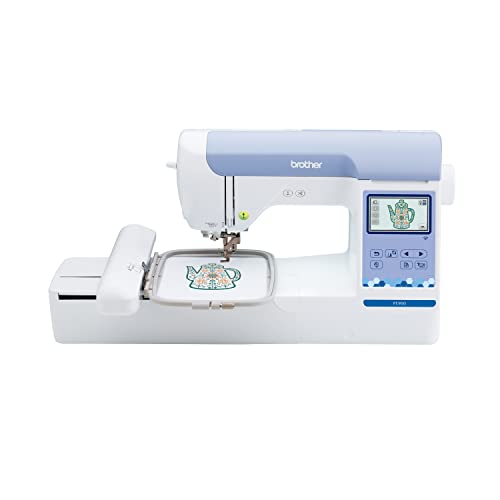

The PE900 provides a dedicated embroidery workflow with a five-by-seven field and built-in lettering. It is relevant when the intended monogram fits and you already have another way to perform ordinary sewing. Supported custom-file transfer can extend work beyond the built-in options.
Try entering and positioning a realistic name or set of initials. Check the available style, spacing, orientation, and finished dimensions. A short name in a decorative font can need more room than a longer name in a compact style.
For home gifts and modest repeat work, the practical question is whether that workflow is clear and the garment can be placed appropriately. Wireless convenience does not decide the quality of small letters or remove stabilization requirements.
Our Brother guide separates embroidery-only and sewing roles. Do not choose a dedicated machine expecting it to construct the garment it decorates.
Brother SE2000 Review: Construction and Personalization Together

The SE2000 combines sewing with a five-by-seven embroidery field. That makes it relevant when you want to construct items and add monograms using one main machine. The embroidery and ordinary sewing functions should be evaluated as separate workflows.
A combination can reduce the number of main units in a small studio, but the same machine cannot perform two independent projects simultaneously. If you want to sew another item while embroidery runs, separate machines may be more convenient.
Check the changeover, required foot and equipment, thread arrangement, and design loading. A demonstration of beautiful lettering alone does not show whether you are comfortable with ordinary sewing or switching processes.
For another combination category, our Janome combination guide provides a comparison. Choose both processes because you need them rather than assuming a combination is automatically better for monograms.
Janome Memory Craft 550E Review: Larger Layouts

The MC550E offers a larger dedicated embroidery field and built-in monogramming functions. Its longer area can be relevant to an appropriately sized name, border, or combined arrangement. More length does not automatically accommodate a square wider than the field’s shorter side.
Measure the whole layout, including decorative elements, rather than only the initials. Check the supported hoop and the way the item is secured. A long table linen and an assembled bag can create different access and support requirements.
USB import allows appropriately prepared compatible files beyond the built-in lettering. That is useful when you need a particular design, but it does not digitize an arbitrary font or image automatically. Test the final file on representative material.
Our Janome embroidery guide explains the category. Verify the exact edition, hoops, accessories, and condition of the current offer.
Built-In Fonts versus Custom Embroidery Files
Use built-in text when it fits the project
Built-in lettering can simplify a supported name or initial arrangement. Inspect the actual character set, size options, and editing controls. A font count does not prove that every required symbol, accent, or layout is available.
Try the complete intended text before committing to a finished item. Check spelling, case, spacing, and orientation. Save a clear approved version where the workflow permits rather than re-creating it differently for each repeat.
Use a prepared file for a specific look
A particular logo, lettering style, or complex arrangement may require digitizing into a supported stitch file. A printed font or image is not automatically a ready embroidery design. Density, sequence, and detail need to suit the final size and material.
Obtain the file for its intended use and retain the original. Large resizing changes can compromise coverage or small details. Confirm commercial-use permission for designs used on goods for sale.
Small Letters Need a Real Stitch Sample
Readability depends on the style, finished size, thread, material texture, and design preparation. A screen preview can look clear while small stitched spaces close or details disappear. Do not select a tiny size simply because it fits the item digitally.
Test through the actual material and support arrangement. Inspect the result at the distance and in the conditions in which the item will be used. The sample should be both visually acceptable and appropriate in feel for the project.
Choose a simpler style when the intended size cannot support fine detail. Making every elaborate letter smaller is not a universal solution. Discuss the final dimensions with a digitizer when a custom file is needed.
Towels, Shirts, Bags, and Household Gifts
Textured towels
Pile can obscure lettering, so evaluate appropriate topping as well as backing. The text should remain readable against the actual texture. A successful sample on flat cotton does not verify the same monogram on a thick towel.
Consider placement relative to borders and how the towel will hang or fold. An accurately centered design on the wrong visible area may still disappoint. Mark and inspect the intended presentation before stitching.
Shirts and stretch garments
Keep the opposite garment layer, sleeves, pockets, and lining clear throughout the design. Support excess material so it does not pull on the hoop. Check placement on the garment in its intended orientation.
Select stabilization for the fabric and lettering density. Stretch material needs a different assessment from a stable woven panel. Inspect puckering, registration, feel, and the result after appropriate handling.
Bags and assembled items
Access can be the main limitation. A monogram may fit the field while a seam, zipper, or rigid wall prevents practical positioning. Decorating a panel before assembly may be easier when the construction permits it.
For another dedicated home category, our Poolin review discusses field and model distinctions. Choose the workflow around the actual item rather than the largest font total.
Repeat Orders and Ownership Costs
For repeated names or initials, establish a checking routine before every item. Confirm the approved text, design version, thread colors, position, and blank. Automated stitching can repeat an unnoticed setup error as efficiently as a correct one.
Record a successful sample with the material, support, needle, thread, hoop, and file. If the blank changes, retest rather than assuming an identical result. Preparation and inspection contribute to repeatability.
Measure the whole job, including editing text, hooping, loading, color intervention, trimming, finishing, and inspection. Advertised maximum speed does not establish a fixed number of monogrammed items per hour.
Include supplies, digitizing where needed, practice blanks, optional software, and service in the budget. If repeated multicolor work becomes the priority, our Smartstitch guide explains a different ownership and color-management category.
Sample and Setup Checklist
- Approve the exact text, order, case, and style.
- Measure the complete layout on the intended item.
- Prepare a compatible design and the correct hoop.
- Use suitable support, needle, thread, and bobbin.
- Check the full design boundary and garment clearance.
- Complete the sample and inspect readability and distortion.
- Retain the setup before repeating the work.
Stop for repeated thread nesting, needle breakage, or a jam. Recheck threading, bobbin insertion, needle condition, support, and file suitability methodically. Disconnect power as directed before clearing trapped material near the needle.
Advantages and Tradeoffs of This Shortlist
Useful strengths
- The choices separate dedicated embroidery from a combination role.
- Field sizes can be matched to actual lettering layouts.
- Built-in text offers a starting point for suitable personalization.
- Prepared custom files can supply a specific supported design.
- Each can be evaluated with an actual monogram sample.
Important tradeoffs
- Font totals do not establish readability or the required character set.
- Field fit does not guarantee access on every finished item.
Buying Checklist
- Inspect the actual fonts and desired text.
- Test final-size readability on representative material.
- Choose dedicated embroidery or genuine combination needs.
- Confirm field, hoop, custom-file, and transfer requirements.
- Verify complete equipment, condition, electrical suitability, and support.
- Read current seller, return, and applicable warranty terms.
For used equipment, request lettering entry or file loading and a full stitch-out. A powered-on display or a photograph of a finished monogram does not establish the condition of the specific unit.
A Project Check Before You Commit
Make a sample using the actual initials rather than only a font preview. Letter combinations change spacing, and a balanced three-letter arrangement may need more attention than a single capital. Check the appearance at the final size and on the intended item. Dense small lettering that looks clear on a screen can behave differently on textured material.
Confirm the order of the initials with the recipient or customer before stitching. Save the approved arrangement, spelling, size, and placement together. This simple approval record addresses an avoidable source of spoiled items that no machine feature can correct after the lettering is permanently stitched.
Frequently Asked Questions
What machine is best for monogramming at home?
Choose around the lettering, final size, item access, and whether ordinary sewing is also needed. The models here represent different roles rather than a universal test ranking. Verify through a representative sample.
Do more fonts make a machine better?
Only when the extra styles and characters serve your projects. Inspect the actual options and final-size result. A useful smaller collection can fit a need better than many styles you never use.
Can a normal sewing machine make automatic monograms?
Built-in sewn letters and a foot named monogramming do not automatically provide hoop embroidery. Confirm the exact process and capability before buying. Custom automatic designs require a suitable embroidery workflow.
Why do small embroidered letters look unclear?
Size, style, digitizing, thread, material texture, and support can contribute. Test the complete setup and consider a simpler or appropriately prepared design. A clear preview is not proof of readable stitching.
Do I need a special file for a custom monogram?
If the built-in controls do not provide the design, you need a compatible prepared embroidery file. An ordinary image or font is not automatically stitch data. Confirm format, dimensions, and permitted use.
Final Recommendation
Compare PE900 for dedicated home personalization, SE2000 when sewing must share the unit, and MC550E when a larger measured layout justifies the field. Choose by the letters and item, not the font total alone.
A successful monogram starts with approved text, readable design, accurate placement, and suitable support. Buy the machine that makes that complete process practical and repeatable.
