

The Juki HZL-F300 is a computerized household sewing machine worth comparing when utility sewing, buttonholes, and deliberate controls matter more than the largest decorative menu. Its value also depends on the accessories included in your exact offer. This review explains its sewing role, how to evaluate feeding and controls, and why optional equipment must be checked so you can compare a complete working setup rather than a machine name alone.
As an Amazon Associate, Practical Textile earns from qualifying purchases. Product links may earn us a commission.
Quick Answer
Consider the HZL-F300 for a computerized household workflow with box feed, thread cutting, and useful utility operations. Compare the exact bundle with the F600 rather than assuming the F300 includes the same table and knee lifter. It is a general sewing machine, not a hoop embroidery system or industrial compound-feed machine.
This guide compares published specifications and project fit; it does not report hands-on testing.
Juki HZL-F300
No verified Amazon offer is linked for this model; read the buying checks below.
Confirm the precise accessory package and any optional equipment.
Juki HZL-F600

Compare included tools and actual project benefits before upgrading.
Check Price on AmazonThis is a specific HZL-F600 bundle. Confirm the seller’s included equipment and warranty.
Brother PQ1600S

A straight-only alternative when specialization is the real requirement.
Who Should Compare the HZL-F300?
The HZL-F300 is a household sewing option for someone who wants computerized controls and a practical range of ordinary construction operations. It is relevant to garment making, appropriate quilting work, repairs, and other compatible projects. Its relationship to Juki’s broader industrial reputation should not be used to claim that this model performs every industrial operation.
Define the projects before comparing specifications. A shirtmaker may prioritize repeatable buttonholes and topstitching. A quilter may care more about seam guidance, layer handling, and support. A home-accessory maker may need long straight seams and a practical way to manage large panels. These are different reasons to consider the same general-purpose machine.
This review uses documented features and original selection analysis, not hands-on performance measurements. Current stock, seller packages, and prices should be checked in the actual offer rather than inferred from this article.
Features to Translate Into Real Operations
Juki lists 106 stitch patterns and 16 buttonhole types for the F300. More important to the buying decision are the controls you will repeatedly use, including speed regulation, needle-position control, pressure adjustment, and thread cutting. Learn how each function behaves in the exact manual and try it on a representative sample.
The box-feed system is a feature to evaluate for fabric movement, not a universal guarantee about every material. It is also not equivalent to compound walking-foot feed. Dense reinforced assemblies or a specialized industrial application should be assessed in the appropriate equipment class.
| Feature area | Why it can matter | What to test |
|---|---|---|
| Computerized controls | Repeatable selection and useful operating conveniences | Setup, stopping, and returning to a previous stitch |
| Box feed | A defined household feeding mechanism | Your actual fabric and complete seam stack |
| Buttonhole options | Different garment closure requirements | Interfaced sample and intended button |
| Thread cutting | Potentially fewer interruptions | Appropriate use with the intended thread and operation |
| Optional accessories | Table and handling needs vary | What the exact seller quote includes |
Try the Controls as a Complete Sewing Sequence
Thread the machine, insert the specified bobbin, select a straight stitch, and sew toward a marked stopping point. Use the needle-position function as directed and practice restarting. This sequence is more informative than pressing buttons while the machine is already prepared by someone else.
Next, change to a relevant utility operation and return to the first setup. Check whether the screen and controls make that process understandable. A useful feature is one you can operate reliably in the middle of a project, not only identify on the specification list.
Test the pedal arrangement and thread-cutting function according to the manual. Avoid assuming that an unfamiliar heel action should be used automatically for every seam. Learn the appropriate routine and whether it feels comfortable while you are sitting in a normal working position.
Garment Sewing: Focus on Closures and Fabric Handling
For clothing, bring samples from the materials you expect to use. Include lining or interfacing and the thickest suitable folded crossing. A smooth seam through two flat layers does not establish how a hem or placket intersection will behave. Inspect the top, underside, and surrounding fabric.
Try the closure operations that appear in your patterns. A buttonhole test should use the actual button and fabric stack. A zipper test should use the correct compatible foot. The machine supplies the stitch formation and controls; it does not select placement, prevent inaccurate cutting, or correct a poorly fitting pattern.
For stretch clothing, test the elasticity the seam needs during use. Choose an appropriate needle and stitch and avoid pulling the fabric through. Pressure adjustment is one setup variable, not the same mechanism as differential feed on a serger. Consider serging or coverstitch separately if those formations are central to your garments.
Quilting: Separate Piecing, Layers, and Support
Piecing requires a repeatable seam allowance and accurate preparation. Test your chosen foot and needle position, then measure a completed unit after pressing. A foot described for quarter-inch work does not make every seam dimension correct without attention to the rest of the process.
For layered quilting, build a sandwich from the actual fabrics and batting. Examine layer movement and the stitch on both faces. A larger support table can help manage fabric weight, but it does not enlarge the space beside the needle or automatically move a quilt through the machine.
Free-motion work remains a coordinated operator skill using the proper model and accessory setup. Practice on a manageable sample rather than treating the machine’s quilting role as an automatic stitch-regulation promise. If large-quilt handling is your main limitation, compare the entire workstation before buying.
The F300 Bundle Needs Its Own Inventory
Do not assume the F300’s standard package is identical to the F600’s. Juki identifies the wide table and knee lifter as optional for the F300 in its model information. A retailer can include extras in a bundle, so check the exact written offer rather than relying on a general comparison chart or a photograph.
Make a list of the feet and tools used in the demonstration. If a necessary accessory is not in the quoted package, add its compatible replacement cost before comparing prices. An inexpensive machine-only offer and a broader bundle are different purchases.
Check whether every included extra is appropriate for the US model and your intended use. A large count of notions is less useful than the correct table, foot, bobbin, or controller. Confirm the exact condition and support arrangement if the listing is refurbished or used.
F300 Versus F600: Compare Useful Differences
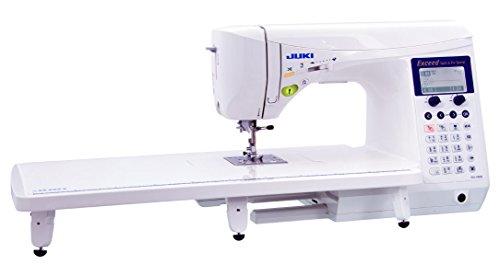
The F600 is the related model to compare when its broader stitch choices and accessory package solve a real project requirement. Do not upgrade only because the pattern total is larger. Ordinary garment construction may use a small portion of either model’s available menu.
Use the same fabric sample and question list on both machines. Compare the complete package, the relevant controls, and the tools you would otherwise need to buy. The result should explain what the additional purchase cost contributes to your actual work.
Keep decorative sewing and embroidery distinct. Neither a larger decorative menu nor sewn lettering turns the F300 or F600 into a computerized hoop embroidery system. If custom logos from imported files are the goal, evaluate a machine with that actual capability.
When a Straight-Stitch Specialist Is a Better Comparison


If the recurring job is almost entirely appropriate straight stitching, a specialist such as the Brother PQ1600S may belong in a different comparison. Its role is narrower: it does not supply zigzag or buttonholes. It can complement a general-purpose machine rather than replace every function.
Our Brother guide separates those roles. Decide whether the real requirement is broader household versatility or a dedicated station. A faster-looking straight machine is not automatically a better sole machine for clothing construction.
For other general-purpose perspectives, our Janome comparison and Singer 4423 review provide useful context. Compare actual features and control preferences rather than treating brand categories as performance guarantees.
Five Reasons to Consider the F300
- Computerized controls for a varied household workflow.
- Useful needle-position and thread-cutting conveniences.
- A buttonhole range to evaluate for garment work.
- Adjustable pressure and a defined household feeding system.
- A focused basis for comparing the exact package with the F600.
Two Limitations
- Required accessories may be optional or seller-dependent.
- It does not replace hoop embroidery, coverstitch, or industrial compound-feed equipment.
Support and Setup Are Part of the Purchase
Confirm the service route, warranty terms, training, and return arrangement for the exact seller. Ask whether an orientation covers threading, routine setup, and the operations you expect to use. A feature-rich machine still benefits from clear instruction.
Follow the model-specific maintenance guidance and keep a successful sample with its setup notes. If a later problem appears, recheck threading, needle condition, material support, and compatible settings before changing several adjustments. Seek appropriate service when a basic correct setup remains unreliable.
Our control-system guide helps evaluate the interface preference. Our computerized beginner guide is useful if this will be your first electronic sewing interface, even if your project skills are already established.
Check the Workstation Before Calling It an Upgrade
Arrange a stable table with enough room to support the project in front of and behind the needle. A panel hanging from the edge can interfere with feeding and make an otherwise suitable setup feel inconsistent. For a partly assembled garment or quilt, consider the space needed to turn and reposition the work.
Try the chair height, visibility, and controller position during a demonstration. The right controls are less useful if the station encourages an awkward posture. A machine selected for frequent sewing should fit the way you actually sit and handle material, not only the dimensions available on a storage shelf.
If you will take classes, compare the complete packed load and a suitable protective case. A dust cover serves storage rather than impact protection. Confirm that accessories can be secured without pressing against exposed parts, and keep the operating manual available for setup after transport.
A Project Check Before You Commit
Compare the F300’s conveniences using a short project with repeated stops rather than only a long straight seam. Sew a few small units, secure the seams, use the cutter as instructed, and reposition the pieces. This shows whether the controls save motions in your actual workflow. A feature that sounds impressive may add little value if your projects rarely use it.
Then calculate the complete setup you would take home. Write optional accessories as separate lines rather than assuming a showroom machine represents the standard package. Ask whether instruction covers those additions and whether a compatible table fits your own workspace. Keep a successful sample with the needle, thread, stitch, and preparation noted. That sample is a useful reference if later fabric changes or threading mistakes make the machine seem inconsistent.
Frequently Asked Questions
Is the HZL-F300 an industrial machine?
It is a computerized household sewing machine. Juki’s industrial background and box-feed terminology should not be used to claim that it provides every industrial feed system or suits every demanding assembly.
Does every F300 offer include a wide table and knee lifter?
No. Juki identifies those as optional for the F300, while retailers can add them to specific bundles. Confirm the exact written inventory instead of borrowing the package description from another model.
Can it import embroidery designs?
It is not a hoop embroidery machine. Ordinary decorative patterns and sewn lettering are different operations from importing a design and stitching it automatically in a hoop.
Should I buy the F600 instead?
Compare the complete packages and the features your work will use. A larger decorative menu alone is not a sufficient reason. Test both with the same representative materials and relevant operations.
What should I test before buying?
Try complete setup, controlled starts and stops, a relevant utility stitch, a buttonhole, and the thickest appropriate seam. Inspect both faces and confirm the accessories used are included in the offer.
Final Recommendation
The F300 is worth comparing for a focused computerized household role with useful operating controls. Choose after verifying the exact bundle, repeating a realistic sewing sample, and confirming support. Move to the F600 or another equipment category only when the additional functions or station solve a requirement you can clearly identify.




