

Quick answer
The main parts of a sewing machine are the spool pin, thread guides, tension dial, take-up lever, needle and needle clamp, presser foot, feed dogs, throat plate, bobbin and bobbin case, bobbin winder, handwheel, and stitch selector. Knowing each part makes threading and fixing problems much easier.
Understanding a sewing machine becomes easier when you can connect each visible part with the job it performs. This labeled guide follows the thread from spool to needle, explains the fabric-handling parts around the stitch plate, and shows how the controls work together. You will also find a practical setup sequence, common troubleshooting clues, and two computerized machine comparisons to help you evaluate a suitable home sewing setup with confidence.
Affiliate disclosure: As an Amazon Associate, Practical Textile earns from qualifying purchases. These assessments use published specifications and product instructions; no firsthand product testing is claimed.
Quick answer
The main sewing machine parts are the spool pin, thread guides, tension control, take-up lever, needle, presser foot, needle plate, feed dogs, bobbin system, handwheel and stitch controls. Together, they guide two threads into a stitch and move the fabric through the sewing area.
Use the photo and numbered key as a map of a domestic sewing machine. Locations, bobbin access and control layouts vary across models. Your exact manual remains the reference for threading, needle insertion, permitted maintenance and replacement parts. If you are comparing machines, learn the thread path and fabric-handling controls before choosing by stitch count alone.
For a first practice session, use scrap woven fabric, a compatible needle and ordinary thread. Identify the controls, thread carefully, then sew a short sample before adjusting settings or attempting an important garment.
Sewing machine parts: photo and numbered key
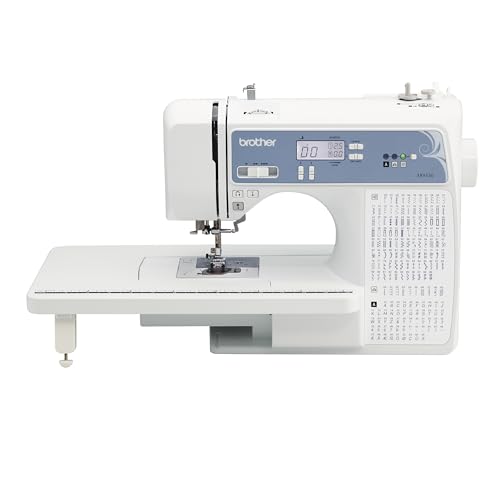
The Amazon product photo shows a Brother XR9550, a domestic machine with a top-loading bobbin system. Use the numbered key with the explanations below to identify the upper-thread path, sewing area and controls. Some components are partly concealed in a product photo. A front-loading machine gives access to its bobbin through a different opening.
1. Spool pin
The spool pin holds the upper-thread supply. Depending on the model, the spool may sit horizontally or vertically and may need a cap or another accessory. Fit the spool as the manual shows so thread unwinds smoothly instead of catching on an edge or wrapping around the pin.
2. Bobbin winder
The winder fills a compatible bobbin before sewing. Its guides and tension path are separate from the normal needle-threading path. Return the winding mechanism to its sewing position when finished; a machine left in winding mode may appear to run without stitching.
3. Thread guides
Guides keep the upper thread on its intended route. A small missed guide can produce a large problem later, especially near the needle bar. Follow the printed arrows and manual rather than improvising a shorter route that appears to reach the needle more easily.
4. Tension control
The upper tension system controls resistance on the top thread. Its dial may be visible or built into an electronic control system. Before turning the setting repeatedly, check the threading and bobbin insertion. A missing part of the thread path can imitate a tension problem.
5. Take-up lever
The take-up lever rises and falls as stitches form, managing the upper thread during the stitch cycle. On some machines it sits partly behind the front cover. Include it in the thread path even when it is less visible than the tension dial or spool pin.
6. Needle and needle clamp
The needle carries the upper thread into the fabric. Its clamp holds it at the required height and orientation. Select the needle system, point and size allowed by the machine and suited to the project. A partly inserted or reversed needle can cause poor stitching or a collision.
7. Presser foot and lifter
The presser foot holds the fabric against the feeding area. Its lifter raises it for positioning and lowers it for sewing. Different feet guide zippers, buttonholes and other operations. Check both the attachment and the selected stitch before starting, especially when a foot has a narrow needle opening.
8. Needle plate
The needle plate supports the fabric around the needle and provides openings for the needle and feed dogs. Seam guides help you maintain an allowance. Use the appropriate plate and compatible stitch width; a needle must not strike the plate during a supported operation.
9. Feed dogs
Feed dogs are the moving teeth below the foot that advance the fabric during normal sewing. Guide the material while allowing the machine to feed it. Pulling hard from behind can bend the needle and distort the seam. Some techniques use a lowered feed-dog setting with suitable accessories.
10. Bobbin and bobbin area
The bobbin supplies the lower thread. Machines use particular bobbin dimensions and insertion directions; similar-looking bobbins are not necessarily interchangeable. The bobbin case or holder works with the hook system below the plate. Follow the model’s access and threading instructions rather than relying on another machine’s layout.
11. Handwheel
The handwheel lets you move the needle mechanism by hand during approved setup operations. Turn it in the direction specified by the manual and stop if movement feels obstructed. Forcing the wheel is not a useful way to clear a jam or push a needle through unsuitable material.
12. Stitch controls and reverse control
The stitch selector chooses the pattern. Length and width settings change supported aspects of that pattern, while reverse or reinforcement controls secure stitching where appropriate. Computerized and mechanical machines present these controls differently; our computerized versus mechanical sewing machine guide explains the distinction.
How the parts make a stitch together
In ordinary lockstitch sewing, the needle brings the upper thread into the fabric and the hook system helps interlock it with the lower thread. The take-up mechanism manages the upper thread as the cycle continues. Meanwhile, the presser foot and feed dogs keep the fabric supported and advancing.
This relationship explains why a symptom does not always point to the nearest visible part. A nest of thread under the fabric can begin with an incorrectly threaded upper path. A fabric-feeding problem can come from a raised foot, an unsuitable setup or an incorrect feed-dog setting rather than a broken motor.
Watch the machine slowly on a plain scrap and observe one function at a time. Where are the threads coming from? Is the foot lowered? Is the fabric moving without being pulled? This is more informative than changing tension, stitch length and needle size together after the first imperfect seam.
A setup sequence for a clean first seam
Start with the machine and project requirements
Read the model’s basic setup instructions. With the machine safely powered off for needle and foot changes, fit a permitted needle and a suitable foot. Inspect the needle plate area for stray thread and confirm that any removable parts are correctly seated.
Prepare the bobbin and upper thread separately
Wind and insert the correct bobbin according to the manual. Then follow the upper-thread path with the presser foot raised where the manufacturer instructs, making sure the take-up lever and lower guides are included. Bring the thread through the needle in the required direction.
Check settings before running
Choose an appropriate straight-stitch setup for the scrap and confirm the foot and plate are compatible. Use the machine’s approved check procedure to establish that the needle clears the foot and plate. Keep fingers clear of the needle area and begin at a controlled speed.
Evaluate a short sample
Inspect both sides of the seam. Look for balanced stitching, smooth fabric feeding and an acceptable seam allowance. Change one setting at a time. If you are preparing a real garment project, our garment sewing machine guide helps connect machine features with common construction tasks.
Two computerized machines that illustrate these controls
| Machine | Format | Useful for | Important distinction | Amazon price / offers |
|---|---|---|---|---|
| Brother XR9550 | Computerized sewing | Garments and introductory quilting | Not a USB embroidery machine | $269.99 View offers |
| Brother HC1850 | Computerized sewing | Mixed domestic sewing projects | Check controls against its own manual | $249.99 View offers |
These comparisons are for readers considering a domestic machine as well as learning its parts. Both models use computerized stitch selection while retaining the fundamental needle, foot, bobbin and feed-dog relationships explained above. Their alphabet stitches are ordinary sewing functions, not a system for importing embroidery design files.
Brother XR9550
The XR9550 is a useful example of the parts in this guide working together on a computerized domestic machine. Stitch selection happens on an LCD, while the needle, presser foot, feed dogs and bobbin still perform the physical work. Learning the screen does not replace learning the thread path.
Brother specifies 165 built-in stitches, including 55 alphanumeric stitches, eight buttonhole styles and eight included presser feet. A wide table supports larger pieces, while the free arm helps with suitable cuffs and sleeves. Its drop-feed facility is relevant when learning supported free-motion techniques.
The appealing purchase case is a broad domestic sewing setup with clear stitch selection. Alphanumeric sewing stitches should not be mistaken for a machine-embroidery system that imports downloaded motifs. Check the exact package, voltage, seller condition and accessories. If the main goal is basic alterations, evaluate ease of threading and usable controls before treating the stitch count as the deciding feature.
Five reasons to consider
- LCD makes stitch selection easy to identify
- Eight one-step buttonhole styles
- Wide table supports larger fabric pieces
- Free arm for appropriate tubular projects
- Eight presser feet in the specified package
Two tradeoffs
- Alphanumeric stitches do not provide design-file embroidery
- Electronic controls add settings to learn
$269.99Check Amazon offers
Brother HC1850
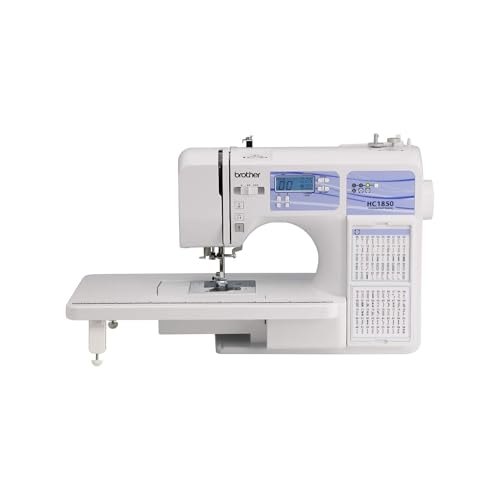
The HC1850 is worth comparing if you like a visible reference for selecting stitches while you work. Brother’s built-in stitch chart gives the stitch-selection area a clear purpose: it helps you connect a stitch symbol with the setting you want to use. The thread tension and fabric-handling basics remain just as important.
Its published specification includes 185 stitches, 55 alphanumeric stitches, eight one-step buttonholes, adjustable sewing speed and eight accessory feet. These offer room to explore garment details and supported quilting tasks. A slower speed setting can be useful while learning accurate starts, corners and seam allowance control.
Choose between this and the XR9550 by comparing the controls, package and final offer, not by assuming that twenty additional stitch entries transform sewing quality. Neither model substitutes for a dedicated industrial machine or a design-file embroidery machine. Our assessment favors the HC1850 for a learner who values its stitch-reference layout and expects to use the wider domestic feature set.
Five reasons to consider
- Built-in chart keeps stitch choices visible
- Adjustable speed supports controlled practice
- Eight one-step buttonhole styles
- Includes a range of accessory feet
- Combines utility and decorative sewing stitches
Two tradeoffs
- More stitch options can distract a beginner
- Not intended for downloaded machine-embroidery designs
$249.99Check Amazon offers
Common problems and where to look first
Loops or a thread nest beneath the fabric
Stop and remove the work using the manual’s procedure. Check the upper-thread route, take-up lever and correct threading conditions before changing a bobbin-case screw. Rethread from the beginning when necessary. A minor setup error is easier to resolve when you do not add several unrecorded adjustments.
Fabric barely advances
Check whether the presser foot is lowered, the stitch length is appropriate and the feed dogs are in the correct position for normal sewing. Also consider the project: a difficult edge or unsupported lightweight fabric may need a different technique. Do not force feeding by pulling the fabric behind the needle.
The needle hits the foot or plate
Stop immediately. Check the selected stitch, compatible foot, correctly fitted needle and any recently changed plate or accessory. Replace a bent or damaged needle with a permitted type. Persistent contact after correct setup needs service attention; continuing to sew can create more damage.
The motor runs but the needle does not sew
Check for a bobbin-winding position or another operating mode described in the manual. A jam, disconnected component or safety condition may require a different response. Switch off before investigating the sewing area, and avoid dismantling covers to pursue a fault beyond routine user maintenance.
Cleaning, replacement parts and practical ownership
Remove accessible lint as the manual directs, using suitable cleaning tools. The bobbin area often needs attention, but removal and reinstallation steps vary. Do not add oil or turn adjustment screws simply because a generic tutorial suggests it; some models specify limited user maintenance.
When shopping for sewing machine parts for Brother or Singer models, record the complete model number and the relevant part number. Presser-foot attachment, bobbin type and electrical components need exact compatibility. The brand name alone is insufficient. Our home sewing machine buying guide can help you evaluate ownership needs before a replacement purchase.
For needles, begin with the manual’s permitted range, then select by fabric and thread. Our 60/8 sewing machine needle guide explains a very fine size, including why it is not approved for every domestic machine.
Frequently asked questions
Which sewing machine parts should a beginner learn first?
Start with the spool pin, upper-thread route, take-up lever, needle, presser foot, bobbin access and stitch controls. Then identify the handwheel and feed-dog setting. Learning their sequence is more useful than memorizing every screw or cover on the machine.
Are Singer and Brother sewing machine parts interchangeable?
Some accessories fit more than one model, but the brand names alone do not establish compatibility. Match the exact model, part number, attachment type and any size or electrical requirements. Bobbins that look similar can still have different specifications.
What is the difference between a bobbin and bobbin case?
The bobbin holds the lower thread. Its case or holder positions it within the lower-thread mechanism. The arrangement varies with the machine, so follow the correct manual when inserting, threading or cleaning the assembly.
Why can the machine run without moving the fabric?
Check the presser-foot position, stitch length and whether the feed dogs are set for normal sewing. Also inspect the operating mode and project setup. Do not pull hard to compensate; stop and identify the cause before continuing.
Should I oil the machine whenever I clean it?
Use only the lubrication and cleaning instructions for the exact model. Some machines specify limited user maintenance. Adding oil in unapproved places or adjusting internal screws can create a new problem rather than solve an existing one.
Our verdict
A sewing machine parts diagram is most useful when you treat it as a working map. Learn the upper-thread route, understand the bobbin arrangement and let the foot and feed dogs handle the fabric correctly. The XR9550 and HC1850 show how computerized controls sit alongside these same fundamentals. Choose equipment by the projects, controls and support you need, then use its exact manual to turn a generic diagram into a dependable routine.
Related articles
Explore more guides at Practical Textile.
Offer check: Amazon.com seller-offer summaries were checked on October 23, 2026. Some listings use “Other sellers” buying options. Confirm the current seller, condition, stock and delivery for your address before ordering.
Expert tip from KAMRUL ISLAM
Most stitch problems come from threading with the presser foot down. Always raise it before threading so the thread sits between the tension discs.



