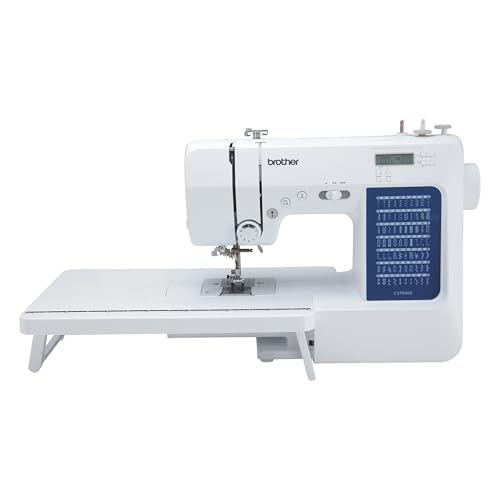
Buying your first sewing machine is easier when you compare the projects you want to make with the features you will actually use. This Brother CS7000X review explains its suitability for everyday sewing, beginner quilting, and garment repairs. We examine the published specifications, included accessories, and important limitations, then compare it with two Brother alternatives so you can decide whether this model fits your workspace, budget, and future sewing plans.
Affiliate disclosure: As an Amazon Associate I earn from qualifying purchases.
Review method: This is a research-based buying assessment using Brother’s documentation and an attributed independent test report. Practical Textile has not performed a hands-on test of this machine.
Quick verdict: who should buy the Brother CS7000X?
The CS7000X is worth considering for a first home sewing setup, particularly when quilting is on your project list. Its included accessories make it easier to compare the complete starting package. Choose it for learning seams, hems, and manageable quilt projects. Choose a different machine if your main goal is automated embroidery or sustained production work.
Our buying judgment: Start with your three most likely projects. If they are a cushion cover, a simple garment, and a small quilt, this model is a reasonable candidate. If they are embroidered business logos, heavy leather bags, and large quilts every week, ask for demonstrations of equipment suited to those tasks before buying.
No products found.
Compare the exact model, seller, condition, included accessories, and return terms on the current listing. A bundle or renewed machine may differ from the standard package.
Brother CS7000X specifications
The following are manufacturer specifications, rather than measurements taken by Practical Textile. Source: Brother.
| Feature | Manufacturer specification |
|---|---|
| Machine type | Computerized sewing and quilting |
| Built-in stitches | 70 |
| Buttonhole styles | 7 one-step, auto-size styles |
| Maximum sewing speed | 750 stitches per minute |
| Included sewing feet | 10, including a walking foot and quilting accessories |
| Fabric support | Detachable wide table |
| Bobbin system | Quick-set, top-loading |
| Needle threading | Automatic needle threader |
| Free-motion option | Drop feed |
| Presser-foot pressure | Not adjustable |
| Built-in lettering fonts | 0 |
A maximum speed specification does not tell you how a particular seam will turn out. For a purchase decision, give more weight to a sample sewn with your own fabric than to a speed figure or stitch count.
Five advantages and two important limitations
Advantages
- Useful starting package: the accessory bundle supports several everyday techniques.
- Quilting support: the table provides additional surface support.
- Controlled learning: adjustable speed offers a way to approach unfamiliar seams slowly.
- Convenient setup: assisted threading and the top-loading bobbin reduce some preparation steps.
- Room to explore: stitch choices cover more than a basic straight seam.
Limitations
- No automated hoop embroidery: decorative sewing and a monogramming foot do not provide an embroidery-file workflow.
- Fixed presser-foot pressure: this removes one adjustment that can matter when working with challenging materials. Brother confirms the limitation.
These advantages are feature-based buying considerations. They do not establish stitch quality, durability, or performance on every fabric.
What projects should you consider?
Use this table to plan a demonstration or your first practice sessions. It is an editorial checklist, not a record of completed machine tests.
| Your project | What to evaluate | Purchase implication |
|---|---|---|
| Cushions and simple cotton projects | A straight seam, a corner, and an edge finish | A useful place to start learning |
| Garment making and alterations | A hem, zipper, and buttonhole in the intended fabric | Judge the finish before committing to complex garments |
| Beginner quilting | Piecing accuracy and a small sample quilt sandwich | Assess control and fabric support together |
| Denim repairs and bulky joins | The thickest actual seam intersection | A successful thin sample does not establish thick-seam capacity |
| Stretch garments | Skipped stitches, distortion, and seam stretch | Try the exact material and construction method |
| Computerized logos and monograms | Embroidery files, hoop size, and positioning | Compare a sewing-and-embroidery machine instead |
Write down the result you need from each project. “Sew denim” is too broad to judge a machine: a pocket repair and a bulky folded hem are different tasks. Bring the most demanding sample, rather than an easy piece that flatters every option.
Textile-focused assessment: how to judge the result
Look beyond the decorative stitch count
Our buying priority would be a small set of repeatable, useful seams. Ask yourself whether you can choose the needed stitch, set it up correctly, and produce a finish you would be happy to wear or sell. An unfamiliar decorative pattern adds little value if your main work is hemming trousers.
Compare the same task across the machines on your shortlist. Change only one variable at a time during a demonstration and keep the samples. A named sample with its settings is more useful later than a memory that one machine “felt better.” This approach also helps you distinguish a setup problem from a feature you truly need.
Evaluate quilting accessories as part of a system
The walking foot should be treated as a task-specific attachment. Brother’s accessory instructions restrict it to appropriate straight or zigzag stitching, advise a moderate or low speed, and prohibit reverse stitching with that foot. Read those instructions before use; compatibility with a machine does not mean compatibility with every stitch. Source: accessory instructions.
For a demonstration, prepare a small sample representing your planned layers. Mark the starting alignment so you can inspect the result afterwards. Separately, consider where the rest of the quilt will sit. A purchase that seems suitable on a clear showroom table may feel different on a crowded desk at home.
Try arranging your workspace before ordering. Leave room to guide the material, reach the controls, and move the work without catching it on nearby objects. This costs nothing and may reveal that a better table arrangement matters more to you than another accessory.
Treat denim and stretch fabric as separate decisions
Brother’s fabric guidance calls for a suitable needle and thread combination and a trial seam using the actual layers. Do not force fabric through the machine. A larger needle cannot make an unsuitable machine suitable for every thick construction. Source: Brother fabric guidance.
For stretch projects, judge the finished seam in the way the garment will be used. Consider appearance, recovery, and comfort as separate requirements. Decide whether a sample is acceptable before buying material for a whole garment. Passing your own project check is more useful than assuming a broad label such as “versatile” answers every question.
For bulkier work, list the seam intersections and attachments that make the project difficult. A bag may contain a manageable flat panel alongside a much more demanding strap junction. Ask the demonstrator to address the difficult part explicitly. If the answer is only about the flat panel, you still have an unresolved buying question.
Check buttonholes before choosing a garment machine
In its June 2023 hands-on CS7000X review, TechGearLab reported easy everyday operation but identified buttonhole neatness as a weakness. That is the tester’s finding, rather than a Practical Textile test result. Read the original test.
If shirts, coats, or other buttoned garments are your main goal, request a buttonhole in your chosen fabric and interfacing. Examine both sides and compare it with the finish you want. Do this before choosing by the number of available buttonhole styles.
Brother CS7000X vs XR9550 vs SE700
These three models answer different buying needs. The comparison uses Brother’s published features; it does not rank their stitch quality or establish which offers the lowest current price.
| Decision point | CS7000X | XR9550 | SE700 |
|---|---|---|---|
| Primary function | Sewing and quilting | Sewing and quilting | Sewing and hoop embroidery |
| Stitch library | 70 sewing stitches | 165 total, including 55 alphanumeric | 103 sewing stitches |
| Buttonhole styles | 7 | 8 | 10 |
| Embroidery capability | No automated hoop embroidery | No automated hoop embroidery | 4 × 4-inch maximum embroidery area; 135 built-in designs |
| Reason to compare | Everyday sewing with a quilting accessory package | More decorative and lettering choices | Embroidery is part of the purchase goal |
CS7000X documentation · XR9550 documentation · SE700 documentation
Check the current listings: No products found. · Brother XR9550 on Amazon · Brother SE700 on Amazon
Consider the XR9550 when built-in lettering and decorative choices solve a specific need. Consider the SE700 when your plan includes hoop embroidery, while checking whether its embroidery area fits the designs you want. A machine with embroidery capability is not automatically a better purchase for someone whose work is entirely seams and quilting.
Our Brother sewing and embroidery machine comparison explains how to compare embroidery-focused options.
What to check before buying in the USA
- Exact model: confirm CS7000X on the listing and order details.
- Condition: separate a new machine from renewed, used, or open-box offers.
- Package: confirm the promised feet, table, cover, controller, and documentation.
- Seller and returns: read who handles a return and when your return window closes.
- Support: locate the applicable warranty and a service option before you need them.
- Total budget: allow for project materials, appropriate needles, thread, and any genuinely necessary extras.
Compare the total setup, rather than the headline machine price alone. A lower offer may still be suitable, but missing accessories or unclear condition can change its value to you. Record what each seller includes so you can make a like-for-like decision.
For buyers outside the USA, confirm the local model, electrical rating, warranty coverage, and accessory package with the regional seller. This review examines USA documentation and Amazon.com product listings.
A practical first-week plan
This is a suggested learning sequence, not a claim about how quickly every beginner will learn. Give each task enough time to understand the result before moving on.
- Make a stitch sample: choose a simple practice fabric and label the settings you use. Keep the sample as a reference.
- Complete one small seam-based project: choose something such as a plain cushion cover that lets you practice measuring and guiding a seam.
- Try the feature you bought the machine for: make a small quilting sample or a garment detail, rather than beginning with your largest project.
- Review the result: note what was easy, what needs practice, and which problem needs a setup check or support advice.
For hands-on setup, use the CS7000X operation manual and its model-specific stitch chart. The manual covers several models, so follow instructions applicable to your machine rather than assuming every pictured feature is included.
Before buying extra feet, compare your task list with the included package. If you cannot identify the project an accessory will help you complete, leave it off your first order. Learning the supplied tools gives you a better basis for deciding what to add later.
If your sample seam looks wrong
Brother’s troubleshooting guidance starts with checking the threading, bobbin, needle, selected foot, and fabric combination. Check that the feed dogs are in the correct position for the task. Resolve the setup before making repeated tension changes. Source: Brother troubleshooting.
For a useful support request, record the fabric, layers, needle, thread, selected stitch, and what you already checked. Include a clear photograph of both sides of the seam. This creates a specific problem to investigate and reduces the chance of receiving advice that applies to a different setup.
Cleaning and oiling
Switch off and unplug before cleaning. Follow the manual’s bobbin-area cleaning procedure with the recommended brush. The manual advises against compressed canned air and says the user must not oil this machine. Stop and contact authorized support if the handwheel becomes difficult to turn or unusual noise develops. Source: operation manual, care and maintenance.
Frequently asked questions
Is the Brother CS7000X suitable for beginners?
It is a reasonable candidate for a first home sewing machine. Compare it against the projects you intend to make and try the controls if possible. Independent testing has described it as easy to use, but your learning experience and preferred workflow may differ.
Can the CS7000X do embroidery or monogramming?
It does not provide automated hoop embroidery or built-in lettering fonts. A monogramming foot and decorative stitches do not mean you can load an embroidery file. Compare the SE700 or another embroidery-capable model if automated lettering or logos are essential.
Do I need a computer to use the CS7000X?
No computer is needed for ordinary sewing. “Computerized” describes the machine’s electronic controls. Select stitches on the machine itself; this is different from an embroidery design-transfer workflow.
Can it sew denim and thick fabrics?
Suitability depends on the particular fabric and seam construction. Try the actual layers with a suitable needle and thread, following Brother’s instructions. Do not assume it can handle every bulky join or production workload because it can sew a simple denim sample.
Should I oil this sewing machine?
No user oiling is prescribed. Brother’s operation manual explicitly says the machine must not be oiled by the user. Follow its cleaning guidance and contact authorized service for unresolved mechanical problems.
Should you choose the Brother CS7000X?
Shortlist the CS7000X when your purchase is mainly about learning everyday sewing and exploring quilting. Make your decision from the finished work you need, the complete package, and the support available to you. Request a demonstration of the hardest part of your planned projects before making a demanding fabric claim part of your buying decision.
If embroidery is essential, compare a machine built for that workflow. If garment finishing is the priority, pay close attention to the sample buttonhole and seam results. The right choice is the machine that meets your actual project requirements at an acceptable total cost.
No products found.Related Practical Textile guides
- Sewing machine buying guide — compare machine types and buying priorities.
- Sewing techniques and troubleshooting guide — work through stitch and setup problems.
- Sewing machine parts and accessories guide — understand feet and other additions.
- Brother sewing and embroidery machine comparison — investigate embroidery-capable alternatives.
- Complete sewing and embroidery guide — connect your machine choice to the broader craft.
Sources and review basis
Documentation and product-listing identity checked on October 13, 2026. Published specifications and seller offers can change. Buying judgments and suggested evaluation checklists are Practical Textile’s editorial analysis.
- Brother USA: CS7000X specifications and package.
- Brother CS7000X manuals — operation manual, care and maintenance.
- Brother accessory instructions — walking foot restrictions.
- Brother: presser-foot pressure limitation.
- Brother: fabric, thread, and needle combinations.
- Brother: fabric feeding troubleshooting.
- TechGearLab: independent CS7000X test, June 12, 2023.
- Brother USA: XR9550.
- Brother USA: SE700.