
The Brother XR9550 combines computerized stitch selection with a wide table and built-in lettering, making it an interesting choice for home sewing. Those features look attractive, but they serve different purposes. This Brother XR9550 review explains where the machine fits for clothing, quilt piecing, and everyday repairs, what its lettering cannot do, and which buying details matter before you choose it over a simpler mechanical machine for your sewing projects.
As an Amazon Associate, Practical Textile earns from qualifying purchases. We may receive a commission when you buy through our product links.
Quick Answer: Who Should Buy the Brother XR9550?
Consider the XR9550 for general home sewing when computerized controls, a speed limiter, and built-in lettering will be useful. Its included table can support fabric beside the needle, and its stitch menu covers more than basic repairs. It is not a hoop embroidery machine, and an extension table does not increase the space inside the machine’s arm. Look elsewhere when large embroidery designs or frequent dense industrial materials define your workload.
This is a specification-based buying review, not a hands-on test. Recommendations reflect the controls and project requirements; we have not measured stitch consistency, long-term reliability, or maximum fabric capacity.
Brother XR9550
Compare it for garment sewing, piecing, and simple built-in lettering.
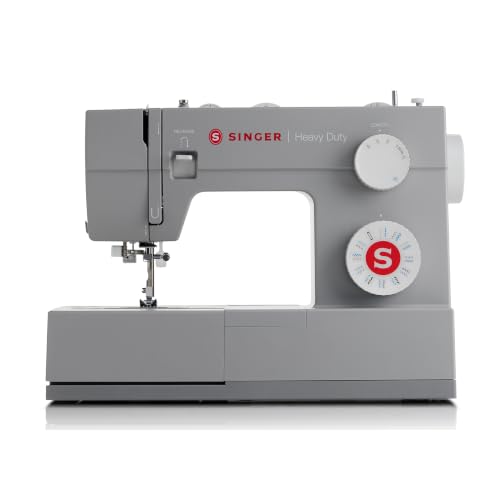
Singer Heavy Duty 4423
Compare this if you prefer direct dial controls and adjustable foot pressure.
Brother XR9550 Overview: Features That Affect Your Work
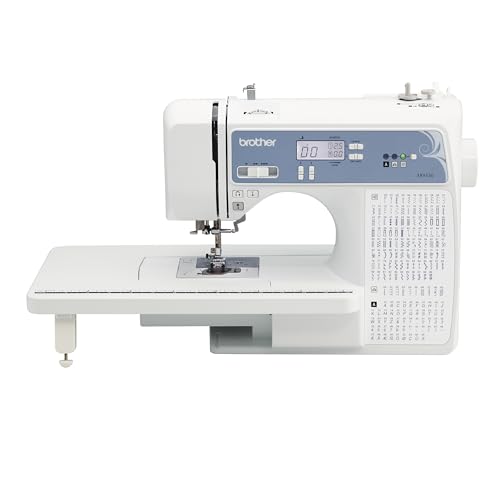

Brother lists 165 built-in selections, including 55 alphanumeric characters and eight automatic buttonhole styles. The total therefore includes lettering rather than representing 165 different construction stitches. Compare the actual stitch chart with your needs: a straight stitch, zigzag, stretch options, and the right buttonhole may do more for your wardrobe than dozens of decorative choices.
The LCD-based interface helps you select stitches without relying only on a mechanical selector. A top-loading bobbin, needle-threading aid, free arm, and drop-feed function support common sewing tasks. Brother’s package description includes eight feet, a wide table, and a protective hard cover. Verify the current seller’s bundle, especially when comparing refurbished, used, or differently packaged offers.
Think of these features as workflow tools. They can make setup more convenient, but they do not replace fabric preparation or correct technique. The machine still needs a compatible needle, suitable thread, accurate threading, and a reasonable seam construction. Computerized selection does not mean the machine can identify and correct every setup mistake.
Controls and Beginner Suitability
A speed limit can make practice more manageable
The sewing-speed controller lets you cap the operating speed instead of relying entirely on delicate pedal pressure. That can be helpful when you are learning to stop near a corner or keep a consistent seam allowance. Start conservatively and increase the limit after you can guide a sample accurately. Speed is useful when it supports control, not when it makes mistakes arrive faster.
A useful first exercise is to mark several straight lines and gentle curves on stable woven scraps. Sew along them without pulling the fabric. Practice stopping, raising the presser foot at an appropriate point, repositioning, and continuing. This reveals whether the controls suit you better than simply running the machine at full speed on an empty table.
Stitch selection still requires the right foot
Before sewing a new stitch, check the manual’s recommended foot and permitted settings. A narrow-opening foot combined with a wide stitch can cause a needle strike. Turn the handwheel as instructed to check clearance when changing the setup, and keep your hands clear of the moving needle. Do not assume that a displayed stitch number guarantees the installed accessory is correct.
Keep the frequently used feet organized and labeled. A beginner often gains more from recognizing the zipper, buttonhole, and overcasting feet than from exploring every decorative selection immediately. Learn one construction operation at a time, then add another once the results are consistent on a sample.
Convenience does not eliminate the learning curve
The needle threader is an aid, not a reason to ignore the threading sequence. Follow the instructions for needle position and thread routing, and do not force the mechanism if the needle or thread combination is unsuitable. When stitches become loose or irregular, start with basic setup checks before assuming the electronics are at fault.
For a first machine, access to instruction can matter as much as an extra feature. Consider whether you can follow the model manual, attend a local class, or get help with a real sample. A machine with many functions is useful only when you can confidently choose and operate the ones your projects require.
Clothing, Repairs, and Everyday Sewing
Woven garments and alterations
The XR9550 is worth considering for manageable clothing projects: seams, hems, zipper installation, and decorative details. Start by checking how the chosen fabric responds to the needle and stitch. A lightweight blouse fabric, firm cotton, and a lined skirt need different handling even when they use the same basic seam construction.
The free arm can help with some sleeves and trouser legs once the accessory compartment is removed. It will not fit every small opening. If a cuff is too narrow, consider a different construction sequence or sew from the accessible side while keeping other layers clear. Machine geometry should guide your approach rather than forcing a tube around an arm that does not fit.
Buttonholes deserve a complete sample
Eight buttonhole styles provide choices, but the useful style is the one that works with the garment and button. Test through the same interfacing and layer arrangement as the final piece. Examine stitch formation, opening size, and the way the button passes through before marking and sewing a row on the garment.
Pay attention to bulk near the buttonhole area. A foot resting unevenly across a nearby seam may not travel as expected. Keep the surface supported, position the required lever correctly, and follow the full sequence in the instructions. Automatic sizing reduces repetitive adjustments; it does not remove the need to prepare the fabric.
Knits and seam finishing
For knits, test whether the seam stretches enough for its location without breaking. Choose an appropriate knit needle and stitch, and avoid stretching the fabric as the feed moves it. A smooth sample at rest is only part of the evaluation: gently stretch it as the garment will stretch in wear.
An overcasting foot can assist with an edge-finishing operation, but this is still a sewing machine rather than a serger. Do not expect it to trim and finish an edge in the same operation as an overlocker. If knit garment production becomes your main activity, compare the separate roles of your sewing machine and specialized finishing equipment.
Quilting: Understand What the Wide Table Changes
The extension table supports work outside the machine. It can help prevent a small quilt or patchwork section from dropping over the edge and pulling against the seam. It does not enlarge the opening to the right of the needle. A large rolled quilt still has to pass through that fixed space when the project requires it.
For piecing, focus first on a repeatable seam allowance. Test your guide position with actual strips, press the sample, and measure the completed unit. Small inaccuracies accumulate across many blocks, so a reliable setup matters more than rushing through a long seam. Decorative stitch variety is largely unrelated to that task.
Free-motion quilting involves lowering the feed and moving the work yourself with the appropriate setup. The included spring-action quilting foot is relevant here, but successful motion still requires practice. Begin with a small sandwich made from the same batting and fabrics you plan to use. Learn to coordinate movement and stitch formation before committing a finished quilt top.
For straight-line quilting, investigate accessory compatibility rather than assuming a walking foot is part of every bundle. Its purpose and operation differ from the spring-action quilting foot. Neither accessory increases the size of the arm opening. If large quilts will be a regular project, evaluate working space, support, and handling comfort before choosing by stitch count.
Built-In Lettering Is Not Hoop Embroidery
The XR9550’s alphanumeric selections can form built-in characters through ordinary sewing. This can be useful for a modest label or decorative detail when the fabric and stabilization are appropriate. The available character style is part of the machine’s built-in selection; it is not the same as importing an arbitrary logo or embroidery file.
A computerized embroidery machine controls the movement of a hooped workpiece according to a design. The XR9550 does not provide that workflow. A presser foot called a monogramming foot also does not establish that a machine supports automatic hoop monograms. Accessory names and marketing photographs are poor substitutes for checking the actual embroidery functions.
If your goal is large personalized names, repeated business logos, or designs sized to a particular hoop, start with an embroidery category. Our Brother sewing machine buying guide explains the difference between general sewing models and a sewing-and-embroidery option. Decide which process you need before comparing letter counts.
Brother XR9550 Versus Singer 4423: Which Workflow Fits?
| Buying consideration | Brother XR9550 | Singer 4423 | Decision guidance |
|---|---|---|---|
| Interface | Computerized stitch selection | Mechanical dials | Choose the control method you find clearer. |
| Speed limiting | Dedicated controller | Pedal control without a separate slider | Consider how you prefer to manage slow work. |
| Built-in lettering | Alphanumeric selections | No computerized alphabet | Useful for simple lettering, not imported embroidery designs. |
| Buttonhole choices | Eight styles | One-step buttonhole | Match the styles to garments you actually sew. |
| Foot pressure | Do not assume manual adjustment | Adjustable | Check specific controls against your fabric needs. |
| Automatic hoop embroidery | No | No | Look in a different category for that process. |
The mechanical alternative is not automatically tougher in every meaningful sense, and computerized controls do not prove superior feeding. Our Singer Heavy Duty 4423 review focuses on that machine’s project fit and limitations. Compare operations and controls before treating either label as a quality score.
Brother XR9550 Pros and Limitations
Reasons to consider it
- Computerized selection organizes a broad stitch menu.
- Speed limitation can support controlled learning and careful details.
- Built-in letters add an option beyond ordinary utility sewing.
- The included table provides extra support beside the needle.
- Several included feet cover common construction and finishing operations.
Reasons to compare other options
- The stitch total includes characters, so compare the actual selections.
- No imported hoop embroidery designs.
- An extension table does not create a larger throat opening.
- Dense material stacks require realistic assessment rather than assumptions.
- Accessories do not replace the learning and setup needed for quilting.
Setup and Troubleshooting Before Your First Real Project
Make a baseline sample
Begin with ordinary woven scraps and an appropriate new needle. Thread the machine and load the correct bobbin according to the instructions. Select a basic straight stitch and inspect the result on both sides. Once that works, move to a sample made from the actual project material and layer arrangement.
Change only one variable when investigating a problem. If you change the needle, tension, thread, and stitch length together, you may get an acceptable result without knowing which change helped. Recording a working setup gives you a dependable starting point for the next seam or similar fabric.
Check feeding and handling
When the fabric moves unevenly, confirm that the correct foot is installed and lowered, the feed is in the correct position, and the material is not caught or dragging. Support larger work on the table. Your hands guide direction; pulling from behind can interfere with feeding and put unnecessary stress on the needle.
For skipped stitches, investigate the needle type, its condition and installation, and the threading path before experimenting broadly with settings. If the needle strikes something, stop and check the setup. Disconnect power before clearing a jam or working near the needle mechanism, and follow the manual’s maintenance instructions.
Separate setup trouble from an unsuitable project
A correctly threaded machine can still be the wrong tool for a particular construction. If material cannot move freely, the presser foot is severely tilted, or the machine repeatedly struggles at the same dense crossing, do not assume a new decorative stitch will fix it. Reduce bulk where appropriate, test safely, or choose equipment intended for that workload.
What to Check Before Ordering
- Exact model: confirm XR9550, not a different XR model with a similar-looking casing.
- Package contents: verify the table, cover, feet, controller, and other accessories in the specific offer.
- Condition: new, refurbished, and used listings can have different terms and included items.
- Electrical suitability: choose the correct US-market version and follow the machine’s labeling.
- Support and returns: read the seller’s return conditions and the manufacturer’s applicable warranty details.
- Real project fit: for unusual or dense materials, seek a demonstration using the intended seam, not just a flat fabric swatch.
Do not choose a listing based only on the lowest headline price. Missing accessories, uncertain condition, or unsuitable return terms can change the practical value. We leave current product information to the AAWP box rather than typing a fixed price into the review. Confirm the final offer and bundle on Amazon before completing a purchase.
For further category comparisons, explore our Janome sewing comparison, Singer 4452 review, and dedicated embroidery guide if automatic hoop work is part of your plans.
Frequently Asked Questions
Is the Brother XR9550 good for beginners?
It is worth considering if you want computerized selection and speed limitation for general home sewing. The broader stitch menu adds options, but you should still learn basic threading, needle selection, seam control, and troubleshooting before exploring every decorative feature.
Does the Brother XR9550 do embroidery?
It provides built-in lettering and decorative sewing, not computerized hoop embroidery. It does not offer the design-import and hoop-motion workflow required for automatic embroidery logos. Choose an embroidery-capable machine when that is the purpose of the purchase.
Can you quilt with the Brother XR9550?
Consider it for appropriate piecing and domestic quilting setups. The table supports work, and the drop-feed function is relevant to free-motion techniques. Quilt size, arm space, correct accessories, and your ability to manage the sandwich still determine whether a particular project is practical.
Are all 165 selections different sewing stitches?
The advertised total includes 55 alphanumeric selections as well as the other built-in patterns. Inspect the stitch chart and useful construction functions rather than assuming the headline total represents 165 different utility stitches.
Is a walking foot included with the Brother XR9550?
Brother’s listed eight-foot package includes a spring-action quilting foot, which is different from a walking foot. Verify the exact seller bundle and compatible accessory part if you need a walking foot for your planned work.
Final Recommendation: A Feature-Rich Home Sewing Option
The Brother XR9550 is most appealing when its computerized interface, speed control, table, and built-in lettering solve real needs in your sewing routine. Its strongest buying case is versatile household sewing with room to explore more techniques. The feature list should support that purpose rather than distract from it.
Compare simpler machines if you mainly make basic repairs and prefer mechanical dials. Choose a different category for automatic embroidery, unusually dense materials, or a workload needing specialized feeding. For everyday clothing and manageable quilt projects, check the current XR9550 bundle, understand its limitations, and budget time for a proper sample before your first finished piece.




