
Poolin Embroidery Machine Reviews: EOC06 vs EOC03
Choosing a Poolin embroidery machine starts with the designs you want to stitch and the space those designs require. A larger touchscreen is convenient.

This guide has Amazon links. If you buy through them we may earn a small commission, at no extra cost to you.
Quick answer
Poolin makes multi-needle embroidery machines aimed at home businesses and small shops, usually priced below established commercial brands. Reviews focus on value for money, embroidery area, speed and ease of use. Before buying, check software compatibility, warranty terms and how quickly parts and support are available.
Choosing a Poolin embroidery machine starts with the designs you want to stitch and the space those designs require. A larger touchscreen is convenient, but hoop dimensions, design preparation, and support arrangements matter more to everyday results. These Poolin embroidery machine reviews compare the EOC06 with the smaller EOC03 embroidery model, explain the naming differences that can confuse buyers, and show which questions to answer before spending on either machine.
As an Amazon Associate, Practical Textile earns from qualifying purchases. We may receive a commission through the Amazon links on this page.
What’s in this article10 sections
Quick Answer: Which Poolin Embroidery Machine Fits Your Projects?
Consider the EOC06 when the width and height of your designs justify a larger embroidery field. Consider the EOC03 embroidery-only model for smaller work when its narrow field is sufficient. Do not treat an elongated hoop as a substitute for a wider hoop. Also check the full model description: Poolin uses EOC03 naming for both an embroidery-only product and a separately described 2-in-1 product.
This is a research-based buying review. We have not performed hands-on stitching, noise, support-response, or endurance tests.
Poolin EOC06

A larger-field option for appropriately sized flat embroidery projects.
Poolin EOC03
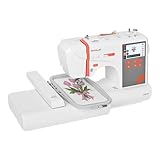
Check the embroidery-only version and its exact included hoops before ordering.
Poolin EOC06 Review: The Larger-Field Choice
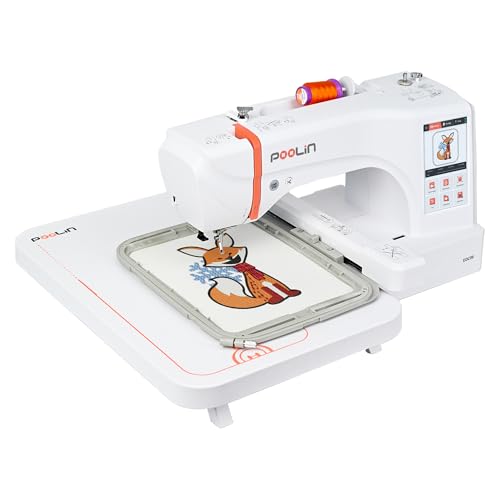
The manufacturer’s current EOC06 description lists a maximum embroidery area of 7.9 by 11 inches, a seven-inch touchscreen, and USB or Wi-Fi design transfer. That combination is relevant when a design genuinely needs more room across both dimensions. It does not establish that every garment can be hooped or that every design within the nominal field will work without preparation.
Before choosing it for a sweatshirt graphic, draw the intended design at its finished size on paper. Place that paper on the garment and assess the available flat area, seams, pocket location, and access to the inside. The garment may limit the usable area before the machine’s maximum field does. This simple check can prevent buying a larger machine for a placement you cannot practically hoop.
The larger screen can make positioning controls and design previews easier to inspect, but a preview is not a finished stitch-out. Fabric movement, stabilizer selection, thread behavior, and digitizing still affect the result. Leave room for a test run rather than assuming that a design which looks clean on the display will behave the same way on a stretchy sweatshirt.
EOC06 advantages and limitations
Reasons to consider it
- The larger field accommodates designs that will not fit a narrow embroidery area.
- The screen provides room to inspect layout and available editing controls.
- File transfer options support designs beyond the built-in collection.
- A flatbed workflow can suit accessible garment panels and household textiles.
- It can be a focused embroidery addition beside an existing sewing machine.
Limitations to understand
- A larger field does not provide multi-needle color changes or commercial cap handling.
- Large or dense designs need suitable stabilization and more material support.
Choose this model because the additional field solves a real design constraint. If most of your planned work is a small chest logo, a name, or a compact patch, compare the complete ownership cost before paying primarily for unused area.
Poolin EOC03 Review: Check the Exact Version
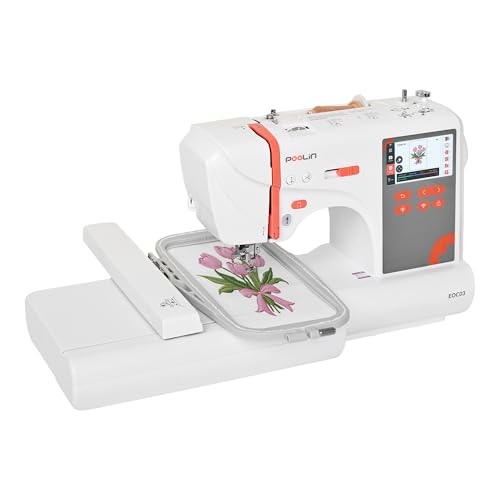
The embroidery-only EOC03 is listed with a maximum area of four by 9.25 inches. That is a long, narrow rectangle. It may suit a line of lettering that exceeds a square four-inch field, but it will not hold a six-inch-wide motif simply because its longest dimension is larger than six inches.
This is where listing photographs can mislead a hurried buyer. Compare the design’s required width and height, not just the largest number printed beside the hoop. Rotating a design helps only when the rotated layout fits both dimensions and makes sense for the garment placement. It does not add width to the machine’s stitching field.
Poolin also describes a separate EOC03 2-in-1 sewing-and-embroidery product. Do not transfer that model’s sewing features to the embroidery-only listing linked here. Read the full description, verify the accessories, and confirm the exact version with the seller if the title is ambiguous. Similar product names are not sufficient evidence of identical functions.
For a household that already has a sewing machine, a dedicated embroidery unit can be a sensible division of work. You can construct the garment on one machine and decorate accessible sections on the other. If you want one machine to do both jobs, compare an explicitly identified combination model instead of assuming every EOC03 can sew ordinary seams.
Poolin EOC06 Versus EOC03: Practical Comparison
| Decision | EOC06 | EOC03 embroidery-only | What to check |
|---|---|---|---|
| Maximum listed field | 7.9 × 11 inches | 4 × 9.25 inches | Measure the final design in both directions. |
| Strongest buying reason | Larger flat motifs | Compact and narrow designs | Choose around actual projects rather than unused capacity. |
| Ordinary garment construction | Dedicated embroidery workflow | Do not confuse it with the separate 2-in-1 version | Confirm sewing capability explicitly. |
| File preparation | Compatible stitch files required | Compatible stitch files required | A picture file still needs digitizing. |
| Commercial cap work | Do not assume a cap driver | Do not assume a cap driver | Investigate the actual cap system, not a hat photograph. |
This is a suitability comparison rather than a measured performance ranking. We have not established which machine makes a better stitch in the same fabric. For more context about the brand, start with our Poolin buying considerations and compare any claims against the exact model you intend to order.
Design Files, Digitizing, and the Real Creative Workflow
A logo image is not an embroidery file
A JPG or PNG describes an image, while an embroidery file describes stitch instructions. Import capability does not mean a machine can turn any picture into attractive embroidery automatically. A digitized design needs appropriate stitch types, directions, density, underlay, and sequencing for the intended size and fabric.
If you plan to sell decorated goods, budget for professional digitizing or suitable software and the time to learn it. A detailed logo that looks excellent on a business card may need simplification when stitched small. Ask for a sample appropriate to the final garment material rather than approving only a digital mockup.
Resizing has limits
Making a design smaller can crowd stitches and close small lettering. Enlarging it can create gaps or weaken coverage if the stitch information is not recalculated appropriately. Use resizing controls within the design supplier’s recommendations and inspect the result through an actual test. A machine’s editing menu does not guarantee that every design tolerates major size changes.
Keep a clean master copy of purchased or commissioned files. Name working files with the design, finished size, fabric type, and version so you do not accidentally stitch a trial version on a customer item. Confirm commercial-use licensing before offering goods made from a design you obtained elsewhere.
Which Projects Make Sense?
Shirts and sweatshirts
The main challenge is often getting one fabric layer into the stitching area while keeping everything else clear. Check that the back of the garment, sleeves, drawcords, or pocket sections cannot enter the needle path. Place the garment so it can move throughout the design without pulling against a table edge or the machine.
Stretch garments generally require stabilization that supports the stitches during wear and washing. The right choice depends on the fabric and design rather than a universal rule that one backing solves everything. Test on an equivalent blank when the garment is valuable or difficult to replace.
Towels, patches, and bags
Towel pile can interfere with the appearance of small details, so investigate an appropriate topping as well as backing. Patches need a plan for the edge finish and attachment method. A flat embroidery machine does not automatically create a finished merrowed border merely because you loaded a patch-shaped design.
Bags introduce access and bulk problems. A large nominal field is irrelevant if a pocket seam prevents the chosen section from lying in the correct position. Embroidering a panel before assembly is often easier than decorating a fully constructed bag, when the project and construction sequence allow it.
Hats and small-business orders
Be cautious about buying either model primarily for structured caps. Flat garment embroidery and stitching around a cap are different workflows. Verify the specific supported accessory and how much of the cap can actually be reached. For a production-oriented alternative, read our Smartstitch embroidery machine review, with attention to the added setup and support demands.
Hooping, Stabilizer, and First-Design Setup
Start with a small built-in design or a well-digitized file on stable test fabric. Follow the machine’s threading and bobbin instructions, select a compatible needle, and use the hoop intended for that design. Secure the material evenly without stretching it into a distorted shape. After hooping, confirm that the target area is positioned as intended.
Use the model’s position-checking or tracing procedure as directed, keeping fingers and loose material away from the moving mechanism. Check the entire design boundary, not just the starting point. A design can begin in a clear area and still strike a hoop or encounter a seam later in the sequence if the setup is wrong.
Watch the initial stitching closely enough to identify a problem promptly. If thread nests, fabric shifts, or the needle repeatedly breaks, stop and investigate the thread path, bobbin, needle condition, stabilization, and design rather than repeatedly restarting the same failing setup. Disconnect power before clearing trapped material near the needle.
Record successful combinations of blank, stabilizer, thread, needle, and design version. An orderly sample record is especially valuable when you later repeat an order. It helps separate a machine problem from a changed blank, a different design file, or a setup that was never replicated accurately.
Ownership Cost, Training, and Support
Machine price is only part of the budget. Thread, bobbins, backing, topping, needles, practice blanks, design files, digitizing, and possible additional hoops all affect what it costs to start. Set aside supplies for unsuccessful samples instead of calculating every test as if it will become a sellable item.
For paid work, measure the complete job: preparing the file, hooping, changing colors, stitching, trimming, inspection, and rework. Advertised maximum speed is not an hourly production guarantee. A design with frequent stops or difficult placement can take considerably longer than a simple stitch-count calculation suggests.
Before buying, ask who handles troubleshooting, replacement parts, warranty service, shipping damage, and returns for the specific seller and US-market unit. Confirm whether training is included and how you access it. A promise of support is most useful when the process, availability, and applicable terms are clear before a problem occurs.
Our Poolin manufacturer overview provides additional brand context. If your project also needs sewing, compare the categories in our Brother sewing machine guide. For another dedicated embroidery category, explore our Janome embroidery machine guide.
Frequently Asked Questions
Is the Poolin EOC06 a sewing and embroidery machine?
Treat the EOC06 discussed here as a dedicated embroidery purchase. Do not assume it constructs ordinary garment seams. If you need both processes in one machine, verify an explicitly described sewing-and-embroidery model before ordering.
Does the Poolin EOC03 sew as well as embroider?
The name requires careful checking. Poolin describes both an embroidery-only EOC03 and a separate EOC03 2-in-1 product. Confirm the full listing and included equipment rather than relying on the shortened model name.
Can I embroider my business logo with a Poolin machine?
You need a compatible, properly digitized embroidery file, a design that fits the field, and a suitable garment setup. Owning the machine does not digitize a JPG automatically. Test the logo at its final size before accepting production work.
Is a four-by-9.25-inch field larger than a five-by-seven field?
The comparison depends on the design. The first is longer but narrower. A motif wider than four inches may not fit it, even when that motif fits a five-by-seven field. Always compare both dimensions in the intended orientation.
Which Poolin model is better for a beginner?
Choose around the projects, learning resources, and support you need. Smaller designs may make the EOC03 sufficient, while wider motifs may justify the EOC06. Neither removes the need to learn stabilization, hooping, threading, and design preparation.
Final Recommendation
The EOC06 is the more relevant starting point when you have measured designs that need its larger field. The EOC03 embroidery-only model deserves consideration when the narrower field fits your work and the exact version is clear. Buy the usable embroidery area and support arrangement your projects need, then allow time and supplies for testing.
Check the current Amazon offer for the precise model, included hoops, seller terms, and electrical suitability. Do not let a bundle photograph substitute for a written equipment list. A machine is a better purchase when you understand the full workflow before the first blank goes under the needle.
Expert tip from KAMRUL ISLAM
Budget multi-needle machines can stitch well, but downtime costs a business more than the price gap. Ask about local support before comparing specifications.
