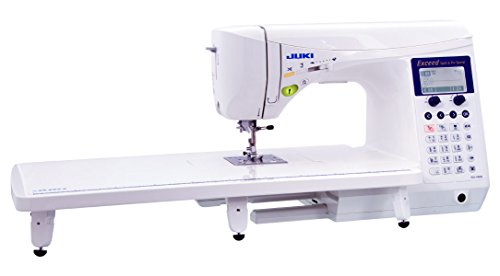
The Juki HZL-F600 is a computerized household machine for sewers comparing garment construction, decorative work, and quilting in one station. Its broad pattern menu is only part of the decision. This review explains the controls, supplied-equipment questions, buttonholes, and practical project tests that matter so you can decide whether the complete F600 setup improves your sewing routine or whether a simpler model already supplies the operations your projects actually require.
As an Amazon Associate, Practical Textile earns from qualifying purchases. Product links may earn us a commission.
Quick Answer
Compare the F600 when its computerized controls and broader package have practical value across your garments and quilts. Test the operations you repeat and confirm the exact included accessories. Choose the F300 when its complete offer already meets the requirement, or a straight-stitch specialist when a dedicated narrower role is what you need.
This guide compares published specifications and project fit; it does not report hands-on testing.
Juki HZL-F600

Evaluate the controls and exact included equipment with a representative project.
Check Price on AmazonThis is a specific HZL-F600 bundle. Confirm the seller’s included equipment and warranty.
Juki HZL-F300
No verified Amazon offer is linked for this model; read the buying checks below.
Compare the useful differences and complete bundle rather than the pattern total alone.
Brother PQ1600S

A separate specialist role when zigzag and buttonholes are handled elsewhere.
Where the HZL-F600 Fits in a Sewing Room
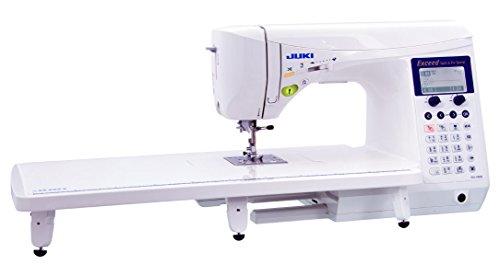
The F600 is best evaluated as a versatile household sewing station. It belongs in a comparison for someone who alternates between garment construction, suitable quilting, and decorative sewing. It does not become a universal industrial machine because Juki also makes industrial equipment, and it is not a hoop embroidery system.
Begin with your recurring work. If every project uses ordinary straight seams and an occasional buttonhole, the full decorative menu may contribute little. If your designs repeatedly use appropriate pattern combinations, garment closures, and quilting accessories, the broader package may have clearer value. The purchase should follow that actual workload.
This is a research-based review, not a report of a hands-on comparison or a durability test. The aim is to translate documented features into practical questions you can resolve through the exact offer, manual, and a representative demonstration.
Read the Specifications Without Mixing Counts
Juki’s US model page describes 225 stitch patterns, four lettering fonts, and 16 buttonhole styles. These figures should not be combined into an invented total or confused with embroidery designs. Product listings can present pattern and stitch counts differently, so use the exact manufacturer description and manual when comparing menus.
The model also provides household controls such as needle positioning, thread cutting, speed regulation, adjustable foot pressure, and box feed. Each addresses a particular part of operation. None alone guarantees an acceptable seam on every material or eliminates the need for appropriate preparation.
| Buying question | Relevant feature area | Evidence to request |
|---|---|---|
| Will it improve repeated garment work? | Utility stitches and buttonholes | Your fabric, interfacing, and closure sample |
| Will decorative functions be used? | Patterns, lettering, and sequences | An actual planned decorative layout |
| Will quilting be easier to handle? | Feet, table, controls, and surrounding support | A representative quilt sandwich and working arrangement |
| Is the package worth more than F300? | Included tools and relevant features | A complete written comparison of the two offers |
Buttonholes: Test a Real Shirt or Jacket Stack
A range of buttonhole styles is useful only when it produces a suitable closure for the garment. Bring the intended fabric, interfacing, and button to a demonstration. Test near the kind of edge or seam used by the real pattern rather than relying only on an unusually stiff prepared strip.
Inspect both sides and the opening before cutting. Check that the button passes as intended without distorting the placket. Placement, spacing, and overlap remain design and preparation decisions. A computerized mechanism can form the stitch without correcting an incorrectly marked garment.
For repeat shirtmaking, try more than one buttonhole and note how you reset or repeat the operation. The useful question is whether the full sequence is understandable and consistent for you. A single attractive demonstration does not establish that every fabric will behave the same way.
Learn the Thread-Cutting Routine Deliberately
The F600 offers more than one way to operate thread cutting, including its controller-related function. Learn the exact manual procedure before using an unfamiliar action in the middle of a project. A heel movement that is convenient for one operator may take practice for another.
Test stopping, cutting, removing the work, and beginning the next seam on a suitable sample. Check the thread tails and stitch security according to the operation. Convenience should support a correct finish rather than become an automatic action applied to every thread or technique.
If you work across several machines, make the control differences explicit. A familiar pedal arrangement on one machine does not establish the same behavior on another. A short practice sequence helps you learn the model without making the first important garment the experiment.
Decorative Sequences Need a Defined Use
Pattern combinations and lettering can be useful on borders, labels, or decorative details. Before choosing a machine for these functions, make a small design plan. Decide the desired scale, spacing, direction, fabric, and finish. The available patterns should be judged against that plan.
Try a short sequence and inspect it after removing any temporary support as appropriate. A decorative sample on stable demonstration material may not behave the same way on a lightweight garment. Test the actual combination of material, thread, needle, and support before sewing the finished item.
Sewn lettering is not equivalent to importing an arbitrary logo for hoop embroidery. If custom automatic embroidery is the main goal, compare the appropriate equipment category. Our sewing-and-embroidery guide explains a genuine combination role.
Quilting: Look Beyond the Included Table
A support table helps manage material around the needle, but the rest of the workstation still matters. A quilt hanging from the edge can pull against the feed system. Consider the space behind and beside the machine as well as the area immediately under your hands.
For piecing, test the chosen foot and needle position and measure the resulting units after pressing. For layered stitching, use the actual batting and fabrics. These tests answer different questions. A good piecing sample does not establish that a large quilt will be comfortable to maneuver.
Free-motion work also depends on the operator’s movement and a compatible setup. A quilting accessory does not automatically regulate stitch length or move the quilt. Begin with a manageable sandwich and learn how speed and movement interact before committing to a large valuable project.
Box Feed and Pressure Adjustment Are Specific Tools
Evaluate fabric movement on the complete seam stack. Layer shifting, surface friction, stretch, and unsupported weight can create different problems. Determine which symptom you are trying to improve before changing pressure or adding a foot.
Box feed is not industrial compound walking-foot feed. An appropriate accessory can help some household layer-control tasks, but it does not change the machine’s underlying equipment class. Dense reinforced work should earn a place through a suitable sample, not through brand reputation.
Stop if the motor strains, the needle deflects, or the construction cannot advance normally. More expensive household equipment does not establish an unlimited material range. Use the machine instructions and qualified support to determine an appropriate setup and when another class is needed.
F600 Versus F300: Compare the Complete Offers
The F300 is worth comparing when you want the family’s general computerized sewing role without paying mainly for extra decoration or a different package. Make an operation list and identify which differences actually contribute to those projects.
Check the accessories carefully. Juki identifies a wide table and knee lifter as optional for the F300, while an individual retailer may bundle them. The F600’s included equipment should still be confirmed for the exact listing. A machine-only price and an equipped station are different comparisons.
If the additional F600 tools are ones you would otherwise purchase, calculate the complete compatible setup. If they will remain unused, do not let their count determine the choice. Ask for the same sample and questions on both machines so the comparison remains meaningful.
When a Straight-Stitch Station Is the Better Upgrade


A straight-only specialist can make sense when repeated suitable straight sewing is the actual bottleneck. The Brother PQ1600S represents that different role. It cannot replace zigzag or buttonholes, so another machine may remain necessary for general construction.
Our Brother machine guide separates those categories. Decide whether your next purchase should broaden one household station or create a specialist station. Neither direction is automatically more advanced; the better choice removes a clear limitation.
For other household comparisons, read our Janome overview and Singer 4432 review. They provide context for features and control preferences rather than evidence that every model serves the same purpose.
Five Reasons to Consider the F600
- A broad household sewing role across suitable projects.
- Useful control conveniences for repeated operations.
- Buttonhole options to evaluate for garment construction.
- Decorative combinations when your designs genuinely use them.
- A package comparison that can include useful quilting equipment.
Two Limits
- More patterns do not create hoop embroidery or industrial feeding.
- Included equipment and service terms must be checked for the exact offer.
Ownership Checks Before the Final Choice
Ask where service is performed, how training is provided, and which warranty and return terms apply. Confirm the condition of the unit and the full supplied inventory. Keep model information and purchase documents together for later support or accessory questions.
Budget for suitable needles, thread, cutting and pressing tools, lighting, and stable support. An elaborate machine still depends on a sound surrounding process. Follow the exact model’s maintenance instructions rather than copying cleaning or oiling advice from unrelated equipment.
Our interface comparison and computerized beginner guide can help assess the operating style. Experience with sewing techniques does not remove the value of learning a new model’s controls carefully.
Keep a small reference card for the functions you adopt first: a preferred utility setup, the appropriate cutting routine, and a buttonhole sample. This makes the first projects easier to repeat without exploring the whole menu at once. Add another function when a real project requires it, preserving the settings and sample that worked.
A Project Check Before You Commit
Use a project with repeated corners to evaluate the F600’s control layout. Check whether the buttons, controller, and knee-lifter position feel comfortable from your normal chair. A knee lifter is useful only when the station allows you to operate it without an awkward posture. Likewise, an extension table should sit securely and support the work at a comfortable height.
Ask to repeat the same seam after changing to another stitch and back again. This tests the ease of returning to a known setup, not just the range of functions available. Record the settings of the better sample and inspect both faces after pressing. A model can have an extensive specification while still requiring careful fabric preparation; the practical comparison is how predictably you can use those controls across your own projects.
Frequently Asked Questions
Does the F600 do hoop embroidery?
No. Its decorative sewing patterns and lettering should not be confused with importing a design and stitching it automatically in a hoop. That requires an appropriate embroidery-capable machine.
Is a larger stitch total the main reason to choose it?
Only if the additional patterns are useful to your designs. Controls, supplied tools, sample results, and support may contribute more to everyday value than decorative quantity.
Does box feed make it an industrial walking-foot machine?
No. These are different mechanisms and equipment roles. Evaluate the complete material stack and the feed system actually provided rather than translating a marketing phrase into another capability.
Should I choose the F300 to save money?
Compare the complete offers, including accessories you genuinely need. The F300 may be enough when its operations meet the work, but optional equipment can change the total comparison.
What is the most useful demonstration?
Use your actual materials and repeat the operations that matter: setup, controlled seams, a relevant buttonhole, and a quilting or decorative sample if those motivate the purchase. Inspect results and operate the controls yourself.
Final Recommendation
The F600 deserves comparison when its controls, useful decorative functions, and complete package support a varied household workflow. Confirm that advantage through representative samples and an exact inventory. Choose the F300 or a different specialist only when its role better matches the work, and give service and comfortable daily operation as much weight as the feature menu.