 Practical Textile
 Transform your embroidery projects effortlessly with the best software for digitizing embroidery, designed for every creative need.
If you’re looking to create stunning embroidery designs, the Embrilliance StitchArtist Level 1 is perfect for beginners. This software is user-friendly and ideal for Mac and PC users, allowing you to digitize with ease. For more advanced features, Embrilliance StitchArtist Level 2 offers enhanced tools to refine your designs, while Embrilliance Essentials provides versatile editing capabilities that every embroiderer will appreciate.
Whether you’re a hobbyist or a professional, these software options cater to various needs. Their intuitive interfaces and robust features make them perfect for creating intricate designs or simple patterns.
In this full review, you will learn about the unique benefits of each software, helping you choose the best fit for your embroidery projects. Get ready to enhance your creativity with Embrilliance!


Embrilliance StitchArtist Level 1 Software

If you’re a hobby embroiderer looking to elevate your designs without the headache of complex software, Embrilliance StitchArtist Level 1 is your go-to solution. This digitizing embroidery software for Mac and PC simplifies the process, allowing you to create stunning stitches without breaking the bank or your brain. With its user-friendly interface, you can effortlessly tackle projects like simple appliqué designs, running stitch patterns, and filled shapes, all while enjoying automatic placement guides and easy tracing features.
Pros
One of the standout features of StitchArtist Level 1 is its ability to let users create beautiful embroidery designs without the steep learning curve associated with other software. The limited set of stitch types means you can jump right in and start designing without feeling overwhelmed. Plus, the automatic placement guides and tacking stitches make appliqué projects a breeze. The software is compatible with both Windows and MacOS, ensuring that you can easily integrate it into your existing setup. And let’s not forget the joy of having a physical disk—no more searching for download links or worrying about internet connections!
Cons
While Embrilliance StitchArtist Level 1 is fantastic for beginners, experienced digitizers might find it a bit too simplistic. The limited stitch types may not satisfy those looking for advanced features or intricate designs. Additionally, the software focuses on basic projects, which means you might outgrow it as your skills develop. If you’re aiming for high-end digitizing, you may need to eventually upgrade to a more comprehensive program. But for hobbyists looking to create without the fuss, it’s a solid choice!
To buy this product, click here.
Embrilliance Essentials Embroidery Software
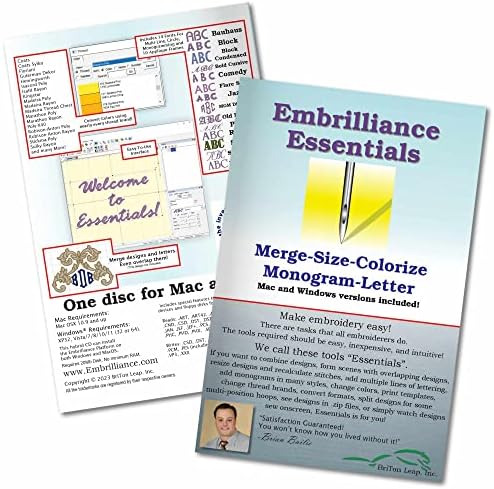
Embrilliance Essentials is the go-to embroidery software for Mac & PC that revolutionizes how you handle your embroidery projects. Compatible with the latest Windows and MacOS systems, this software ensures you have free updates and disk-free installers at your fingertips. With features like automatic stitch recalculation when resizing existing embroidery files and the ability to add lettering in various modes, you’ll wonder how you ever managed without it!
Pros
One of the standout features of Embrilliance Essentials is its versatility. You can easily resize your embroidery designs without worrying about the integrity of the stitches, thanks to the automatic stitch recalculation. The software comes packed with 21 fonts, allowing you to create stunning multi-line and monogram text, and even lets you spiral text for that extra flair. Plus, it supports saving designs in your machine’s format and offers compatibility with cutting machines like ScanNCut and Silhouette. If you’re looking to overlap designs, the program automatically removes unnecessary underlying stitching, making your life a whole lot easier.
Cons
While Embrilliance Essentials is a powerhouse, it does have a limitation: it doesn’t convert JPG or other graphics into embroidery designs. If you’re hoping to turn your favorite image into an embroidery masterpiece, you’ll need to pair this software with the Embrilliance StitchArtist series. However, for those focused on digitizing existing designs and lettering, this software is a dream come true!
Check the latest price from here.
Embrilliance StitchArtist Level 2 Software

If you’re diving into the world of embroidery, the Embrilliance StitchArtist Level 2 Digitizing Embroidery Software for MAC & PC is your trusty sidekick. This software builds on the foundation of Level 1, offering a comprehensive suite of tools designed for those ready to elevate their design game. Whether you’re crafting intricate logos or experimenting with various stitch types, this program gives you the freedom to unleash your creativity without the hassle of juggling multiple applications.
Pros
The Embrilliance StitchArtist Level 2 shines with its user-friendly interface, making it accessible for both beginners and seasoned pros. Its compatibility with both MAC and PC ensures that no one is left out of the embroidery fun. The extensive instructional resources, including a dedicated YouTube channel and a helpful community, provide a safety net for users as they explore the software’s capabilities. Plus, the ability to run on current operating systems with free updates means you won’t be left in the dust as technology evolves.
Cons
To get this product, click here.
Embrilliance StitchArtist Level 3 Software
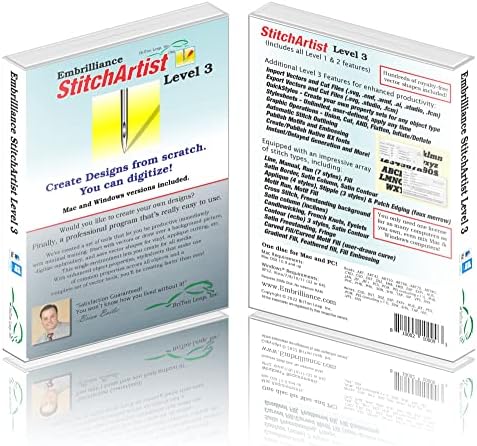
If you’re on the hunt for the best software for digitizing embroidery, look no further than Embrilliance StitchArtist Level 3. This powerful tool is designed for both hobbyists and professionals who want to unleash their creativity in the embroidery world. With advanced features like Styles, QuickStyles, and an Eyelet tool, it elevates your design game to new heights. You can carve lines, manipulate shapes with graphical operators, and even publish Motifs and Embossed effects. It’s like having a digital embroidery studio right at your fingertips!
Pros
The standout feature of StitchArtist Level 3 is its user-friendly interface that makes digitizing a breeze. You can easily import images and draw ‘objects’ for stitching, allowing for complete creative control. The instant stitch generation is a game-changer, eliminating tedious mode changes and letting you focus on what you love—creating stunning designs. Additionally, the specialized tools for font and patch creation are a dream come true for anyone looking to expand their embroidery repertoire. Plus, the ability to change stitch types on the fly means you can experiment without fear!
Cons
To know more about this product, click here.
Brother Stitch Express Software

The Brother SAEXPRESS – Stitch Express is touted as the best software for digitizing embroidery, and it certainly lives up to the hype. With over 60 built-in line art designs and more than 14 fill patterns, this software makes it a breeze to create stunning embroidery projects. Whether you’re a novice or a seasoned pro, its user-friendly interface allows for easy navigation and quick learning. Plus, it’s compatible with hoops up to 10” x 16”, making it versatile for various projects.
Pros
One of the standout features of the Brother SAEXPRESS is its extensive library of built-in designs, which saves you time and sparks creativity. The software’s ability to auto-digitize means you can convert images into embroidery designs with just a few clicks, making it incredibly efficient. Additionally, the compatibility with larger hoops lets you tackle bigger projects without feeling restricted. The installation process is straightforward, and the software runs smoothly on most PCs, ensuring you won’t be wrestling with technical issues when you should be focusing on your art.
Cons
While the Brother SAEXPRESS is packed with great features, it does have some limitations. The basic digitizing capabilities might not satisfy those looking for advanced editing options, which could leave seasoned digitizers wanting more. Additionally, the software is PC-only, so Mac users will need to find alternative solutions. However, for most hobbyists and small business owners, these drawbacks are minor compared to the value this software provides.
Check details of this product, click here.
Faq about best software for digitizing embroidery:
1: What is digitizing software for embroidery?
Digitizing software converts images into embroidery patterns by creating stitch data that embroidery machines can read.
2: What features should I look for in embroidery digitizing software?
Look for user-friendly interfaces, a variety of stitch types, editing tools, and compatibility with different embroidery machines.
3: Is there free software available for embroidery digitizing?
Yes, there are free options like Ink/Stitch and SewArt, but they may have limited features compared to paid software.
4: What is the best software for beginners?
Beginner-friendly software includes Hatch Embroidery Software and Brother’s PE-Design, known for their intuitive interfaces and tutorials.
5: Can I use digitizing software on a Mac?
Yes, some software like Embrilliance and StitchBuddy are compatible with Mac, while others may require virtualization or emulation.
6: How much does professional digitizing software cost?
Professional digitizing software typically ranges from $100 to over $1,000, depending on features and capabilities.
7: Can I learn to digitize embroidery on my own?
Yes, many resources, including online courses and tutorials, can help you learn digitizing at your own pace.
Conclusion
Embrilliance StitchArtist Level 1 Software emerges as a premier choice for those seeking to craft intricate designs with unparalleled precision and versatility. Its intuitive interface coupled with robust features empowers users to transform their creative visions into reality seamlessly.
On the other hand, Embrilliance Essentials Embroidery Software stands out for its user-friendly capabilities, making it an ideal solution for both novices and seasoned embroiderers. Its comprehensive tools facilitate effortless design customization, ensuring that users can achieve professional-grade results with remarkable ease.