 Practical Textile
 Cheap models lag in features—but the Brother SE700 and Poolin EOC07 bring serious home embroidery power.
Choosing which embroidery machine is best for home use can be tricky. The Brother SE700 offers seamless wireless connectivity and a vibrant touchscreen, perfect for intricate designs. Meanwhile, the Poolin EOC07 impresses with its expansive 7.9″ x 15″ embroidery area, ideal for larger projects and detailed customization.
For those focused on versatility, the Brother PE900 stands out with its WLAN capability and user-friendly interface, making complex stitching accessible. Each machine caters to different home embroidery needs.
Below, we analyze budget, lifespan, and real-user feedback.


Brother SE700 Sewing Embroidery Machine
If you’ve been wondering which embroidery machine is best for home use, the Brother SE700 Sewing and Embroidery Machine deserves a solid look. This combo powerhouse merges sewing and embroidery in one sleek, white unit, perfect for both beginners and seasoned crafters. With 135 built-in designs and 103 sewing stitches, creativity knows no bounds. The 4″ x 4″ hoop area offers ample space for a variety of projects, while the 3.7-inch touchscreen makes editing and previewing your designs a breeze—no more squinting or guesswork. Plus, the wireless LAN connectivity and the Artspira Mobile App bring your custom patterns right to your fingertips, making file transfers feel like magic rather than a chore.
Pros
The SE700 shines with its versatility, combining sewing and embroidery so you don’t need two machines cluttering your craft room. The wireless LAN feature is a game-changer, allowing effortless design transfers straight from your PC or mobile device. The automatic needle threader saves your eyesight and patience, while the jam-resistant drop-in bobbin keeps things running smoothly. Its 8 included feet cover a wide range of sewing needs, which means you’re well-equipped from the get-go. The touchscreen interface is intuitive, making customization fun rather than frustrating.
Cons
While the 4″ x 4″ embroidery field suits many home projects, it might feel a bit cramped for large or intricate designs. The machine is designed for 120 volts US households only, so international users will need to look elsewhere or use a voltage converter (and risk voiding the warranty). Also, some users might find the machine’s software ecosystem a tad complex at first, requiring a bit of patience to fully master all the wireless features.
To buy this product, click here.
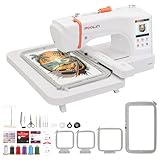
Poolin EOC07 Embroidery Machine Large Area
Pros
The Poolin EOC07 shines with its large embroidery area, which supports multiple hoop sizes, making it versatile for both simple and complex projects. The Institch OS3 system is user-friendly, reducing setup time and allowing you to focus on your creativity rather than technical headaches. The Wi-Fi feature and digital software make design transfers seamless, and the included starter supplies mean you can dive into stitching right away. The 7-inch color touchscreen is bright and intuitive, giving you confidence as you monitor your progress. For those looking to turn their hobby into a side hustle, this machine’s business-ready capabilities are a big plus.
Cons
While the Poolin EOC07 offers a lot, its size might be a bit bulky for very tight craft spaces, so make sure you have a dedicated spot. The advanced features and large embroidery area might be overwhelming for absolute beginners who prefer a simpler, more compact machine. Also, some users might find the initial Wi-Fi setup a tad fiddly, although the after-sales support is there to help smooth out any bumps.
Check the latest price from here.
Brother PE900 Embroidery Machine White
Pros
The Brother PE900 shines with its wireless connectivity and mobile app integration, making file transfers and custom design creation impressively simple. Its large embroidery field and spacious arm clearance accommodate bigger projects comfortably, while the advanced color sorting and jump stitch trimming save time and thread, enhancing efficiency. The 3.7” touchscreen is user-friendly and sharp, allowing for detailed editing without frustration. Plus, the extensive library of built-in designs and fonts offers plenty of creative freedom out of the box.
Cons
As an embroidery-only machine, the PE900 won’t replace your sewing machine, which might disappoint those seeking an all-in-one device. The machine is designed exclusively for 120-volt US outlets, limiting use elsewhere without adapters. Also, while the wireless features are great, initial software setup can be a bit fiddly for less tech-savvy users, requiring patience and some troubleshooting.
To get this product, click here.
Smartstitch S-1001 Embroidery Machine

If you’re hunting for which embroidery machine is best for home use but want something that punches way above its weight, the Smartstitch S-1001 Upgraded Embroidery Machine deserves your attention. This new generation commercial-grade machine is surprisingly compact and lightweight, boasting 10 needles and a blazing 1200 stitches per minute max speed. The expansive 9.5″x14.2″ embroidery area paired with a responsive 7″ touch screen makes designing on everything from hats to T-shirts a smooth, professional experience. Whether you’re tackling denim, leather, or canvas, this machine handles it all with precision thanks to features like auto thread trimming, auto color changing, and laser embroidery positioning. The self-lubrication system and thread break detection keep things humming quietly and efficiently, which is a blessing for home use.
Pros
The Smartstitch S-1001 shines with its rich feature set usually reserved for industrial machines, yet it fits comfortably in a home studio. Its friendly learning curve is a standout, supported by thorough manuals, video tutorials, and an active user community ready to lend a hand. The machine’s stable structure and noise reduction make long sewing sessions less of a headache. Plus, the starter pack with threads and stabilizers means you can jump right into projects without hunting down accessories. Customer service is notably responsive, providing remote and local technical support, which eases the inevitable newbie jitters.
Cons
While the S-1001 packs serious power, the initial setup requires careful attention, especially to keep the wooden pallet and packaging intact in case of return—a minor but important hassle. The machine’s advanced features might overwhelm absolute beginners who prefer a more plug-and-play approach, and the physical buttons, although handy, feel a bit dated compared to fully digital controls. Also, the price point is a bit steep for hobbyists just dabbling in embroidery, making it more suited for serious crafters or small business owners.
To know more about this product, click here.
Brother SE2000 Sewing Embroidery Machine

If you’re wondering which embroidery machine is best for home use, the Brother SE2000 Computerized Sewing and Embroidery Machine deserves serious consideration. This nifty combo machine blends sewing and embroidery into one sleek package, offering a generous 5″ x 7″ embroidery field perfect for larger, intricate designs. Whether you’re a beginner or seasoned stitcher, the SE2000’s wireless LAN capability lets you transfer embroidery files effortlessly from your PC, while the ARTSPIRA mobile app opens up a treasure trove of 50 free designs and custom pattern creation right from your phone. The large 3.7” touchscreen provides intuitive editing features like resizing, rotating, and combining patterns, making customization a breeze without needing a computer.
Pros
The Brother SE2000 shines with its seamless integration of sewing and embroidery, boasting an impressive 241 built-in sewing stitches alongside 190 embroidery designs, plus 13 fonts for personalized flair. The Advanced Color Sort and Jump Stitch Trimming features streamline multi-color projects, reducing thread changes and tidying up jump stitches automatically—saving time and frustration. The inclusion of 8 sewing feet and a sizeable embroidery hoop means you’re equipped for a variety of projects right out of the box. Plus, wireless design transfer and mobile app support add a modern touch that many machines of this class lack.
Cons
While the SE2000 packs a punch, the 5″ x 7″ embroidery field might feel a bit limiting for those dreaming of huge, elaborate designs. Also, it’s designed exclusively for 120-volt use in the US, which could be a dealbreaker for international crafters or those needing voltage adaptability. The touchscreen, though handy, isn’t as large or high-res as some competitors, which might make intricate editing less comfortable over long sessions. Lastly, if you’re a pure sewing enthusiast without much interest in embroidery, this combo might be more machine than you need—and a bit pricier than basic sewing-only models.
Check details of this product, click here.
Faq about which embroidery machine is best for home use:
1:What features should I look for in a home embroidery machine?
Look for features like built-in designs, USB connectivity, embroidery area size, and ease of use to enhance your home embroidery experience.
2:Are there specific s known for quality home embroidery machines?
Popular s include Brother, Janome, and Singer, known for their reliability and user-friendly models.
3:What is the average price range for a good home embroidery machine?
Good home embroidery machines typically range from $300 to $1,500, depending on features and capabilities.
4:Can I use a sewing machine for embroidery?
Some sewing machines have embroidery functions, but dedicated embroidery machines offer superior functionality and ease.
5:Do I need special software for designing embroidery patterns?
Most embroidery machines come with software, but additional design software can enhance creativity and customization.
6:What is the best embroidery machine for beginners?
The Brother PE800 is often recommended for beginners due to its user-friendly interface and extensive features.
Conclusion
Both machines offer distinct advantages tailored to home-based creativity. The Brother SE700 excels with its compact 4″ x 4″ hoop and extensive built-in designs, making it ideal for users valuing versatility and ease of use in a computerized format. Its wireless LAN connectivity and touchscreen enhance accessibility for various sewing and embroidery tasks.
Alternatively, the Poolin EOC07 stands out with a significantly larger embroidery area and advanced Wi-Fi design transfer capabilities, catering to ambitious projects requiring expansive customization. Its robust touchscreen interface and included starter supplies provide a comprehensive package for intricate designs. Ultimately, the choice hinges on the scale and complexity of your embroidery ambitions, balancing convenience against expansive creative potential.