
Choosing the best Brother sewing machine starts with what you actually want to make: everyday alterations, clothing, quilts, or personalized gifts. A long stitch list alone will not tell you which model belongs on your sewing table. This guide compares five Brother machines by practical use, explains their important limitations, and helps you spend on features you will use rather than extras that do not match your projects at home.
As an Amazon Associate, Practical Textile earns from qualifying purchases. If you buy through an affiliate link on this page, we may receive a commission.
Quick Answer: Which Brother Sewing Machine Should You Choose?
Our research-based starting recommendation is the Brother CS5055 for a home sewist who wants computerized controls for everyday sewing. Choose the GX37 if straightforward dial controls matter more than computerized features. Consider the XR9550 for built-in lettering and more stitch choices, the PQ1600S for dedicated straight-stitch quilting work, or the SE2000 when hoop embroidery is a genuine part of your plans.
These are suitability recommendations, not results from a hands-on comparison. No single model is the right choice for every fabric, workload, or skill level.
Brother CS5055
A practical starting point for everyday computerized sewing.
Brother GX37
A simpler choice for learning essential sewing skills.
Brother SE2000

For projects that need actual embroidery capability.
Brother Sewing Machine Comparison at a Glance
Use this table to narrow the type of machine you need before comparing current offers. The stitch totals below use Brother’s published descriptions; they are not a measure of stitch quality or a promise that one machine handles tougher material than another.
| Machine | Useful features | Who should consider it? | Important limitation | Current offer |
|---|---|---|---|---|
 CS5055 |
60 built-in stitches; seven buttonhole styles; LCD selection | Everyday home sewing with computerized stitch selection | No hoop embroidery; no adjustable presser-foot pressure | Check on Amazon |
 GX37 |
37 built-in stitches; one-step buttonhole; dial selection | Basic alterations, repairs, and learning to sew | No computerized stitch selection or hoop embroidery | Check on Amazon |
 XR9550 |
165 built-in stitch selections including 55 alphanumeric; eight buttonhole styles | Decorative sewing and simple built-in lettering | Letter stitches do not make it a hoop embroidery machine | Check on Amazon |
 PQ1600S |
Straight stitch; up to 1,500 stitches per minute; knee lifter | Quilters and sewists prioritizing straight-stitch workflow | No zigzag or automatic buttonholes | Check on Amazon |
 SE2000 |
241 sewing stitches; 193 built-in embroidery designs; 5 × 7-inch embroidery field | Sewing plus embroidered gifts, clothing, and home projects | Embroidery adds setup and learning; field size limits single-hooping designs | Check on Amazon |
Compare the exact model, included accessories, seller, condition, and return terms before ordering. Bundles and available offers can change.
How We Selected These Brother Machines
This is an editorial buying guide based on research into Brother’s US product information and matching Amazon model listings, reviewed on October 16, 2026. We selected five machines with meaningfully different roles rather than presenting similar models as five interchangeable winners.
The comparison focuses on controls, useful sewing functions, project fit, workspace-related features, and the compromises each category involves. Manufacturer specifications describe available functions; the recommendations explain how those functions may fit a particular buyer. We have not personally tested these machines, measured noise, timed projects, or verified durability through long-term ownership. We therefore do not assign performance scores or claim that a machine produces better stitches than a competitor.
For example, a straight-stitch specialist and an embroidery combination machine solve different problems. Comparing only their stitch totals would hide the most important purchasing decision. Similarly, the cheapest offer is poor value if it leaves you without the function your next project requires.
The Best Brother Sewing Machines for Different Home Projects
1. Brother CS5055 — Our Starting Pick for Everyday Computerized Sewing
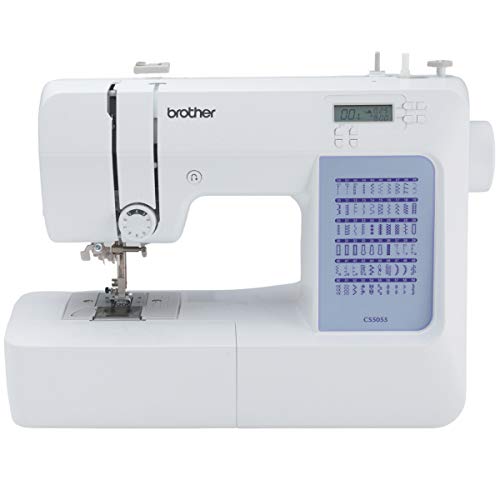
- 60 UNIQUE BUILT-IN STITCHES: The Brother CS5055 sewing machine includes 60 built-in...
- IMPROVED NEEDLE THREADER: Easier than ever to use, the automatic needle threader reliably...
- INCLUDED ACCESSORIES: The CS5055 includes 7 sewing feet, 4 bobbins, a needle set, a...

The CS5055 is a useful starting point when your plans center on ordinary home sewing and you prefer selecting stitches on an LCD rather than with a mechanical dial. Brother lists 60 built-in stitches, seven one-step buttonhole styles, a needle-threading system, and seven accessory feet.
For a beginner, the useful question is which operations those features support. A pillow cover needs controlled seams and suitable seam finishing. A woven garment may also need buttonholes, a zipper, and careful handling around curves. Start with that project list rather than treating every decorative selection as a reason to spend more.
The included feet cover several everyday operations, but this is not the same package as a machine supplied with a wide quilting table. Do not assume the table or quilting accessories from another Brother model are included. Check the exact listing, compatible attachments, and the workspace required for your projects.
Consider the XR9550 if built-in lettering and its wider range of selections matter to you. Look at the PQ1600S if you already know you want dedicated straight-stitch quilting work. Choose the SE2000 if your plans require hoop embroidery rather than decorative sewing stitches.
Reasons to consider it
- LCD-based computerized stitch selection.
- 60 built-in sewing stitches.
- Seven one-step buttonhole styles.
- Needle-threading assistance.
- Seven included feet for several everyday tasks.
Limitations
- It does not provide hoop embroidery.
- Presser-foot pressure is not adjustable.
Our recommendation: Start here if you want a computerized Brother machine for ordinary home projects. Our guide to computerized sewing machines for beginners explains the control style to consider before buying.
2. Brother GX37 — For Beginners Who Prefer Dial Controls
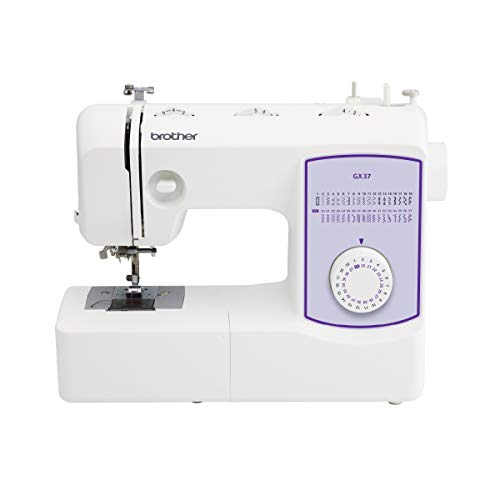
- 37 unique built-in stitches: The GX37 features 37 unique, built-in stitches and an...
- Automatic needle threader and drop-in top bobbin: This sewing machine includes an...
- Included accessories: The GX37 includes 6 sewing feet, needle set, bobbins, manual and...
The GX37 deserves consideration when you want a straightforward machine for learning seams, basic alterations, and repairs. Brother lists 37 built-in stitches, dial-based stitch selection, a one-step buttonhole, a needle-threading system, and six included sewing feet.
A dial interface can appeal to someone who wants to see and select settings directly. That is a preference rather than proof that the machine is easier for every beginner. Correct threading, suitable needles, and practice with your own fabric remain essential whichever control style you choose.
The free arm is relevant when working on suitable cuffs and sleeves, while the included feet support several common sewing operations. Before buying additional attachments, check the exact model’s compatibility. Do not assume accessories advertised for a different Brother machine will fit or work in the same way.
Compare the GX37 with the CS5055 by thinking about your daily routine. Would you rather use a dial or computerized stitch selection? Will your next projects need more than the essential seam and finishing operations? Compare the whole package and current offers instead of assuming that a higher stitch total automatically improves your results.
Reasons to consider it
- Dial-based stitch selection.
- 37 built-in sewing stitches.
- One-step buttonhole for suitable garment projects.
- Needle-threading assistance.
- Six included feet support common tasks.
Limitations
- No computerized stitch-selection interface.
- No hoop embroidery capability.
Our recommendation: Choose it for a deliberately simple sewing setup. If an early project goes wrong, check the threading, material, and needle size appropriate to your Brother machine and fabric before deciding that you need another machine.
3. Brother XR9550 — For More Stitch Choices and Built-In Lettering
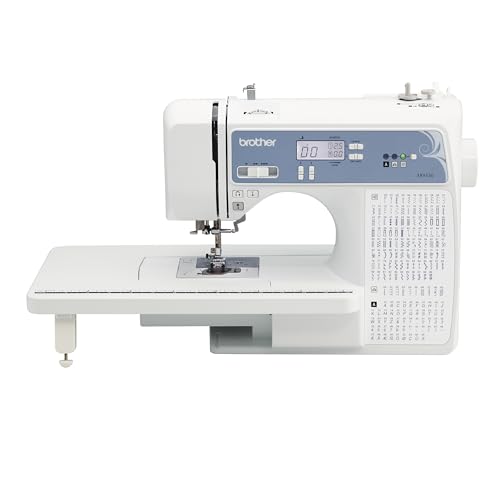
- 165 unique built-in stitches: The Brother XR9550 computerized machine includes...
- Automatic needle threader and drop-in top bobbin: The Brother fast needle threading system...
- Included accessories: Included with the XR9550 quilting and sewing machine is a protective...
The XR9550 belongs on your shortlist if decorative stitches and built-in lettering are part of your actual project plans. Brother describes 165 built-in stitch selections, including 55 alphanumeric selections, together with eight one-step buttonhole styles, an LCD display, a wide table, and eight accessory feet.
Read that total carefully: it includes the alphanumeric selections. It is not 165 utility stitches with another 55 letters added on top. More importantly, built-in sewing letters are different from importing an embroidery design and stitching it automatically inside a hoop. Buyers shopping for embroidered logos or larger personalized designs should make that distinction before choosing.
For a home sewist who wants decorative borders, lettering, and ordinary construction seams, the XR9550 provides a different reason to buy than the CS5055. Compare the exact functions and included feet you will use. A large menu is valuable only when it supports projects you intend to finish.
Reasons to consider it
- Broad built-in stitch selection.
- Alphanumeric sewing options.
- Eight one-step buttonhole styles.
- LCD-based stitch selection.
- Wide table included in Brother’s described package.
Limitations
- Built-in lettering is not hoop embroidery.
- Extra selections add little value if you mainly sew basic seams.
Our recommendation: Choose the XR9550 when its lettering and decorative options answer a real need. For ordinary computerized sewing, compare it closely with the CS5055 rather than treating the higher stitch count as an automatic upgrade.
4. Brother PQ1600S — For Dedicated Straight-Stitch Sewing and Quilting

- Feed Dog Adjustments: With visible 4 color-coded levels of feed dog adjustment and presser...
- Lightning-Fast Sewing Speeds: The PQ1600S is a high-speed straight stitching machine...
- Push-button Thread Cutter: The PQ1600S has a push-button thread cutter that will cut the...
The PQ1600S is the specialist in this comparison. Brother lists straight-stitch operation, a maximum speed of 1,500 stitches per minute, a push-button thread cutter, a knee lifter, adjustable presser-foot pressure, and an extension table.
Its appeal is workflow: a quilter or experienced sewist can prioritize straight-seam work instead of paying for a large decorative-stitch menu. The knee lifter and cutter may be particularly relevant when you repeatedly position fabric and finish seams. Maximum speed is a ceiling, however, not a pace you must use or a measurement of the quality of a finished project.
The trade-off is substantial. This is not the machine to buy as your only all-purpose option if you need zigzag stitches or automatic buttonholes. A straight-stitch specialist can be a useful second machine, while a general-purpose model handles operations outside its role. Its features also do not establish that it is appropriate for every leather, upholstery, or commercial production task.
Reasons to consider it
- Focused straight-stitch workflow.
- Published maximum speed of 1,500 stitches per minute.
- Push-button thread cutter.
- Knee lifter for presser-foot operation.
- Adjustable presser-foot pressure.
Limitations
- No zigzag stitching.
- No automatic buttonhole function.
Our recommendation: Consider it after you know that straight-stitch work dominates your projects. For mixed garment construction on one machine, the CS5055, GX37, or XR9550 is a more appropriate category to investigate.
5. Brother SE2000 — For Sewing Plus Hoop Embroidery

- ARTSPIRA MOBILE APP: Access 50 free embroidery designs, make custom embroidery patterns by...
- WIRELESS LAN ENABLED: Transmit embroidery files from your PC to your sewing and embroidery...
- SEWING and EMBROIDERY IN ONE: With a host of over 190 built-in and 50 downloadable...
The SE2000 answers a different question: what if you want to sew an item and then personalize it with machine embroidery? Brother lists 241 built-in sewing stitches, 193 built-in embroidery designs, a maximum 5 × 7-inch embroidery field, a color display, and wireless design-transfer capability with compatible software.
The embroidery field matters more than a large design count. Before buying, compare the dimensions of the designs you want to stitch with the available field. A larger overall design may require a different workflow, splitting, or another machine; do not assume it will fit because the machine supports embroidery.
Also allow for learning beyond ordinary sewing. Embroidery requires suitable stabilizer, hooping, thread, and design preparation. A combination machine shares its time between sewing and embroidery rather than performing both operations simultaneously. If you only want to alter pants and make pillow covers, those extra capabilities may add unnecessary cost and complexity.
Reasons to consider it
- Combines sewing and hoop embroidery.
- 5 × 7-inch maximum embroidery field.
- Built-in sewing stitches and embroidery designs.
- Color display for supported editing functions.
- Wireless transfer with compatible software.
Limitations
- Embroidery adds preparation and a separate learning process.
- Single-hooping design size is constrained by the embroidery field.
Our recommendation: Choose it when embroidery is already on your project list. If sewing is your main priority, our computerized versus mechanical sewing machine comparison can help you decide whether a simpler category would meet your needs.
How to Choose the Best Brother Sewing Machine for Your Projects
Start with the Jobs You Expect to Repeat
Write down three realistic projects, including the materials and operations involved. “Sewing clothes” is broad. Hemming woven pants, constructing stretchy leggings, and adding embroidery to a sweatshirt create different requirements. Identify whether you need ordinary seams, stretch stitches, buttonholes, free-motion work, or hoop embroidery before comparing model names.
Buy for the work you will repeat, with some room to grow. A feature you might use once is a weaker purchasing reason than a control or accessory you will use every weekend. This also helps you recognize when one machine cannot sensibly cover your entire plan.
Mechanical vs. Computerized: Choose a Control Style
A mechanical interface can appeal to someone who wants visible dial settings and a straightforward routine. A computerized interface can make sense for someone who values its particular selection controls and available functions. Neither label guarantees easier learning, stronger construction, or better results on your chosen fabric.
Look at the operations themselves: selecting a stitch, changing length and width, threading, managing speed, and returning to the setup you commonly use. If possible, compare a demonstration with the manual in hand. Familiarity with those actions matters more than the size of the feature list.
Match the Fabric, Needle, Thread, and Foot
A machine recommendation does not replace correct setup. A needle suitable for a lightweight woven fabric may be inappropriate for a stretch knit or a thick seam. Use a needle system and size permitted by the machine manual, match the needle type to the material, and test with the actual layers you intend to sew.
A walking foot may help manage certain layered projects, but it is not a universal cure for feeding problems or a conversion to industrial compound feed. Check compatibility before buying an attachment. Our Brother walking-foot guide is relevant when comparing accessory options.
Think About Workspace, Not Just a Wide Table
Measure the space where the machine will stay, including room behind and beside it for fabric. Supporting a project reduces the temptation to pull it through the needle area. A detachable extension table helps with support, but the clearance to the right of the needle still matters when moving a bulky quilt.
Consider storage and setup time too. If using the machine means clearing a dining table, unpacking accessories, and rearranging a room, a complicated setup may discourage practice. Choose an arrangement you can use consistently rather than planning around an ideal sewing room you do not yet have.
Check the Complete US Purchase, Not Only the Machine Name
Confirm the exact model number and the electrical rating on the unit you are ordering. A similarly named overseas version or a different bundle may not match a US listing. Check whether the item is new, refurbished, or used, and read the seller’s return conditions.
Count essential accessories already included, then add the cost of the materials and tools you still need. Keep the receipt and review the applicable warranty terms; a limited warranty does not mean every part and service charge is covered for the same period. Avoid choosing between two offers on headline price alone.
Your First Project: A Setup Routine That Prevents Buyer’s Remorse
Before judging your new machine, give it a fair first project. Start with a manageable woven fabric and a simple seam rather than a bulky alteration or an unfamiliar stretch material. Use the manual for the exact model, because threading and control sequences can differ.
- Identify the machine and accessories. Compare the box contents with the supplied instructions, and keep unfamiliar feet labeled.
- Prepare safely. Switch off the machine before changing the needle or doing tasks for which the manual requires power to be off.
- Thread in the prescribed sequence. Seat the spool, upper thread, and correct bobbin as instructed. A missed guide can undermine an otherwise suitable setup.
- Test on matching scraps. Use the same fabric layers, thread, and planned stitch as the project. Examine both sides of the seam.
- Change one variable at a time. Record the adjustment and its effect instead of changing tension, needle, and stitch settings together.
- Move to the real project gradually. Practice the exact operation, such as a buttonhole or hem, before sewing the finished piece.
If the stitching looks unbalanced, do not assume a higher number on the tension dial means better stitching. Check threading and the needle first, then follow your model’s instructions. See our Brother sewing machine tension adjustment guide for related background, while keeping your machine manual as the model-specific reference.
For anyone wondering how to thread a Brother sewing machine, the important habit is following the complete path and checking that the thread is seated correctly. The precise path and needle-threader procedure depend on the model. A threading guide for another Brother machine should not replace the instructions supplied with yours.
Which Models Should You Compare Most Closely?
CS5055 vs. GX37
Compare these when the main decision is a more feature-rich computerized setup versus simpler dial-based sewing. Consider controls and included equipment, then compare the current total purchase cost. Do not pay for decorative options simply because the list is longer.
CS5055 vs. XR9550
Compare these when both general sewing and quilting interest you. The XR9550’s built-in alphanumeric selections are a concrete reason to investigate it; the CS5055 remains a sensible starting point if lettering is not a priority. Compare the exact accessories needed for your own projects.
PQ1600S vs. a General-Purpose Model
This is a specialist-versus-versatility decision. Choose a straight-stitch workflow only when you can accommodate its missing operations. If you need buttonholes and zigzag on the same machine, keep those requirements at the top of your list.
SE2000 vs. a Sewing-Only Model
The deciding factor is whether you need hoop embroidery. Buying a combination machine does not eliminate embroidery preparation, and buying a computerized sewing machine does not automatically give you embroidery-file support. Choose the category first, then the model.
Frequently Asked Questions
What Is the Best Brother Sewing Machine for a Beginner?
For a beginner interested in everyday computerized sewing, the CS5055 is our research-based starting recommendation. The GX37 deserves consideration if dial controls and a simpler feature set better suit your learning style. Choose by the projects and controls you need, not by assuming every beginner needs the same machine.
Can a Brother Sewing Machine Do Embroidery?
Some Brother machines can, but the capability is model-specific. Of the five compared here, the SE2000 provides hoop embroidery. Decorative sewing stitches and the XR9550’s built-in lettering are not substitutes for a machine that stitches compatible embroidery designs inside a hoop.
Is a Brother Machine With More Stitches Always Better?
No. Count the functions your projects require first. A useful straight stitch, suitable seam-finishing options, and a buttonhole can matter more than dozens of decorative selections. The PQ1600S illustrates why the total can mislead: its focused straight-stitch role is fundamentally different from that of a general-purpose machine.
Which Brother Sewing Machine Should I Choose for Quilting?
Consider the XR9550 when you want to explore quilting alongside general sewing, and verify the feet and accessories needed for your technique. Consider the PQ1600S when straight-stitch quilting work is an established priority and you understand the operations it does not provide. Project bulk, workspace, fabric support, and your preferred technique also affect the decision.
Can These Brother Machines Sew Leather or Multiple Layers of Denim?
Do not treat a brand name, metal frame, or high maximum speed as proof of heavy-material capacity. Material thickness, seam intersections, needle suitability, feed behavior, and the machine’s specified limits all matter. Check the exact model manual and seek a demonstration with comparable material before buying for demanding leather or repeated heavy-layer work.
Final Verdict: Buy for Your Projects, Not the Longest Feature List
For a mixed home-sewing setup, start your comparison with the Brother CS5055. Choose the GX37 for a simpler dial-based approach, or investigate the XR9550 when built-in lettering and additional stitch selections will earn their place in your projects.
The PQ1600S is the specialist to consider for dedicated straight-stitch work. The SE2000 is the relevant choice here when hoop embroidery is part of the plan. These are different tools for different jobs, so the most useful upgrade is the one that removes a limitation you actually encounter.
Before ordering, return to your three-project list. Check that the chosen model can perform the required operations, confirm the exact package and seller terms, and use the comparison table to view the current Amazon offer. That is a more dependable way to choose the best Brother sewing machine for your home than buying by stitch count alone.


