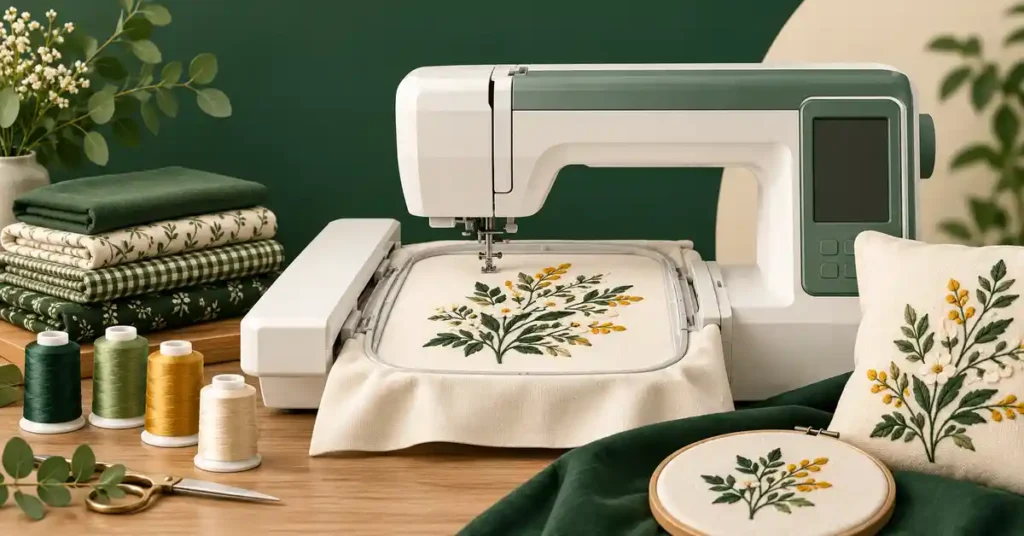
A sewing and embroidery machine combo for beginners should make two different processes understandable without creating an expensive first-project mismatch. Ordinary seams, hoop preparation, file transfer, and design placement each need learning. This guide compares small and larger-field combinations, explains which functions a beginner should test independently, and uses garment preparation examples to help you choose a complete starter setup that fits the designs, available space, and instruction you need.
As an Amazon Associate, Practical Textile earns from qualifying purchases. Product links may earn us a commission.
Quick Answer
Compare Brother SE700 when small four-by-four designs meet the plan, SE2000 when five-by-seven embroidery is necessary, and Janome MC9850 for a different combination setup. Choose the field around actual files and include instruction. A combo does not digitize every picture automatically or sew a separate project while embroidering.
This guide compares published specifications and project fit; it does not report hands-on testing.
Brother SE700

Confirm that the first intended designs fit.
Brother SE2000

Compare the complete package rather than field size alone.
Janome Memory Craft 9850
Test both interfaces and exact file requirements.
Begin With Two Separate Checklists
| Mode | Beginner test | Common misunderstanding |
|---|---|---|
| Ordinary sewing | Threading, seam, reverse, and buttonhole | Embroidery features guarantee every garment function |
| Embroidery | Load file, prepare hoop, position, trace, and stitch | A picture file is already a stitch file |
| Changeover | Return to the other mode correctly | Both processes can run simultaneously |
Brother SE700: Keep the First Design Modest


The SE700 combines sewing with a four-by-four embroidery field. It can be a useful starting category when small motifs are genuinely what you want to make. Check the complete dimensions of the design, not only the central image in a preview.
A larger hoop does not automatically expand this uninterrupted field. If the planned logo is already too large, compare a larger-field model before purchase rather than assuming a software setting will remove the limit. Learning a planned split-design workflow is different from a simple first embroidery project.
Brother SE2000: More Field, Not Automatic Preparation

The SE2000 provides a five-by-seven combination role. That can avoid an immediate field-size mismatch when the real designs require it. The extra area does not select support, clear the back of a garment, or verify the imported file for you.
Ask to complete an ordinary sewing sample and a small embroidery sample, then change back. Include the correct accessories and manual sequence. A buyer should understand which feet, unit, needle setup, and controls belong to each operation.
Janome MC9850: Compare the Complete Learning Package
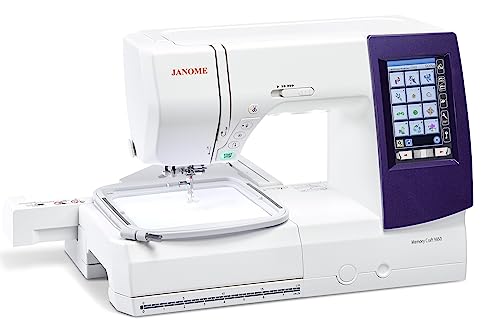
The MC9850 is another sewing-and-embroidery combination to compare by exact package and interface. Check compatible files, hoops, accessories, and instruction instead of applying another brand’s transfer procedure or bobbin directions.
If you already have a suitable sewing machine, also price dedicated embroidery. Separate units can let sewing continue while a design stitches. A combo may save a footprint, but its two activities remain scheduled on one machine.
Five Starter Benefits and Two Compromises
- Two capabilities can share one household station.
- A defined field makes project planning concrete.
- Ordinary sewing supports assembly and finishing.
- Compatible design import extends the project options.
- Structured instruction can establish repeatable setup habits.
The compromises are mode changeover and shared availability. If embroidery occupies the machine, ordinary sewing waits. If the interface feels overwhelming, a simpler first project and model-specific instruction can matter more than another feature.
Read our SE700 guide, SE2000 guide, and Janome combo comparison. The combo category guide and home embroidery guide help compare the arrangements.
Project Preparation and a Repeatable Sewing Setup
Garment embroidery adds placement and support decisions to ordinary sewing. These first-project checks help a beginner evaluate both modes of the combo without assuming that successful seam formation establishes an equally successful embroidered finished item.
Measure the design and the placement separately
Measure the stitched motif, including lettering, borders, and any required clearance. The garment’s overall size does not determine the embroidery field you need. A large sweatshirt can carry a tiny chest motif, while a small panel can contain a design larger than the machine’s supported single field.
Mark the garment location while considering how it hangs and is worn. Check seams, plackets, pockets, zippers, and neckline shape. A center found by folding the garment flat may not give the intended visual placement when it is worn. Use reference marks and, where useful, a paper design outline to compare the proposed position.
Decide what must remain accessible behind the target area. A pocket bag or lining may need to stay free, and a narrow sleeve can limit hoop access. A flat panel embroidered before assembly is a different loading problem from a finished garment. Confirm the actual configuration before committing to the design.
Match backing and topping to their jobs
Backing supports the embroidery from below, while a topping above a textured surface can serve a different role. Choose those functions separately. A suitable topping does not automatically replace the continuing support needed by a design on a stretchy fabric. Read the specific product instructions and include removal in your sample.
Cut-away backing is often a starting category when lasting support is needed, particularly on appropriate knit projects. Tear-away can suit other fabric-and-design combinations. These categories are not universal rules. Fabric stretch, design density, care, placement, comfort, and the exact product all affect the decision.
Check whether the garment permits adhesives, fusing, water removal, or other required processes before using them. A convenient backing application on one fabric can mark or distort another. Test a hidden or matching material where possible, and do not assume every garment can be treated with heat merely because the backing is fusible.
Hoop the garment without distorting it
Follow the hoop and machine instructions and keep the garment’s grain and reference marks aligned. Support the intended area firmly enough for the technique without stretching the fabric out of its normal shape. A knit held unusually taut may look smooth while stitching and reveal distortion after release.
Check that the hoop attachment is correct and that its full planned travel is clear. Keep sleeves, side seams, the opposite garment face, cords, and other material out of the stitch path. Use the documented position or tracing checks where available. A design that appears centered on the screen still needs physical clearance around the actual hoop.
Some garments use a documented floating or adhesive-supported method rather than conventional fabric hooping. Understand and sample the full procedure instead of interpreting floating as permission to leave the work loosely attached. The support must remain suitable throughout stitching and finishing.
Embroider a shirt with a clear fabric diagnosis
First identify whether the shirt is a stable woven garment or a stretchy knit. A woven button-up shirt and a jersey T-shirt are not the same support problem. Inspect the target area for a pocket, placket, interfacing, seams, and any delicate surface finish that changes the available placement or hooping method.
For a stretchy shirt, plan a support system that prevents unwanted movement and remains suitable during wear and care. Make a sample of the actual or closely matched material with the intended design. A sample on stiff craft fabric does not establish how the design will behave on a soft knit shirt.
For a woven shirt, check the design’s interaction with the fabric weight and placement. A dense emblem on a very light panel can change how it hangs. Use the sample to inspect puckering, feel, and visibility of the backing rather than judging only whether the machine completed the design.
Keep the shirt’s back and pocket layers clear unless they are intentionally included. Pause and recheck access as required by the machine’s instructions. The goal is a complete embroidered garment, not merely an attractive design that accidentally closes another part of the shirt.
Run the sample through the full finishing process
Use the actual prepared design, relevant material stack, and intended support. Record needle, thread, backing, topping, and hooping method. Watch the complete stitch-out as the instructions require. A sample stopped before a dense border or final color change does not prove the whole design.
Remove excess support carefully using the appropriate method. Inspect the back for loose loops, scratchy or bulky areas, and accidental catches. Let the fabric relax before assessing distortion. If cleaning is part of the intended care, evaluate a properly cleaned sample too rather than assuming the fresh hoop result is the permanent appearance.
Change one factor at a time if the sample fails. Design preparation, support, needle condition, threading, hooping, and handling can all contribute. Adding more backing to every unsuccessful stitch-out may create stiffness while leaving an unrelated cause unresolved.
Keep design rights and repeat orders organized
Keep the design source, license, original file, and prepared machine file together. Personal use and selling embroidered items may involve different permissions. A purchased download does not automatically grant every commercial use. Confirm the actual terms before promising branded or personalized items to customers.
For repeat garments, record placement references that can be reproduced without assuming every size has identical proportions. A useful worksheet includes the design version, garment, measured location, materials, and finishing method. Check the next batch against an approved complete sample rather than an unlabelled photograph alone.
Keep a placement reference with the approved sample
Record the design’s stitched dimensions and the garment reference points used for placement. Photograph the completed item with useful context, not only a close-up of the motif. A chest design can appear differently on another size or neckline, so a fixed distance copied without checking the garment is not always the right repeat method.
Add the backing, topping, needle, thread, and support-removal information to that record. If a second garment has a different fabric or surface, identify it as a material change and sample accordingly. A familiar brand name on the shirt does not guarantee that every style has the same structure.
Before repeating the design, check that the opposite garment layers remain clear throughout the actual hoop travel. Placement marks and screen centering do not resolve physical access. A finished sleeve, pocket, or bag can make the same motif impractical even when the measured design fits the machine’s stated field.
These notes help separate a placement issue from a stitching issue. If the design is tidy but visually misplaced, changing tension or adding stabilizer is not the relevant correction. Solve the actual part of the workflow that produced the unwanted result.
Make software compatibility a specific check
List your own computer’s operating system and the design-transfer method you intend to use. Confirm support through the current manufacturer documentation before treating wireless transfer as a solved problem. Design transfer, file conversion, embroidery editing, and digitizing are different functions. The software that sends a ready-made file may not create a new embroidery design from artwork.
Save the original purchased design, its instructions, and the machine-compatible file in an organized folder. Check the license if you plan to sell finished embroidered products. Buying a design file does not automatically grant every commercial use. Resolve those questions before promising personalized items to customers or investing in a large set of designs.
Frequently Asked Questions
Is a combo too difficult for a beginner?
It depends on instruction, interface, and the first projects. Learn ordinary setup and embroidery preparation as separate processes. A modest successful sample is more useful than attempting a complex garment immediately.
Does the machine convert any picture?
No blanket conversion claim is justified. An embroidery stitch file contains instructions different from an ordinary image. Confirm the included software’s actual digitizing and editing capabilities.
Can the machine sew while it embroiders?
Not on another project at the same time. Both operations share the unit. Separate sewing and embroidery equipment creates a different workflow when overlapping tasks matter.
Which field should a beginner choose?
Choose around actual design dimensions and expected projects. Starting small is sensible only when the intended work fits; a known larger design requirement should be addressed before buying.
What should instruction include?
Threading, bobbin handling, ordinary stitches, mode changes, file transfer, hoop selection, placement, tracing, and a complete sample. Confirm that the lesson applies to the exact model.
Final Recommendation
Choose SE700 for a suitable small-field plan, SE2000 for a genuine five-by-seven need, or MC9850 when its complete arrangement suits you better. Buy a learnable workflow with clear instruction, and test both modes before committing to a complex project.