
Sewing and Embroidery Machines: Choose the Field and Workflow
Choose a sewing and embroidery machine when you need both ordinary construction and imported-design embroidery in one machine body. Confirm the field size first, then compare mode changes, controls and file transfer. A computerized sewing-only machine does not provide the same capability. The discussion below separates documented capabilities from practical selection considerations for your work. Its purpose is to support an informed comparison of suitable equipment, not promise universal results.

This guide has Amazon links. If you buy through them we may earn a small commission, at no extra cost to you.
Choose a sewing and embroidery machine when you need both ordinary construction and imported-design embroidery in one machine body. Confirm the field size first, then compare mode changes, controls and file transfer. A computerized sewing-only machine does not provide the same capability. The discussion below separates documented capabilities from practical selection considerations for your work. Its purpose is to support an informed comparison of suitable equipment, not promise universal results.
What’s in this article12 sections
How this guide helps you choose
A combination-machine decision guide for users balancing space, garment construction and motif size.
Options organized by use
| Option | Reason to compare | Practical selection note |
|---|---|---|
| Brother SE700 | Compact-field combination | Consider when small motifs fit your project list and sewing is also required. |
| Brother SE2000 | Larger home-field combination | Compare when the planned design dimensions justify a 5 × 7 field. |
| Brother SE2100Di | Disney-package combination | Evaluate the design-download terms and exact package separately from the related SE2000 platform. |
| Baby Lock Bloom | Dealer-supported combination | Use a dealer demonstration for mode changes, field limits, computer transfer and service arrangements. |
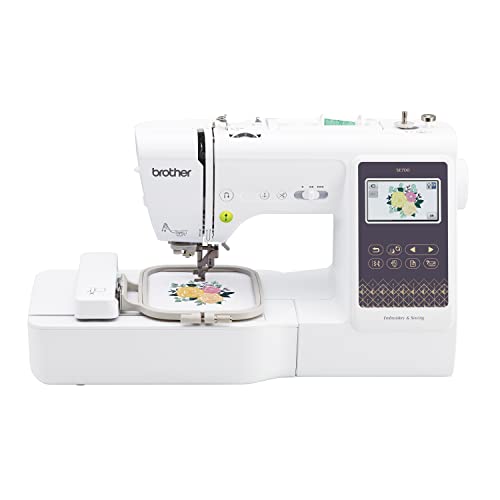


Amazon boxes cover only the specifically verified listings above. Manufacturer and dealer options without a verified ASIN are discussed separately. Bundle contents, condition and availability need checking in the current offer.
Verify that the machine actually performs both functions
A large sewing-stitch total, electronic screen or monogramming foot is not proof of computerized hoop embroidery. Look for the actual embroidery unit, maximum field, and supported design-file process. Then confirm the ordinary sewing operations your patterns require.
This category serves a different need from an embroidery-only machine and from a computerized sewing-only model. A buyer searching for an embroidery sewing machine should identify which of those meanings matches the project. The machine should construct the seam and stitch the design you need, not merely appear in a broad retailer category.
Compare the relevant equipment categories using the embroidery machine buying guide.
Field size is a permanent part of the decision
Check the stitch dimensions of several real files. Names, borders and logos can exceed a small field even when the garment itself is small. A larger physical frame or an attractive software thumbnail does not guarantee a larger continuous embroidery area.
Design splitting and repositioning are separate workflows requiring planning and alignment. If your key project needs a larger field, consider that before accepting a lower-priced small-field machine. It is better to buy for a known design than to discover immediately that the primary motif cannot be stitched as planned.
Plan design files and project sizes with the embroidery designs and file guide.
One machine saves a body but changes the schedule
The sewing and embroidery modes are used in sequence. You cannot sew a different seam on the same machine while its embroidery unit is stitching. Include setup, removal and storage of the unit when evaluating convenience.
For a hobbyist finishing one item at a time, the mode change may be easy to accommodate. For a small business preparing several items, separate sewing and embroidery machines can keep two stages moving. The right choice depends on available space, your existing equipment, and the way you work through a project.
Connect construction and decoration steps using the sewing and embroidery project guide.
Computer transfer is not the same as digitizing
Wireless and USB routes deliver files. They do not automatically turn every image into a suitable embroidery design. Confirm current software support, file formats, field dimensions and any account or subscription requirements.
Your specific Windows computer has not been tested in this research. Before relying on a transfer program, check the manufacturer’s current system requirements. Keep originals and working copies organized, and stitch a sample of the final file. A successful transfer is only one step in a satisfactory design result.
Ask for a complete mixed-project demonstration
Request an ordinary sewing sample, a full embroidery motif, and the mode change between them. Try the important sewing operation yourself. In embroidery mode, check file delivery, placement and clearance around the table.
Measure room for the hoop’s movement and storage for the unused unit. Compare the complete package and service arrangements with a dedicated embroidery machine plus the sewing machine you already own. The answer should come from the full project, not from adding unrelated feature counts into a single score.
Five advantages and two limitations
Advantages
- One machine body can serve construction and decoration.
- Combination operation can suit limited storage.
- Field-based selection aligns the purchase with real motifs.
- Current transfer options can simplify file delivery.
- A mixed-mode demonstration reveals the actual workflow.
Limitations
- Sewing stops while that machine runs embroidery.
- Small fields and mode changes can remain substantial limits.
Check the exact listing and documentation
Brother SE700: Check Brother SE700 listing
Brother SE2000: Check Brother SE2000 listing
Brother SE2100Di: Check Brother SE2100Di listing
Baby Lock Bloom: Manufacturer information for Baby Lock Bloom
Frequently asked questions
Is computerized sewing the same as a sewing and embroidery machine?
No. A true combination machine has an embroidery unit, a defined field and supported design-file capability.
Can both modes run at the same time?
No. One machine performs sewing and embroidery in separate working arrangements.
Will a larger hoop increase the programmed field?
Do not assume that. Physical frame size and maximum embroidery dimensions are different.
Does wireless transfer replace digitizing?
No. Suitable stitch data must be prepared before transfer.
When is a dedicated embroidery machine better?
When ordinary sewing is already covered or you want to prepare other sewing while embroidery runs, provided space and budget permit it.
Related Practical Textile guides
- Brother sewing and embroidery comparison
- machine parts, needles and accessories
- embroidery machine category
Explore sewing, embroidery, dyeing, printing and other fabric topics at Practical Textile.
Sources and research method
Manufacturer pages, product documentation and exact listing identities were checked on 2026-10-13. Feature-based recommendations are editorial judgments; they are not measured performance results. Availability, software requirements, packages and lifecycle can change.
