
Choosing the best Janome sewing machine starts with the work you want to finish, not the largest stitch count in the range. A mechanical learner, a computerized garment sewer, and someone combining sewing with embroidery need different features. This guide compares useful Janome categories, explains the role of feet and fabric handling, and provides a practical shopping process for selecting a complete setup that matches your projects and available support.
As an Amazon Associate, Practical Textile earns from qualifying purchases. Product links may earn us a commission.
Quick Answer
Compare a mechanical Janome for direct utility sewing, the 4120QDC category for computerized household controls, and the MC9850 when genuine sewing-and-embroidery capability is required. Confirm the exact revision and package. The MC9850 box identifies that specific model; the other Amazon cards are separately named cross-brand comparisons, not Janome listings.
This guide compares published specifications and project fit; it does not report hands-on testing.
Janome Memory Craft 9850
Compare when both ordinary sewing and automatic hoop embroidery are needed.
Brother GX37
Use as a control and complete-cost comparison rather than a Janome substitute listing.
Juki HZL-F300
No verified Amazon offer is linked for this model; read the buying checks below.
Check optional accessories when comparing the complete station.
Which Janome Category Fits Your Sewing?
| Requirement | Category to compare | Check before purchase |
|---|---|---|
| Basic repairs and direct dials | Mechanical household model | Buttonhole sequence, controls, and sample handling |
| Garments and piecing with electronic conveniences | Computerized sewing, including 4120QDC | Exact revision, controls, and accessories |
| Ordinary seams plus imported embroidery | MC9850 combination | Hoops, mode changes, files, and work support |
Mechanical Janome: Buy Simplicity for a Reason
A mechanical Janome can make sense when your regular work is utility sewing and you prefer selecting stitches directly. Ask to demonstrate the actual model rather than an adjacent machine with more features. The seller should show its buttonhole process, reverse operation, bobbin loading, and stitch adjustments. A familiar brand name does not establish identical controls across the mechanical range.
Bring a woven repair sample and a realistic folded seam. Evaluate starting slowly and stopping where intended. If the machine handles those tasks comfortably, decorative extras may offer little practical benefit. If it does not, identify whether the issue is preparation, foot choice, or a control you would prefer on another model.
For a separate benchmark, compare the GX37 and Singer 4423. Neither is a Janome offer; they help establish what useful direct-control sewing looks like at the complete cost you are considering.
Computerized Janome: Compare the Controls You Will Use
A model such as the 4120QDC belongs in a different shortlist from a basic mechanical machine. Identify the current variant and ask which electronic conveniences, table, and feet are included. Do not transfer a feature or bundle from an older review, another country’s offer, or a nearby model number.
The useful demonstration is a sequence of ordinary tasks: choose a straight stitch, adjust length, stop at a corner, change to a buttonhole, and return to the original setup. This shows whether the interface saves effort in your actual sewing. A machine with many selections can still be awkward if the controls you need repeatedly are difficult to find.
Compare the operating styles before paying for a feature list. The F300 card is another computerized reference; its optional table and knee lifter must be included in any fair station-cost comparison.
Janome MC9850: Choose a Combo Only When Both Modes Matter
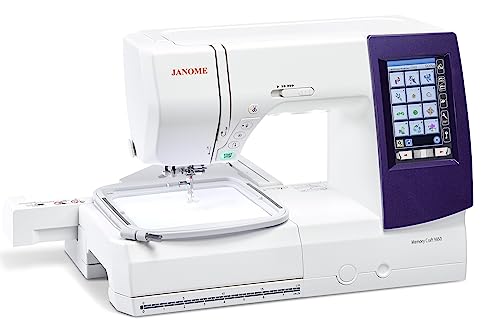
The MC9850 combines sewing and embroidery. It should not be confused with an embroidery-only Janome such as the 550E. If you want to sew garment seams and import a design for hoop embroidery on one machine, this is a relevant category. If you already own a suitable sewing machine, a separate embroidery model creates another possible workflow.
Its embroidery field and compatible file requirements need to fit the intended designs. Ask the dealer to import one of your files and show the full setup. Embroidery editing is not the same as digitizing arbitrary artwork, and a combo does not perform ordinary sewing while embroidering another item at the same time.
Read our Janome combo guide and dedicated embroidery comparison to decide which arrangement suits your room and sequence of work.
Five Selection Priorities and Two Common Tradeoffs
- Comfortable starts and stops on your actual materials.
- Correct feet for recurring operations.
- Enough work support for the project.
- A clear manual and usable instruction.
- A complete offer with accessories identified.
Two compromises deserve particular attention. First, a combo concentrates both activities in one machine, so embroidery can delay sewing. Second, an accessory-rich package is not automatically the best value if it omits the control or working space you need most.
Project Preparation and a Repeatable Sewing Setup
Use the following foot and needle checks to evaluate the specific Janome configuration demonstrated by the seller. They help connect a model recommendation with the seams, compatible tools, and repeatable setup needed for your own projects.
Check presser foot compatibility before buying
Compatibility can involve the attachment system, shank arrangement, needle position, feed system, stitch width, and the machine model. A generic low-shank description is not a complete promise that a foot suits every household machine. Some machines use proprietary feet or need a specific adapter. Follow the manufacturer or accessory supplier’s model compatibility information.
A foot that attaches physically can still be unsuitable for the intended stitch. Its needle opening may not clear the selected swing or position, or its guiding features may be intended for a different operation. Before sewing, install and test clearance using the machine’s safe procedure with the power isolated as directed. Do not let a pedal press be the first test of an unfamiliar setup.
Keep the part number and instructions with each specialist foot. A mixed box of unmarked accessories becomes difficult to use confidently. If several people share the machine, record the intended use and compatible settings rather than relying on someone else to recognize the foot by shape alone.
Use a zipper foot for the correct zipper application
A conventional zipper foot is narrow or offset so stitching can be placed close to the zipper. The exact side of attachment and needle position depend on the foot and machine. An invisible-zipper foot is a different accessory designed for that zipper construction. One should not be substituted for the other solely because both descriptions contain the word zipper.
Prepare the opening and zipper position before attaching the foot. Temporary basting or suitable removable positioning methods can keep layers aligned. A narrow foot does not prevent a zipper tape from moving if the fabric has been stretched or the seam allowance is inconsistent. Sew a practice opening before working on a finished garment.
Keep the pull and teeth clear of the needle path. Stop and reposition according to the technique instead of forcing the foot past an obstruction. Follow the zipper and machine instructions if shortening a zipper is part of the project. Different zipper constructions need different handling, and sewing directly over unsuitable teeth or stops can damage the needle.
Understand presser foot pressure
Presser foot pressure is the force applied through the foot to help hold the material against the feeding system. Some machines allow adjustment through a dial, screw, or screen; others do not provide an ordinary user adjustment. Do not confuse a visible screw near the needle with an invitation to alter pressure. Identify the correct control in the manual first.
Too much or too little pressure for a particular setup can contribute to handling difficulties, but the same visible symptom can have other causes. A knit that stretches may also be affected by how it is supported or pulled. A layered seam may need a different foot or preparation rather than simply more pressure. Test one change at a time on the actual material stack.
Record the starting setting and return to a suitable baseline after the specialist project. A change made for one fabric can become the hidden cause of trouble on the next. If the model has no user-adjustable pressure, use supported techniques and accessories rather than dismantling the machine to create an adjustment it was not designed to provide.
Make a labeled foot-and-clearance sample
Choose one compatible ordinary foot and one compatible zipper foot for a practice exercise. With the machine isolated as directed, install each through the documented method and check the supported needle position and clearance. Then sew a small appropriate sample, keeping the fabric, needle, and thread identified.
Record which stitch and position the sample used and store it with the foot instructions. If another project requires zigzag, a twin needle, or a different needle position, check clearance again rather than assuming the earlier straight-stitch sample covers the new setup. The point of the record is to preserve context, not to create a universal setting card.
If the accessory cannot be identified confidently, resolve its part number and compatibility before operating it. A mixed-box bargain is not useful when it encourages an unverified foot to be attached and tested first by pressing the pedal. Knowing the part’s name should lead to the correct instructions and intended use.
Read the package as three separate specifications
The needle system identifies the construction required by the machine. The point or needle type describes how it is intended to interact with material and thread. The size describes another part of the selection; it does not replace either of those checks. Two packages can show the same size while containing needles intended for different jobs.
Do not identify compatibility solely by the brand on the machine or the color on a needle. Many household machines use a familiar flat-shank system, but exceptions and specialist systems exist. The correct reference is the model’s manual or an authorized compatibility listing. Industrial needles should not be treated as interchangeable with household needles merely because they look similar in a photograph.
Keep the original package with unused needles. A loose needle may be difficult to identify confidently, especially if its markings are small or worn. Label a storage compartment by system, type, and size rather than mixing everything under a general ‘sewing needles’ heading. This also makes a later project note more useful.
Install the needle as the manual requires
Switch off or isolate the machine as instructed before changing a needle. Remove the old needle carefully and protect the opening so it does not fall into the machine. Check the specified orientation, insert the replacement fully as directed, and secure the clamp using the manufacturer’s procedure. A correct needle installed too low or facing the wrong way is still an incorrect setup.
Check clearance after changing a needle, foot, or needle position using the manual’s recommended handwheel procedure. This is particularly relevant with a zipper foot, twin needle, or narrow opening. Do not assume that a needle that clears the foot at one position will clear it with a different stitch width or swing.
Dispose of damaged needles safely. Do not keep a bent needle in the unused-needle compartment or try to straighten it for another project. A replacement needle is a small part of the project cost compared with damage to fabric or the machine. If a new correctly installed needle strikes a part, stop and seek the appropriate model-specific advice.
Frequently Asked Questions
Which Janome is best for a beginner?
The exact model you can thread, control slowly, and use with clear instruction is the better starting point. Mechanical simplicity can help some learners, while others benefit from electronic pace and needle-position controls. Compare the actual machines rather than deciding by brand alone.
Should I choose a combo or separate machines?
A combo saves a machine footprint, while separate equipment can let sewing continue during embroidery. Compare your existing equipment and project sequence before paying for both functions on one unit.
Does a large table mean more throat space?
No. A table supports fabric outside the machine. The needle-to-tower space remains a separate measurement and matters when bulky work must pass through the machine.
Are Janome accessories universal?
No universal compatibility should be assumed. Confirm the exact model, part number, and operation. A foot that appears to mount is not necessarily safe or suitable for the selected stitch.
What should a dealer demonstrate?
Request threading, bobbin winding, your regular seam, a relevant buttonhole, and the controls influencing the purchase. For a combo, add file transfer and a complete embroidery setup using a compatible design.
Final Recommendation
Choose the Janome category first, then the exact supported package. Buy a mechanical model for useful direct operation, a computerized model for controls that improve repeated work, or MC9850 when both sewing and embroidery justify the combination. Use sample results and complete cost to make the final decision.




