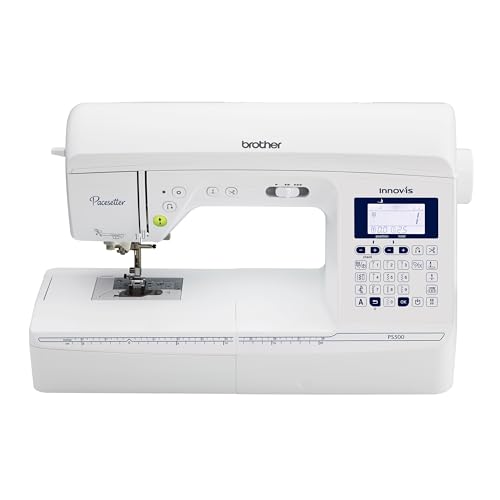
Brother Pacesetter Ps500 Sewing Machine
On this page
The Brother Pacesetter PS500 sewing machine is an exceptional tool for both novice and experienced sewers alike. With its versatile features and user-friendly design, this sewing machine makes tackling a wide range of projects—from quilting to garment making—easy and enjoyable. The PS500 is equipped with modern technology that allows for precise stitching and a professional finish, making it a popular choice among sewing enthusiasts. In this article, we will delve deep into the features, benefits, and tips for using the Brother Pacesetter PS500, ensuring you make the most out of this impressive sewing machine.
Table of Contents
- Key Features of the Brother Pacesetter PS500
- Setting Up Your Brother Pacesetter PS500
- Sewing with the Brother Pacesetter PS500
- Maintenance Tips for Longevity
- Frequently Asked Questions
Key Features of the Brother Pacesetter PS500
The Brother Pacesetter PS500 is packed with features that enhance its usability and performance. Below are some of the standout features:
1. Versatile Stitch Options
This sewing machine comes with a variety of built-in stitches, including utility stitches, decorative stitches, and quilting stitches. This feature allows you to choose the perfect stitch for your project, whether you are sewing clothing or creating decorative pieces.
2. Automatic Needle Threading
The PS500 features an automatic needle threading system, which makes threading the needle a breeze. This is especially beneficial for those who struggle with traditional needle threading methods.
3. LCD Touch Screen Display
The user-friendly LCD touch screen display makes it easy to select stitches, adjust settings, and view tutorials. This modern interface provides a clear view of your selections, enhancing your sewing experience.
4. Drop Feed System
The drop feed system allows for free-motion sewing, which is perfect for quilting and other creative projects. This feature gives you the flexibility to move your fabric freely under the needle.
5. Lightweight and Portable
Weighing in at a manageable size, the Brother Pacesetter PS500 is easy to transport, making it ideal for sewing classes or workshops.
Setting Up Your Brother Pacesetter PS500
Setting up your Brother Pacesetter PS500 is a straightforward process. Follow these steps for a smooth installation:
1. Unboxing and Assembly
Carefully unbox your sewing machine, ensuring that all accessories are included. Assemble the machine according to the user manual instructions, attaching the foot pedal and power cord.
2. Selecting the Right Needle and Thread
Choose the appropriate needle and thread type for your project. The PS500 works well with various thread types, including all-purpose and specialty threads.
3. Threading the Machine
Use the automatic needle threading feature to thread the needle effortlessly. Follow the threading diagram on the machine to ensure correct threading.
4. Adjusting the Tension
Before starting your sewing project, adjust the tension settings according to the fabric you’re using. Proper tension is crucial for achieving even stitches.
Sewing with the Brother Pacesetter PS500
Once your machine is set up, you can start sewing. Here are some tips and techniques to maximize your sewing experience:
1. Choosing the Right Stitch
Utilize the variety of built-in stitches for different sewing applications. For instance, use a zigzag stitch for knits and a straight stitch for woven fabrics.
2. Utilizing the Drop Feed Feature
For quilting or free-motion sewing, activate the drop feed feature. This allows you to maneuver the fabric freely, creating intricate designs.
3. Practicing on Scrap Fabric
Before starting a new project, practice on scrap fabric to familiarize yourself with different stitches and settings. This ensures that you achieve the desired results without wasting your main fabric.
4. Keeping Your Fabric Straight
Use the built-in guides on the sewing bed to maintain straight lines while sewing. This helps in achieving professional-looking seams.
5. Accessorizing Your Sewing
The Brother Pacesetter PS500 is compatible with various sewing feet and attachments. Consider investing in additional presser feet to expand your sewing capabilities, such as walking feet for quilting.
Maintenance Tips for Longevity
1. Regular Cleaning
Dust and lint can accumulate in the machine, affecting performance. Regularly clean the machine using a soft brush and a lint roller. Pay special attention to the feed dogs and bobbin area.
2. Oiling the Machine
Refer to the user manual for oiling instructions. Regular oiling will keep the moving parts lubricated and functioning smoothly.
3. Checking the Needle
Regularly inspect the needle for any signs of wear or damage. A dull or bent needle can cause skipped stitches and fabric damage.
4. Storing Properly
When not in use, cover your sewing machine to protect it from dust. Store it in a dry, cool place to avoid any damage.
5. Servicing
Consider having your Brother Pacesetter PS500 serviced by a professional every 1-2 years. This can help identify any potential issues before they become serious problems.
A: You can sew a variety of projects, including clothing, home decor, quilting, and crafts with the Brother Pacesetter PS500.
A: While the PS500 is primarily a sewing machine, it can be paired with embroidery attachments for added functionality. For more embroidery options, consider checking out our top picks for the best embroidery sewing machine.
A: Common issues like skipped stitches or thread bunching can often be resolved by checking your needle, thread tension, and ensuring the machine is threaded correctly. Consult the user manual for specific troubleshooting advice.
Conclusion
The Brother Pacesetter PS500 sewing machine is an excellent investment for anyone looking to enhance their sewing skills. Its user-friendly features, combined with versatility, make it suitable for a wide range of sewing projects. By following the tips and maintenance advice outlined in this article, you can ensure that your PS500 remains in top condition, providing you with endless opportunities for creativity and expression through sewing. Whether you’re tackling a quilting project or sewing your own garments, the Brother Pacesetter PS500 is a reliable companion in your sewing journey.