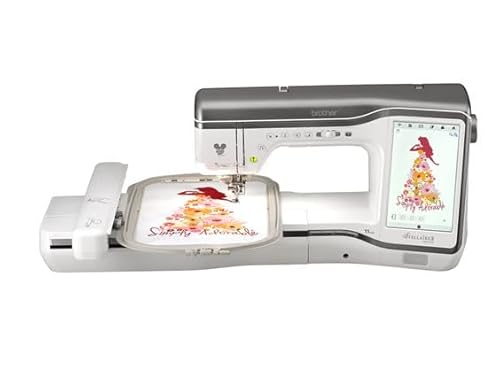
The Brother Stellarie 2 Innov-is XJ2 sewing and embroidery machine has taken the crafting world by storm, offering a remarkable blend of technology and creativity. This advanced machine is designed for both beginners and seasoned enthusiasts, providing a user-friendly interface and a plethora of features that elevate your sewing and embroidery projects. In this article, we will explore the various functionalities, advantages, and tips for maximizing your experience with this impressive machine.
Key Features of the Brother Stellarie 2 Innov-is XJ2
The Brother Stellarie 2 Innov-is XJ2 is packed with innovative features designed to enhance your sewing and embroidery experience. Here are some of the standout features:
- Large Touchscreen Display: The 10.1-inch LCD touchscreen provides an intuitive interface, allowing you to easily navigate through functions and settings.
- Built-in Designs: With 1,000 built-in embroidery designs and 140 sewing stitches, the machine offers a wealth of creative possibilities.
- Wi-Fi Connectivity: You can easily transfer designs from your computer or mobile device to the machine via Wi-Fi, streamlining your creative process.
- Advanced Needle Threading System: This feature simplifies the threading process, making it quick and hassle-free.
- Automatic Fabric Sensor: The machine automatically adjusts the tension based on the fabric type, ensuring optimal stitch quality.
Setting Up Your Brother Stellarie 2 Innov-is XJ2
Setting up the Brother Stellarie 2 Innov-is XJ2 is straightforward. Follow these steps to ensure a smooth start:
- Unpacking: Carefully unpack the machine and all included accessories from the box.
- Placement: Choose a stable, well-lit workspace that allows easy access to power outlets.
- Power Connection: Plug the machine into a power source and switch it on.
- Threading the Machine: Follow the threading instructions in the user manual to thread the needle and bobbin properly.
- Testing: Run a test stitch on scrap fabric to ensure everything is functioning correctly.
Sewing Capabilities
The sewing capabilities of the Brother Stellarie 2 Innov-is XJ2 are extensive, catering to various sewing styles and techniques. Here’s a closer look at what it can do:
Variety of Stitches
The machine features 140 built-in sewing stitches, including utility stitches, decorative stitches, and quilting stitches. This variety allows you to choose the perfect stitch for your project.
Automatic Buttonhole Function
The automatic buttonhole feature lets you create perfectly sized buttonholes with ease. Simply select the buttonhole option, and the machine will do the rest!
Quilting Features
For quilting enthusiasts, the Brother Stellarie 2 Innov-is XJ2 offers specialized quilting stitches and the ability to use a walking foot for even layers. The spacious work area also accommodates larger quilt projects.
Embroidery Features
The embroidery capabilities of the Brother Stellarie 2 Innov-is XJ2 are equally impressive. Here’s what you can expect:
Large Embroidery Area
The machine boasts a generous 10.2” x 6.2” embroidery area, allowing you to work on larger designs without needing to reposition the fabric.
Variety of Designs
With 1,000 built-in embroidery designs, you’ll have plenty of inspiration at your fingertips. Additionally, the machine supports USB and Wi-Fi connectivity for downloading new designs.
Editing Features
The editing functions allow you to resize, rotate, and combine designs directly on the touchscreen. This feature gives you full control over your embroidery projects.
Maintenance Tips
Regular Cleaning
Dust and lint can accumulate in the machine, affecting performance. Regularly clean the bobbin area and feed dogs using a soft brush.
Oil the Machine
Follow the manufacturer’s instructions on oiling your machine. Proper lubrication ensures smooth operation and prolongs the machine’s lifespan.
Software Updates
Check for software updates regularly to ensure your machine has the latest features and improvements. Updates can often be done via Wi-Fi.
Accessories for the Brother Stellarie 2 Innov-is XJ2
Enhancing your sewing and embroidery experience often involves using various accessories. The Brother Stellarie 2 Innov-is XJ2 is compatible with numerous accessories that can expand its capabilities:
| Accessory | Function |
|---|---|
| Walking Foot | Helps in sewing multiple layers of fabric evenly, ideal for quilting. |
| Embroidery Foot | Facilitates free-motion embroidery for intricate designs. |
| Zipper Foot | Allows for precise insertion of zippers in garments. |
| Buttonhole Foot | Automates the buttonhole-making process with accurate sizing. |
FAQs
A: The machine can handle a variety of fabrics, including cotton, denim, silk, and more. Always adjust the settings according to the fabric type for optimal results.
A: Yes, you can use third-party designs as long as they are in a compatible file format. The machine supports various formats for easy integration.
A: Regularly clean the machine after every project, and perform more thorough maintenance, such as oiling and checking for software updates, at least once a month.
A: Yes, the machine typically comes with a limited warranty. Be sure to check the specific terms and conditions from the manufacturer.
In conclusion, the Brother Stellarie 2 Innov-is XJ2 sewing and embroidery machine is an exceptional tool that caters to the diverse needs of crafters. With its advanced features, user-friendly interface, and extensive capabilities, it empowers users to unleash their creativity. Whether you are sewing a simple garment or embarking on an intricate embroidery project, this machine is designed to enhance your crafting experience. Explore the endless possibilities it offers, and enjoy creating beautiful pieces with ease and precision.