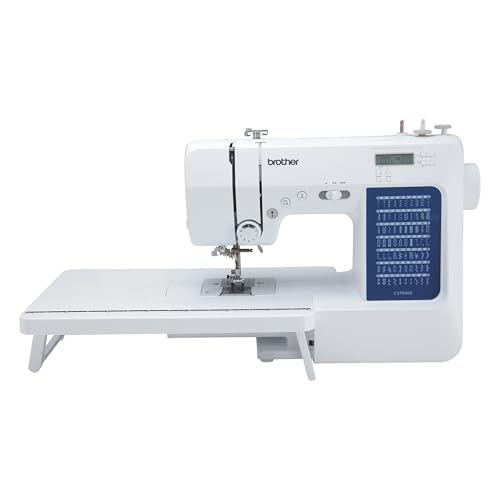
The Brother XR9500PRW sewing machine is a versatile and highly regarded choice for both novice and experienced sewists. Known for its user-friendly features and a wide array of built-in stitches, this machine has become a popular option for those looking to embark on sewing and embroidery projects. Whether you’re crafting simple garments, intricate quilts, or personalized gifts, the XR9500PRW is equipped to handle various sewing tasks with ease. In this article, we will dive deep into the features, benefits, and tips for getting the most out of your Brother XR9500PRW sewing machine.
Features of the Brother XR9500PRW
The XR9500PRW is loaded with features that enhance its usability and versatility:
Built-In Stitches
This machine comes with 100 built-in sewing stitches, including utility, decorative, and quilting stitches. This allows for a range of creative possibilities, from simple hems to complex designs.
Automatic Needle Threading
The automatic needle threading system saves time and frustration by threading the needle with just a push of a button.
Large LCD Display
The large LCD screen makes it easy to select and customize stitches, view settings, and adjust parameters for your projects.
Wide Table
The included wide table provides extra support for larger projects, such as quilts, ensuring stability and ease of handling.
Embroidery Functionality
With built-in embroidery features, the XR9500PRW allows users to add intricate designs to their projects. This includes a variety of embroidery designs and lettering fonts.
Setting Up Your Machine
Setting up the Brother XR9500PRW is straightforward. Here’s a step-by-step guide:
Unboxing and Assembly
When you first unbox your sewing machine, check to ensure all components are included. Typically, you will find:
- Machine body
- Power cord
- Foot pedal
- Wide table
- Accessory feet
- Needles
- Spool caps
- User manual
Connecting Power
Plug the machine into a power outlet and connect the foot pedal. Make sure to place the machine on a stable, flat surface for optimal performance.
Threading the Machine
Follow the instructions in the manual to properly thread the machine. Ensure the thread is correctly placed in the tension discs to avoid sewing issues.
Sewing with the XR9500PRW
Once your machine is set up, you’re ready to start sewing! Here are some tips to maximize your sewing experience:
Choosing the Right Stitch
Depending on your project, select the appropriate stitch. For example:
| Project Type | Recommended Stitch |
|---|---|
| Garments | Zigzag or straight stitch |
| Quilts | Quilting stitch or decorative stitch |
| Home Decor | Decorative stitch |
Adjusting Stitch Length and Width
You can customize your stitches by adjusting their length and width through the LCD screen. This is particularly useful for decorative stitches to achieve the desired look.
Proper Fabric Handling
Always use the right presser foot for your fabric type. For instance, a walking foot is beneficial for quilting to prevent fabric shifting.
Embroidery Features
The Brother XR9500PRW offers an exciting array of embroidery features that can elevate your sewing projects. Here’s how to make the most of its embroidery capabilities:
Built-In Designs and Fonts
With over 100 built-in embroidery designs and multiple fonts, you can easily personalize your projects. Select designs through the LCD display and adjust their size as needed.
Using Embroidery Hoops
Attach the embroidery hoop properly, ensuring the fabric is taut but not overstretched. This will help achieve crisp and clean embroidery results.
Transferring Designs
You can also transfer additional embroidery designs from your computer using compatible software. This expands your creative options significantly.
Maintenance Tips
Cleaning the Machine
Regularly clean the machine to prevent lint buildup, especially in the bobbin area and feed dogs. Use a small brush to remove debris.
Oiling the Machine
Consult the manual for recommended oiling points and frequency. Proper lubrication ensures smooth operation and longevity.
Checking Needle and Thread
Always use the appropriate needle for your fabric type and replace it regularly to avoid sewing issues. Additionally, use high-quality thread to minimize breakage and tension problems.
Frequently Asked Questions
A: The XR9500PRW can handle various fabrics, including cotton, denim, silk, and even lightweight knits. Always choose the right needle and stitch settings based on the fabric type.
A: Yes, you can transfer your own designs to the machine using compatible software and a USB connection.
A: Common issues include thread jams, skipped stitches, and tension problems. Consult the user manual for troubleshooting guidance, or check online resources for solutions.
A: Absolutely! Its user-friendly features make it ideal for beginners, while its advanced capabilities also cater to experienced sewists.
Conclusion
The Brother XR9500PRW sewing machine stands out as a fantastic option for anyone interested in sewing and embroidery. With its extensive features, ease of use, and versatility, it can accommodate a wide range of projects, from simple repairs to elaborate designs. Regular maintenance and a willingness to explore its capabilities will ensure you get the most out of your investment. Whether you’re creating everyday items or unique gifts, the Brother XR9500PRW is a reliable companion on your sewing journey. For those looking to further enhance their skills, consider checking out the Best Embroidery Shops in San Antonio: A Hidden Gem! or explore Try it once, you’ll love this embroidered blouse! to get inspired!