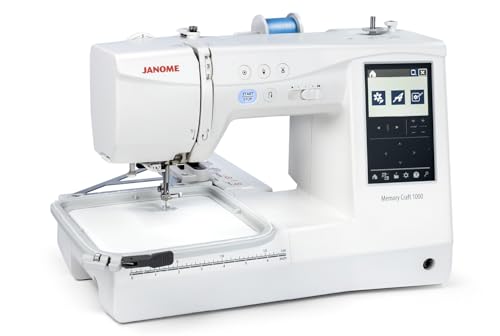
Embroidery Machine Janome 500E
On this page
When it comes to embroidering intricate designs and patterns, having the right machine can make all the difference. The Janome 500E embroidery machine has emerged as a popular choice for both hobbyists and professional embroiderers alike. This versatile machine offers a range of features that cater to various embroidery needs, making it a fantastic investment for anyone looking to elevate their sewing game.
Table of Contents
- Key Features of the Janome 500E
- Setting Up Your Janome 500E
- Maintaining Your Machine
- Creative Project Ideas
- Frequently Asked Questions
Key Features of the Janome 500E
The Janome 500E is packed with features that enhance the user experience and expand creative possibilities. Some of the standout features include:
- Large Embroidery Area: With a spacious 7.9″ x 11″ embroidery field, users can tackle large designs without the need for constant repositioning.
- Built-in Designs: The machine comes with 160 built-in designs and 6 fonts, providing a diverse range of options to choose from.
- USB Port: Users can easily import custom designs via USB, allowing for complete creative freedom.
- LCD Touch Screen: The intuitive interface makes it easy to navigate through designs, settings, and editing features.
- Automatic Needle Threader: This feature saves time and effort, ensuring that you can focus on your projects without the hassle of manual threading.
Setting Up Your Janome 500E
Setting up your Janome 500E is straightforward. Here’s a step-by-step guide to help you get started:
1. Unboxing and Assembly
Carefully unpack the machine and check for all included accessories. Assemble the machine according to the user manual, ensuring that all parts are securely attached.
2. Connecting Power
Plug in the machine and turn it on. Ensure that the power source is stable to prevent any disruptions during use.
3. Threading the Machine
Follow the threading guide in the user manual. Start by winding the bobbin and then threading the top thread. The automatic needle threader can simplify this process.
4. Selecting a Design
Use the LCD screen to navigate through the built-in designs or connect your USB to import custom designs. Select your desired design and adjust the size if necessary.
Maintaining Your Machine
1. Cleaning the Machine
Regular cleaning prevents dust and lint buildup. Use a soft brush to clean the bobbin case and the feed dogs. It’s advisable to clean your machine after every few projects.
2. Oil the Machine
Refer to the user manual for specific oiling instructions. Generally, oiling should be done every few months, depending on usage.
3. Check the Needle
Regularly inspect and replace the needle to ensure smooth operation. A dull or bent needle can affect the quality of your embroidery.
Creative Project Ideas
The possibilities with the Janome 500E are endless. Here are some creative project ideas to inspire your next embroidery venture:
1. Personalized Gifts
Create personalized items such as monogrammed towels, bags, or clothing. Embroidery adds a special touch that makes gifts memorable.
2. Home Decor
Use your machine to create unique wall art or decorative pillows. Custom designs can transform ordinary items into stunning decor pieces.
3. Apparel Embellishments
Enhance your wardrobe by adding embroidered designs to jackets, shirts, or hats. This can create a stylish and unique look that stands out.
4. Quilting Projects
Incorporate embroidery into your quilting projects. Adding embroidered blocks can create a beautiful and personalized quilt.
Frequently Asked Questions
A: You can use a variety of threads, including polyester, rayon, and cotton embroidery threads. Always choose high-quality threads for the best results.
A: While the Janome 500E is primarily an embroidery machine, it can perform basic sewing tasks. However, for extensive sewing projects, consider a dedicated sewing machine.
A: Yes! The user-friendly interface, instructional manual, and built-in tutorials make it accessible for beginners, while advanced features cater to experienced users.
A: It’s recommended to service your machine at least once a year, or more frequently if you use it heavily. Regular check-ups can prevent major issues.
In conclusion, the Janome 500E embroidery machine stands out as a versatile and user-friendly option for both novice and experienced embroiderers. With its extensive features, ease of use, and creative potential, it’s an ideal tool for bringing your embroidery visions to life. Whether you’re looking to personalize gifts, create home decor, or embellish your wardrobe, this machine can help you achieve your goals with precision and style. To explore more ideas, consider checking out New Age Custom Embroidery: Personalize with Style! or delve into other embroidery machines like the Review: pr1055x embroidery machine price for more insights on similar products. Happy embroidering!