You’ve got a pile of plain T-shirts, a stack of baby blankets, or maybe a dozen plain tote bags sitting in your closet. You want to add your own monogram, a cute animal, or a clever quote – but the idea of learning complicated software or spending thousands on a commercial machine stops you cold. The truth is, home embroidery machines have become far more accessible and capable in the last few years, and you don’t need a degree in digitizing to get great results.
What makes a great home embroidery machine today? A combination of easy-to-use controls, a large enough hoop area for the projects you actually want to make, reliable connectivity for transferring your own designs, and enough built-in patterns to keep you busy while you learn. Price is a factor, but so is long-term support and available accessories.
We’ve tested and compared five machines that cover the range from absolute beginner to small-business ready. Two are from Brother – the SE700 and the new Skitch – and two are from Poolin, a brand that’s making serious waves with large-format machines at lower prices. There’s also a bundle version of the SE700 that includes a ton of extras. Read on to find out which one fits your sewing room, your skills, and your ambitions.
Here’s a quick look at how the five machines stack up against each other on the specs that matter most.
| Features | Brother SE700 | Brother Skitch | Poolin EOC07 | Brother SE700 Combo | Poolin EOC05 |
|---|---|---|---|---|---|
| Embroidery Area | 4″ x 4″ | 4″ x 4″ | 15″ x 7.9″ (max) | 4″ x 4″ | 4″ x 9.25″ |
| Built-in Designs | 135 | None (via Artspira) | 200 | 135 + 500 bonus | Not specified |
| Display | 3.7″ touchscreen | None (phone app) | 7″ touchscreen | 3.7″ touchscreen | 7″ touchscreen |
| Connectivity | Wi-Fi, USB, App | Bluetooth (Artspira) | Wi-Fi, USB | Wi-Fi, USB, App | Not specified |
| Best For | First combo machine | Ultra-portable beginner | Large projects & business | Combo with full starter kit | Budget-friendly beginner |
Brother SE700 Sewing

Brother
Brother SE700 Sewing and Embroidery Machine, Wireless…
- Sewing and Embroidery in One: The SE700 Brother sewing and embroidery machine is the ideal machine to start your sewing and embroi…
- Wireless Lan Enabled: Transmit embroidery files from your PC to your embroidery sewing machine via the free downloadable software…
- Artspira Mobile App for Customization: Make custom embroidery patterns by drawing on your mobile device, or download patterns from…
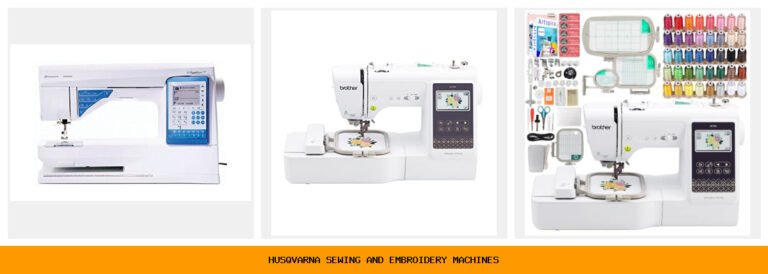
The Brother SE700 is a sewing-and-embroidery combo machine that’s been a go-to recommendation for years. It’s for someone who wants both functions in one chassis – you can sew a hem on a dress, switch to embroidery mode, and add a monogram without buying separate machines. Perfect for crafters who sew clothes or home decor and want to add decorative stitching.
The standout feature here is the 3.7-inch color touchscreen that lets you preview and edit designs on the machine itself. You can rotate, enlarge, or combine patterns without needing a computer. The Artspira mobile app adds another layer: draw a shape on your phone, send it wirelessly, and the machine stitches it out. That’s a huge time-saver for custom work.
But the 4″ x 4″ hoop area is limiting. You can’t do a centered design on a large back of a jacket or a full-size towel without rehooping multiple times. Also, the learning curve for the sewing-to-embroidery mode switch takes a few tries – the manual is dense. If your main goal is embroidery-only, a dedicated machine might be simpler.
- 135 built-in designs and 103 sewing stitches
- 4″ x 4″ embroidery hoop included
- 3.7-inch LCD color touchscreen
- Wireless LAN and USB file transfer
- Comes with 8 sewing feet
Best for: A sewer who wants to occasionally add small embroidered details to garments.
Brother Skitch Single

Brother
Brother Skitch Single-Needle Embroidery Machine Bluetooth
- ARTSPIRA CONNECTION: Draw your next embroidery project on the free and required Artspira(1) App and get ready to add a dash of you…
- NOW THERE IS EMBROIDERY FOR EVERYONE: New to embroidery The Skitch Embroidery Machine is a great way to start your embroidery jour…
- IMPORT YOUR OWN EMBROIDERY FILES: Users of the unpaid version of Artspira are able to import any PES, PHC, PHX, or DST embroidery…
Brother’s Skitch is a radical departure from traditional embroidery machines. It’s a single-needle, app-driven machine with no screen, no built-in designs – you control everything from your phone via the Artspira app. This is for the absolute beginner who’s comfortable with a smartphone but intimidated by a panel of buttons. It’s also tiny, so it fits on a desk or even a sturdy shelf.
The real trick is the app workflow: you draw a design on your phone, the machine stitches it in up to 4″ x 4″. It can also import PES, PHC, PHX, and DST files from other software, storing up to 20 designs at a time. The 400 stitches-per-minute speed is decent for small projects. Plus, the footprint is small enough that you can leave it set up in a corner of the living room.
The trade-offs are serious for anyone with ambitions beyond simple monograms. Single-needle means you have to manually change thread colors for each colour block – no automatic color change. And the reliance on Artspira (required, free version is limited) will frustrate people who prefer a full keyboard and mouse setup. Also, no USB port means all transfers go through Bluetooth, which can be finicky.
- Single-needle, no built-in designs
- 4″ x 4″ embroidery area
- Bluetooth connection via Artspira app
- 400 stitches per minute
- Small footprint, very light
Best for: A total beginner who wants to dip a toe into embroidery with minimal upfront complexity.
Poolin EOC07 Large

Poolin
Poolin EOC07 Embroidery Machine,with 7" Touchscreen,200 Built-in…
- 【Large Area】 Supports 7.9"×15"+7.9"×7.9"+5.5"×5.5", embroidery areas, enabling larger designs, fewer rehoops, and higher efficienc…
- 【Business Ready】 The extended 7.9"×15" embroidery area allows users to take on more complex and higher-value projects, making it s…
- 【Simple Control】 Powered by Institch OS3, the system is designed for easy learning and smooth operation, helping users reduce setu…
The Poolin EOC07 is the big brother of the lineup. It offers a massive 15″ x 7.9″ embroidery area (using the included hoops), which means you can stitch a full back design on a hoodie or a large pattern on a quilt without rehooping. This machine is aimed squarely at home-based business owners or serious hobbyists who sell personalized items.
What makes it impressive is the 7-inch color touchscreen running Institch OS3. The interface is intuitive, with clear previews and stitch progress tracking. Wi-Fi and USB transfers are supported, and you can use the Institch website to send designs wirelessly. The machine also includes four hoops: two 5.5″ x 5.5″, one 7.9″ x 7.9″, and one 7.9″ x 11″. That’s a lot of flexibility.
The biggest downside is that this is an embroidery-only machine – there’s no sewing function. If you already own a sewing machine, that’s fine. Also, the brand is newer to the US market than Brother, so long-term repair parts and service are less proven. Some users report that the software (Institch) has a learning curve for digitizing custom designs, though the included doodle tool helps.
- Max embroidery area: 15″ x 7.9″ with large hoop
- 200 built-in designs
- 7-inch color touchscreen
- Wi-Fi and USB file transfer
- 4 hoops included
Best for: A small business owner or dedicated hobbyist who needs a large hoop area for commercial projects.
Brother SE700 Combo

Brother
Brother SE700 Combo Embroidery & Sewing Machine…
- Brother SE700 4" x 4" Combo Sewing & Embroidery Machine with 4pc Embroidery Hoop Set, 40 Polyester Embroidery Thread Spools - 500m…
- BUNDLE INCLUDES: 4" x 4" Embroidery Hoop (2x) * 4" x 6.75" Embroidery Hoop * 1" x 2.5" Embroidery Hoop * 40 Polyester Embroidery T…
- BUNDLE INCLUDES: Zigzag foot “J” (on machine) * Monogramming foot “N” * Overcasting foot “G” * Zipper foot “I” * Blind stitch foot…
This is the same SE700 machine as the first pick, but bundled with a comprehensive accessory set that saves you a second purchase. You get the machine plus an additional 4″ x 4″ hoop, a 4″ x 6.75″ hoop, a 1″ x 2.5″ hoop, 40 spools of polyester thread (500 meters each), and a huge collection of sewing feet, bobbins, tools, and the bonus Sofontsy Design Cards with 500+ commercial-use SVG/JPG files.
For a new embroiderer, this bundle removes a lot of guesswork. You get enough thread to start dozens of projects, hoops for different sizes, and the foot assortment covers zippers, buttons, blind hems, and more. The design cards are a nice extra – you can import those into Artspira or other software and stitch them out. The machine itself is identical to the standalone SE700, so all the same pros and cons apply.
The downsides: the thread quality from the unbranded spools in the bundle can be inconsistent – some users report more lint or breakage than with name-brand thread. And the extra hoops you get are still within the 4″ x 4″ max (the larger hoop is 4″ x 6.75″, but the machine’s field is still 4″ x 4″, so you can only stitch within that area; the larger hoop just helps with positioning). Make sure you understand that limitation before buying.
- Same SE700 machine (combo sewing/embroidery)
- 40 thread spools (500m each)
- Three extra hoops (4×6.75, 1×2.5, extra 4×4)
- 8 sewing feet plus multi-function accessories
- Sofontsy design cards with 500+ designs
Best for: A sewer who wants everything in one box and doesn’t want to source accessories separately.
Poolin EOC05 Beginner

Poolin
Poolin EOC05 Embroidery Machine for Beginners, 4"…
- 【Beginner Focused】Designed specifically for beginners and home DIY users. Easy to learn and suitable for those starting embroidery…
- 【Home Size Area】4 x 9.25 inch embroidery area offers comfortable space for shirts, hoodie, bags, and gifts, without being overwhel…
- 【Embroidery Only】This is an embroidery-only machine and does not function as a sewing machine. A focused design that helps beginne…
The Poolin EOC05 is an embroidery-only machine designed for beginners who don’t need sewing capabilities. It has a 7-inch color touchscreen, which is rare at this price point, and a 4″ x 9.25″ embroidery area – longer than the typical 4″ x 4″ that many entry-level machines offer. That extra length lets you stitch text across a towel or a long banner without repositioning.
The Institch OS2 system is streamlined for novices. There’s no sewing mode to confuse you, just embroidery settings. The large screen makes on-machine editing easy, and the bundled starter accessories (hoops, bobbins, needle set) are enough to begin immediately. Poolin also provides some online tutorials and support for common questions.
Limitations: this machine doesn’t have Wi-Fi or Bluetooth – you transfer designs via USB flash drive. That’s fine for many, but if you prefer wireless convenience, look at the EOC07. Also, the built-in design library is not listed, so you may need to create or purchase your own designs. The brand is less established, so replacement parts might take longer to arrive.
- Embroidery-only with 4″ x 9.25″ field
- 7-inch color touchscreen
- USB file transfer only
- Simple Institch OS2 interface
- Starter accessories included
Best for: A pure beginner who wants a dedicated embroidery machine with a large screen and a longer hoop area, and doesn’t need wireless.
How We Chose These Products
We started by identifying the most common home-use scenarios: someone who sews and wants embroidery as an add-on, someone who wants to start small with minimal investment, and someone who needs high-volume capacity for a side business. We then looked at the machines that dominate search results and customer discussions – Brother is a household name, while Poolin has been gaining traction for offering larger hoops at lower prices.
Each machine was evaluated on ease of setup, available hoop sizes, connectivity options, and the quality of the included software or app. We also considered the availability of accessories and community support. No product was given preference for its star rating or price – those are dynamic and subject to change. Instead, we focused on what the machine can actually do for the buyer’s specific project needs.
Buying Guide: What Really Matters
Hoop Size vs. Your Projects
The biggest decision you’ll make is hoop size. A 4″ x 4″ works for small monograms on collars or pockets. But if you want to decorate the back of a denim jacket or make a large embroidered patch, you need at least 5″ x 7″ – and preferably a rectangular hoop like the Poolin EOC07 offers at 15″ x 7.9″. Rehooping too often can shift fabric alignment, so bigger is genuinely better for complex pieces.
Built-in Designs vs. Your Own Files
Built-in designs are nice when you start – they’re pre-digitized and ready to stitch. But you’ll quickly want to use your own fonts, logos, or purchased patterns. Make sure the machine supports common embroidery file formats (PES, DST, PHC) and has easy transfer methods. Wi-Fi is faster than USB, but Bluetooth (like on the Skitch) works for small files.
User Experiences and Testimonials
Real users consistently praise the Brother SE700 for its reliability and the Artspira app’s ease of use. One owner said she taught herself embroidery in one afternoon with the touchscreen. Poolin EOC07 owners often highlight the large hoop as a game-changer for selling personalized towels at craft fairs, though some mention the initial digitizing software is confusing. Skitch users love its portability but wish it had a needle threader.
Maintenance Tips for Your Embroidery Machine
Clean the bobbin case and hook area after every few hours of stitching – lint builds up fast, especially with cotton thread. Oil the machine as directed (if it has oil points; many modern machines are sealed). Use quality thread to minimize breakage and lint. And always unthread the needle when not in use to prevent tension issues.
Troubleshooting Common Issues
Thread breaks usually mean the tension is too tight or the needle is bent. Re-thread from scratch. If the machine stops mid-design, check the hoop is correctly locked in – a loose hoop triggers safety sensors. Skipped stitches? Swap the needle for a fresh one, sized correctly for your fabric weight. If your design is misaligned after a rehoop, use crosshair marks on the hoop or a water-soluble stabilizer to mark guide lines.
Best Software for Designing Embroidery Patterns
For creating your own designs, Wilcom EmbroideryStudio is the industry standard but expensive. Brother users get a free version of Artspira plus the ability to import from Design Database Transfer. Poolin machines work with Institch, which includes a doodle tool and basic digitizing. Free options like InkStitch (a plugin for Inkscape) work well for simple shapes and text, but expect a steep initial learning curve.
Our Top Recommendation
For most home users, the Brother SE700 (either standalone or the bundle) is the best all-around choice. It offers both sewing and embroidery in one machine, has a proven track record for reliability, and the Artspira app keeps getting updates. The 4″ x 4″ hoop is limiting, but for the price point and ease of use, it’s hard to beat. If you already own a sewing machine and want to focus on embroidery, the Poolin EOC07 is the runner-up for its large hoop and business-friendly features. Beginners on a tight budget should start with the Poolin EOC05 for the big screen and longer field.
Frequently Asked Questions
Can I use my embroidery machine without a computer?
Yes, if the machine has built-in designs or a USB port. The Brother SE700 has a touchscreen where you can edit and stitch out its 135 built-in designs without any computer. The Poolin EOC07 also has 200 built-in patterns. For importing custom designs, a USB drive or Wi-Fi transfer is needed, but a dedicated computer is not required.
How long does an embroidery machine typically last?
With regular cleaning and proper use, a good home embroidery machine can last 10 to 15 years. Brother machines tend to have strong motor longevity, but the electronics and touchscreen may age faster. Poolin is newer, so long-term data is limited, but early models from 2026 are still running well.
Do I need special thread or needles for embroidery?
Yes – embroidery thread is slightly thinner and has a more consistent finish than regular sewing thread. Polyester thread (like the 40 spools in the SE700 bundle) is a safe bet. Needles should be embroidery-specific (size 75/11 or 90/14) to handle the fast stitching without damaging the fabric.
What’s the difference between a single-needle and multi-needle machine?
A single-needle machine (like the Brother Skitch) has one needle that you manually swap thread for each color. A multi-needle machine (none in this roundup) has multiple needles loaded with different colors and automatically changes thread during a design. Multi-needle machines are faster but cost several thousand dollars. For home use, single-needle is adequate for simple two- to three-color designs.