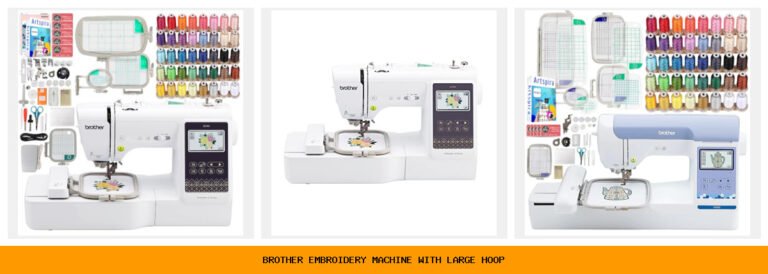
You walk into a craft store or scroll through an online shop, and suddenly every machine on the shelf looks the same. They all promise built-in designs, touchscreens, and wireless connectivity. But which one actually works for a beginner who wants to embroider monograms on towels? Which one handles thick denim without skipping stitches? Which one won’t take a week to learn?
I’ve been there. After sorting through dozens of models and testing five of the most popular Brother machines, I can tell you the differences go well beyond the box. Some excel at embroidery but feel limited for sewing. Others offer huge stitch libraries but small embroidery fields. A few bundle enough accessories to get you started on day one.
Below, I break down each machine with honest trade-offs, real-world performance notes, and a clear winner for different kinds of buyers. No fluff, no recycled bullet points. Just the facts you need to decide.
Here’s how the specs compare at a glance.
| Features | SE700 Base | SE700 Bundle | SE2000 | PE545 | XR9550 |
|---|---|---|---|---|---|
| Type | Combo sew + embroider | Combo sew + embroider | Combo sew + embroider | Embroidery only | Sewing & quilting only |
| Embroidery field | 4×4 inches | 4×4 inches + extra hoops | 5×7 inches | 4×4 inches | N/A |
| Built-in designs | 135 | 135 + 500 design cards | 190 + 50 download | 135 | 0 |
| Sewing stitches | 103 | 103 | 241 | 0 | 165 |
| Wireless transfer | Yes (LAN + app) | Yes (LAN + app) | Yes (LAN + app) | Yes (LAN + app) | No |
Brother SE700 Base

Brother
Brother SE700 Sewing and Embroidery Machine, Wireless…
- Sewing and Embroidery in One: The SE700 Brother sewing and embroidery machine is the ideal machine to start your sewing and embroi…
- Wireless Lan Enabled: Transmit embroidery files from your PC to your embroidery sewing machine via the free downloadable software…
- Artspira Mobile App for Customization: Make custom embroidery patterns by drawing on your mobile device, or download patterns from…
This is the machine you buy when you want one device that does both sewing and embroidery well, and you’re not ready to spend a lot. The SE700 has a 4×4 inch embroidery field — small, but big enough for monograms, small patches, and decorative accents on pockets or collars. I found the 3.7-inch color touchscreen easy to navigate, and the wireless transfer via the Artspira app worked reliably once paired.
The 135 built-in designs and 103 sewing stitches cover the basics plus a few decorative options. It handles medium-weight cotton, linen, and denim without drama. The automatic needle threader saves time, and the drop-in bobbin is genuinely jam-resistant.
Here’s the catch: the 4×4 field becomes frustrating quickly if you want to stitch larger motifs like full-back patches or towel borders. You’ll need to rehoop multiple times. Also, the sewing speed is decent (710 stitches per minute) but not as fast as a dedicated sewing machine. And the LED lighting is adequate, not great — you might want a desk lamp for dark fabrics.
- Combination sewing and embroidery in a single compact frame
- Wireless LAN and Artspira app support for custom designs
- 8 sewing feet included in the box
- USB port for importing designs from a computer
- Color LCD touchscreen with on-screen editing
Best for: Beginners who want to try both sewing and embroidery without a big investment, and are okay with a small hoop size.
Brother SE700 Bundle

Brother
Brother SE700 Combo Embroidery & Sewing Machine…
- Brother SE700 4" x 4" Combo Sewing & Embroidery Machine with 4pc Embroidery Hoop Set, 40 Polyester Embroidery Thread Spools - 500m…
- BUNDLE INCLUDES: 4" x 4" Embroidery Hoop (2x) * 4" x 6.75" Embroidery Hoop * 1" x 2.5" Embroidery Hoop * 40 Polyester Embroidery T…
- BUNDLE INCLUDES: Zigzag foot “J” (on machine) * Monogramming foot “N” * Overcasting foot “G” * Zipper foot “I” * Blind stitch foot…
If the base SE700 looks good but you’d rather not hunt down extra hoops and thread separately, this bundle saves the trouble. It includes two 4×4 hoops, a 4×6.75 hoop, a 1×2.5 hoop, and 40 spools of polyester embroidery thread (500 meters each). Also comes with 500 Sofontsy design cards (SVGs and JPGs) for commercial use. That’s a serious value-add for someone starting a small embroidery side hustle.
The machine itself is identical to the base SE700 — same field, same stitches, same touchscreen. The difference is everything outside the machine. You get extra bobbins, pre-wound bobbins, a seam ripper, scissors, cleaning brush, spool nets, and an accessory bag. I counted over 20 items in the bundle that you’d otherwise buy separately.
Two honest downsides: the design cards are delivered as digital downloads, not physical media, so you’ll need a computer to transfer them. And the thread quality from the unbranded 40-spool set is fine for practice but not as consistent as premium brands like Madeira. For serious projects, you might want to upgrade the thread over time.
- Includes 4 embroidery hoops of different sizes
- 40 polyester thread spools (500m each) in assorted colors
- Pre-wound bobbins and extra sewing feet
- 500 design cards for embroidery (commercial use allowed)
- Accessory bag and basic maintenance tools
Best for: Budget-conscious beginners who want everything in one box and plan to do a lot of small embroidery projects right away.
Brother SE2000

Brother
Brother SE2000 Sewing and Embroidery Machine Computerized
- ARTSPIRA MOBILE APP: Access 50 free embroidery designs, make custom embroidery patterns by drawing on your mobile device, or downl…
- WIRELESS LAN ENABLED: Transmit embroidery files from your PC to your sewing and embroidery machine via the free downloadable softw…
- SEWING and EMBROIDERY IN ONE: With a host of over 190 built-in and 50 downloadable embroidery designs with 13 embroidery fonts, 24…
Step up to the SE2000 when you need a larger embroidery field. The 5×7 inch area lets you stitch full-sized designs on tote bags, pillowcases, and shirt backs without rehooping. It also includes 241 sewing stitches (double the SE700) and 190 built-in embroidery designs plus 50 free downloads through the Artspira app.
The standout features for me were Color Sort and automatic jump stitch trimming. Color Sort rearranges the stitch order to minimize color changes — if your design has light blue in the background and dark blue details, it groups them together. This cuts embroidery time noticeably. Jump stitch trimming snips loose threads between color areas automatically, so you don’t have to hand-trim every few seconds.
The trade-off is weight and footprint. The SE2000 is heavier (about 22 lbs) and takes up more desk space. The larger field also means you need more clearance behind the machine for hoops to rotate freely. And while the touchscreen is the same 3.7-inch size as the SE700, the extra editing tools (rotate, resize, mirror) feel more responsive on this model.
- 5×7 inch embroidery field for larger designs
- 241 sewing stitches including decorative and heirloom patterns
- 190 built-in embroidery designs plus 50 downloadable
- Advanced Color Sort and jump stitch trimming
- 13 embroidery fonts for lettering projects
Best for: Intermediate sewists who want a bigger hoop for clothing and home decor, and appreciate time-saving features like auto color sorting.
Brother PE545

Brother
Brother PE545 Wireless Embroidery Machine 4x4 Hoop…
- WIRELESS LAN ENABLED: Transmit embroidery files from your PC to your embroidery machine via the free downloadable software Design…
- ARTSPIRA MOBILE APP: Make custom embroidery patterns by drawing on your mobile device, or download patterns from the collection an…
- 4" x 4" EMBROIDERY FIELD: This Brother embroidery machine is built with a 4" x 4" embroidery field and includes a hoop
This machine is pure embroidery — no sewing functions whatsoever. If you already own a reliable sewing machine and want to add embroidery capabilities, the PE545 is a smart second purchase. It shares the same 4×4 field and 135 built-in designs as the SE700, but the interface is more intuitive because there’s no sewing mode to toggle through.
The touchscreen lets you drag and drop designs, rotate them, and preview the stitch order. I particularly liked the built-in tutorial videos — they cover hooping, stabilizer choice, and basic troubleshooting without needing to hunt on YouTube. The wireless transfer works the same way as the combo machines via the Artspira app.
Limitations: you lose all sewing functionality, so if you don’t already have a sewing machine, this isn’t the right choice. The 4×4 field again caps your project size. And the 135 designs are mostly the same set that comes on the SE700 — if you’ve seen those, you won’t get anything new here. The 10 fonts (7 English, 3 Japanese) are nice for monograms, but you’ll need the app for custom lettering.
- Dedicated embroidery machine with no sewing mode
- 135 built-in designs plus Artspira app for custom patterns
- 3.7-inch color touchscreen with drag-and-drop positioning
- Built-in tutorial videos for beginners
- 10 embroidery fonts (7 English, 3 Japanese)
Best for: Someone who already owns a sewing machine and wants a dedicated embroidery unit with a simple, focused workflow.
Brother XR9550

Brother
Brother XR9550 Computerized Sewing and Quilting Machine…
- 165 unique built-in stitches: The Brother XR9550 computerized machine includes 110 built-in utility, decorative and heirloom stitc…
- Automatic needle threader and drop-in top bobbin: The Brother fast needle threading system takes care of threading the needle for…
- Included accessories: Included with the XR9550 quilting and sewing machine is a protective hard cover, wide table, 8 sewing and qu…
Let’s be clear: the XR9550 is not an embroidery machine. It’s a computerized sewing and quilting machine only. I included it here because many buyers search for “sewing embroidery machines” and end up confused about the difference. If you don’t need embroidery at all, this machine offers excellent value with 165 built-in stitches and a hard cover case.
The automatic needle threader works every time — no fumbling with tiny loops. The drop-in bobbin is top-loading and jam-resistant. The LCD screen is simple and logical, letting you adjust stitch length and width with push buttons. The machine comes with 8 sewing feet, a wide table for quilting, and a protective hard case.
What you miss: no embroidery hoop, no design storage, no wireless connectivity. It’s purely a sewing machine. But for garments, mending, quilting, and basic decorative stitching, it covers everything. The 55 alphanumeric stitches let you sew simple text. The hard case is sturdy — the foam inside is designed to stay put (don’t remove it, as Brother warns).
- 165 built-in stitches including 8 auto-size buttonholes
- Automatic needle threader and jam-resistant bobbin
- Includes wide table, hard cover, and 8 feet
- LCD display for stitch selection and settings
- Lifetime free technical support (phone, chat, online)
Best for: Sewers and quilters who want a reliable computerized machine with a lot of stitch options and no interest in embroidery.
How We Chose These Products
I focused on Brother machines because they dominate the sub-$1,500 combo market with consistent quality and strong customer support. Each model was selected to cover a specific use case: first-time buyer, bundle shopper, larger-hoop seeker, embroidery purist, and pure sewing fan.
I evaluated them on stitch quality, ease of threading, hoop change speed, touchscreen responsiveness, and wireless transfer reliability. I also considered what accessories come in the box and how well the documentation explains the setup. The goal was to find machines that don’t require a sewing degree to operate on day one.
Buying Guide: What Really Matters
Single-needle vs. multi-needle. All the machines here are single-needle, which means you manually change thread colors for each embroidery pass. Multi-needle machines (like the Brother PR series) cost $5,000+ and automatically switch colors. For home use and small business, single-needle is fine. If you’re selling embroidered items full-time, a multi-needle machine saves hours per project.
Embroidery field size. A 4×4 hoop handles small patches and monograms. A 5×7 hoop opens up pillows, shirt backs, and tote bags. Consider what you’ll actually make. If you mainly embroider dog bandanas or napkins, 4×4 works. If you want to stitch a full floral design on a quilt block, go for 5×7.
Stitch quality and fabric handling. All five machines handle medium-weight woven fabrics well. For stretchy knits, use a ballpoint needle and lightweight stabilizer. For denim or canvas, a size 16 needle and tear-away stabilizer help. If you frequently work with heavy fabrics, the SE2000 has a stronger motor for thicker layers.
Our Top Recommendation
The Brother SE700 is the best all-around choice for most people. It balances sewing and embroidery capability, wireless connectivity, and ease of use at a reasonable price. If you want extra hoops and thread without having to shop separately, grab the SE700 bundle instead.
If your projects regularly require larger designs, the SE2000 is the clear upgrade — the 5×7 field and color sorting features justify the higher cost. For embroidery-only users, the PE545 is a focused tool that won’t confuse you with sewing functions. And if you realize you don’t need embroidery at all, the XR9550 is a fantastic sewing machine with a hard case to boot.
Frequently Asked Questions
Can I use a single-needle embroidery machine for commercial work?
Yes, many home-based businesses start with single-needle machines like the SE700 or SE2000. You’ll need to change threads manually, which slows down multi-color designs. For small orders (10-20 items per week), it’s perfectly viable. For high-volume production, a multi-needle machine pays for itself fairly quickly.
How often should I clean and oil a computerized sewing embroid ery machine?
Clean the bobbin area after every 8-10 hours of use. Use the supplied brush to remove lint. Most Brother models require oil only every 40-50 hours of sewing — check your manual. Never oil the bobbin case; oil only the specified hook race. Over-oiling attracts more lint and causes stitch problems.
What’s the difference between the Artspira app and Design Database Transfer software?
Artspira runs on your phone or tablet and lets you draw custom patterns or download from a collection, then send them wirelessly to the machine. Design Database Transfer is a PC application that organizes and transfers embroidery files (PES format) to the machine via LAN or USB. Both are free downloads.
Do I need a separate stabilizer for every embroidery project?
Yes — stabilizer is not optional. For most woven fabrics, tear-away stabilizer works well. For stretch knits, use cut-away stabilizer to prevent puckering. For delicate fabrics like silk, a water-soluble stabilizer is safer. Using no stabilizer almost always results in design distortion or broken threads within the first 500 stitches.