Whether you’re an experienced seamstress or just starting your journey into the world of embroidery, the right machine can make all the difference in your creative endeavors. The Baby Lock Flare Embroidery Machine stands out as a versatile tool that caters to embroidery enthusiasts of all skill levels. With its innovative features and user-friendly design, it enables you to bring your artistic visions to life with precision and ease. In this article, we’ll delve into the various aspects of the Baby Lock Flare, including its key features, benefits, and tips for getting the most out of your machine.
Table of Contents
- Key Features of the Baby Lock Flare
- Benefits of Using the Baby Lock Flare
- Getting Started with Your Baby Lock Flare
- Maintenance Tips for Longevity
- Troubleshooting Common Issues
- Frequently Asked Questions
Key Features of the Baby Lock Flare
The Baby Lock Flare Embroidery Machine is packed with features designed to enhance your embroidery experience. Below are some of its standout features:
Large Embroidery Area
The Flare boasts a spacious embroidery area, allowing you to work on larger designs without the need for constant repositioning. This feature is particularly beneficial for intricate patterns or multi-part projects.
Intuitive Touchscreen Interface
The machine is equipped with a user-friendly touchscreen interface that simplifies navigation. With just a few taps, you can select designs, adjust settings, and monitor your progress.
Built-in Designs and Fonts
With over 100 built-in designs and multiple font options, the Baby Lock Flare provides a variety of creative possibilities right out of the box.
Automatic Needle Threading
This feature eliminates the hassle of manual threading, making it easier to get started on your projects quickly.
Advanced Editing Capabilities
The machine allows users to edit designs directly on the touchscreen. You can resize, rotate, and combine designs, giving you full creative control over your projects.
Benefits of Using the Baby Lock Flare
The Baby Lock Flare Embroidery Machine offers numerous advantages that make it a top choice for embroiderers. Below are some key benefits:
Enhanced Creativity
The wide range of features allows for endless creative possibilities. You can personalize gifts, create custom apparel, or produce unique home decor items.
Time Efficiency
With its automatic features and large embroidery area, the Flare significantly reduces the time spent on projects. This efficiency is ideal for those looking to produce items for sale or for special occasions.
User-Friendly Operation
The intuitive interface and automatic features make the Baby Lock Flare accessible for beginners, while still providing advanced options for experienced users.
High-Quality Results
The precision of the Baby Lock Flare ensures that your finished products look professional and polished, which is especially important for those looking to sell their designs.
Getting Started with Your Baby Lock Flare
Starting with your Baby Lock Flare is straightforward, but there are several steps to ensure you set it up correctly for optimal use.
Unboxing and Setup
Once you’ve received your Baby Lock Flare, carefully unbox it and check that all components are included. Follow the manufacturer’s instructions for initial setup, including attaching the embroidery arm and threading the machine.
Downloading Designs
The Baby Lock Flare allows you to import designs from your computer. Ensure you have a compatible USB drive to transfer your designs. Visit online sources for additional design options or create your own using embroidery software.
Understanding Your Machine
Spend some time familiarizing yourself with the various functions and settings of the machine. Review the user manual and consider watching online tutorials to gain a better understanding of its features.
Maintenance Tips for Longevity
To keep your Baby Lock Flare in top condition, regular maintenance is essential. Here are some maintenance tips:
Regular Cleaning
Dust and lint can accumulate in your machine, affecting its performance. Clean the machine regularly, focusing on the needle area and the bobbin case.
Change Needles Frequently
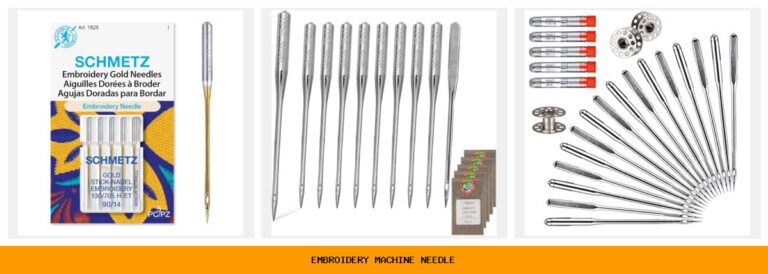
Using a dull needle can lead to poor stitching quality and can even damage your fabric. Change your needle regularly, especially if you notice any issues with stitching.
Use Quality Threads
Investing in high-quality threads will improve the overall quality of your embroidery and reduce the chances of thread breakage.
Software Updates
Check for any software updates that may enhance your machine’s functionality or fix bugs. Keeping your machine updated ensures it runs smoothly.
Troubleshooting Common Issues
Even the best machines can encounter issues from time to time. Here are some common problems and their solutions:
Thread Breakage
Thread breakage can be frustrating. Check that you are using the correct needle and thread type, and ensure the thread is properly threaded through the machine.
Uneven Stitches
If your stitches appear uneven, it may be due to incorrect tension settings. Consult your manual to adjust the tension according to the fabric and thread you are using.
Design Not Stitching Properly
Ensure that the design is compatible with your machine and that there are no issues with the file format. If problems persist, try re-downloading the design.
A: You can import designs using a USB drive. Ensure that the designs are in a compatible format for your machine.
A: Start with medium-weight cotton fabric, as it is easy to work with and produces great results.
Frequently Asked Questions
A: Yes, while primarily an embroidery machine, it can also be used for quilting projects with the right accessories.
A: Baby Lock typically offers a limited warranty on their machines, which may vary by retailer. Check with your dealer for specific details.
Conclusion
The Baby Lock Flare Embroidery Machine is an excellent choice for anyone looking to explore the world of embroidery, offering a blend of advanced features and user-friendly operation. Whether you’re creating personalized gifts or starting a small business, this machine can help you achieve high-quality results efficiently. By understanding its key features, benefits, and maintenance requirements, you can maximize your embroidery experience and unleash your creativity. For more insights on embroidery machines, check out our article on Top Commercial Embroidery Machines: Real User Insights and reviews on the Flare Embroidery Machine, Brother LB6800 Sewing & Embroidery Machine, and Embroidery Machine on Amazon. Happy stitching!