
We earn a commission if you buy through links on this page, at no extra cost to you. Picks are based on Brother's published specifications, Amazon listing details and a textile engineer's experience with fabric, thread and stabiliser behaviour; we did not test these machines ourselves.
Quick answer
In this Brother embroidery machine comparison chart, the SE700 is the best all-round pick: it sews and embroiders, has a 4" x 4" hoop and Wi-Fi. Choose the SE2000 for a 5" x 7" hoop plus sewing, the PE900 for 5" x 7" embroidery only, the PE535 on a tight budget, and the Stellaire XE1 for a 9.5" x 14" field.
Our top picks at a glance

Brother SE700 Sewing & Embroidery Machine, 4x4
Sewing plus 4" x 4" embroidery, 135 built-in designs and wireless design transfer in one compact machine.
Buy on Amazon
Brother SE2000 Sewing & Embroidery Machine, 5x7
Same idea as the SE700 but with a 5" x 7" field, 193 designs and 241 sewing stitches.
Buy on Amazon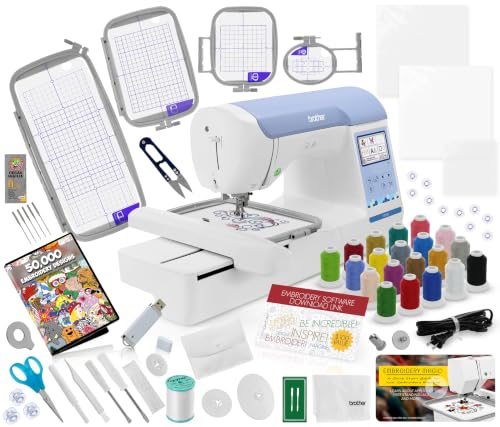
Brother PE900 Embroidery Machine, 5x7, Wireless
A dedicated 5" x 7" embroidery machine with 193 designs, Wi-Fi and USB for people who already own a sewing machine.
Buy on AmazonNew to machine embroidery? Read our guide to the difference between sewing and embroidery machines first.
Brother embroidery machine comparison chart
| Brother model | Max hoop size | Built-in designs | Sews too? | Screen and connectivity | |
|---|---|---|---|---|---|
| 4" x 4" | 135 | Yes, 103 stitches | 3.7" colour touchscreen, wireless LAN | Buy on Amazon |
| 5" x 7" | 193 | Yes, 241 stitches | 3.7" colour touchscreen, wireless LAN | Buy on Amazon |
| 5" x 7" | 193 | No, embroidery only | 3.7" colour touchscreen, wireless LAN and USB | Buy on Amazon |
 | 4" x 4" | 80 | No, embroidery only | 3.2" colour touchscreen, USB port | Buy on Amazon |
 | 9.5" x 14" | 727 | No, embroidery only | 10.1" LCD, wireless and USB | Buy on Amazon |
Specs from Brother USA product pages and Amazon listing titles. Bundles on Amazon add hoops, thread or software, so check the listing for what is in the box.
Which Brother embroidery machine is best for which user?
Hoop size matters most, because you cannot add a bigger field later. A 4" x 4" hoop covers left-chest logos and monograms; a 5" x 7" hoop covers totes, towels and kids' tees. Only the Stellaire XE1 handles jacket backs in one hooping.
| If you are... | Choose | Why |
|---|---|---|
| A beginner who wants to sew and embroider | Brother SE700 | Two machines in one, 4" x 4" hoop, wireless file transfer |
| A crafter who wants bigger designs and sewing | Brother SE2000 | 5" x 7" hoop and 241 sewing stitches |
| Someone who already owns a sewing machine | Brother PE900 | 5" x 7" embroidery only, so no sewing features you would not use |
| On the tightest budget, small monograms only | Brother PE535 | Simple 4" x 4" embroidery-only machine with 80 designs |
| Doing jacket backs, quilts or a small side business | Brother Stellaire XE1 | 9.5" x 14" field, 727 designs, 10.1" screen |
| Running a production shop with many colour changes | A multi-needle machine | Single-needle Brother models need a thread change for every colour |
For colour-heavy production work, see our guide to the multi-needle embroidery machine.
Stabiliser, thread and fabric: what a textile engineer adds
Most stitch-out problems blamed on the machine come from the fabric. Knits stretch. A T-shirt, polo or sweatshirt is made of interlocking loops that open under the pull of dense stitches, then spring back after hooping, which causes puckers, gaps between fill and outline, and rippled letters. Wovens like denim barely move and need far less support.
| Fabric | Stabiliser | Notes |
|---|---|---|
| T-shirt jersey, rib, polo pique | Cut-away (or no-show mesh on light tees) | Cut-away stays in and supports the stitches through every wash |
| Sweatshirt fleece, hoodies | Medium cut-away plus water-soluble topping | Topping stops stitches sinking into the pile |
| Denim, canvas, twill | Tear-away | Stable weave; tear-away removes cleanly |
| Towels, terry | Tear-away plus water-soluble topping | Loops swallow satin stitches without topping |
| Sheer, organza, freestanding lace | Wash-away (water-soluble) | Dissolves fully in water |
A general guide; always run a test stitch-out on a scrap of the same fabric.
Expert tip from Kamrul Islam
Pre-wash cotton knits before you embroider them. Jersey and pique can shrink several percent in the first hot wash, and if the fabric shrinks after embroidery the stitched area stays the same size and puckers around it. Washing also removes finishing softeners that can stop adhesive stabiliser from bonding.
For thread, use 40 wt polyester embroidery thread for most home work. Polyester holds colour better in hot washes and with oxygen bleach than rayon, which is softer and shinier but less tough. Use a 75/11 embroidery needle on wovens and a 75/11 ballpoint on knits so the needle slides between loops instead of cutting them. Our guide to quality sewing thread explains why thread breakage often starts with the wrong needle.
The 5 best Brother embroidery machines reviewed
Brother SE700 Sewing & Embroidery Machine, 4x4
Sewing + embroidery · 4" x 4" hoop · 135 designs · wireless LAN
The SE700 is the Brother most beginners land on. It sews with 103 built-in stitches, then switches to embroidery with the attached unit, so one machine covers hemming, mending and monograms. Wireless LAN sends designs from a computer without a USB stick.
Pros
- Sews and embroiders in one footprint
- 135 built-in designs and 10 lettering fonts
- Wireless design transfer
Cons
- 4" x 4" field limits design size
- Single needle, so one thread colour at a time
Skip it if skip it if you already know you want designs bigger than 4" x 4".
Expert tip from Kamrul Islam
On a T-shirt, hoop the cut-away stabiliser and fabric together without stretching the knit; if the jersey is pulled tight in the hoop it relaxes afterwards and the design puckers.
Brother SE2000 Sewing & Embroidery Machine, 5x7
Sewing + embroidery · 5" x 7" hoop · 193 designs · 241 stitches
The SE2000 is the step up for people who like the SE700 idea but want room to grow. The 5" x 7" field fits most tote bags, towels and kids' tees, and Brother lists 193 built-in embroidery designs and 241 sewing stitches. It also cuts jump stitches automatically, which saves trimming time on lettering.
Pros
- 5" x 7" field plus full sewing
- 193 designs, 241 stitches
- Wireless LAN and automatic jump-stitch cutting
Cons
- Costs more than the SE700
- Heavier to carry to classes
Skip it if skip it if you will only ever stitch small chest logos.
Expert tip from Kamrul Islam
For towels, lay water-soluble topping on the terry before stitching; without it the loops push through satin stitches and the lettering looks thin after the first wash.
Brother PE900 Embroidery Machine, 5x7, Wireless
Embroidery only · 5" x 7" hoop · 193 designs · Wi-Fi + USB
If you already own a sewing machine, the PE900 gives you the same 5" x 7" field as the SE2000 without paying for sewing features. Brother lists 193 designs, 13 lettering fonts, a 3.7" colour screen, wireless LAN and a USB port. This listing is a bundle, so check what is included.
Pros
- 5" x 7" field at a lower cost than combo machines
- Both wireless LAN and USB
- 13 built-in lettering fonts
Cons
- No sewing at all
- Single needle
Skip it if skip it if this will be your only sewing machine.
Expert tip from Kamrul Islam
Embroidery-only machines suit sweatshirt fleece well, but use a medium cut-away under the fleece and topping on top so fill stitches do not sink into the brushed pile.
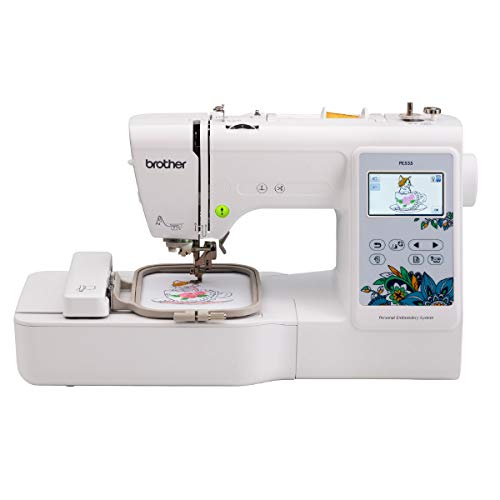
Brother PE535 Embroidery Machine, 4x4, 80 Designs
Embroidery only · 4" x 4" hoop · 80 designs · USB
The PE535 is Brother's simple entry point into embroidery. It has a 4" x 4" field, 80 built-in designs, 9 font styles and a 3.2" colour touchscreen, and you load your own designs through the USB port. There is no wireless transfer, but for names on baby bibs, small patches and pocket monograms it does the job.
Pros
- Lowest-cost way into Brother embroidery
- Easy touchscreen editing
- USB port for your own designs
Cons
- Only 80 built-in designs
- No wireless, no sewing
Skip it if skip it if you want Wi-Fi transfer or a 5" x 7" hoop.
Expert tip from Kamrul Islam
Small 4" x 4" lettering on knits is where puckering shows most; use a no-show mesh cut-away on light T-shirts so the backing does not show through pale colours.
Brother Stellaire XE1 Embroidery Machine, 9.5x14
Embroidery only · 9.5" x 14" field · 727 designs · 10.1" screen
The Stellaire XE1 is the big jump in this lineup. Its 9.5" x 14" field handles jacket backs and quilt blocks in one hooping, and Brother lists 727 built-in designs, a 10.1" LCD, wireless and USB, and up to 1,050 stitches per minute.
Pros
- Largest field in this chart
- 727 designs and a 10.1" screen
- Wireless and USB
Cons
- Much higher price than the other four
- Large, heavy machine that needs a dedicated table
Skip it if skip it if you mainly stitch small logos or need fast colour changes for orders.
Expert tip from Kamrul Islam
Large designs on knits put a lot of stitches into one area; split dense fills or reduce density slightly, and use a heavier cut-away so the fabric does not draw in around the edges.
How to get a clean first stitch-out on any Brother machine
- Pick the fabric first. Decide if it is a knit or a woven, then choose cut-away for knits and tear-away for stable wovens.
- Pre-wash cotton garments. This removes shrinkage and finishing softeners before you stitch.
- Fit the right needle. Use a 75/11 ballpoint for knits and a 75/11 embroidery needle for wovens.
- Hoop without stretching. Fabric should be smooth and firm in the hoop, not pulled tight like a drum.
- Use 40 wt embroidery thread and the correct bobbin thread. Do not use regular sewing thread in the bobbin for dense designs.
- Test on a scrap. Stitch the design once on the same fabric and stabiliser before you start on the real garment.
Buyer's guide: how to compare Brother embroidery machines
Hoop size. This is the one spec you cannot upgrade. If you think you might ever want designs bigger than 4" x 4", go straight to a 5" x 7" model like the SE2000 or PE900.
Sewing plus embroidery, or embroidery only. Combo machines (SE700, SE2000) save space and money if you need both. Embroidery-only machines (PE535, PE900, XE1) make sense if you already own a good sewing machine. Our beginner combo machine guide goes deeper on this choice.
Connectivity. Wireless LAN lets you send designs straight from a computer or app. USB works fine but means moving a stick every time. Check the listing to confirm which your model has.
Single needle vs multi-needle. Every machine in this chart is single-needle, so you change thread by hand for each colour. For order-based work, compare prices in our embroidery machine price guide.
Frequently asked questions
Which Brother embroidery machine is best for beginners?
The Brother SE700 is the best choice for most beginners because it sews and embroiders, has a 4 x 4 inch hoop and sends designs over Wi-Fi. If you want a bigger hoop from the start, choose the SE2000.
What is the difference between the Brother SE700 and PE900?
The SE700 sews and embroiders with a 4 x 4 inch hoop, while the PE900 is embroidery-only with a larger 5 x 7 inch hoop. Pick the SE700 if you need a sewing machine and the PE900 if you already have one.
What hoop sizes does the Brother PE900 take?
The PE900 has a maximum embroidery field of 5 x 7 inches. Smaller hoops such as 4 x 4 can also be used for small designs; check the Amazon listing to see which hoops are included.
How does the Brother SE2000 compare to a larger Innov-is machine?
The SE2000 is a 5 x 7 inch sewing and embroidery combo, while larger Innov-is and Stellaire models offer bigger fields, larger screens and more designs at a much higher price. The Stellaire XE1 in this chart has a 9.5 x 14 inch field.
What stabiliser should I use for T-shirts?
Use cut-away stabiliser for T-shirts and other knits because the fabric stretches and needs permanent support. On light-coloured tees, a no-show mesh cut-away is less visible from the front.
What thread works best in Brother embroidery machines?
Use 40 weight embroidery thread, either polyester or rayon, with a matching embroidery bobbin thread. Polyester holds its colour better through hot washes and bleach.
Can I upgrade the hoop size later?
No. The maximum embroidery field is fixed by the machine, so buy the hoop size you will need rather than the size you need today.
Our verdict
Our verdict
For most people the Brother SE700 is the right first machine: it sews, embroiders and transfers designs wirelessly. Step up to the SE2000 or PE900 if you want a 5" x 7" hoop, and only choose the Stellaire XE1 if you truly need large designs. Whatever you buy, match the stabiliser to the fabric, and use cut-away on every knit.
Buy on Amazon



