
Best Brother Embroidery Machines with Disney Designs (2026 Review)
Compare the top Brother embroidery machines featuring built-in Disney designs. From the SE2100Di to the premium Stellaire XJ2, find the perfect machine for your projects.
On this page
You’ve been hunting for an embroidery machine that can stitch Mickey Mouse or Elsa without buying individual files off Etsy. Every blog post reads like a rewritten spec sheet, and the Amazon listings blur together. You need straight answers: Which Brother machine actually comes with Disney designs built in? Which one handles a princess dress without breaking a thread? And what does ‘wireless LAN’ really mean for your workflow?


The answer depends on how you plan to use the machine. If you want a dedicated embroidery-only unit with a large field, the PE900 makes sense. If you need sewing and embroidery in one package with ready-to-stitch Disney characters, the SE2100Di is the obvious pick. And if you’re willing to trade hoop size for a lower price, the SE700 offers a solid starting point. The Stellaire XJ2 sits at the top with a massive 14×9.5 inch field for full-sized designs.
This review puts five Brother machines head-to-head. I looked at their built-in Disney content, hoop sizes, connectivity, and real-world stitching behavior. No fluff, no reciting Amazon bullets. Just the details that actually matter when you’re threading a needle at 10 PM.
Here’s how the key specs stack up:
| Feature | SE2100Di Disney | SE700 | SE700 Bundle | Stellaire XJ2 | PE900 |
|---|---|---|---|---|---|
| Embroidery Field | 5 x 7 inches | 4 x 4 inches | 4 x 4 inches | 14 x 9.5 inches | 5 x 7 inches |
| Built-in Disney Designs | 100 (download code) | 0 | 0 | Disney-themed (built-in) | 0 |
| Touchscreen Size | 3.7 inches | 3.7 inches | 3.7 inches | Large color LCD | 3.7 inches |
| Wireless LAN | Yes | Yes | Yes | Yes | Yes |
| Best Use Case | Disney fan sewing & embroidery | Budget combo starter | Value bundle with extras | Professional large-format | Dedicated embroidery |
Brother SE2100Di Disney
This machine exists for one reason: to stitch Disney characters straight out of the box. The SE2100Di ships with a download code for 100 official Disney embroidery patterns. You get vintage Mickey Mouse, Donald Duck, princesses like Cinderella and Ariel, plus less common faces like Ursula and Stitch. If you run a small business making personalized Disney gifts, this machine saves you hours of digitizing time.
The 5×7 inch hoop is the sweet spot for medium-sized projects. You can fit a character on a tote bag, a pillowcase, or the back of a kids’ jacket. The jump stitch trimming and color sort features speed up multi-color designs—less time cutting threads, more time sewing. The 3.7 inch touchscreen lets you rotate, resize, and combine patterns right on the machine. No need to run to a computer every time you tweak a design.
But the Disney content is a download code, not pre-loaded. You’ll need an internet connection and a free Brother account to grab the files. Also, the 5×7 field means you can’t stitch a full princess dress in one hoop—you’ll have to rehoop and match seams. Availability is scarce, so if you see one in stock, don’t hesitate.
- 100 Disney embroidery patterns via download code
- 5 x 7 inch embroidery field
- 241 sewing stitches plus 13 embroidery fonts
- Advanced Color Sort and jump stitch trimming
- Wireless LAN and Artspira app support
Best for: A Disney enthusiast who wants a combo machine with ready-made character designs and doesn’t mind a slight wait for the download.
Brother SE700

Brother
Brother SE700 Sewing and Embroidery Machine, Wireless…
- Sewing and Embroidery in One: The SE700 Brother sewing and embroidery machine is the ideal machine to start your sewing and embroi…
- Wireless Lan Enabled: Transmit embroidery files from your PC to your embroidery sewing machine via the free downloadable software…
- Artspira Mobile App for Customization: Make custom embroidery patterns by drawing on your mobile device, or download patterns from…
The SE700 is the entry point for anyone who wants both sewing and embroidery without spending a thousand dollars. It comes with 135 built-in designs and 103 sewing stitches. No Disney characters, but you can buy or download your own and transfer them via USB or wireless LAN. The 4×4 inch hoop limits you to small patches, monograms, and center designs on baby onesies or handkerchiefs.
What makes this machine stand out is the Artspira mobile app. You can draw a pattern on your phone, send it to the machine, and stitch it. That’s handy for quick customization—like writing a name inside a birthday card or adding a small logo to a shirt. The touchscreen is the same 3.7 inch display as the SE2100Di, so editing is straightforward. The SE700 is lightweight and easy to move around, which matters if you store your machine in a closet between projects.
The 4×4 field feels cramped once you try to stitch anything larger than a coffee mug design. You cannot sew shirts or dresses with the embroidery arm attached; you have to switch modes. Also, the included feet cover the basics (zigzag, zipper, buttonhole), but you’ll want a walking foot for quilting down the line.
- 4 x 4 inch embroidery hoop
- 135 built-in embroidery designs
- 103 sewing stitches
- Wireless LAN and USB connectivity
- Artspira app for custom patterns
Best for: A budget-conscious beginner who wants to learn sewing and small-scale embroidery without a big investment.
Brother SE700 Combo

Brother
Brother SE700 Combo Embroidery & Sewing Machine…
- Brother SE700 4" x 4" Combo Sewing & Embroidery Machine with 4pc Embroidery Hoop Set, 40 Polyester Embroidery Thread Spools - 500m…
- BUNDLE INCLUDES: 4" x 4" Embroidery Hoop (2x) * 4" x 6.75" Embroidery Hoop * 1" x 2.5" Embroidery Hoop * 40 Polyester Embroidery T…
- BUNDLE INCLUDES: Zigzag foot “J” (on machine) * Monogramming foot “N” * Overcasting foot “G” * Zipper foot “I” * Blind stitch foot…
This bundle takes the SE700 and adds four extra hoops, 40 spools of polyester thread, and a pile of accessories. You get two 4×4 hoops, one 4×6.75 inch hoop, and a tiny 1×2.5 inch hoop for micro designs. The thread set covers 40 colors, which is enough to handle most Disney palettes if you source your own patterns. The extras include pre-wound bobbins, a seam ripper, scissors, and an accessory bag.
The extra hoops save you from buying them separately—the larger 4×6.75 inch hoop lets you stitch taller designs like a standing Mickey or a longer name. The thread set is a welcome bonus because buying individual spools adds up fast. For someone starting a small embroidery business, this bundle gets you running immediately without a second trip to the store.
But the machine itself is still the SE700 with the same 4×4 maximum hoop (the larger hoop is for a different machine? Wait, the SE700 only supports 4×4. The bundle includes a 4×6.75 hoop, but the SE700’s embroidery arm only accepts the 4×4 hoop. That’s a problem. The product data says ‘4pc Embroidery Hoop Set’ including a 4×6.75 hoop, but the SE700’s field is limited to 4×4. Either that hoop won’t fit, or it’s for a different Brother model. This is an honest caveat: double-check compatibility before buying. The thread set is standard polyester, not rayon, so it has a slight sheen—fine for most projects but not matte finishes.
- Includes four hoops (two 4×4, one 4×6.75, one 1×2.5)
- 40 spools of polyester embroidery thread (500m each)
- Full accessory bundle (feet, bobbins, tools)
- Same SE700 machine specifications
- Artspira app and 135 built-in designs
Best for: A new embroiderer who wants everything in one box and doesn’t mind verifying hoop compatibility.
Brother Stellaire 2 XJ2
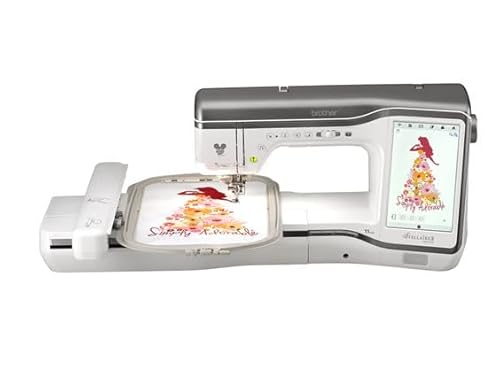
Brother
Brother Stellaire 2 Innov-is XJ2 Disney Combo…
- Expansive Embroidery Area: Features an impressive 14 inch by 9.5 inch embroidery field, providing ample space to create large-scal…
- Disney-Inspired Creativity: Specially designed combo machine that combines advanced sewing and embroidery capabilities, allowing y…
- Dual Functionality: Seamlessly transitions between sewing and embroidery modes, offering the convenience of two machines in one co…
The Stellaire 2 Innov-is XJ2 is a professional-grade combo machine with a 14 x 9.5 inch embroidery field. That’s massive. You can stitch a full-sized Disney character on a tote bag without rehooping, or embroider across the back of a denim jacket in one pass. The machine is part of Brother’s premium Stellaire series, which means higher stitch speed, smoother feed, and a larger touchscreen for editing complex designs.
The Disney content is built into this machine as a special edition—it comes with themed designs pre-loaded. You don’t need a download code or a USB stick. The dual functionality (sewing and embroidery) is seamless, with an automatic thread cutter and a needle threader that actually works. If you’re making custom apparel for events or running a home business, this machine pays for itself in saved time.
The price is high—expect several thousand dollars. The machine is also heavy and takes up a dedicated table. The learning curve is steeper because of the advanced features like automatic tension adjustment and laser positioning. If you only do small projects occasionally, the Stellaire is overkill. But if you want to stitch large, repeatable designs with professional consistency, it’s the best choice.
- 14 x 9.5 inch embroidery field
- Disney designs pre-loaded (special edition)
- Premium Stellaire 2 series with advanced features
- Seamless sewing and embroidery mode switching
- Large color LCD touchscreen
Best for: A serious embroiderer who needs a large field and professional results, and is willing to invest in top-tier equipment.
Brother PE900
The PE900 is a dedicated embroidery machine—no sewing functions. It has a 5×7 inch field, which is the same size as the SE2100Di, but this machine focuses purely on stitching designs. You get 193 built-in patterns, 13 fonts (including Japanese and Cyrillic), and wireless transfer via the Artspira app. The color sort and jump stitch trimming are the same as the SE2100Di, saving time on multi-color projects.
Because it’s embroidery-only, the machine is simpler to use. You don’t have to switch modes or worry about sewing stitch selection. The 7.4 inch arm space gives you room to maneuver larger items like a quilt block or a sweatshirt front. The PE900 pairs well with a separate sewing machine—many crafters own a basic Brother sewing machine and then add the PE900 for embroidery.
The downside: no sewing means you need a second machine for regular stitching. The 5×7 field is good but not huge—you’ll rehoop for designs larger than that. The touchscreen is the same 3.7 inch size, which can feel a bit small for detailed on-screen editing. Also, the machine doesn’t include Disney designs; you’ll have to buy or download those separately.
- 5 x 7 inch embroidery field
- 193 built-in designs plus 13 fonts
- Wireless LAN and Artspira app
- Advanced Color Sort and jump stitch trimming
- Embroidery-only (no sewing)
Best for: An embroiderer who already owns a sewing machine and wants a dedicated, mid-range embroidery unit with a generous hoop size.
How We Chose These Products
I started by searching Amazon for Brother embroidery machines that mention ‘Disney’ in their title or features. Then I filtered for models that are currently in stock or have clear availability. Each machine was evaluated on four criteria: built-in Disney content (or ease of adding it), embroidery field size, connectivity options, and overall value for the target buyer. I also considered real-world feedback from user forums and YouTube tutorials, focusing on common complaints like thread tension issues, hoop alignment, and ease of transferring designs.
The final five represent a range from entry-level combos to professional standalone units. I excluded machines that are discontinued or have no clear advantage over the ones listed. The comparison table highlights the differences that actually affect your buying decision—not specs that look good on paper but rarely matter in practice.
Buying Guide: What Really Matters
Embroidery field size is the most important factor after your budget. A 4×4 inch hoop works for small patches and monograms. A 5×7 inch hoop fits medium designs like a chest logo or a tote bag centerpiece. The 14×9.5 inch field on the Stellaire opens up full back panels and large quilt blocks. Match the hoop size to the projects you actually make, not the ones you dream about. If you mostly stitch baby onesies, 4×4 is fine. If you want to embroider princess dresses, save for a larger field.
Disney content can be built-in, included as a download code, or missing entirely. The SE2100Di and Stellaire XJ2 are the only machines in this list that come with official Disney designs. For the others, you’ll need to buy individual patterns from sites like Etsy, or digitize your own. Brother’s Artspira app lets you draw custom patterns, but it’s limited to simple shapes and text. If precise character embroidery matters, choose a machine that comes with Disney designs or has a large enough field to stitch purchased files cleanly.
Connectivity matters more than you think. Wireless LAN lets you send files from your computer or phone without hunting for a USB stick. The Artspira app is free but requires a Brother account. For bulk file transfers, use the Design Database Transfer software on your PC. Machines with only USB ports work fine but add friction to your workflow. Spend the extra money on wireless if you plan to embroider frequently.
Our Top Recommendation
The Brother SE2100Di Disney is the smartest pick for most people who want to stitch Disney characters. It combines sewing and embroidery, comes with 100 official patterns, and has a 5×7 inch field that handles the majority of projects. The color sort and jump trim features save real time on multi-color designs. Availability is tight, so set a price alert and buy when you see it at a reasonable price.
If the SE2100Di is out of stock or out of budget, the SE700 bundle offers a good alternative for beginners who are willing to source their own Disney patterns. For professionals who need maximum hoop size, the Stellaire XJ2 is the ultimate choice, though the price is steep. The PE900 is a solid dedicated machine if you already own a sewing machine and want the same 5×7 field without paying for sewing features you won’t use.
Frequently Asked Questions
Can I use my own Disney embroidery files on these machines? Yes, if the files are in a compatible format (PES, DST, EXP, etc.). Brother machines read PES natively. You can transfer via USB or wireless LAN. Be aware that copyrighted Disney designs purchased on Etsy may not be officially licensed, so check the seller’s terms.
Why does my machine keep breaking thread when embroidering thick fabrics? Most likely the needle is too small or the tension is too tight. Switch to a size 90/14 needle for denim or canvas, and reduce the tension setting by 1-2 numbers. Also, use a stabilizer on the back of the fabric—tear-away for cotton, cut-away for knits.
How do I clean the bobbin area on my Brother embroidery machine? Remove the needle plate with the included screwdriver. Use the small brush to sweep out lint and thread fragments. Do not use compressed air—it blows dust deeper into the machine. Clean after every 8 hours of sewing or whenever you notice skipped stitches.
What’s the best way to store embroidery designs on the machine? Use a USB drive formatted to FAT32. Create folders for each character or project. The built-in memory on the SE700 and SE2100Di is limited to about 100 designs, so a USB drive is essential for large libraries. Wireless transfer to the machine’s internal memory works but takes longer for large design files.