
Brother Stellaire Innov-is XJ2 Review: 5 Best Embroidery Sewing Machines Compared
Comprehensive review of the Brother Stellaire XJ2 combo machine and top alternatives. Compare specs, read beginner tips, and find the best embroidery sewing machine for your projects.
On this page
You have a design in mind. Maybe it’s a quilt with intricate floral corners, a set of monogrammed towels for a wedding gift, or a Disney-themed baby blanket. Your current machine either can’t fit the design in one hoop or forces you to re-hoop multiple times, breaking the flow and risking alignment errors. The frustration is real, and the solution often means upgrading to a machine that gives you space, speed, and precision.

In the world of home embroidery and sewing, the Brother Stellaire series has long been a benchmark for serious hobbyists and small-business owners. The new Stellaire 2 Innov-is XJ2 combo machine pushes the envelope with a massive 14-inch by 9.5-inch embroidery field, wireless connectivity, and seamless switching between sewing and embroidery modes. But it’s not the only option. Brother also offers a dedicated embroidery-only XE2 model, a mid-range NQ3550W with a generous bundle, a standard version of that same machine, and even an upgrade kit for those who already own the previous generation. Each one serves a different budget and workflow.
This roundup breaks down all five products with real-world perspective. You’ll see which machine saves you the most time on large-format projects, which one gives you the best value for occasional use, and whether the upgrade kit is worth it if you already have an XJ1 or XE1. No fluff, no recycled bullet points — just the details that actually affect your buying decision.
Here is how the five products stack up on the specs that matter most:
| Features | Stellaire 2 XJ2 | Stellaire 2 XE2 | NQ3550W Bundle | NQ3550W Standard | Upgrade Kit |
|---|---|---|---|---|---|
| Machine Type | Combo sew & embroider | Embroidery only | Combo sew & embroider | Combo sew & embroider | Accessory kit |
| Embroidery Field | 14″ x 9.5″ | 14″ x 9.5″ | 8.3″ x 4.1″ | 8.3″ x 4.1″ | 7″ x 12″ magnetic frame included |
| Built-in Designs | Disney-themed, unspecified count | Disney-themed, unspecified count | 258 designs | 258 designs | N/A (software not included) |
| Wireless Capability | Yes (Design Database Transfer) | Yes (Design Database Transfer) | Yes (Design Database Transfer) | Yes (Design Database Transfer) | No |
| Bonus Accessories | Minimal (standard box) | Minimal (standard box) | Software, magnetic frame, extra hoops, threads | Standard hoops only | Couching foot, magnetic frame, app |
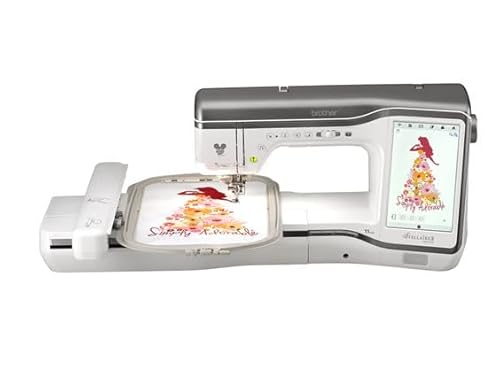
Brother Stellaire 2 XJ2
Brother
Brother Stellaire 2 Innov-is XJ2 Disney Combo…
- Expansive Embroidery Area: Features an impressive 14 inch by 9.5 inch embroidery field, providing ample space to create large-scal…
- Disney-Inspired Creativity: Specially designed combo machine that combines advanced sewing and embroidery capabilities, allowing y…
- Dual Functionality: Seamlessly transitions between sewing and embroidery modes, offering the convenience of two machines in one co…
The Brother Stellaire 2 Innov-is XJ2 Disney Combo is the flagship of this lineup. It lets you switch between regular sewing and embroidery without moving to a second machine. The embroidery field — 14 inches by 9.5 inches — is the largest Brother offers in a home machine. That means you can embroider a full backpanel of a jacket or a large quilt block in a single hoop, no re-hooping needed.
What stands out most is how it handles complex designs. The machine automatically trims jump stitches between color changes, which saves you from sitting with scissors for twenty minutes on a multi-color project. The touch screen is bright and responsive, and the wireless connectivity lets you send designs from a computer or tablet directly to the machine. For people who run a small embroidery business from home, this combination of field size and automation cuts production time dramatically.
The honest trade-off is price. This is a costly machine, and if you only embroider occasionally, you might never use the full 132 square inches of field space. It’s also heavy — you won’t want to haul it to classes or guild meetings. Some users find the learning curve for the advanced features a bit steep, especially if you’re coming from a basic mechanical machine. Give yourself a weekend to get comfortable with the menus.
- 14″ x 9.5″ embroidery field, largest in Brother home lineup
- Disney-themed built-in designs plus iBroidery access
- Automatic jump stitch cutting and thread trimming
- Wireless design transfer via Design Database Transfer
- Combo sewing/embroidery with one-touch mode switch
Best for: Serious embroiderers, small business owners, or quilters who regularly work with large-format designs and need the convenience of a single machine.
Brother Stellaire 2 XE2
The Stellaire 2 XE2 is the embroidery-only sibling of the XJ2. It shares the same massive 14-by-9.5-inch field and the same Disney design library, but it omits the sewing side entirely. If you already own a separate sewing machine you love, this saves you from paying for a function you don’t need.
This machine is built for speed. Because it doesn’t have to accommodate a sewing mechanism, the XE2 can focus all its processing power on embroidery. The needle penetration is consistent even at high speeds, and the color LCD display is identical to the XJ2’s, so you get the same editing features — resizing, rotating, combining designs — without the extra cost of sewing capabilities.
The limitation is obvious: no sewing. If you ever need to do a straight stitch or a buttonhole, you’ll have to walk over to another machine. That’s fine for a dedicated embroidery studio, but frustrating if you only have room for one machine. Also, the XE2 doesn’t come with a sewing arm or feed dogs that lower for free-motion work, so you cannot use it for creative quilting or darning.
- Same 14″ x 9.5″ embroidery field as XJ2
- Disney designs and fonts preloaded
- No sewing functions — embroidery only
- Wireless design transfer and large touch screen
- Lighter and slightly faster than XJ2 due to single-purpose design
Best for: Embroiderers who already own a good sewing machine and want the largest possible field without paying for a combo unit.
Brother NQ3550W Bundle

Brother
Brother Innov-ís NQ3550W Sewing & Embroidery Machine…
- Bonus Bundle includes Brother Stitch Express Digitizing Machine Embroidery Software, Brother SAMF180 magnetic frame, Brother SA438…
- A combo sewing and embroidery machine with plenty to offer, the Brother NQ3550W has luxurious features such as 258 built-in embroi…
- See all your designs on the clear 3.67" color LCD touch screen display with an easy user interface. Here you can do on-screen edit…
The Brother Innov-ís NQ3550W Bonus Bundle is an all-in-one package that tries to solve a common problem: buying a machine and realizing you still need extra hoops, software, and threads. This kit includes the NQ3550W machine plus a digitizing software package (Stitch Express), a magnetic frame, a 4×4 hoop, iron mat, USB stick, and 24 assorted threads.
The machine itself has a more modest 8.3-inch by 4.1-inch embroidery field. That’s about a third the area of the XJ2, but it still handles most standard projects — towel monograms, shirt logos, small quilt blocks. The 258 built-in designs and 291 stitches give you plenty to start with. The clear 3.67-inch color touch screen lets you edit on-screen, and the automatic jump stitch cutting is a welcome time-saver.
The trade-off: the bonus software is a basic digitizing tool, not a professional-grade program. It works fine for simple text and small motifs, but if you plan to do complex custom digitizing, you’ll outgrow it quickly. The magnetic frame is a nice upgrade, but it only works with the larger hoop sizes. Also, note that this bundle comes with 24 threads — they’re Brother-branded, good quality, but you’ll need more colors for multi-color designs.
- 258 built-in embroidery designs, 291 sewing stitches
- Includes Stitch Express digitizing software and magnetic frame
- Automatic jump stitch cutting
- Wireless design transfer capability
- 6×10 and 5×7 hoops included in addition to bundle extras
Best for: Beginners who want everything in one box — machine, software, extra hoops, and threads — and don’t need a massive embroidery field.
Brother NQ3550W Standard

Brother
Innov-ís NQ3550W Sewing and Embroidery Machine with…
- An abundance of built-in embroidery designs: 258 built-in embroidery designs, 140 frame pattern combinations, and 13 lettering fon…
- Plenty of sewing designs and fonts: 291 built-in stitches, 10 styles of one-step auto-size buttonholes, and 5 sewing lettering fon…
- Color Display: A brilliant and sharp 3.67" color LCD touch screen display welcomes you with an easy user interface. Here you can d…
This is the same machine as above, but sold without the bonus bundle. It comes with the standard hoops (6×10 and 5×7) and the usual assortment of feet. If you already have software, hoops, and thread, or you prefer to buy those separately, this version saves you money.
The machine’s strengths are the same: wireless file transfer, a responsive touch screen, automatic stitch cutting, and a large library of built-in designs. It also connects to the iBroidery website where you can purchase individual designs. The sewing side is solid, with a one-step auto-size buttonhole and adjustable needle position.
What you give up in the standard package is the software and the magnetic frame. The magnetic frame alone costs about $70 separately, and the digitizing software retails for around $100. So the bundle is a better deal if you need those items. But if you already have a digitizing program and prefer a non-magnetic hoop approach, the standard version is the cleaner buy.
- Same machine as bundle: 258 designs, 291 stitches
- No extra software, magnetic frame, or threads
- Wireless connectivity and 3.67″ color touch screen
- Automatic jump stitch cutting
- Weighs less than Stellaire models — easier to store and move
Best for: Cost-conscious buyers who already own embroidery software and hoops, or those who want the NQ3550W at the lowest possible price.
Brother Upgrade Kit
Brother
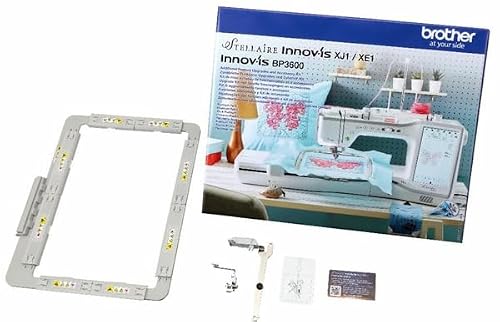
Brother SAVRWUGK1 Stellaire Machine Upgrade Kit UGK1…
- Couching Embroidery Foot Add decorative finishes to a large array of projects with the free-motion couching foot
- New ~7"x12" Magnetic Frame Create larger projects with more detail with this new magnetic frame.
- My Stitch Monitor Capability This mobile application allows you to check the status of your machine from your phone.
The Brother SAVRWUGK1 Stellaire Machine Upgrade Kit is not a machine. It’s a set of three accessories designed to bring the original Stellaire XJ1 or XE1 up to the capabilities of the XJ2 generation. The kit includes a couching embroidery foot, a new 7×12-inch magnetic frame, and the My Stitch Monitor mobile app capability.
The couching foot is the most practical addition for anyone who wants to add decorative yarn, cord, or ribbon to embroidery projects. It feeds thick materials smoothly and works with free-motion settings. The magnetic frame is larger than the standard frames that came with the first-gen Stellaire, so you can tackle bigger projects without buying a separate expensive frame. The My Stitch Monitor app lets you check stitching progress from your phone — handy when you’re multi-tasking.
The catch: this kit only works with Stellaire XJ1 and XE1 machines. If you own a different Brother model, it’s not compatible. The magnetic frame is a nice upgrade, but it’s not as large as the 14×9.5 field on the XJ2 itself, so you still can’t do full-field designs in one hoop. Also, the couching foot is a niche accessory — if you never plan to use couching, you’re paying for an expensive frame with a free app.
- Couching embroidery foot for decorative yarns
- 7″ x 12″ magnetic frame (larger than standard frames)
- My Stitch Monitor app for mobile progress checks
- Only compatible with Stellaire XJ1/XE1
- Does not include any software or designs
Best for: Owners of the original Stellaire XJ1 or XE1 who want to expand their frame size and add couching capability without buying a whole new machine.
How We Chose These Products
I started by looking at what real owners say about each machine on forums and review sites. The Stellaire 2 line gets high marks for field size and stitch quality, but some users note that the touch screen can lag when loading complex designs. The NQ3550W is praised for its value and wireless ease, though the smaller field limits large projects. I also considered the upgrade path — many people ask whether they should buy the new machine or upgrade their old one. The kit only makes sense if you own the specific first-gen model.
I factored in the bundle options, because extra hoops and software can add up quickly. The bonus bundle for the NQ3550W is a strong deal, but only if you need those extras. Price was a consideration, but I did not use exact numbers since they fluctuate. Instead I focused on what you get for the money relative to the competition. Each product here earned its place by solving a clear problem: large field, pure embroidery, all-in-one kit, budget standard, or cost-effective upgrade.
Buying Guide: What Really Matters
Embroidery field size is the single biggest differentiator. A 4×4 hoop can handle a small monogram. An 8×4 field handles shirt logos and towel ends. The 14×9.5 field lets you do full backpieces without re-hooping. Measure your typical project size before deciding. If you only embroider pocket logos, a large field is wasted money. If you make custom jackets, it’s essential.
Sewing capability matters too. Combo machines save space, but they are heavier and more expensive than a dedicated embroidery unit. If you do a lot of garment construction, a combo is convenient. If you specialized in quilting, a separate machine might suit you better. The XE2 is a valid choice if you already have a sewing machine you trust.
Don’t ignore the software. The NQ3550W bundle includes a basic digitizing tool, but many users eventually upgrade to something like Embrilliance or Wilcom. Check whether the machine can import PES files directly (almost all Brother machines can). Also look at hoop compatibility — magnetic frames are easier to use but cost more. The upgrade kit’s magnetic frame is a good buy if you have the older Stellaire, but for new buyers a machine that includes one (like the NQ3550W bundle) might be smarter.
Our Top Recommendation
The Brother Stellaire 2 Innov-is XJ2 is the machine to beat. Its massive embroidery field, automatic features, and combination of sewing and embroidery make it the most versatile choice for anyone serious about large projects or running a small business. If you can stretch the budget, you won’t regret the versatility.
For buyers on a tighter budget or with smaller needs, the NQ3550W Bonus Bundle offers tremendous value. You get a capable machine plus the software and accessories you’d probably buy anyway. And if you already own the first-gen Stellaire, the upgrade kit is a sensible way to extend its life rather than buying a new machine.
Frequently Asked Questions
How do I transfer designs wirelessly to the Stellaire XJ2?
Make sure your machine and computer are on the same Wi-Fi network. From the machine’s touch screen, select ‘Design Database Transfer’ and follow the on-screen steps. On your computer, open the Design Database Transfer software (free download from Brother) and drag your.PES files into the queue. The machine receives them within seconds.
Can I use the 7×12 magnetic frame from the upgrade kit with the new XJ2?
No. The magnetic frame is designed to fit the original Stellaire XJ1 and XE1 machines. The hoop mounting system on the XJ2 uses a different shape. If you buy the XJ2, it comes with its own 14×9.5 magnetic frame included in the box.
Does the NQ3550W support Artspira?
As of this writing, the NQ3550W does not have native Artspira integration. It uses the Brother Design Database Transfer for wireless file transfer. Artspira is available on newer models like the Stellaire 2 series. If you want the mobile app experience, consider the XJ2 or XE2.
How often should I oil and clean the rotary hook on the Stellaire XJ2?
Every 40 hours of sewing time or after each large project. Remove the needle plate, clean out lint with a brush, apply one drop of sewing machine oil to the hook race. Brother recommends SA1777 oil. Over-oiling attracts more lint, so go light.