You bought a plain canvas tote bag at a craft fair, and four hours later it’s still sitting in your closet because you wanted to add something personal. Or maybe you’ve been eyeing those monogrammed towels online but can’t justify the price tag. This is where a home embroidery machine steps in — not just as a tool, but as a way to turn ordinary items into something that’s genuinely yours.

The best machines for home use balance ease of learning with enough flexibility to grow with you. Some focus purely on embroidery; others combine it with sewing. Key differentiators include hoop size (determines how large a design you can stitch in one go), built-in designs and fonts, screen quality for editing, and connectivity options for transferring your own files. A beginner-friendly interface matters more than raw speed for most people starting out.
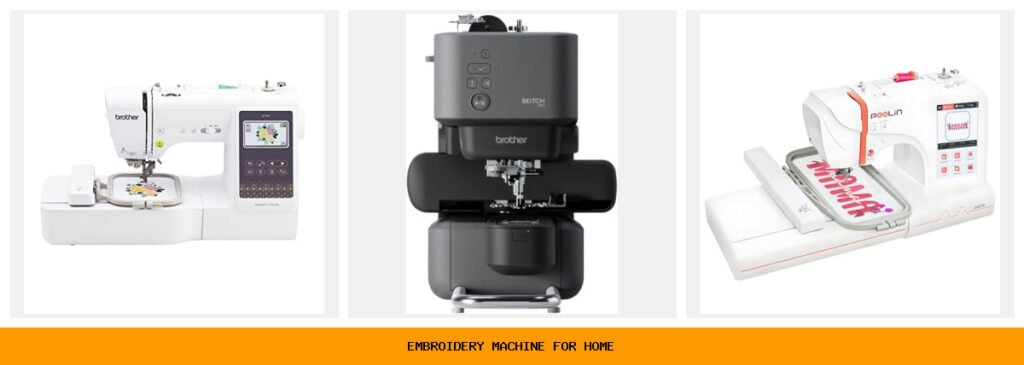
I reviewed five models that cover a wide range of budgets and needs. The Brother SE700 (both standard and bundle versions) works well if you want a sewing-embroidery combo. The Brother Skitch is a dedicated embroidery machine that’s almost toy-sized but surprisingly capable. Poolin’s EOC05 and EOC07 offer larger embroidery areas at lower prices, making them strong contenders for home businesses. Below you’ll find a quick comparison, then deeper looks at each machine, plus a buying guide and FAQ to help you decide.
Here is how the key specs stack up side by side:
| Features | Brother SE700 | Brother Skitch | Poolin EOC05 | Poolin EOC07 | Brother SE700 Bundle |
|---|---|---|---|---|---|
| Machine Type | Sewing + embroidery combo | Embroidery only | Embroidery only | Embroidery only | Sewing + embroidery combo |
| Embroidery Area | 4″ x 4″ | 4″ x 4″ | 4″ x 9.25″ | 7.9″ x 15″ (max) | 4″ x 4″ |
| Screen Size | 3.7″ color touchscreen | None (uses app) | 7″ color touchscreen | 7″ color touchscreen | 3.7″ color touchscreen |
| Connectivity | Wireless LAN, USB | Bluetooth (Artspira) | USB, Wi-Fi (Institch) | Wi-Fi, USB | Wireless LAN, USB |
| Ideal User | Beginners wanting sewing + embroidery | Minimalists, app lovers | Home DIY, large designs | Small business, big projects | Beginners with accessories |
Brother SE700 Combo

Brother
Brother SE700 Sewing and Embroidery Machine, Wireless…
- Sewing and Embroidery in One: The SE700 Brother sewing and embroidery machine is the ideal machine to start your sewing and embroi…
- Wireless Lan Enabled: Transmit embroidery files from your PC to your embroidery sewing machine via the free downloadable software…
- Artspira Mobile App for Customization: Make custom embroidery patterns by drawing on your mobile device, or download patterns from…
The Brother SE700 is a computerized sewing and embroidery combo machine that feels like a natural starting point for someone who wants both functions in one unit. It’s not the biggest or the fastest, but it does nearly everything a home crafter realistically needs. With 135 built-in embroidery designs and 103 sewing stitches, you can jump into either activity right out of the box without buying extra patterns.
What stands out most is the wireless LAN connectivity. You can send designs from your computer to the machine using Brother’s Design Database Transfer software, or use the Artspira mobile app to draw custom patterns on your phone and transfer them over Wi-Fi. The 3.7-inch color touchscreen lets you preview and edit designs before stitching, which saves thread and frustration. For a beginner, this kind of integrated workflow is a huge time-saver.
The 4″ x 4″ hoop area is the main trade-off. It’s fine for hats, small patches, and shirt pockets, but you cannot stitch a full back-of-jacket design in one pass. You’ll need to re-hoop and realign the fabric for larger pieces — a chore that gets old fast. Also, while the sewing side is solid for basic mending and garment construction, it doesn’t replace a heavy-duty sewing machine for thick fabrics like denim or leather. Stick with this machine if small projects are your focus and you want an all-in-one solution.
- 135 built-in embroidery designs and 103 sewing stitches
- Wireless LAN and USB file transfer
- 3.7-inch LCD color touchscreen with on-screen editing
- Includes 8 sewing feet and embroidery arm
- 4″ x 4″ hoop with included frame
Best for: Hobbyists who want one machine to sew and embroider small projects like towels, bags, and shirt fronts.
Brother Skitch Single-Needle

Brother
Brother Skitch Single-Needle Embroidery Machine Bluetooth
- ARTSPIRA CONNECTION: Draw your next embroidery project on the free and required Artspira(1) App and get ready to add a dash of you…
- NOW THERE IS EMBROIDERY FOR EVERYONE: New to embroidery The Skitch Embroidery Machine is a great way to start your embroidery jour…
- IMPORT YOUR OWN EMBROIDERY FILES: Users of the unpaid version of Artspira are able to import any PES, PHC, PHX, or DST embroidery…
The Brother Skitch (PP1) is a single-needle embroidery-only machine that rethinks the entire experience. There is no built-in screen — everything happens through the Artspira app on your phone or tablet. You draw or select a design in the app, then send it via Bluetooth to the machine. It’s a small, lightweight unit that sits on a tabletop without taking over your space.
This machine is all about lowering the barrier to entry. The app is free to use and lets you import PES, PHC, PHX, or DST embroidery files — so you aren’t locked into Brother’s ecosystem. You can store up to 20 designs in Artspira and swap them freely. The 4″ x 4″ area fits most common items, and the 400 stitches-per-minute speed is adequate for casual projects. For someone who already owns a sewing machine and only needs embroidery, this is a clean, affordable option.
But it has real limits. No screen means you depend entirely on your phone or tablet, and the machine pauses if the Bluetooth connection drops during a long stitch-out. The single needle requires manual thread color changes for multi-color designs, which adds time. And the hoop is the smallest on this list — you will be re-hooping a lot. This machine is not for someone planning to run a business or do large, consistent batches of embroidery. It’s for the person who wants to try embroidery without committing to a big, expensive machine.
- Single-needle embroidery machine, works only with Artspira app
- Bluetooth connection to phone or tablet
- Imports PES, PHC, PHX, DST files
- 4″ x 4″ embroidery area, 400 spm
- Small footprint — fits in a tight craft corner
Best for: First-time embroiderers who already own a sewing machine and want the simplest possible start.
Poolin EOC05 for Beginners

Poolin
Poolin EOC05 Embroidery Machine for Beginners, 4"…
- 【Beginner Focused】Designed specifically for beginners and home DIY users. Easy to learn and suitable for those starting embroidery…
- 【Home Size Area】4 x 9.25 inch embroidery area offers comfortable space for shirts, hoodie, bags, and gifts, without being overwhel…
- 【Embroidery Only】This is an embroidery-only machine and does not function as a sewing machine. A focused design that helps beginne…
The Poolin EOC05 is an embroidery-only machine built from the ground up for home DIY users who have never embroidered before. Its standout feature is the 4″ x 9.25″ embroidery area — that’s more than twice the length of the Brother 4″ x 4″ hoops. You can stitch a full pocket design on a hoodie or a long name on a towel without repositioning the fabric.
It runs on Institch OS2, an operating system that guides you through every step with clear prompts on the 7-inch color touchscreen. The large display shows design previews, stitch progress, and simple menus that don’t overwhelm. For absolute beginners, this removes the most intimidating part of learning embroidery: figuring out the machine’s settings. The EOC05 also keeps things focused — no sewing functions, no app dependencies, no extra clutter.
The downside is that this machine is new to the market and doesn’t have the large community or third-party support that Brother machines enjoy. Replacement parts and accessories are harder to find. Also, while the 4″ x 9.25″ area is generous for home projects, it’s not enough for full back-of-jacket designs (for that, you’d need the EOC07). And the built-in design library is limited compared to what Brother offers. But if you are buying strictly for home use — shirts, bags, towels, baby items — the EOC05 delivers excellent value for the price.
- 4″ x 9.25″ embroidery area — largest in its price class
- 7-inch color touchscreen with Institch OS2
- Embroidery-only, no sewing functions
- USB and Wi-Fi file transfer
- Beginner-focused interface with step-by-step guidance
Best for: Home DIYers who want a larger embroidery area than Brother offers, without the complexity of a sewing machine combo.
Poolin EOC07 Large Area
The Poolin EOC07 takes everything the EOC05 does and scales it up significantly. Its maximum embroidery area is 7.9″ x 15″ — that’s big enough to stitch a design across the back of a jacket or the full front of a hoodie in one hoop. It comes with four hoops: two 5.5″ x 5.5″, one 7.9″ x 7.9″, and one 7.9″ x 11″. That variety lets you pick the right hoop for each project, reducing fabric waste and re-hooping time.
This machine is clearly aimed at side businesses and small commercial operations. The Institch OS3 system includes a built-in cost calculator so you can estimate materials and pricing per design. It also supports Wi-Fi design transfer through the Institch website, plus doodle embroidery software for creating original patterns. For someone turning embroidery into a revenue stream — custom patches, team uniforms, personalized gifts — the EOC07 offers a production-friendly workflow without the price tag of a industrial machine.
The trade-off is size and complexity. This is a large unit that needs a dedicated table. The learning curve is a bit steeper than the EOC05 because there are more settings and hoops to manage. And while Poolin provides engineering support, the company’s service infrastructure isn’t as robust as Brother’s. If you just need occasional home embroidery, the EOC07 is probably overkill. But if you’re serious about making money with embroidery, it’s arguably the best value on this list.
- Max embroidery area 7.9″ x 15″, includes 4 hoops
- 200 built-in designs, plus Wi-Fi transfer
- 7-inch color touchscreen with Institch OS3
- Cost calculator and doodle software included
- Starter accessories in the box (additional hoops, bobbins, etc.)
Best for: Home-based entrepreneurs ready to scale from hobby to small business with large-format embroidery.
Brother SE700 Bundle

Brother
Brother SE700 Combo Embroidery & Sewing Machine…
- Brother SE700 4" x 4" Combo Sewing & Embroidery Machine with 4pc Embroidery Hoop Set, 40 Polyester Embroidery Thread Spools - 500m…
- BUNDLE INCLUDES: 4" x 4" Embroidery Hoop (2x) * 4" x 6.75" Embroidery Hoop * 1" x 2.5" Embroidery Hoop * 40 Polyester Embroidery T…
- BUNDLE INCLUDES: Zigzag foot “J” (on machine) * Monogramming foot “N” * Overcasting foot “G” * Zipper foot “I” * Blind stitch foot…
This is the same Brother SE700 machine as the first pick, but packaged with a substantial accessory bundle. You get four additional hoops (including a 4″ x 6.75″ and a 1″ x 2.5″ hoop for small items), 40 spools of polyester embroidery thread (500 meters each), and all the standard sewing feet and notions. The bundle also includes a set of 500 design cards in SVG and JPG formats with commercial use rights.
For someone starting from scratch, this bundle removes the need to buy thread, hoops, or extra designs for months. The extra hoops alone are worth considering — the standard SE700 only comes with one 4″ x 4″ hoop. Having the 4″ x 6.75″ hoop lets you do slightly larger designs, and the tiny 1″ x 2.5″ hoop is perfect for monogramming collars or hat brims. The thread collection covers a wide color range, so you can start stitching multi-color projects immediately.
The main limitation is the same as the standard SE700: the 4″ x 4″ area is small for ambitious projects. Also, some of the included accessories (scissors, seam ripper) are basic quality — functional but nothing special. The 500 design cards are digital files that need to be transferred to the machine, which takes time. Still, if you know you want the SE700 and plan to use it regularly, the bundle saves you the hassle of gathering parts separately. Check the current price on Amazon — the bundle often costs only a little more than the machine alone.
- Same SE700 machine plus 4-hoop set and 40 thread spools
- Includes 500 design cards with commercial use license
- Extra hoops: 4″ x 6.75″, 1″ x 2.5″, plus two 4″ x 4″
- Full accessory kit: feet, bobbins, tools
- All standard SE700 features: touchscreen, Wi-Fi, 135 designs
Best for: Newbies who want a turnkey setup with thread and hoops included, and intend to work within a 4″ x 4″ area.
How We Chose These Products
I started by looking at what real home embroiderers actually buy and keep using, not just what gets marketed heavily. The five machines here span a range of prices and capabilities, but every one has a clear purpose and a solid user base. I prioritized machines that are currently in stock and supported by the manufacturer — nothing that’s been discontinued or relies on obsolete software.
I evaluated each machine on three core criteria: ease of learning for a complete beginner, size and flexibility of the embroidery area, and quality of the software or interface. A machine with a great stitch-out that frustrates users with a confusing menu won’t get used. I also considered connectivity options because transferring your own designs is where the real value lies. Finally, I checked for any known reliability issues by scanning owner forums and long-term reviews. Machines that scored well for both initial experience and long-term durability made the cut.
Buying Guide: What Really Matters
The biggest mistake new buyers make is buying a machine with too small a hoop. A 4″ x 4″ area is fine for hats and patches, but you will quickly want to do larger projects like hoodie backs or tote bags. Measure the largest item you plan to embroider, then buy a machine whose hoop can handle it. Re-hooping to stitch a large design in sections is possible but frustrating — it’s worth spending a bit more to get a bigger hoop from the start.
Another factor that gets overlooked is the digitizing software. Most machines come with basic software that lets you resize and combine built-in designs. If you want to create original artwork or convert images to stitch files, you’ll need third-party digitizing software (like Embrilliance or Hatch). Before committing to a machine, check what file formats it accepts and whether the bundled software does what you need. Brother machines use PES format, which has broad third-party support. Poolin machines use DSB and DST, which are also common.
Finally, consider the cost of consumables. Thread, bobbins, needles, and stabilizer add up over time. A machine that uses standard size bobbins and class 15 needles is cheaper to maintain than one with proprietary parts. All the machines on this list use common sizes, so you won’t be locked into expensive brand-name supplies. But the Skitch’s reliance on an active Bluetooth connection is a quirk — make sure your phone or tablet can stay paired for a full stitch-out.
Our Top Recommendation
For most home users, the Poolin EOC05 offers the best balance of cost, ease of use, and embroidery area size. The 4″ x 9.25″ hoop covers 80% of common home projects without needing to re-hoop, the 7-inch touchscreen makes navigation a breeze, and the Institch OS2 operating system is genuinely beginner-friendly. It outshines the Brother SE700 for pure embroidery work because of the larger hoop and simpler interface — unless you specifically need the sewing functions.
If you need a sewing-embroiery combo, the Brother SE700 bundle is the runner-up. You get a proven machine with a strong support network, and the extra hoops and thread in the bundle make it a practical starter kit. For those wanting to start a small business, the Poolin EOC07 is the clear winner — its 15-inch area and cost calculator are built for production, not just hobby projects. And the Brother Skitch is a smart pick if you’re dead certain you only want embroidery and you love working from your phone.
Frequently Asked Questions
Can I use a home embroidery machine on thick fabrics like denim or canvas?
Yes, but you need a strong needle (size 14 or 16) and a stabilizer designed for heavyweight fabrics. Most home machines can handle one or two layers of denim, but multiple layers (like a jean seam) may stall the machine. The Poolin EOC07 has the most power on this list, but all of them are limited compared to industrial machines. For regular thick-fabric projects, a dedicated heavy-duty sewing machine is a better investment.
How do I transfer my own designs to these machines?
All five machines accept USB drives, and most support wireless transfer. Brother machines use the free Design Database Transfer software (PC) or the Artspira app (mobile). Poolin machines use the Institch website or a direct USB connection. The Skitch only works via Bluetooth through Artspira. Your design must be in a compatible format — PES for Brother, DST or DSB for Poolin. You can convert files using free software like InkStitch or paid digitizing programs.
What hoop size do I need for a full back-of-jacket design?
For a typical adult jacket back (around 10″ x 12″), you need at least a 6″ x 10″ hoop. The Poolin EOC07 with its 7.9″ x 11″ hoop can handle it in one pass. The other machines on this list are too small — you would have to split the design into multiple hoops, which is tricky and often leaves visible gaps. If jacket backs are your goal, the EOC07 is your only option among these five.
Do I need a separate sewing machine if I buy an embroidery-only machine?
Yes. An embroidery-only machine cannot sew seams, buttonholes, or hems. If you plan to make garments from scratch, you’ll need a sewing machine in addition to the embroidery machine. That’s why the Brother SE700 combo is popular — it does both. But if you already own a sewing machine, an embroidery-only model like the Skitch or Poolin EOC05 saves money and desk space.
For more expert recommendations, see Good Housekeeping’s guide to the best embroidery machines of 2026 and Crafted Blog’s detailed home embroidery machine reviews.