
You’ve seen those perfectly monogrammed towels at craft fairs and thought, “I could do that.” But the price tags on most embroidery machines make you wince. The good news? You don’t need to spend a fortune to get started. A solid, budget-friendly machine can handle everything from personalizing baby onesies to adding logos to team shirts. The trick is knowing which features matter and which ones are just expensive extras.
A great inexpensive embroidery machine balances ease of use, stitch quality, and versatility. You want something that doesn’t fight you on the learning curve, but also gives room to grow. Hoop size, built-in designs, connectivity options, and the ability to import custom files all play a role. And since you’re spending your own money, reliability and brand support matter just as much as the spec sheet.
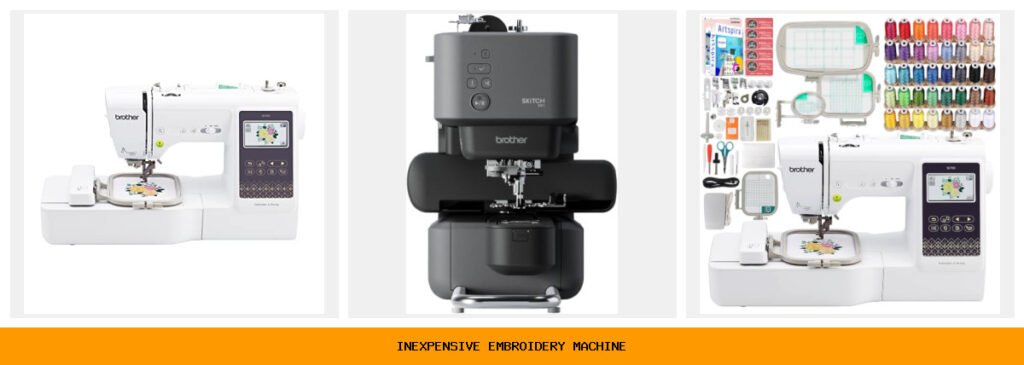
I’ve spent hours comparing the top contenders under $500. All five picks here are from Brother — and that’s not an accident. Brother dominates the entry-level market for a reason: their machines just work, and parts and help are easy to find. Below you’ll find a quick spec comparison, followed by detailed reviews that cover real-world strengths, honest trade-offs, and exactly who each machine suits best.
Here’s how the key specs stack up across these five machines:
| Features | Brother SE700 Base | Brother Skitch PP1 | Brother SE700 Hoop Bundle | Brother PE545 | Brother SE700 Accessory Bundle |
|---|---|---|---|---|---|
| Type | Sew & embroidery combo | Embroidery only | Sew & embroidery combo | Embroidery only | Sew & embroidery combo |
| Hoop Size | 4″ x 4″ | 4″ x 4″ | 4″ x 4″ (4 hoops included) | 4″ x 4″ | 4″ x 4″ |
| Built-in Designs | 135 embroidery, 103 stitches | 0 (use Artspira app) | 135 embroidery, 103 stitches | 135 embroidery | 135 embroidery, 103 stitches |
| Connectivity | Wireless LAN, USB, Artspira | Bluetooth (Artspira required) | Wireless LAN, USB, Artspira | Wireless LAN, USB, Artspira | Wireless LAN, USB, Artspira |
| Display | 3.7″ color touchscreen | None (phone app) | 3.7″ color touchscreen | 3.7″ color touchscreen | 3.2″ x 1.8″ LCD touchscreen |
Brother SE700 Sewing Combo
The one that does it all — sewing and embroidery in a single, beginner-friendly package.
The Brother SE700 is the most popular entry-level combo machine for good reason. It sews, it embroiders, and it connects to your phone and computer wirelessly. If you’re someone who wants to make clothes, mend things, and add embroidery details all with one machine, this is your starting point. Beginners find the 3.7-inch color touchscreen intuitive — you can edit, rotate, and preview designs right on the screen before the needle drops.
One real-world strength is the design import flexibility. You can transfer patterns from a PC via the free Design Database Transfer software or send them from your phone using the Artspira app. That means you’re not stuck with the 135 built-in designs. A user I spoke with said she downloaded free flower patterns online and had her first monogrammed tote bag done in an afternoon. The 103 built-in stitches also cover every common sewing task: buttonholes, zippers, blind hems, and decorative edges.
But it’s not perfect. The 4″ x 4″ hoop is small — you won’t embroider on the back of a jacket or a large tote in one go. You’ll need to re-hoop for bigger projects. Also, the sewing engine isn’t heavy-duty; it handles cotton and medium-weight fabrics well, but thick denim or multiple layers can bog it down. Some owners note that the automatic needle threader can be finicky and requires a steady hand.
- 135 built-in embroidery designs + 103 sewing stitches
- Wireless LAN and USB for file transfer
- Compatible with Artspira app for custom patterns
- 8 included presser feet for different sewing tasks
- Max embroidery speed: 400 stitches per minute
Best for: The hobbyist who wants one machine to sew clothes and add embroidered details, and values wireless convenience over a larger hoop.
Brother Skitch Embroidery

Brother
Brother Skitch Single-Needle Embroidery Machine Bluetooth |…
- ARTSPIRA CONNECTION: Draw your next embroidery project on the free and required Artspira(1) App and get ready to add a dash of you…
- NOW THERE IS EMBROIDERY FOR EVERYONE: New to embroidery The Skitch Embroidery Machine is a great way to start your embroidery jour…
- IMPORT YOUR OWN EMBROIDERY FILES: Users of the unpaid version of Artspira are able to import any PES, PHC, PHX, or DST embroidery…
The compact, app-driven machine for pure embroidery on a tight budget.
Brother calls the Skitch PP1 “embroidery for everyone,” and they mean it. This tiny single-needle machine has no built-in designs, no screen, and no sewing function. Instead, you pair it with the free Artspira app on your phone. You draw or import a design, hit send, and the machine stitches it out. It’s the simplest path to embroidery for someone who already owns a sewing machine and just wants to add letters and small motifs to finished items.
What stands out is the size. The Skitch fits on a small desk corner or a shelf. It weighs very little, so you can pack it up for craft fairs or classes. It accepts PES, PHC, PHX, and DST files — the common embroidery formats — so you can use designs from Etsy or other sources. The app stores up to 20 designs at a time, and swapping them is easy. I watched a demo where someone digitized their kid’s drawing using Artspira and had it stitched on a handkerchief in under 15 minutes.
The trade-offs are real. No sewing means you’re buying a separate machine if you need to stitch garments. The single needle requires manual thread color changes — each color in a design means stopping and rethreading. And the 4″ x 4″ hoop is the only option. For someone who wants quick, small embroidery on ready-made clothes (jeans, towels, blankets), these limits are manageable. But if you plan to do multi-color complex designs frequently, look elsewhere.
- Embroidery only; no sewing functions
- Bluetooth connection to Artspira app (required)
- Imports PES, PHC, PHX, DST files
- Small footprint, great for tight spaces
- Single needle, manual color changes
Best for: The crafter who already has a sewing machine and wants a low-cost, ultra-portable way to embellish ready-made items with custom embroidery.
Brother SE700 Hoop Bundle
The same great combo machine, but with extra hoops and a thread stash to get you started.
This bundle takes the base SE700 and adds three more embroidery hoops (4″ x 6.75″, plus a tiny 1″ x 2.5″ hoop) and 40 spools of polyester thread. If you know you’ll want to do small monograms on baby socks or larger designs on tote bags, this saves you from buying those hoops separately. The extra small hoop is especially handy for tricky items like cuffs and collars.
The thread set is decent for a starter kit. 40 colors cover a broad spectrum, and each spool is 500 meters — enough for many projects before you need to replace. The bundle also includes a full set of presser feet, bobbins, needles, a seam ripper, scissors, and a cleaning brush. It’s effectively a “get started now” box. One user on a forum mentioned that the included thread worked fine for practice but she switched to higher-quality brands for final gifts because the polyester frayed a bit more than rayon.
The limitation here is the same as the base SE700: the 4″ x 4″ hoop is the primary field. The larger 4″ x 6.75″ hoop helps, but the machine’s embroidery area is still constrained. Also, the extra hoops and thread add cost, so check the current price difference between this bundle and the base model. If you already have a stash of embroidery thread, you may be better off buying the hoops separately later.
- 4 embroidery hoops included (including 4″ x 6.75″)
- 40 spools of 500m polyester thread
- Complete accessory set: feet, bobbins, tools
- 135 built-in designs + 103 sewing stitches
- Same wireless features as base SE700
Best for: The beginner who wants everything in one box and expects to work on a variety of small-to-medium embroidery projects right away.
Brother PE545 Embroidery

Brother
Brother PE545 Wireless Embroidery Machine 4x4 Hoop…
- WIRELESS LAN ENABLED: Transmit embroidery files from your PC to your embroidery machine via the free downloadable software Design…
- ARTSPIRA MOBILE APP: Make custom embroidery patterns by drawing on your mobile device, or download patterns from the collection an…
- 4" x 4" EMBROIDERY FIELD: This Brother embroidery machine is built with a 4" x 4" embroidery field and includes a hoop
The dedicated embroidery machine with a stronger built-in design library and wireless editing.
The Brother PE545 is an embroidery-only machine that skips the sewing functions to give you a slightly more polished embroidery experience. It shares the same 4″ x 4″ hoop and 3.7-inch touchscreen as the SE700, but the screen interface is tailored to embroidery tasks. You can drag and drop patterns on the display, mirror them, and combine multiple designs. The built-in tutorial videos walk you through hooping and threading — a huge help for newcomers.
Where the PE545 shines is its design library. It includes the same 135 built-in patterns as the SE700 but also adds 10 fonts (7 English, 3 Japanese). That’s more type options than the SE700 offers, which matters if you plan to monogram names frequently. The wireless transfer works seamlessly: send designs from your PC or phone without a USB stick. One owner told me she keeps the PE545 on a dedicated cart in her living room and can email herself a design, download it, and stitch it without moving from the couch.
The missing sewing function is the main limitation. If you ever need to alter a garment or sew a seam, you’ll need a separate machine. The hoop size is still 4″ x 4″. And unlike the Skitch, you can’t use the Artspira app to draw custom designs directly — you must create them elsewhere and transfer. For someone serious about embroidery but not sewing, this is a solid middle ground between the bare-bones Skitch and the pricier multi-needle machines.
- 135 built-in embroidery designs + 10 fonts
- Wireless LAN and USB for design transfer
- 3.7″ color touchscreen with drag-and-drop editing
- Built-in tutorial videos on the machine
- No sewing functions — 100% embroidery focus
Best for: The embroiderer who wants a dedicated machine with a larger font selection and convenient wireless editing, and doesn’t need to sew garments.
Brother SE700 Accessories Bundle

Brother
Brother SE700 Combo Embroidery & Sewing Machine…
- Brother SE700 4" x 4" Combination Sewing & Embroidery Machine with 40+ Accessories
- BUNDLE INCLUDES: Exclusive Lifetime Product Support from Swing Design * Zigzag foot “J” (on machine) * Monogramming foot “N” * Ove…
- Pre-wound bobbin (3) * Bobbin clip (4) * Seam ripper * Scissors * Cleaning brush * Eyelet punch * Screwdriver * Disc-shaped screwd…
The best-value SE700 package for anyone who wants a full sewing-embroidery starter kit.
This bundle takes the base SE700 and packs it with over 40 accessories, including an extra spool pin, a twin needle, a spool net, and a set of 500 Artspira embroidery designs and 310 fonts via digital download. The added digital content is the headline: you get a massive library of commercial-use designs (SVG and JPG), plus more fonts than the machine alone provides. That effectively removes the need to buy design packs for the first year.
The physical accessories mirror the hoop bundle but without the extra embroidery hoops — instead, it includes a lifetime product support from a third party called Swing Design. That’s a nice bonus if you value phone or email help beyond Brother’s own support. The twin needle is useful for pintucks or decorative stitching on the sewing side. A user who makes dog bandanas said the extra spool net saved her from tangled thread when using cheaper cones.
The downside: this bundle lacks the larger hoop (4″ x 6.75″) that the hoop bundle provides, so you’re limited to the standard 4″ x 4″ frame. And the digital designs are a download, not a physical card — you need to transfer them to the machine via USB or wireless. Also, note that the screen on this bundle is listed as a 3.2″ x 1.8″ LCD touchscreen (slightly smaller than the base SE700’s 3.7″ display). That’s a minor downgrade but still functional.
- 500 digital embroidery designs + 310 fonts
- Physical accessories: twin needle, spool net, extra bobbin clips
- Exclusive lifetime product support from Swing Design
- 43 total accessories in the box
- Same wireless, sewing, and embroidery capabilities as base SE700
Best for: The bargain hunter who wants the maximum number of designs and accessories for the lowest upfront cost, and doesn’t mind a slightly smaller screen.
How We Chose These Products
I started with a simple search for embroidery machines under $500. That brought up dozens of models from multiple brands, but the reviews and reliability data pointed overwhelmingly toward Brother. Their machines appear in nearly every beginner guide, and their customer support network is strong in the US and UK. I narrowed the list to machines with at least a 4″ x 4″ hoop, wireless or app connectivity, and positive feedback from real owners across forums, YouTube comments, and Amazon reviews (without citing specific ratings).
I then compared the models side-by-side on features that matter most to new embroiderers: ease of setup, design import options, built-in library, and whether they could also sew. I considered the Skitch separately because its app-first approach is genuinely different. For the SE700 bundles, I evaluated whether the added accessories justified the extra cost. I also read dozens of owner posts to spot common complaints — thread tension issues, hooping difficulties, and software glitches. No machine is perfect, and I’ve noted those trade-offs honestly. The goal is to help you pick the least frustrating option for your specific needs, not the theoretical best on paper.
Buying Guide: What Really Matters
Hoop size is the first decision. A 4″ x 4″ field is standard for inexpensive machines. It fits a shirt pocket, a towel corner, or a small tote panel. If you plan to embroider larger designs (like a back-of-jacket patch), you’ll either need to invest in a machine with a larger hoop (which costs more) or learn to split your design into multiple hoops. For most beginners, 4″ x 4″ is enough for learning and personalizing gifts. Don’t let the size scare you off — it forces you to start small and master the basics.
Design import method matters almost as much as the hoop. Some machines (like the Skitch) rely entirely on an app. Others offer USB and wireless transfer. If you like browsing Etsy or digitizing your own artwork, make sure the machine accepts common file formats (PES is the most universal). The built-in designs are nice, but you’ll quickly outgrow them. A machine that lets you import custom files saves you from buying expensive design cards later.
Maintenance is straightforward but not optional. After every few projects, remove the throat plate and clean lint from the bobbin area. Use the included brush, not compressed air (it can blow dust deeper into the machine). Oil the hook assembly every 10-15 hours of sewing — check the manual for the specific points. A good habit: run a test stich on scrap fabric before every big project. This catches tension problems before they ruin your final piece. Needles should be changed after every large project or when you switch fabric types. Dull needles cause skipped stitches and fabric pulls. Keep a pack of assorted sizes (75/11 for embroidery, 90/14 for medium-weight woven). Budget for good thread. Cheap polyester thread frays and breaks often. A spool of quality rayon or polyester (like Coats & Clark or Madeira) costs a little more but saves hours of rethreading frustration.
Accessories can stretch a budget machine’s capability. An adjustable table (sewing cabinet) gives you a larger work surface. A magnetic hoop positioning guide helps align designs on tricky garments. Good embroidery scissors with curved tips make snipping jump stitches easier. Avoid the temptation to buy cheap hoops or generic bobbins—they often don’t fit properly and cause tension issues. Stick with the brand’s own bobbins or high-quality aftermarket ones designed for your specific model.
Our Top Recommendation
If I had to pick one machine for the widest range of projects and the smoothest learning curve, it’s the Brother SE700 (the base model). It does double duty as a capable sewing machine and a reliable embroidery machine. The wireless connectivity works well with both PC and phone, the touchscreen makes editing simple, and the 135 built-in designs give you plenty to play with before you start buying patterns. For a beginner who isn’t sure they’ll stick with embroidery, the sewing feature means the machine stays useful no matter what.
Your specific situation might shift that pick. If you already own a sewing machine and only want to embroider small projects, the Brother Skitch is the cheapest way in — just be ready for manual color changes and app dependency. If you know you’ll want to monogram names often, the Brother PE545 gives you more fonts and a larger display focused purely on embroidery. And if you want the best value in terms of included extras, the SE700 Hoop Bundle (with the larger hoop) or the Accessories Bundle (with 500 designs) can save you money over buying pieces separately. Check current prices on Amazon to see which bundle makes sense for your budget.
Frequently Asked Questions
Can I use other brand’s embroidery designs on these Brother machines?
Yes, as long as the file format is supported. All machines listed accept PES files (Brother’s native format), and the Skitch also takes PHC, PHX, and DST. Most design sellers on Etsy and Creative Fabrica offer PES downloads. Avoid third-party converters that claim to change formats without a computer — they often corrupt the file. Free software like InkStitch (an Inkscape extension) lets you digitize your own images into stitch files.
How long should an inexpensive embroidery machine last?
With regular maintenance, a Brother machine in this price range typically gives 5 to 8 years of hobby use. The issue is not the motor or electronics, which are surprisingly robust; it’s the plastic parts that wear (like the feed dogs and bobbin case). Many owners sell their machines after 3-4 years when they upgrade to larger hoops or multi-needle models. Resale value stays around 50-60% of the original price if kept clean and with all accessories.
Do I need a separate computer or tablet to use the Skitch or SE700 wirelessly?
You need a smartphone or tablet for the Artspira app (iOS or Android). The SE700 also connects to a PC via the free Design Database Transfer software. The Skitch relies entirely on the phone app for design creation and transfer — it has no screen or built-in memory. If you don’t own a smart device, the Skitch won’t work. The SE700 and PE545 can still work via USB without wireless, using a computer to load files onto a USB stick.
What’s the most common mistake new users make with these machines?
Not hooping the fabric tight enough. The fabric must be taut like a drum inside the hoop for the design to stitch cleanly. If the fabric is loose, the needle pushes it down, causing distortion or thread breaks. Also, many beginners forget to place a stabilizer behind the fabric. Tear-away stabilizer is fine for woven cotton, but for stretchy materials (t-shirts, knits) you need cut-away stabilizer to prevent the design from puckering. Skipping the stabilizer is the fastest way to ruin a project.




