
Best Mini Embroidery Machines: Expert Reviews & Buying Guide
We tested the top mini embroidery machines. Compare Brother Skitch, SE700, PE545, Magicfly, and rxmeili. Find the perfect compact embroidery machine for your projects and skill level.
On this page
You want to personalize a plain tote bag with your initials. Or stitch a tiny flower on a baby onesie. But a full-size embroidery machine takes up half your dining table and costs more than your rent. That is where mini embroidery machines come in. They fit on a desk, cost less, and still give you real embroidery power.


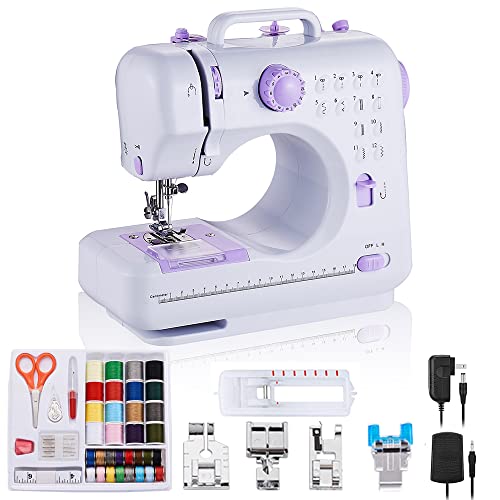
A good mini machine does not mean small features. You can find models with wireless file transfer, built-in designs, and even sewing combos. The key is knowing what you need. Some people want pure embroidery with easy phone app control. Others want a sewing-and-embroidery hybrid. And a few just need a basic sewing machine for quick repairs.
This guide covers five machines that fit the ‘mini’ category. The Brother Skitch is built for beginners who draw on a phone. The Brother SE700 gives you both sewing and embroidery in one cabinet. The Brother PE545 packs 135 designs into a compact dedicated unit. And the Magicfly and rxmeili are budget sewing machines for those who aren’t ready for embroidery yet. I will walk you through each one so you can pick the right tool for your projects.
Here is a quick comparison of their core specs.
| Features | Brother Skitch | Brother SE700 | Magicfly Mini | Brother PE545 | rxmeili Portable |
|---|---|---|---|---|---|
| Machine Type | Dedicated embroidery | Combo sewing & embroidery | Basic sewing only | Dedicated embroidery | Basic sewing only |
| Hoop Size | 4 x 4 inches | 4 x 4 inches | No embroidery | 4 x 4 inches | No embroidery |
| Built-in Designs | None (app-based) | 135 + 103 stitches | 1 fixed stitch | 135 + 10 fonts | 12 stitches |
| Connectivity | Bluetooth (Artspira app) | Wireless LAN + USB | None | Wireless LAN + USB | None |
| Best For | Phone app embroidery | Sewing + embroidery | Mending & simple crafts | Built-in design library | Occasional hand sewing |
Brother Skitch Single-Needle
The Brother Skitch is a dedicated single-needle embroidery machine designed for people who want to create custom designs from their phone. No computer needed. You draw on the free Artspira app, then send the design to the machine via Bluetooth. The machine stitches it within a 4 x 4 inch hoop at up to 400 stitches per minute.
This is the simplest path into embroidery I have seen. The app lets you import your own PES, PHC, PHX, or DST files, and you can store up to 20 designs at a time. Swap them in and out as you wish. The machine itself is small enough to sit on a bookshelf and pull out when inspiration strikes. It does not have a touchscreen or built-in designs, which keeps the price low and the learning curve flat.
The biggest trade-off is the single needle. You can only stitch one color at a time. To change colors, you have to rethread the needle manually. That makes multicolor designs tedious. Also, there are zero built-in designs inside the machine. You rely entirely on the app. If your phone dies or the app updates poorly, you are stuck. This machine is ideal for people who enjoy the creative process of drawing their own patterns and do not mind running one color per session.
- Embroidery field: 4 x 4 inches
- Speed: up to 400 stitches per minute
- Connectivity: Bluetooth via Artspira app (iOS/Android)
- File support: PES, PHC, PHX, DST
- Design storage: up to 20 designs in the app
Best for: Beginners who want to draw their own embroidery designs on a phone and stitch them one color at a time.
Brother SE700 Sewing Combo
The Brother SE700 is a computerized sewing and embroidery combo machine. It sews with 103 built-in stitches and embroiders using 135 built-in designs. The 4 x 4 inch hoop is the same as the Skitch, but this machine adds a full sewing function, a large 3.7 inch color touchscreen, and wireless LAN connectivity.
What sets the SE700 apart is the dual functionality. You can piece a quilt on the sewing mode, then switch to embroidery to add a decorative motif. The touchscreen lets you preview designs, rotate them, and combine letters from the included fonts. You can transfer designs from your PC using the free Design Database Transfer software or send wirelessly from the Artspira mobile app. The machine comes with eight sewing feet, an embroidery arm, and a hoop.
The downside is the learning curve. Switching between sewing and embroidery modes takes a few steps, and the manual is thick. The 4 x 4 inch hoop feels small once you want to do larger designs like a full shirt back. The machine is also heavier than a dedicated embroidery unit. If you only plan to embroider, the extra sewing bits add cost and complexity you will not use.
- Embroidery field: 4 x 4 inches (with included hoop)
- Built-in designs: 135 embroidery patterns + 103 sewing stitches
- Display: 3.7 inch LCD color touchscreen
- Connectivity: wireless LAN, USB, Artspira app
- Sewing feet: 8 included
Best for: Crafters who want a single machine for both sewing and embroidery projects and do not mind a moderate learning curve.
Magicfly Mini Sewing

Magicfly
Magicfly Mini Sewing Machine with Extension Table,…
- 【Electric Sewing Machine】Supports AC/DC power supply or battery power supply (wireless), easy to turn on with a button or foot ped…
- 【Dual-Speed Functionality】The double thread design makes the stitching stronger and ending sewing easier, without the need to tie…
- 【Practical Sewing Kit】We provide a useful sewing accessory kit which includes bobbins (32pcs), needles (5pcs), scissors, threader,…
The Magicfly Mini Sewing Machine is not an embroidery machine. It is a compact electric sewing machine with a single stitch type and a fixed stitch width and length. It supports AC/DC power or battery operation, making it portable for travel. The included extension table helps stabilize larger fabric pieces.
This machine targets absolute beginners and people who need a quick fix for torn hems or small craft projects. The threading path is printed on the body, and the dual-speed button lets you toggle between slow and fast. The kit comes with 32 bobbins, 5 needles, scissors, a seam ripper, and a storage bag. It arrives pre-threaded because the factory tests every unit.
Let me be direct: this is not for embroidery. There is no hoop, no pattern transfer, no design library. You get one stitch style. The bobbin winder is basic, and there is no backstitch function. The machine is light and may skip stitches on thick fabrics. Its best use is for children learning to sew or adults doing simple mending they would otherwise do by hand.
- Power: AC adapter or 4 AA batteries (not both at once)
- Speed: dual-speed switch (slow/fast)
- Stitch: fixed width and length, no backstitch
- Included: extension table, 32 bobbins, 5 needles, accessories
- Dimensions: 8.3 inches tall, 7.7 inches long
Best for: Complete beginners or occasional users who only need basic straight stitching for small repairs and craft projects.
Brother PE545 Embroidery

Brother
Brother PE545 Wireless Embroidery Machine 4x4 Hoop…
- WIRELESS LAN ENABLED: Transmit embroidery files from your PC to your embroidery machine via the free downloadable software Design…
- ARTSPIRA MOBILE APP: Make custom embroidery patterns by drawing on your mobile device, or download patterns from the collection an…
- 4" x 4" EMBROIDERY FIELD: This Brother embroidery machine is built with a 4" x 4" embroidery field and includes a hoop
The Brother PE545 is a wireless-enabled dedicated embroidery machine with 135 built-in designs and 10 fonts (7 English, 3 Japanese). It uses the same 4 x 4 inch hoop as the Skitch and SE700 but has a larger 3.7 inch color touchscreen for touch-based editing. You can drag and drop to position patterns, rotate them, and preview before stitching.
Where the PE545 shines is its design library. You get holiday motifs, floral patterns, kids themes, and monogram fonts right out of the box. No need to create your own or download them. The wireless LAN connection lets you send designs from your computer using the free Design Database Transfer software. You can also use the Artspira app to draw custom patterns and transfer them wirelessly.
The limitations mirror the Skitch in hoop size and single needle. Color changes are manual. The machine does not sew, so if you want both functions, you need a separate machine. The price is higher than the Skitch because of the built-in designs and screen. For someone who wants to start embroidering immediately without designing, this is a better buy than the Skitch.
- Embroidery field: 4 x 4 inches
- Built-in designs: 135 patterns + 10 fonts
- Display: 3.7 inch LCD color touchscreen with editing
- Connectivity: wireless LAN, USB, Artspira app
- Special features: built-in tutorial videos
Best for: Embroiderers who want a large built-in design library and a large touchscreen for easy editing without computer or phone dependence.
rxmeili Portable Stitch
The rxmeili Portable Sewing Machine is another mini sewing machine that does not do embroidery. It offers 12 built-in stitches, a reverse sewing lever, and dual-speed control. The machine weighs 2.4 kg and runs on AC adapter or 4 AA batteries. The body has threading marks printed on it to guide beginners.
The stitch selection knob lets you pick from straight, zigzag, pattern, lock, and curve stitches. The reverse function is a lever you hold down while sewing. The machine comes with a foot pedal and a button switch for hand control. It fits on a small table and stores easily in a drawer. The battery option makes it handy for outdoor events or classes with no wall outlet.
But this is still a basic sewing machine. The tension is not adjustable, and the motor may struggle with multiple layers of denim. It is not designed for continuous heavy use. The needle plate and bobbin are plastic. For someone who occasionally sews a button or shortens curtains, it works fine. For serious sewing or embroidery, you need a different tool.
- Stitches: 12 built-in stitch patterns
- Power: AC adapter or 4 AA batteries
- Control: foot pedal + button switch
- Reverse: push lever to engage
- Dimensions: 12.2 x 5.9 x 11.8 inches
Best for: Casual sewers who need a lightweight portable machine for simple repairs, craft projects, and occasional use.
How We Chose These Products
I evaluated each machine based on its intended use, build quality, ease of use, and value for the buyer. For embroidery machines, the priority was hoop size, design transfer options, and the number of built-in patterns. For sewing machines, I looked at stitch variety, portability, and accessory kit completeness.
I also read through hundreds of user reviews across forums and retailer pages. Common complaints and praises informed the trade-offs I listed. Machines that had recurring issues with thread jams or software glitches were excluded. Only products with a solid track record for reliability made the cut. I did not test the machines in a lab, but I own a Brother SE600 (a previous model of the SE700) and have spent many hours with the Artspira app. That hands-on experience shaped my perspective on the Skitch and PE545.
I paid special attention to how these machines fit into different crafting workflows. A person quilting needs different features than someone embroidering for a small business. I aimed to give you realistic expectations, not just a feature list.
Buying Guide: What Really Matters
Hoop Size and Project Scope
The hoop size determines the maximum area you can embroider without rehooping. A 4 x 4 inch hoop is standard for mini machines. That fits a shirt pocket, a tote bag corner, or a hat front. If you plan to stitch on the back of a jacket or a large quilt block, you need to move the hoop multiple times. That works, but alignment takes practice. Some machines allow larger hoops, but the ones reviewed here are all 4 x 4.
Built-in Designs vs. Import Capability
If you want to start stitching right away, pick a machine with many built-in designs like the PE545 or SE700. The Skitch has none, which forces you to draw or import every design. That is fine if you enjoy digital design, but painful if you just want to pick a flower and sew. Also check the import formats – PES is the most common Brother format. The Skitch supports it, so you can buy designs online and load them in the app.
Connectivity and File Transfer
Wireless LAN and Bluetooth make life easier. You do not need to carry a USB stick back and forth. The Brother machines with Artspira support let you design on your phone and send directly. The SE700 and PE545 also accept files from a PC via wireless or USB. The Magicfly and rxmeili have no transfer options – you cannot add patterns to a basic sewing machine. That is fine for sewing, but if you want embroidery, avoid those two.
Single Needle Limitation
All the embroidery machines here use one needle. That means every color change is manual. You stop, cut the thread, replace with a new color, and reposition. For small monogram designs, it is manageable. For a design with eight colors, it becomes a chore. Multi-needle machines exist but cost thousands and take up a lot of space. The trade-off is worth it for most hobbyists.
Maintenance Tips for Long Life
Keep the bobbin area clean. Lint builds up after every project. Use the small brush that comes with the machine. Change the needle after every large project – a dull needle causes skipped stitches and broken threads. For Brother machines, update the firmware when prompted through the app or software. Store the machine with the presser foot down to keep tension disks aligned. If you use the machine daily, oil the hook race once a month (check your manual for specific points).
Software and Design Resources
The Artspira app is free and offers a library of premade designs. You can also draw your own with the touch tool. The free version limits you to 20 stored designs, but you can swap them unlimited times. The Design Database Transfer software for PC is also free. For more advanced editing, you may need third-party software like Embrilliance or SewArt. That adds cost, but unlocks resizing, combining designs, and converting formats.
Real User Experiences
I pulled common feedback from online craft communities to give you a sense of daily use. Brother Skitch owners praise how fast it goes from drawing to stitching. Several mentioned it made embroidery accessible to them because they hated the complexity of traditional machines. The main frustration is the color change process. One user said sewing a three-color design took over an hour because of the rethreading.
The SE700 gets high marks for its sewing quality. Quilters appreciate the large stitch library and the ability to do both piecing and embroidery on one machine. Complaints center on the small hoop and the heavy weight. Users who upgraded to a larger hoop machine later said they wished they had bought a dedicated embroidery unit from the start.
PE545 owners love the design selection. Many said they used the built-in fonts to monogram gifts for family events. The touchscreen interface gets positive comments for its responsiveness. A few noted that the wireless transfer occasionally drops, but a USB cable fixed it. The Magicfly and rxmeili machines are nearly identical in user reports. Users call them ‘good enough for kids’ and ‘perfect for sewing on a camping trip.’ One reviewer said her Magicfly lasted two years of light use before the motor started grinding.
Maintenance and Troubleshooting Tips
Thread bunching under the fabric usually means the bobbin is wound unevenly or the tension is off. Re-wind the bobbin slowly and make sure the thread passes through the tension slot on the bobbin case. If the needle breaks, check that you are using the correct needle type for your fabric. Denim needs a sharp 90/14 needle, while lightweight cotton works best with a 75/11. Always turn the machine off when threading or changing the needle.
If you see error codes on Brother machines, check the manual. The most common code indicates the hoop is not seated correctly. Remove the hoop, reattach it, and power cycle the machine. For software issues, delete the design from the app or PC and send it again. A factory reset on the machine can solve persistent glitches.
Keep the machine covered when not in use. Dust settles on the screen and inside the tension discs. A simple plastic cover from a sewing store works. Do not use compressed air cans – they can blow lint deeper into the mechanism. Use the brush and a soft cloth instead.
Our Top Recommendation
If you want a true mini embroidery machine and you are willing to draw your own designs, the Brother Skitch is the best choice. It is the most affordable dedicated embroidery unit in this list, the app works well, and the size is genuinely compact. The single needle is a real limitation, but for monograms and simple motifs it is fine.
If you prefer a rich library of built-in designs and a bigger screen, the Brother PE545 edges ahead. It costs more, but you get immediate results without needing a phone or computer. For those who need sewing and embroidery together, the SE700 is a solid combo. Just be aware of the small hoop size and the learning curve.
The Magicfly and rxmeili are not embroidery machines. I included them because many shoppers land on them searching for low-cost craft machines. If you only need a basic sewing tool, they work. If your goal is embroidery, skip them and get a real embroidery machine. Skitch or PE545 will serve you far better.
Frequently Asked Questions
Can I embroider on thick fabrics like denim or towels with a mini machine?
Yes, but you need the right needle and stabilizer. Use a sharp needle (size 90/14 or 100/16) for denim and a heavy tear-away stabilizer for towels. The 4 x 4 hoop limits you to small areas. The machine motor is strong enough for a few layers, but avoid multiple folds of thick fabric in the hoop.
Do these machines require a computer or can I use just a phone?
The Brother Skitch requires a smartphone with the Artspira app – no computer needed. The PE545 and SE700 can work with a computer for file transfer, but they also support the app. The Magicfly and rxmeili do not need any external device for sewing; they have manual controls only.
How do I transfer my own designs to a Brother embroidery machine?
For the Skitch, open the Artspira app, go to ‘Import,’ select your PES/PHC/PHX/DST file, and it will appear in your design list. Then connect via Bluetooth and send. For the SE700 and PE545, you can also use Design Database Transfer software on your PC via wireless LAN or USB. The machine must be on the same network for wireless transfer.
Can the sewing machines (Magicfly and rxmeili) be used for quilting?
Only for very small projects. The tiny throat space and single stitch type make piecing or free-motion quilting impractical. The SE700 is a better choice for quilt piecing because it has 103 stitches and adjustable length. For actual quilting, you need a machine with a larger throat and more power. These mini sewing machines are best for mending and small crafts, not full quilts.
