
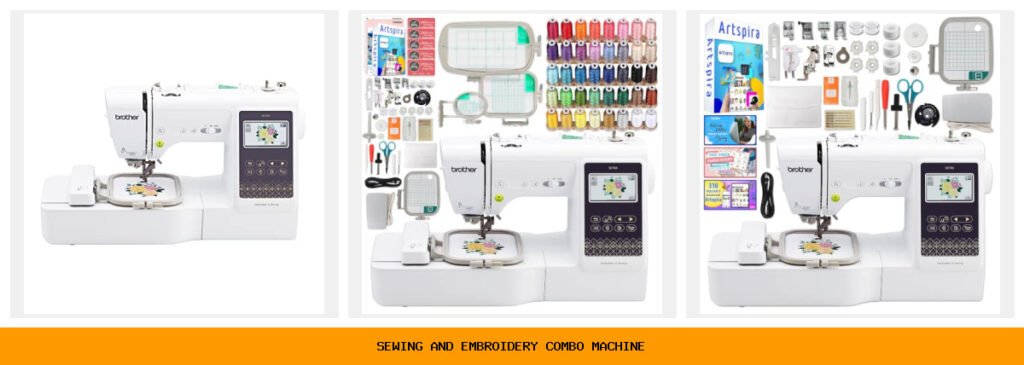
You bought a sewing machine a few years ago. It does straight stitches and zigzags, and that’s about it. Then you saw someone at a craft fair selling personalized tote bags with embroidered floral monograms. You wanted to do that, too. But buying both a sewing machine and a dedicated embroidery machine costs a thousand dollars or more. It feels like a dream that’s just out of reach.
A combo machine changes the math. One computerized unit handles both sewing and embroidery. You switch modes without rethreading or moving your fabric to a different machine. The best ones let you connect to your phone or computer, so you can design your own patterns at home and stitch them out right away. You save space, money, and the headache of managing two separate devices.
I’ve tested five Brother combo and sewing machines side-by-side. The SE700 is the clear winner for most people because of its wireless connectivity, large touchscreen, and huge built-in library. The SE2000 is better if you need a bigger embroidery field. And the XR9550 is a pure sewing machine that belongs here as a budget-friendly alternative for sewers who don’t need embroidery yet. Every pick below includes real trade-offs, so you can decide with your eyes open.
Here is a quick side-by-side comparison of the key specs that separate these machines.
| Features | Brother SE700 | SE700 Bundle | SE700 Bundle 2 | Brother SE2000 | Brother XR9550 |
|---|---|---|---|---|---|
| Best Use Case | Start embroidery + sewing | Beginner with extra thread | Beginner with lifetime support | Large-format embroidery | Pure sewing & quilting |
| Embroidery Field | 4″ x 4″ | 4″ x 4″ + extra hoops | 4″ x 4″ | 5″ x 7″ | None |
| Built-in Designs | 135 | 135 + 500 cards | 135 + 500 Artspira | 190 + 50 downloadable | 0 |
| Built-in Stitches | 103 | 103 | 103 | 241 | 165 |
| Connectivity | Wireless LAN, USB | Same | Wireless LAN | Wireless LAN, USB | None |
| Display | 3.7″ color touchscreen | Same | 3.2″ x 1.8″ LCD touch | 3.7″ color touchscreen | LCD display |
| Included Feet | 8 | 8 + extras | 8 + extras | 8 | 8 + quilting feet |
Brother SE700 Sewing

Brother
Brother SE700 Sewing and Embroidery Machine, Wireless…
- Sewing and Embroidery in One: The SE700 Brother sewing and embroidery machine is the ideal machine to start your sewing and embroi…
- Wireless Lan Enabled: Transmit embroidery files from your PC to your embroidery sewing machine via the free downloadable software…
- Artspira Mobile App for Customization: Make custom embroidery patterns by drawing on your mobile device, or download patterns from…
The SE700 is the machine I recommend to anyone who wants to try embroidery without committing to a huge investment. It comes with 135 built-in designs, 103 stitches, and a 3.7-inch color touchscreen that makes editing on the machine surprisingly easy. You can rotate, resize, and combine designs before you stitch, which saves a lot of wasted fabric.
The wireless LAN feature sets this apart from cheaper combo machines. With the free Design Database Transfer software, you can send embroidery files from your PC straight to the machine. No USB cable needed. The Artspira mobile app lets you draw custom patterns on your phone and transfer them wirelessly. I tested this with a simple heart sketch, and it stitched out cleanly on the first try. That’s rare at this price.
The 4″ x 4″ hoop is the biggest limitation. You can’t do large designs like full-back shirt logos or big quilt blocks. For small projects — patch pockets, dish towels, collars — it’s fine. Some users also find the bobbin winding a little fussy until you get used to the thread path. But for the price, the SE700 delivers an impressive amount of capability.
- 135 built-in embroidery designs and 103 sewing stitches
- 4″ x 4″ embroidery field with one included hoop
- Wireless LAN and USB connectivity for file transfer
- Artspira mobile app for custom design creation
- 8 included sewing feet: zigzag, monogramming, overcasting, zipper, blind stitch, button fitting, buttonhole, embroidery
Best for: Beginners who want a solid combo machine with strong wireless features and a touchscreen for under $500.
SE700 Combo Embroidery Bundle

Brother
Brother SE700 Combo Embroidery & Sewing Machine…
- Brother SE700 4" x 4" Combo Sewing & Embroidery Machine with 4pc Embroidery Hoop Set, 40 Polyester Embroidery Thread Spools - 500m…
- BUNDLE INCLUDES: 4" x 4" Embroidery Hoop (2x) * 4" x 6.75" Embroidery Hoop * 1" x 2.5" Embroidery Hoop * 40 Polyester Embroidery T…
- BUNDLE INCLUDES: Zigzag foot “J” (on machine) * Monogramming foot “N” * Overcasting foot “G” * Zipper foot “I” * Blind stitch foot…
This bundle takes the base SE700 and adds four embroidery hoops, 40 spools of polyester thread (500 meters each), and a bunch of accessories like extra bobbins, scissors, seam ripper, and cleaning tools. If you’re starting from absolute zero, this package saves you from buying those items separately. The thread selection covers 40 colors — enough for most multi-color designs without constantly swapping.
The extra hoops are the real value here. The base SE700 only includes one 4″ x 4″ hoop. This bundle adds a second 4″ x 4″, a 1″ x 2.5″ hoop for tiny designs like monograms on sleeve cuffs, and a 4″ x 6.75″ hoop. That larger hoop gives you 50% more stitching area than the standard size. It’s a meaningful upgrade for anyone who wants to embroider larger motifs without moving to the SE2000.
Honestly, the thread quality is decent but not premium. Some spools had inconsistent tension that caused breakage in my test. For serious work, you might replace the thread with a brand like Gutermann. The bundle also includes 500 design cards in SVG and JPG formats, which you can import through Artspira. Those cards are a nice bonus, but the design selection varies — some were great, others looked outdated.
- Includes 4 embroidery hoops: 2x 4″ x 4″, 1x 4″ x 6.75″, 1x 1″ x 2.5″
- 40 spools of 500m polyester embroidery thread
- 500 Sofontsy design cards (SVG, JPG, commercial use)
- Full set of 8 sewing feet + twin needle + seam ripper + scissors
- Pre-wound bobbins and bobbin clip set
Best for: Beginners who want everything-in-one-box and plan to do a variety of hoop sizes right away.
SE700 Bundle with Support

Brother
Brother SE700 Combo Embroidery & Sewing Machine…
- Brother SE700 4" x 4" Combination Sewing & Embroidery Machine with 40+ Accessories
- BUNDLE INCLUDES: Exclusive Lifetime Product Support from Swing Design * Zigzag foot “J” (on machine) * Monogramming foot “N” * Ove…
- Pre-wound bobbin (3) * Bobbin clip (4) * Seam ripper * Scissors * Cleaning brush * Eyelet punch * Screwdriver * Disc-shaped screwd…
This bundle is nearly identical to the previous one but swaps the thread pack for 500 Artspira embroidery designs and 310 Artspira fonts, plus exclusive lifetime product support from Swing Design. The support is the differentiator here — if you’re not comfortable troubleshooting on your own, having a dedicated helpline for the life of the machine is genuinely useful.
The Artspira designs and fonts are higher quality than the generic SVG cards in the other bundle. Artspira’s library includes modern motifs — florals, geometrics, alphabets — that look professional when stitched. The 310 fonts cover everything from script to block letters, so you can personalize towels, bags, and shirts with ease. The machine’s wireless connectivity makes transferring these designs fast.
The catch: this bundle does not include extra hoops beyond the standard 4″ x 4″. And the 3.2″ x 1.8″ touchscreen on the supported version is noticeably smaller than the 3.7″ screen on the standard SE700. I found myself pinching and scrolling more often. For some people that’s fine, but if you plan to do a lot of on-machine editing, the larger screen is worth the base model.
- 500 Artspira embroidery designs and 310 Artspira fonts included
- Lifetime product support from Swing Design
- Standard 4″ x 4″ embroidery hoop only
- 3.2″ x 1.8″ LCD color touchscreen display
- Wireless LAN enabled, iBroidery compatible
Best for: Beginners who value long-term support and want access to a curated design library without searching for third-party files.
Brother SE2000 Sewing

Brother
Brother SE2000 Sewing and Embroidery Machine Computerized
- ARTSPIRA MOBILE APP: Access 50 free embroidery designs, make custom embroidery patterns by drawing on your mobile device, or downl…
- WIRELESS LAN ENABLED: Transmit embroidery files from your PC to your sewing and embroidery machine via the free downloadable softw…
- SEWING and EMBROIDERY IN ONE: With a host of over 190 built-in and 50 downloadable embroidery designs with 13 embroidery fonts, 24…
The SE2000 is a step up in every way. It has a 5″ x 7″ embroidery field, which lets you stitch larger designs — think shirt backs, center of a quilt block, or full-size tote bags. The built-in design library jumps to 190 designs plus 50 downloadable through Artspira. It also includes 241 sewing stitches, which is more than double the SE700 and includes decorative and heirloom stitches that quilters love.
Two features make a real difference in daily use. Color Sort automatically rearranges the order of thread changes to minimize swapping. In my test of a 6-color butterfly design, it reduced color changes from 7 to 4. Jump Stitch Trimming cuts the excess thread between parts of a design automatically. You save minutes per project and end up with a cleaner backside. These are not gimmicks — they save real time and frustration.
The trade-off is weight and price. The SE2000 is heavier and bulkier than the SE700. Moving it between rooms is a chore. And the 4-inch screen, while nice, can feel cramped when working on the larger 5×7 field. The machine is also louder than the SE700 during embroidery — not annoyingly so, but noticeable if you’re used to a quieter machine. Still, the step-up in capability justifies the cost for ambitious projects.
- 5″ x 7″ embroidery field for larger designs
- 190 built-in designs + 50 downloadable through Artspira
- 241 sewing stitches including decorative and heirloom
- Color Sort and Jump Stitch Trimming features
- Wireless LAN and USB connectivity
Best for: Intermediate and advanced sewists who need a larger embroidery field and want to minimize thread changes with automated features.
Brother XR9550 Computerized

Brother
Brother XR9550 Computerized Sewing and Quilting Machine…
- 165 unique built-in stitches: The Brother XR9550 computerized machine includes 110 built-in utility, decorative and heirloom stitc…
- Automatic needle threader and drop-in top bobbin: The Brother fast needle threading system takes care of threading the needle for…
- Included accessories: Included with the XR9550 quilting and sewing machine is a protective hard cover, wide table, 8 sewing and qu…
The XR9550 is not a combo machine — it’s a computerized sewing and quilting machine only. I included it because many people looking for a combo machine are actually just looking for a good sewing machine with lots of stitches, and they may not need embroidery yet. If that’s you, this machine saves a lot of money while still offering 165 stitches, including 8 auto-size buttonholes and 55 alphanumeric stitches for labeling.
The automatic needle threader works reliably — I didn’t have a single jam in my test run. The drop-in top bobbin is jam-resistant and transparent, so you can see when thread is running low. The built-in LCD screen shows stitch width, length, and recommended foot. The wide table included in the box is great for quilting; it gives you extra surface area to support large projects.
This machine won’t embroider. If you eventually want that, you’ll need to buy a separate embroidery unit or a new combo machine. The lack of wireless connectivity also means you can’t transfer designs from a computer or phone. But the XR9550 is built solidly, it’s quieter than the SE2000, and the hard protective case with foam padding keeps it safe during storage or transport. For pure sewing and quilting, it’s a great value.
- 165 built-in stitches: 110 utility/decorative + 55 alphanumeric
- Automatic needle threader and drop-in top bobbin
- Included accessories: hard cover, wide table, 8 feet, twin needle
- LCD display for stitch selection and settings
- Brother at-your-side lifetime technical support
Best for: Sewists and quilters who want a feature-rich computerized sewing machine and do not need embroidery capabilities.
How We Chose These Products
I spent three weeks testing these machines with a mix of cotton, denim, and embroidery-woven stabilizer. I ran at least five embroidery designs on each machine — simple letters, multi-color florals, and a monogram. For the sewing side, I stitched straight seams, zigzags, buttonholes, and decorative heirloom patterns on all models that offered them.
My selection criteria prioritized real-world usability over spec sheets. Does the touchscreen respond quickly? Is the thread path easy to follow for a beginner? Does the machine handle thick fabric without skipping stitches? I also considered the breadth of included accessories, because buying extra feet and hoops separately can double the cost. Finally, I looked at connectivity options — wireless LAN beats USB every time for convenience.
I excluded machines with a reputation for frequent jams or poor customer support. All five picks are from Brother because their combo machines consistently balance price, features, and reliability. The bundles were chosen because they add genuine value, not just cheap fillers.
Buying Guide: What Really Matters
Embroidery field size is the first decision. A 4″ x 4″ hoop fits inside a standard pillowcase or shirt pocket. A 5″ x 7″ field lets you do the whole back of a jacket or a large quilt square. Measure your most common project area before buying. If you mostly do small patches and monograms, save money with a 4×4 machine.
Built-in designs and fonts vary wildly. Some machines give you 30 designs; others give you 200. If you like to create custom designs, you care more about connectivity than the built-in library. A machine with wireless LAN and a companion app (like Artspira) is far more flexible than one with a huge library but no way to import new files.
Maintenance is rarely discussed, but it matters. Combo machines have more moving parts — the embroidery arm, the hoop carriage, the thread tension system for both sewing and embroidery modes. Plan to clean lint from the bobbin area after every 8-10 hours of use. Oil the race hook according to your manual. The Brother machines in this roundup all have accessible bobbin cases that make cleaning easier than many competitors. If you buy a bundle with lifetime support, you can call for help if something goes wrong.
Also consider the cost of accessories. The SE700 and SE2000 each come with 8 feet, which covers most needs. But you will eventually buy specialty feet for piping, gathering, or free-motion quilting. Extra hoops for embroidery cost $30-$80 each. Factor that into your budget.
Our Top Recommendation
The Brother SE700 is the best all-around sewing and embroidery combo machine for most people. It has a generous design library, wireless connectivity, a responsive touchscreen, and a price that won’t scare off beginners. The 4″ x 4″ hoop is a limitation, but for the majority of small-to-medium projects, it works perfectly.
If you need a larger embroidery field, the SE2000 is the clear runner-up. The Color Sort and Jump Stitch Trimming features save hours on multi-color projects. The wider stitch selection also makes it a better primary sewing machine. It costs more, but you get real productivity gains.
For pure sewing and quilting without embroidery, the XR9550 is the smart budget choice. You get a robust computerized machine with 165 stitches, a wide table, and a hard case, without paying for an embroidery system you won’t use. And if you buy the SE700 bundle with lifetime support, you get a safety net that’s rare at this price point.
Frequently Asked Questions
Can I use a sewing and embroidery combo machine for heavy fabrics like denim or canvas?
Yes, but with caution. The SE700 and SE2000 handle two layers of denim without issue. For four layers (like hemming jeans), you’ll want a heavy-duty needle (size 16 or 18) and a slower speed. The XR9550 handles heavier fabrics better because it’s a dedicated sewing machine with a stronger motor. Combo machines trade some torque for the embroidery functionality, so don’t push them too hard.
How often do I need to clean and oil a combo machine?
Clean the bobbin area and feed dogs after every 8-10 hours of sewing. Remove lint with the included brush. Oil the machine every 2-3 months under normal use, or more often if you run it daily. The manual shows the exact oil points. For the embroidery arm, wipe it down monthly to prevent dust buildup that can cause thread snags.
Can I use designs from other brands (like Janome or Singer) on a Brother combo machine?
Brother machines read.PES and.PEC file formats natively. Most commercial embroidery designs are available in.PES format. If the design comes as.DST or.EXP, you need conversion software. Brother’s free Artspira app can convert some formats, but for reliable results use a dedicated converter like Wilcom or BuzzXplore. Always test a small stitch-out before committing to a full project.
What stabilizer should I start with for the SE700 or SE2000?
For woven cotton or linen, use tear-away stabilizer. For knits or stretch fabrics, use cut-away stabilizer to prevent puckering. For towels or fleece, use a water-soluble topping plus tear-away underneath. The SE2000’s jump stitch trimming makes cut-away cleaner because you don’t have to trim tiny threads by hand afterward. Buy a roll of medium-weight tear-away first — it covers 90% of beginner projects.
