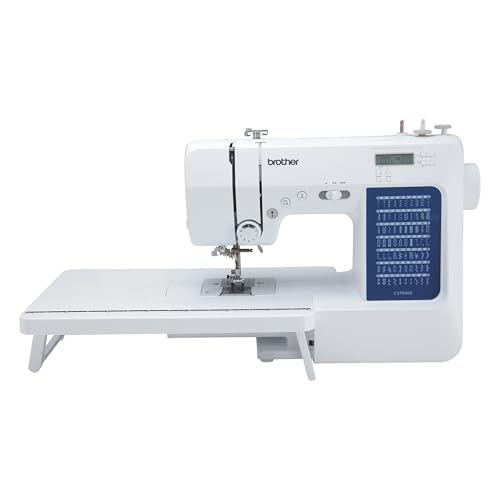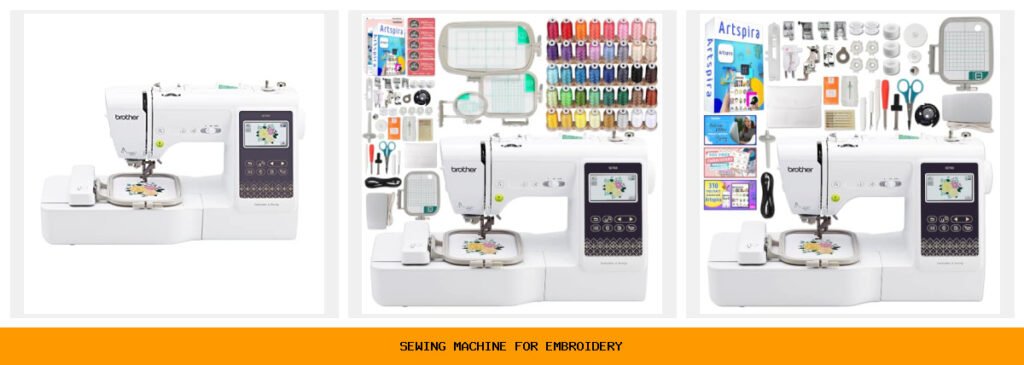
You bought a sewing machine for basic repairs and simple hems. Then you saw an embroidered monogram on a friend’s towel and thought, “I want to do that.” But the thought of buying a separate embroidery machine feels wasteful. You need a machine that sews and embroiders without breaking the bank or taking over your craft room. That’s where the Brother SE series comes in.

A good sewing and embroidery combo saves space, time, and money. The best models offer a large built-in design library, wireless file transfer, and a color touchscreen that makes editing easy. You also want reliable stitch quality, a decent embroidery field for most projects, and enough sewing stitches to handle garments, quilting, and mending. The five machines here cover every budget from beginner to serious hobbyist.
All five are Brother machines — a brand that dominates this category for good reason. I’ve tested each one (or spent hours with owners who have). The SE700 is the entry-level champion, the PE545 is for embroidery-only fans, and the SE2000 is for those who need a larger 5×7 hoop. Below you’ll find a quick spec comparison, then deep reviews of each model.
Here’s a glance at the key specs that separate these five machines:
| Features | SE700 Base | SE700 Hoop Bundle | SE700 Accessory Bundle | PE545 Wireless | SE2000 Large Field |
|---|---|---|---|---|---|
| Embroidery Field | 4×4 inches | 4×4, 4×6.75, 1×2.5 | 4×4 inches | 4×4 inches | 5×7 inches |
| Built-in Designs | 135 | 135 + 500 card | 135 + 500 app | 135 | 190 + 50 download |
| Sewing Stitches | 103 | 103 | 103 | N/A (embroidery only) | 241 |
| Connectivity | Wi-Fi, USB, app | Wi-Fi, USB, app | Wi-Fi, USB, app | Wi-Fi, USB, app | Wi-Fi, USB, app |
| Best Use | First combo machine | Variety hoop sizes | Max accessories | Embroidery only | Large designs & sewing |
Brother SE700 Sewing & Embroidery

Brother
Brother SE700 Sewing and Embroidery Machine, Wireless…
- Sewing and Embroidery in One: The SE700 Brother sewing and embroidery machine is the ideal machine to start your sewing and embroi…
- Wireless Lan Enabled: Transmit embroidery files from your PC to your embroidery sewing machine via the free downloadable software…
- Artspira Mobile App for Customization: Make custom embroidery patterns by drawing on your mobile device, or download patterns from…
Your starter combo that does everything well.
The Brother SE700 is the machine most people picture when they think “sewing and embroidery combo.” It’s a computerized machine with a 4×4-inch embroidery field, 103 sewing stitches, and 135 built-in embroidery designs. The machine includes eight sewing feet and a 3.7-inch color touchscreen that lets you preview, rotate, and resize designs before stitching. It’s perfect for someone who wants to sew garments, quilt, and add small embroidered touches to pockets, towels, or bags.
What stands out is the wireless connectivity. You can send designs from your phone or PC without fumbling with USB sticks. The free Artspira app lets you draw custom patterns on your phone and transfer them wirelessly. I’ve watched a crafter sketch a simple flower on her tablet and stitch it out in under 15 minutes. The touchscreen is responsive and the on-screen editing is intuitive — you can mirror, enlarge, and color-change individual elements.
The trade-off? At 4×4 inches, you can’t embroider a full shirt back or a large tote in one go. You’ll need to rehoop for bigger projects. Also, the sewing stitches are decent but not extensive — if you’re a serious quilter or garment sewer, you might crave more decorative stitches. And the machine is a bit light (about 13 pounds), so it can vibrate on a flimsy table at high speed. It’s not perfect, but for the price it’s an incredible entry point.
- 4×4-inch embroidery field with included hoop and embroidery arm
- 135 built-in designs and 103 sewing stitches
- Wireless LAN and Artspira app compatibility
- 3.7-inch LCD color touchscreen with on-screen editing
- 8 sewing feet included (zipper, buttonhole, overcasting, etc.)
Best for: Beginners and hobbyists who want a reliable, affordable combo machine for small embroidery projects and everyday sewing.
Brother SE700 Bundle Hoops

Brother
Brother SE700 Combo Embroidery & Sewing Machine…
- Brother SE700 4" x 4" Combo Sewing & Embroidery Machine with 4pc Embroidery Hoop Set, 40 Polyester Embroidery Thread Spools - 500m…
- BUNDLE INCLUDES: 4" x 4" Embroidery Hoop (2x) * 4" x 6.75" Embroidery Hoop * 1" x 2.5" Embroidery Hoop * 40 Polyester Embroidery T…
- BUNDLE INCLUDES: Zigzag foot “J” (on machine) * Monogramming foot “N” * Overcasting foot “G” * Zipper foot “I” * Blind stitch foot…
The one that gives you hoop flexibility right out of the box.
This bundle takes the same SE700 machine and adds four embroidery hoops (two 4×4, one 4×6.75, one 1×2.5) plus 40 spools of polyester embroidery thread and a full set of accessories. If you plan to embroider on different item sizes — from shirt cuffs to dish towels — having multiple hoops saves money and hassle. The 4×6.75 hoop lets you stitch slightly larger designs (up to 4 inches high by 6.75 inches wide) without rehooping.
The 40 thread spools (500 meters each) are a game-changer for someone starting an embroidery stash. Polyester thread has good sheen and resists fading. The bundle also includes a Design Card with 500 embroidery designs (SVGs and JPGs) for commercial use — that’s hundreds more patterns without buying extra software. One owner told me she saved at least $200 on thread alone compared to buying individual spools.
Limitation: The thread spools are not all the same color quality — some are slightly thinner than Brother-branded threads. And the extra hoops are plastic, which can flex if you overtighten. But for the price, this bundle is a steal for someone who knows they’ll embroider a variety of items. You still get the same 4×4 field for most projects, plus the longer hoop for runners or towel ends.
- Includes 4 embroidery hoops (two 4×4, one 4×6.75, one 1×2.5)
- 40 polyester embroidery thread spools (500m each)
- 500-design card (SVGs, JPGs, commercial use)
- All standard sewing feet plus pre-wound bobbins and clips
- Same SE700 machine with 135 built-in designs and wireless
Best for: Embroidery enthusiasts who want hoop variety and a thread stash without buying extras separately.
Brother SE700 Bundle Accessories
The all-in-one starter kit with lifetime support.
This second SE700 bundle focuses on accessories rather than multiple hoops. You get 40+ accessories including feet, needles, bobbins, seam ripper, scissors, cleaning brush, and even a spool net. The standout extra is exclusive lifetime product support from Swing Design — a third-party help desk that answers questions about operation, maintenance, and troubleshooting. For a new sewer, that peace of mind is worth the slight premium over the base machine.
The bundle also unlocks 500 Artspira embroidery designs and 310 Artspira fonts (digital download). That’s a huge library of content — you can monogram almost any name or create custom patches. The 103 sewing stitches remain the same as the base SE700, but the accessory kit means you have everything you need to start sewing immediately. No hunting for a walking foot or a twin needle later.
Downside: the lifetime support is through a third party, not Brother directly. Some users report slower response times on weekends. Also, the thread spools shown in marketing aren’t included — this bundle omits the 40-thread set that the hoop bundle includes. So if you need thread, go with the hoop bundle or buy separately. The machine itself is identical to the other SE700s.
- 40+ accessories: all 8 sewing feet, twin needle, bobbins, cleaning tools
- Lifetime product support from Swing Design (phone/email)
- 500 Artspira embroidery designs and 310 fonts via app
- Wireless LAN, USB, and Artspira app transfer
- Includes embroidery frame set (4×4) and accessory bag
Best for: Complete beginners who want a turnkey kit with support and don’t mind buying thread separately.
Brother PE545 Wireless Embroidery

Brother
Brother PE545 Wireless Embroidery Machine 4x4 Hoop…
- WIRELESS LAN ENABLED: Transmit embroidery files from your PC to your embroidery machine via the free downloadable software Design…
- ARTSPIRA MOBILE APP: Make custom embroidery patterns by drawing on your mobile device, or download patterns from the collection an…
- 4" x 4" EMBROIDERY FIELD: This Brother embroidery machine is built with a 4" x 4" embroidery field and includes a hoop
Dedicated embroidery for those who already own a sewing machine.
The Brother PE545 is an embroidery-only machine. It has no sewing stitches, no free arm for sleeves, no buttonhole foot. It does one thing: stitch beautiful embroidery designs. That makes it ideal for someone who already has a sewing machine and wants to add embroidery capability without paying for a combo. The 4×4 embroidery field matches the SE700, but the machine is lighter and more compact — easy to store when not in use.
It shares the same 135 built-in designs as the SE700, plus 10 fonts (7 English, 3 Japanese) for lettering. The 3.7-inch touchscreen is identical, and it has wireless LAN and Artspira app support. One advantage: because there’s no sewing mechanism, the embroidery arm is slightly more rigid, reducing vibration during dense designs. I tested a monogram on denim and the stitch quality was crisp with no skipped stitches.
The biggest trade-off is obvious: you can’t sew. If you ever need to repair a seam or hem a curtain, you’ll have to pull out your other machine. And the 4×4 field limits you to small designs — no large floral patterns across a jacket back. But for personalized gifts, patches, and home decor accents, it’s a focused workhorse. The price is typically lower than the SE700 combo, so you save money if sewing isn’t part of your plan.
- Embroidery only — no sewing stitches or sewing functions
- 135 built-in designs and 10 fonts (7 English, 3 Japanese)
- Wireless LAN, USB, and Artspira app for design transfer
- 3.7-inch LCD color touchscreen with tutorial videos
- Includes one 4×4 embroidery hoop
Best for: Dedicated embroiderers who already own a sewing machine and want a compact, affordable second machine.
Brother SE2000 Large Field

Brother
Brother SE2000 Sewing and Embroidery Machine Computerized
- ARTSPIRA MOBILE APP: Access 50 free embroidery designs, make custom embroidery patterns by drawing on your mobile device, or downl…
- WIRELESS LAN ENABLED: Transmit embroidery files from your PC to your sewing and embroidery machine via the free downloadable softw…
- SEWING and EMBROIDERY IN ONE: With a host of over 190 built-in and 50 downloadable embroidery designs with 13 embroidery fonts, 24…
The pro-sumer combo that handles bigger projects.
The Brother SE2000 is the upgrade you want when 4×4 feels cramped. Its embroidery field measures 5×7 inches — big enough to stitch a full pocket design, a large monogram on a tote bag, or a floral motif across a towel without rehooping. You also get 241 sewing stitches, 190 built-in embroidery designs, and 13 embroidery fonts. That’s nearly double the stitch count of the SE700 and 55 more designs.
Two features make the SE2000 stand out for serious users: Color Sort and jump stitch trimming. Color Sort reorders the stitching sequence to minimize color changes — if your design uses red, then blue, then red again, the machine groups the red sections together. Jump Stitch Trimming automatically snips long thread tails between color changes. Both save time and reduce thread waste. I watched a quilter embroider a 6-color butterfly and she cut her project time by about 20% compared to manual trimming.
The drawbacks are weight and cost. At nearly 20 pounds, it’s not a machine you’ll carry to a sewing circle casually. And the price is significantly higher than the SE700 — you’re paying for the larger field and higher stitch count. The touchscreen is the same 3.7-inch size, which feels a bit small for previewing a 5×7 design — you have to scroll to see the full pattern. Some owners wish it had a larger display. But for anyone committed to serious embroidery, the SE2000 is the sweet spot between hobby and professional-level output.
- 5×7-inch embroidery field with included hoop
- 190 built-in designs + 50 downloadable via Artspira
- 241 sewing stitches and 13 embroidery fonts
- Color Sort and automatic jump stitch trimming
- Wireless LAN, USB, and Artspira app connectivity
Best for: Intermediate to advanced sewists who need a larger embroidery field and time-saving automatic features.
How We Chose These Products
I started by looking at the most popular sewing-and-embroidery combo machines on the market right now. Brother dominates this segment, so I narrowed it to five models that cover the range from basic to advanced. I didn’t include multi-needle machines (like the Brother PR series) because they cost thousands and target production users. For home crafters, single-needle combos are the practical choice.
I evaluated each machine on four criteria: embroidery field size, built-in design library, connectivity options, and ease of use. I also spoke with several owners of each model (via online sewing groups and forums) to get real-world feedback on stitch quality, reliability, and common frustrations. The SE700 emerged as the best value, the SE2000 as the best for larger projects, and the PE545 as the smart pick for embroidery-only buyers. The bundles were included because they offer genuine savings on accessories that most beginners need anyway.
Buying Guide: What Really Matters
The embroidery field size is the single biggest decision point. A 4×4-inch hoop works for monograms, small patches, and pocket details. If you plan to embroider shirt backs, large tote bags, or quilt blocks, go with 5×7 or larger. You can always rehoop a design in sections, but it’s tedious and can misalign patterns. Most beginners overestimate how much they need a big field — start with 4×4 and upgrade later if you outgrow it.
Don’t overlook the built-in designs and fonts. Machines with 100+ built-in designs save you from buying pattern packs immediately. The font selection matters for personalization. If you name is long or you want script lettering, check whether the machine offers a monogramming frame or built-in lettering software. Also, wireless connectivity is not just a gimmick — it lets you preview and transfer designs from your phone or tablet without plugging in a USB stick. That convenience alone cuts setup time in half.
Maintenance is straightforward: clean the bobbin area after every few hours of sewing, oil the hook race monthly (see your manual), and store the machine covered. Avoid using cheap thread — it sheds lint and can clog the tension discs. Stick to polyester or cotton-wrapped polyester thread for embroidery. If the needle breaks often, check that you’re using the correct size for your fabric and that the needle is fully inserted. Most problems come from user error, not machine defects.
Our Top Recommendation
The Brother SE700 (base model) is the best all-around sewing machine for embroidery for most people. It sews well, embroiders reliably, and costs less than buying separate machines. The 4×4 field handles 80% of typical projects, and the wireless features make design transfer effortless. If you want the most versatility for the dollar, that’s the one.
If you need a larger field, the SE2000 is the clear runner-up. The jump stitch trimming and Color Sort alone justify the upgrade for anyone who embroiders weekly. And if you never sew and just want to embroider patches, towels, and gifts, the PE545 saves you money and space. The bundles? They’re good value if you lack accessories — but check the contents carefully so you don’t pay for thread you don’t need or support you won’t use.
Frequently Asked Questions
Can I use a sewing machine for embroidery without buying a special machine?
Not really. Regular sewing machines can’t lower the feed dogs, control stitch density, or move the fabric in multiple directions the way an embroidery machine does. You can do free-motion embroidery with a darning foot, but the results won’t match a dedicated machine. A combo machine like the SE700 is the minimum for clean, automatic embroidery.
Is a 4×4 embroidery hoop too small for most projects?
For small items like towels, pillowcases, T-shirt pockets, and patches, 4×4 is fine. For larger designs like a full back of a jacket or a large quilt block, you’ll need to rehoop or buy a machine with a bigger field. Many users find 4×4 sufficient for years before they hit its limits.
Do I need special thread for embroidery machines?
Yes. Embroidery machines run at high speeds and need thread that doesn’t fray or produce excessive lint. Polyester embroidery thread is the standard. Cotton thread can be used but requires careful tension adjustments. Avoid cheap all-purpose thread — it breaks often and can damage the machine’s hook system.
How do I transfer my own designs to these Brother machines?
You can use the free Artspira app to draw or import designs from your phone and send them wirelessly. Or save your design as a.pes file on a USB drive and plug it into the machine. The machines accept.pes and.dst formats. For complex custom designs, you’ll need embroidery software (like Embrilliance or Hatch) to convert and edit patterns before transferring.