
Smartstitch S-1001 Review: Needles, Hats and Ownership Costs
Smartstitch embroidery machine reviews are most useful when they explain the workload behind the specifications. A multi-needle machine can simplify.

This guide has Amazon links. If you buy through them we may earn a small commission, at no extra cost to you.
Quick answer
SmartStitch makes multi-needle embroidery machines aimed at small embroidery businesses and serious hobbyists. When judging one, compare the number of needles, maximum embroidery area, speed, hoop options, software compatibility and after-sales support. For a business, support and parts availability matter as much as specifications.
Smartstitch embroidery machine reviews are most useful when they explain the workload behind the specifications. A multi-needle machine can simplify color changes, but it also introduces setup, maintenance, and business decisions that a home embroiderer may not expect. This guide focuses on the S-1001, compares its workflow with a single-needle alternative, and explains how to evaluate hats, shirts, training, and production costs before bringing commercial-style embroidery into your own workspace.
As an Amazon Associate, Practical Textile earns from qualifying purchases. We may receive a commission from purchases through our product links.
What’s in this article11 sections
Quick Answer: Is the Smartstitch S-1001 Right for You?
Consider the S-1001 when repeated multicolor embroidery and a supported cap workflow justify a multi-needle machine. It is a ten-needle model, not a fifteen-needle model. Its practical value depends on the designs you repeat, the garments you can hoop, the training you receive, and the support available for the exact unit. A simpler flatbed machine may be enough for occasional personal projects.
This is a research-based purchasing guide. We have not measured production output, stitched sample caps, tested service response, or compared long-term reliability in person.
Smartstitch S-1001

Investigate it for repeat multicolor orders and the exact supported cap equipment.
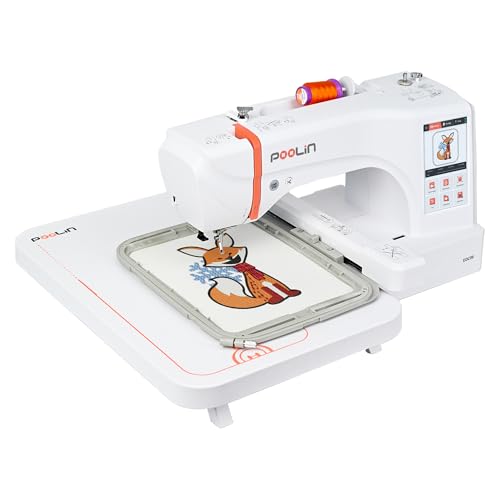
Poolin EOC06

Compare a simpler dedicated embroidery workflow for accessible flat projects.
Smartstitch S-1001 Review: Understand the Exact Machine

The current manufacturer description identifies the S-1001 as a ten-needle embroidery machine with a 9.5-by-14.2-inch flat embroidery field, a seven-inch screen, and USB or Wi-Fi design transfer. These are identification and capability specifications, not evidence that every listed material or garment will stitch equally well.
Different revisions and packages can use similar names. Confirm the precise model, software version, included hoops, cap equipment, stand, and accessories in writing. Do not assume an older video shows every detail of the machine currently offered. Equally, a feature on a larger Smartstitch model should not be transferred to the S-1001 because the machines share a brand.
The field describes an available flat design boundary. Real garment access may be smaller, and the appropriate cap field is different. A large flat rectangle does not become the usable area on a structured cap. Measure the intended placement and confirm the relevant accessory rather than interpreting the largest published dimension as universal capacity.
For the broader brand and category context, our Smartstitch model guide provides another starting point. Check the specifications for the exact machine in the current offer whenever names or revisions differ.
What Ten Needles Actually Change
A multi-needle arrangement allows several thread colors to remain installed. With suitable setup and color assignment, the machine can move between assigned needles during a design instead of requiring you to rethread a single needle at each color change. That can reduce operator intervention on repeated multicolor designs.
Ten needles do not mean ten shirts are embroidered simultaneously. The S-1001 is a single-head machine, so one embroidery position is active at a time. Needle count describes available thread positions; head count describes how many separate workpieces a multi-head arrangement may stitch together. Confusing those numbers creates unrealistic production expectations.
More installed colors are useful when the designs need them. A studio repeating one-color names may gain less from additional needle positions than a studio processing the same multicolor logo all afternoon. Conversely, a design with more colors than available thread positions can still require planned thread changes. Compare the machine with your actual design library rather than an imagined ideal order.
Each thread path also needs correct setup. An incorrectly assigned color, damaged needle, unsuitable thread, or tension problem can affect a repeat order. Develop a thread-position record and a consistent checking sequence. Automation is most useful when it repeats a verified setup rather than repeating an unnoticed error across multiple garments.
Hats: The Most Important Demonstration to Request
Confirm the complete cap workflow
A cap-capable machine needs the right driver, frame, preparation tools, and operator method for the specific cap. Ask exactly what is included, how the cap is loaded, and which parts are optional. A photograph of a finished hat does not establish what accessories arrive in your package.
Request a demonstration on a cap similar to the one you want to sell. Structured and unstructured caps behave differently; seams, backing, crown shape, and available clearance affect placement. A logo that works on a flat swatch can require different digitizing and sequencing on a curved cap surface.
Evaluate the finished sample
Inspect lettering, alignment across the center seam, edge definition, puckering, and the inside of the cap. Look at the same details after normal handling. The question is whether the sample is acceptable for the intended customer, not whether the machine can move quickly during a demonstration.
Keep the approved cap sample with the design version, blank model, thread information, and setup notes. When the blank supplier changes the cap construction, retest before treating the previous result as a guarantee. Repeated commercial work benefits from repeatable inputs as much as from automated color changes.
Shirts, Sweatshirts, Patches, and Bags
Garment access and support
A tubular commercial-style workflow can help with some completed garments, but every placement still needs a clearance check. Keep the back of a shirt, sleeves, lining, drawcords, and pockets away from the stitching path. Verify the entire design movement before starting so an apparently clear starting point does not become a trapped layer later.
Support heavier garments without restricting the movement of the hoop or carriage. A sweatshirt dragging off the table can pull against the work and distort registration. Arrange the workstation around the machine’s full operating clearance, with room for the operator to load, inspect, and remove the garment safely.
Stabilization and digitizing
Choose backing and any topping for the garment and design rather than defaulting to one combination for all orders. Stretch fabric, towel pile, dense fills, and small lettering create different demands. A larger or faster machine cannot compensate for a poorly prepared embroidery file or unsuitable stabilization.
For patches, decide how the edge will be finished and how the patch will be attached. A satin border stitched in a hoop is not automatically the same as a merrowed edge from dedicated equipment. For bags, check whether the intended panel is accessible after construction; embroidering before assembly may be the better method when the project permits it.
To compare a simpler machine’s limitations in these projects, read our Poolin embroidery machine review. That comparison is most useful when occasional flat designs and repeated cap orders are competing priorities in the buying decision.
Multi-Needle Versus Single-Needle Flatbed: Practical Comparison
| Requirement | Smartstitch S-1001 approach | Poolin EOC06 approach | Buying implication |
|---|---|---|---|
| Multicolor repetition | Several installed thread positions | Single-needle color-change workflow | Measure operator attention as well as stitching time. |
| Hats | Investigate the supported cap system | Do not assume equivalent cap-driver capability | Demonstrate the exact cap and design. |
| Flat design field | 9.5 × 14.2 inches listed | 7.9 × 11 inches listed | Fit both design dimensions and the actual garment. |
| Workspace | Plan a dedicated operating area | Plan tabletop space and movement clearance | Measure the real room, doorways, and furniture. |
| Training | More setup and workflow decisions | A narrower workflow, still requiring embroidery skills | Confirm instruction and troubleshooting access. |
Neither column predicts the finish on your specific garment without a sample. The larger machine becomes attractive when its workflow saves meaningful effort on the orders you actually expect. For a hobbyist using a few colors occasionally, a simpler system may be easier to justify financially and physically.
Production Planning and the Real Cost of Ownership
Do not calculate capacity from maximum speed alone
Published maximum speed is an upper operating specification, not a promised number of finished shirts per hour. Design movement, trims, color changes, caps, material, stops, and the selected operating settings all affect stitching time. Preparation and finishing add time outside the stitching cycle.
Time a complete sample order from file preparation to final inspection. Include hooping, loading, thread adjustments, removing the garment, trimming, and packing if relevant. A realistic time record is more useful for scheduling than dividing the stitch count by an advertised top speed.
Account for rework and non-stitching costs
Budget for thread, needles, bobbins, stabilizer, topping, practice blanks, digitizing, maintenance, and replacement parts. Include the cost of unsuccessful samples and the possibility of remaking an item. A business plan that assumes every blank becomes a perfect sale ignores a normal part of learning and production control.
Machine ownership also occupies space and operator time. Check delivery arrangements, assembly requirements, access routes, suitable support furniture, and operating clearance before ordering. If the workspace is upstairs or reached through a narrow doorway, establish the actual handling requirements with the seller rather than relying on a product photograph.
A small business should also have a plan for downtime. Ask which faults can be resolved through guided troubleshooting, where parts come from, and what service options exist locally. Avoid accepting urgent orders that depend on untested capability or support assumptions.
Training, Service, and First-Week Setup
The manufacturer describes training and support for the S-1001, but the useful details are the terms of your particular purchase. Confirm how sessions are booked, what preparation is required, which languages are supported, and how ongoing questions are handled. Ask whether cap setup and file troubleshooting are included rather than assuming every training session covers every process.
During the first week, practice with replaceable blanks and a small set of known designs. Learn threading, needle selection, bobbin handling, color assignment, hoop recognition, boundary checks, and stopping procedures. Introduce more complicated materials only after the basic setup produces consistent samples.
Separate machine faults from design faults methodically. If one well-prepared file stitches cleanly and another fails in the same area every time, investigate the file and setup before changing every machine adjustment. Document problems clearly with the design version, materials, and steps already checked so support can give relevant guidance.
Follow the model’s safety and maintenance instructions. Keep hands, loose clothing, hair, and tools clear of moving parts. Stop and disconnect power as directed before working around a jammed needle or performing maintenance. Do not improvise repairs that can damage timing or create an unsafe operating condition.
Smartstitch S-1001 Pros and Limitations
Reasons to consider it
- Multiple installed colors can reduce rethreading interruptions.
- The larger flat field is relevant to appropriately sized designs.
- A supported cap system addresses a different workflow from ordinary flatbed embroidery.
- It can suit a dedicated studio repeating verified designs.
- Training arrangements can help when their actual scope matches your needs.
Reasons to choose more cautiously
- Ten needles do not provide ten simultaneous garment positions.
- Higher ownership complexity and costs may be unnecessary for occasional personal projects.
For other embroidery categories, compare our Janome embroidery guide. If you also construct garments, our Brother sewing guide explains a different machine role. The existing Smartstitch and BAI comparison offers another brand comparison to check against current model details.
Frequently Asked Questions
Does the Smartstitch S-1001 have ten or fifteen needles?
The S-1001 discussed here has ten needles. Do not confuse its specification with a fifteen-needle Smartstitch model. Confirm the exact model and revision in the current seller’s description.
Can the S-1001 embroider several shirts at the same time?
It is a single-head machine, so several installed needle colors do not mean several simultaneous garment positions. Multi-head equipment is a different production arrangement. Evaluate head count separately from needle count.
Is the S-1001 suitable for hats?
Investigate the exact supported cap system and included equipment. Request a sample using your intended cap and logo. The usable cap area, digitizing, and setup differ from flat embroidery, so the flat field is not a cap-size guarantee.
Do I need embroidery digitizing software?
You need correctly digitized compatible files, but you can obtain those through a professional service instead of digitizing everything yourself. If you want to create and revise designs independently, suitable software and training become part of the budget.
Is a multi-needle machine necessary for a small embroidery business?
Not automatically. Repeated multicolor work, cap requirements, operator time, and expected volume determine whether the added workflow is worthwhile. Test real jobs and ownership costs before choosing equipment from a business label alone.
Final Recommendation
The Smartstitch S-1001 deserves consideration when its multi-needle setup and supported garment workflows solve identifiable production problems. The most persuasive buying evidence is a successful sample, clear equipment list, useful training plan, and realistic service arrangement.
Choose a simpler flatbed alternative when accessible flat projects and occasional personal use define the workload. Choose the larger setup because you understand how it will be used, not because a maximum-speed figure or needle count appears impressive in isolation.
Expert tip from KAMRUL ISLAM
On multi-needle machines, thread and stabiliser choice cause more problems than the machine itself. Test with good polyester thread before blaming tension.
