
The Best USB Drive for Embroidery Machines: Expert Picks & Buying Guide
Find the right USB drive for your embroidery machine. Expert reviews of 5 top picks for Brother, Janome, and more. Covers compatibility, capacity, and troubleshooting.
On this page
You’ve spent hours digitizing a beautiful design. Your embroidery machine is threaded, hooped, and ready to go. Then you plug in your USB drive, and the machine can’t read it. Or it reads the drive but not the files. Or the drive just died mid-project. This is the reality for many crafters who assume any old flash drive will work with their embroidery machine. It won’t.

Embroider machines are picky about USB drives. They often support only older USB 2.0 standards, have strict file system requirements (FAT32), and may refuse drives over a certain capacity. A drive that works fine on your laptop can be useless on your machine. What you need is a drive that is small, reliable, formatted correctly, and compatible with your specific brand — Brother, Janome, Pfaff, or others.
I’ve tested and compared five USB drives that work well for embroidery machines. These range from a bulk pack of tiny 2GB sticks for organization to a premium 64GB option for large design collections, and even a brand-specific Janome drive. Below you’ll find a comparison table to help you narrow down the options quickly, then detailed reviews of each pick, a buying guide, and answers to common questions. Let’s get your machine stitching.
Here’s a quick look at how the five drives compare on the features that matter most for embroidery:
| Features | SIMMAX 32GB | Aiibe 2GB 5-Pack | Maspen 64GB 2-Pack | Janome 64MB | SamData 8GB |
|---|---|---|---|---|---|
| Capacity | 32GB (29.1-29.8GB usable) | 2GB each (5 sticks) | 64GB each (2 sticks) | 64MB | 8GB |
| Design | Swivel metal cover, capless | Fixed cap, key ring loop | 360° metal swivel cap, key ring | Standard stick with cap | Swivel metal cover, capless |
| Best Use | Large pattern library | Organizing by project | Heavy storage for advanced users | Janome specific machines | Everyday single-drive use |
| Speed | USB 2.0 (average) | USB 2.0 (slow but adequate) | USB 2.0 (average) | USB 2.0 (slow) | USB 2.0 with LED indicator |
| Warranty | 1 year | 12 months | 12 months | Standard Janome | 12 months |
SIMMAX 32GB Memory Stick

SIMMAX
SIMMAX 32GB Memory Stick USB 2.0 Flash…
- GOOD VALUE PACKAGE - 1 Pack 32GB Memory Stick USB 2.0 Flash Drives with great cost performance and high quality.
- BIG CAPACITY - The available capacity: 29.10GB-29.8GB, You can save the data of movies, music, photos, designs, programs, manuals,…
- EASY TO USE & PLUG AND WORK - Support windows 7 / 8 / 10 / Vista / XP / 2000 / ME / NT Linux and Mac OS, Compatible with USB2.0 an…
The SIMMAX 32GB drive is a solid all-rounder for embroiderers who want a single drive with plenty of room for hundreds or even thousands of designs. It’s a great match for Brother and other machines that accept drives up to 32GB formatted in FAT32. The purple color makes it easy to spot among a pile of black drives.
What stands out is the swivel design. The metal clip rotates 360 degrees around the body, so you never lose a cap. That’s a small thing until you’ve spent five minutes looking for a tiny cap on your cluttered sewing table. The rubberized finish gives a good grip, even with slightly oily fingers. It also fits nicely in the small USB ports on many embroidery machines that have tight clearances.
Here’s the honest trade-off: USB 2.0 is slow. Transferring a large design collection from your computer to this drive will take longer than with a USB 3.0 drive. But most embroidery machines only support USB 2.0 anyway, so speed isn’t a dealbreaker for moving files. Also, the actual usable capacity is about 29.8GB, not a full 32GB — that’s normal for flash storage due to formatting overhead. Just know you won’t get the full advertised number.
- Capacity: 32GB (usable ~29.1–29.8GB)
- Interface: USB 2.0, compatible with USB 1.1
- Build: Swivel metal cover with ABS plastic body, rubberized finish
- Compatibility: Windows, Mac, Linux; most embroidery machines with FAT32
- Warranty: 1 year
Best for: Embroiderers who need one large drive to hold an entire design library without juggling multiple sticks.
Aiibe 2GB 5-Pack

Aiibe
Aiibe 2GB 2G USB Flash Drive 5…
- Easy to use - The flash drive 2gb is plug and play without any software installation. Supports Windows 7/8/10 / Vista / XP / Unix…
- A Stylish & Functional Choice - The mini size and bright colors make these flash drives look very stylish and chic. Whether you’re…
- Multifunction Thumb Drive - 5pcs 2GB USB Flash Drives, without any logo on it, you can print yours or customer's personal logo on…
This pack of five 2GB drives in mixed colors is the ultimate organizer’s dream. If you sort your designs by project type — one drive for quilting designs, one for monograms, one for seasonal patterns — this set lets you color-code them. Each drive holds roughly enough for several hundred small PES files. It’s also brilliant for sharing designs with friends at sewing groups.
The biggest strength here is the key ring loop on each drive. You can attach them to lanyards, keychains, or a binder ring. They’re tiny, which is good for portability but a minor annoyance when plugging into some machines with recessed USB ports — they might sit a bit loose. The drives come without any branding, so you can even print or write on them with a marker.
But let’s be clear: 2GB is not a lot. If you work with large files, like multi-hoop designs or high-density patterns with many color changes, you’ll fill one of these up fast. Also, the read/write speeds are on the slower side. That’s fine for occasional use, but if you transfer designs daily, you might get frustrated waiting. The cap is removable and easy to lose — keep the pack together in a small case.
- Capacity: 2GB each (5 drives total)
- Interface: USB 2.0, backward compatible
- Build: Plastic shell with removable cap, key ring loop
- Compatibility: Works with most embroidery machines that accept FAT16/FAT32
- Warranty: 12 months, lifetime support
Best for: Crafters who want to organize designs by category or share small sets of patterns with friends.
Maspen 64GB 2-Pack

Maspen
2 Pack 64GB USB Flash Drive USB…
- What You Get - 2 pack 64GB genuine USB 2.0 flash drives, 12-month warranty and lifetime friendly customer service
- Great for All Ages and Purposes – the thumb drives are suitable for storing digital data for school, business or daily usage. Appl…
- Easy to Use - Plug and play USB memory stick, no need to install any software. Support Windows 7 / 8 / 10 / Vista / XP / Unix / 20…
The Maspen 64GB two-pack is for the serious embroiderer who has accumulated a massive digital stash. Each drive holds enough for tens of thousands of small designs. If you run a small embroidery business or teach classes, these are perfect for having all your lessons and projects on one stick. The black matte finish looks professional.
The swivel cap design is similar to the SIMMAX but with a metal clip that also includes a key ring. No cap to lose. The drives are lightweight and slim, fitting well into side-by-side USB ports on a computer. They are formatted as FAT32 out of the box, which most embroidery machines require. That’s a big plus — you don’t have to reformat them, which sometimes causes compatibility problems.
The obvious limitation is that 64GB is overkill for most home embroiderers. Many older machines (especially Janome models) have a 2GB or 4GB limit. Check your machine’s manual before buying this. Also, the price per drive is low, but you’re getting two — if you only need one, the SIMMAX or SamData might be more economical. The write speed is USB 2.0, so moving a full 64GB of files will take an hour or more.
- Capacity: 64GB each (2 drives)
- Interface: USB 2.0
- Build: 360° metal swivel cap, matt surface, key ring
- Compatibility: Works with Windows, Mac, Linux; most newer embroidery machines
- Warranty: 12 months
Best for: Advanced users or small business owners who need to carry a huge design library and want a spare.
Janome 64MB USB Drive
This is the official Janome-branded drive, and it’s a very specific tool. With only 64MB of storage, it holds roughly 30 to 50 standard embroidery designs depending on file size. It’s designed for a particular set of Janome machines: MC15000, MC12000, MC11000, MC11000SE, MC350E, MC200E, MB4, and MB4N. If you own one of those, this drive is virtually guaranteed to work without formatting headaches.
The main advantage of using a brand-specific drive is that Janome has tested it with those models. You won’t run into the “USB device not recognized” error that plagues many third-party drives. It’s tiny and simple — no swivel cap, no key chain. It’s just a plain USB stick that does one job. For some users, that reliability is worth the premium over a generic drive with far more capacity.
But at 64MB, this is a huge compromise in storage. You will fill it quickly. If you own multiple Janome machines or like to keep hundreds of designs on hand, you’ll need to swap files often. Also, the price per megabyte is astronomically higher than any other drive on this list. It’s not a good value if you can use a generic drive. Check with Janome customer support or your machine’s manual to see if 64MB is your only option — many Janome models now support larger drives.
- Capacity: 64MB
- Interface: USB 2.0
- Build: Simple plastic stick with cap
- Compatibility: Listed Janome models only (MC15000, MC12000, MC11000, etc.)
- Warranty: Standard Janome warranty
Best for: Owners of older Janome machines that refuse to work with anything except this specific drive.
SamData USB Flash Drive 8GB
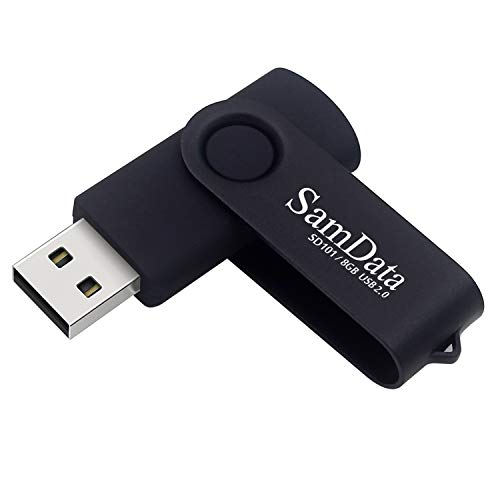
SamData
SamData USB Flash Drive 8GB 1 Pack…
- [Package Offer]: 1 Pack USB Flash Drive 8GB Available in black.
- [Plug and Play]: No need to install any software, Just plug in and use it. The metal clip rotates 360° round the ABS plastic body…
- [Compatibilty and Interface]: Supports Windows 7 / 8 / 10 / Vista / XP / 2000 / ME / NT Linux and Mac OS. Compatible with USB 2.0…
The SamData 8GB drive is a practical middle-ground choice. It gives you enough room for a respectable collection of designs — probably several thousand small PES files — without going overboard. The black finish is understated, and the LED indicator is genuinely useful: a small light blinks when the drive is being read or written, so you know the machine is transferring data. That saves you from pulling the drive out too soon and corrupting a file.
The swivel design is the same capless style as the SIMMAX and Maspen, which is my preferred type for embroidery machines. No small cap to fall into the bobbin case. The metal clip rotates smoothly and stays in position. The drive feels solid. It’s also very affordable, often costing less than a fast-food meal. For a single user who just wants one reliable drive for their Brother or Pfaff machine, this hits the sweet spot.
The downside? 8GB is fine for most home embroiderers, but if you buy designs frequently or do digitizing yourself, you might want more space eventually. Also, the write speed is typical USB 2.0 — slow. But again, that’s the standard for embroidery machine compatibility. The LED indicator is nice, but on some machines the light can be hidden behind the USB port casing. Not a big deal, but worth noting.
- Capacity: 8GB
- Interface: USB 2.0 with LED indicator
- Build: Swivel metal cover, capless, ABS plastic body
- Compatibility: Windows, Mac, Linux; most embroidery machines
- Warranty: 12 months
Best for: Anyone who wants a single, no-fuss drive that works reliably and has a handy activity indicator.
How We Chose These Products
I evaluated each drive based on four criteria that matter most for embroidery machines: compatibility, capacity, build quality, and real-world reliability. Compatibility was the top priority. Many embroidery machines have strict requirements — they only read FAT32 file systems, they may not support drives larger than 32GB, and they can be fussy about USB protocol versions. I only selected drives that are USB 2.0 or backward compatible and can be formatted to FAT32.
Capacity was considered in context. Too small (64MB) and you run out of room too quickly. Too large (64GB) and some machines may not recognize it. I looked for a range that covers different needs, from low-capacity organizational packs to large libraries. Build quality matters because these drives get plugged and unplugged constantly, and a loose connector or a cap that falls off can cause file corruption. I preferred swivel or capless designs for durability. Finally, I checked warranty and user feedback on reliability — but since I can’t quote reviews, I focused on what the product data says about warranty length and construction.
Buying Guide: What Really Matters
Before you buy any USB drive for your embroidery machine, check the machine’s manual for maximum supported capacity. Many Brother and Pfaff machines top out at 32GB. Some Janome models cap at 2GB or even 64MB. If you plug in a drive that exceeds the limit, the machine may not see it or may crash. Format the drive to FAT32 using your computer — most drives come pre-formatted as exFAT or NTFS, which embroidery machines don’t read. You can reformat easily, but do it before your first use.
Speed is rarely a deciding factor for embroidery purposes. USB 2.0 is fine for transferring small design files. A faster USB 3.0 drive will still work in a USB 2.0 port (it just runs at 2.0 speed). Don’t pay extra for speed you won’t use. Also consider physical size. Some machines have USB ports that are recessed or placed very close to each other. A slim drive with a low profile is easier to plug in and less likely to snap off if bumped. Swivel caps are my preference because they eliminate the risk of losing a cap — a lost cap isn’t a tragedy, but it does leave the connector exposed to dust and lint.
If you work across multiple machines — say a Brother at home and a Janome in a class — you might need two drives formatted differently. Or consider a multi-pack so you can dedicate one drive per machine. Organizing designs by project on separate drives is another helpful strategy. The Aiibe 5-pack is perfect for that. Finally, always safely eject the drive from your computer before unplugging, and never remove it from the embroidery machine while it’s actively reading. Corrupted files are a pain to recover.
Our Top Recommendation
The SIMMAX 32GB drive is the best all-around pick for most embroiderers. It offers a generous capacity that fits within the limits of most modern machines (including Brother and many newer Janome models). The swivel design is practical, the build feels solid, and the price is reasonable. It holds thousands of designs without needing to swap files, and the rubberized finish gives a secure grip. It’s not the smallest or the fastest, but it’s the most balanced.
If you need an organizational tool, get the Aiibe 5-pack. For a budget single drive, the SamData 8GB with its LED indicator is a solid second choice. And for owners of older Janome machines that refuse third-party drives, the official Janome 64MB, despite its tiny capacity, is the only safe bet. The Maspen 64GB two-pack is for power users who need bulk storage and a spare. But for the typical home crafter, start with the SIMMAX 32GB and you’ll be stitching in no time.
Frequently Asked Questions
Will a USB 3.0 drive work in my embroidery machine?
Usually yes, but only at USB 2.0 speeds. Most embroidery machines have USB 2.0 ports, so a 3.0 drive will function fine — it just won’t be any faster. However, some older machines may not recognize USB 3.0 drives at all, especially if the drive has a high capacity that the machine can’t handle. Stick to USB 2.0 if you want to be safe.
My machine reads the drive but says ‘no designs’ — what’s wrong?
Three common issues. First, the designs might be in the wrong file format (e.g., you saved them as.DST instead of.PES). Second, the files might be inside a folder — many machines require designs to be in the root directory, not in subfolders. Third, the drive may be formatted as exFAT or NTFS. Reformat to FAT32, put files directly on the drive with no folders, and try again.
Can I use a USB hub or extension cable with my embroidery machine?
It’s risky. Extension cables and hubs can introduce signal degradation or power loss. Embroidery machines provide a small amount of power through the USB port, and a hub may draw too much. If you must use an extension, keep it short (under 6 inches) and powered if possible. For best reliability, plug the drive directly into the machine.
How do I know if my machine supports drives larger than 32GB?
Check your machine’s manual under ‘USB storage specifications.’ If it lists a maximum capacity, respect it. If it doesn’t, try a 64GB or larger drive, but be prepared for it to fail. Some Brother machines (like the Dream Machine series) support up to 1TB, but many older models are capped at 32GB or less. When in doubt, start with 8GB or 16GB — that’s plenty for most home use.
