We earn a commission if you buy through links on this page, at no extra cost to you. Picks are based on fibre and ink chemistry, manufacturer specs and instructions, and 14 years of industrial dyeing and printing experience; we did not test these products ourselves.
Quick answer
The best printer for printing on fabric depends on the fibre. For cotton, use an inkjet printer with pre-treated sheets such as Jacquard Inkjet Cotton, or a dedicated fabric printer like the Brother PrintModa Studio. For polyester, use a sublimation printer such as the Sawgrass SG500 or Epson SureColor F170 plus a heat press.
Our top picks at a glance
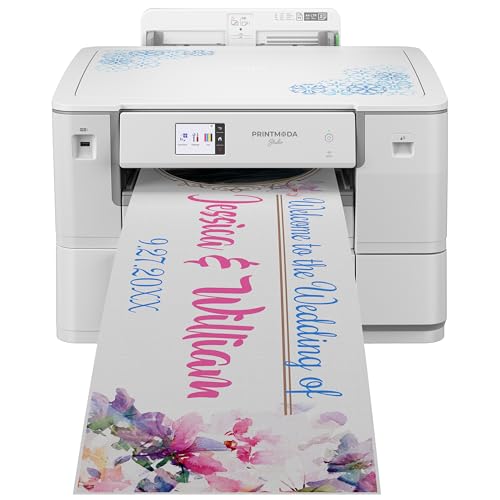
Brother PrintModa Studio Fabric Printer
Prints straight onto a roll of printable cotton, so you skip freezer paper and sheet cutting.
Buy on Amazon
Epson EcoTank ET-2800 All-in-One Supertank Printer
A low-cost refillable inkjet that feeds pre-treated 8.5x11 cotton sheets for quilt labels and patches.
Buy on Amazon
Sawgrass SG500 Sublimation Color Printer
Purpose-built for sublimation ink, with colour-managed software for bright, wash-proof polyester prints.
Buy on AmazonPrinting whole T-shirts for sale? See our guide to the best T-shirt printing machine for small business.
Fabric printer comparison: method, fabric, ink and wash durability
| Product | Method | Best fabric | Ink | Wash durability (typical) | |
|---|---|---|---|---|---|
| Direct-to-fabric inkjet (roll) | Brother printable cotton | Brother LC406 CMYK cartridges | Good for quilting and crafts; gentle wash | Buy on Amazon |
| Inkjet onto fabric sheets | Pre-treated cotton or silk sheets | Epson 502 refill bottles | Fair to good once fixed and rinsed | Buy on Amazon |
| Sublimation transfer + heat press | Polyester (65%+), white or light | Sawgrass UHD sublimation ink | Excellent; dye is inside the fibre | Buy on Amazon |
 | Sublimation transfer + heat press | Polyester (65%+), white or light | Epson dye-sublimation ink bottles | Excellent; dye is inside the fibre | Buy on Amazon |
No products found. Jacquard Inkjet Cotton Fabric Sheets 8.5x11, 10 Pack | Printable fabric sheets | 100% cotton, paper-backed | Any home inkjet | Hand washable, per maker | No products found. |
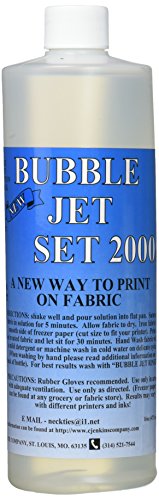 | Pre-treatment fixative | Cotton and silk you cut yourself | Works with home inkjet ink | Improves wash resistance of inkjet prints | Buy on Amazon |
Wash durability is typical for the method and ink class, based on manufacturer guidance and textile chemistry, not a test of each product.
Which printing method works on which fibre?
Most failed fabric prints come from matching the wrong method to the wrong fibre. Inkjet puts ink onto a treated surface; sublimation turns dye into a gas that enters a synthetic fibre. Each works properly on only one family of fibres.
| Fabric | Best home method | Why |
|---|---|---|
| 100% cotton, linen, rayon | Inkjet on pre-treated sheets or fabric soaked in Bubble Jet Set | Cellulose fibres absorb water-based ink; the treatment holds it in place |
| Silk | Inkjet on pre-treated silk sheets | Takes inkjet ink well with a fixative; hand wash only |
| 100% polyester | Sublimation | Disperse dye enters the softened polyester and becomes permanent |
| Poly/cotton 65/35 or higher poly | Sublimation (faded, vintage look) | Only the polyester part takes the dye; the cotton part stays pale |
| 50/50 or cotton-rich blends | Inkjet transfer paper or DTF, not sublimation | Too little polyester for a strong sublimation print |
| Dark fabrics of any fibre | Dark transfer paper, HTV or DTF | Sublimation and inkjet inks are transparent and cannot print light on dark |
Sublimation needs white or light-coloured polyester. See our guide to the best fabric for sublimation for more.
Pigment vs reactive vs disperse: how industry prints fabric
Industry prints fabric with three main systems, and home printers copy two of them. Knowing which one you use tells you how well the print will wash.
- Pigment printing (any fibre). Colour particles sit on the surface, held by a heat-cured binder. Wet rubbing is its weak point. Home inkjet on fabric sheets behaves most like this.
- Reactive printing (cotton, viscose). The dye bonds chemically with cellulose, then is steamed and washed off, giving a soft hand and good wash fastness. No home printer can do this; see dyeing cotton with reactive dyes.
- Disperse dye and sublimation (polyester). The dye house dyes polyester with disperse dyes at high temperature. Sublimation uses the same dye class: heat turns it into a gas that enters the polyester and locks in as it cools, so the print typically outlasts the garment.
Expert tip from Kamrul Islam
In industrial printing, a print can look perfect off the machine and still fail at wash-off. At home, cold-rinse a printed test scrap before you print the whole project.
The 6 best printers and supplies for printing on fabric, reviewed
Brother PrintModa Studio Fabric Printer
Direct-to-fabric inkjet · prints designs up to 297 mm x 1.3 m · separate paper tray
Built for quilters and sewists who want printed cotton without the freezer-paper routine. It feeds Brother's printable cotton roll from one tray and plain paper from another, and runs from the Artspira app. Brother lists designs up to 297 mm wide and 1.3 m long, enough for quilt panels, totes and labels.
Pros
- Prints on a fabric roll, not single cut sheets
- Two trays, so it doubles as a paper printer
- App-based design tools with ready-made projects
Cons
- Expensive compared with a home inkjet
- Designed around Brother's own printable cotton
Skip it if skip it if you only print a few quilt labels a year; a sheet-fed inkjet costs far less.
Expert tip from Kamrul Islam
Wash finished projects cold on a gentle cycle. Like a pigment print, printed cotton wears from wet friction more than from the wash water.
Epson EcoTank ET-2800 All-in-One Supertank Printer
Inkjet all-in-one · refillable ink tanks · 8.5x11 sheet feed
A refillable home inkjet with pre-treated cotton sheets is the cheapest route to fabric printing. The ET-2800 uses bottled ink instead of cartridges, so ink cost per print is low, and it handles paper-backed 8.5x11 fabric sheets for quilt labels and photo patches.
Pros
- Low ink cost from refillable tanks
- Handles paper-backed 8.5x11 fabric sheets
- Also works as an everyday home printer
Cons
- Not designed for fabric; use pre-treated sheets or Bubble Jet Set
- Letter size only, so no large panels
Skip it if skip it if you want to print polyester shirts; it is a standard inkjet, not a sublimation printer.
Expert tip from Kamrul Islam
Trim loose threads from fabric sheets and feed them one at a time. One stray thread can catch the print head and smear the sheet.
Sawgrass SG500 Sublimation Color Printer
Sublimation printer · Sawgrass UHD ink · prints up to 8.5x14
The SG500 is made for sublimation from the box, so there is no printer conversion. Sawgrass UHD ink and Creative Studio colour profiles help prints match the screen after pressing. It suits small businesses making polyester shirts, jerseys and sublimation blanks.
Pros
- Built for sublimation, with colour-managed software
- Very washfast results on polyester
- Large community and support for beginners
Cons
- Only works on polyester or poly-coated items
- Sublimation ink is costly per millilitre
Skip it if skip it if most of your garments are 100% cotton; sublimation will barely show on them.
Expert tip from Kamrul Islam
Follow the paper maker's time and temperature chart and cover the transfer with protective paper. Excess heat on polyester causes ghosting and shiny press marks.
Epson SureColor F170 Dye-Sublimation Printer
Dye-sublimation printer · bottled ink tanks · letter and legal sizes
Epson's own desktop sublimation printer gives you factory sublimation ink and a warranty instead of a converted EcoTank. Refillable ink bottles keep running costs down, and setup is simple for beginners printing polyester shirts, totes and coasters.
Pros
- Factory-made for sublimation, not converted
- Refillable bottles keep ink cost down
- Compact desktop size
Cons
- Polyester and coated blanks only
- Needs a separate heat press
Skip it if skip it if you want to print on dark fabrics; sublimation ink is transparent and will not show on black.
Expert tip from Kamrul Islam
Pre-press the polyester for a few seconds before placing the transfer. It drives out moisture that would turn to steam and blur fine lines.
Jacquard Inkjet Cotton Fabric Sheets 8.5x11, 10 Pack
100% cotton · paper-backed · 8.5x11 · 10 sheets
Pre-treated cotton bonded to a paper carrier, so it runs through a normal home inkjet. Jacquard describes the prints as permanent, lightfast and hand washable. Peel off the backing and sew the fabric into quilts, labels or patches.
Pros
- Works in most home inkjet printers
- Pre-treated, so no soaking step
- Easy to sew or glue after printing
Cons
- Hand wash recommended
- Costs more per yard than treating your own fabric
Skip it if skip it if you need yardage; at that point treat your own cotton with Bubble Jet Set.
Expert tip from Kamrul Islam
Let the print dry at least 30 minutes before peeling and rinsing; fresh ink smears easily.
Bubble Jet Set 2000 Fabric Ink Fixative, 16 oz
Pre-treatment solution · 16 oz · for cotton and silk
Bubble Jet Set 2000 lets you print on your own cotton or silk. Soak the fabric, dry it, iron it onto freezer paper and print. It helps inkjet ink stay in the fibre, so prints survive washing far better than on untreated fabric.
Pros
- Treat any cotton or silk you choose
- Cheaper per sheet than pre-made fabric sheets
- Pairs well with any home inkjet
Cons
- Extra soaking, drying and backing steps
- Treated fabric still needs gentle washing
Skip it if skip it if you only print a handful of labels; ready-made sheets save time.
Expert tip from Kamrul Islam
Prewash cotton to remove mill finishes first. In the dye house we always scour fabric before colour goes on, for the same reason: finishes block absorption.
How to print on fabric with an inkjet printer
- Choose the fabric. Use tightly woven, light 100% cotton or silk, or ready-made sheets such as Jacquard Inkjet Cotton.
- Prewash and treat. Wash without softener, dry, soak in Bubble Jet Set and dry fully. Skip this with pre-treated sheets.
- Back the fabric. Iron freezer paper (shiny side down) onto the fabric and trim to exactly 8.5x11 inches.
- Print. Feed one sheet at a time and print on the fabric side.
- Dry and rinse. Wait at least 30 minutes, peel off the paper, then follow the maker's rinse instructions, usually a cold rinse.
- Wash gently. Cold water, mild detergent, line dry.
Buyer's guide: choosing a printer for fabric
Start with your fabric. Cotton quilts, labels and patches need an inkjet with fabric sheets or a dedicated fabric printer. Polyester shirts and coated blanks need sublimation. No single printer does both well.
Check the size. Most home inkjet and sublimation printers stop at letter or legal size. For quilt panels, a roll-fed printer like the PrintModa saves piecing.
Think about wash life. Sublimation on polyester typically lasts as long as the garment. Inkjet on treated cotton suits crafts and quilts but fades faster with hot, frequent washing. For sublimation fabric choice, see the best fabric for sublimation.
Count the extras. Sublimation needs a heat press, sublimation paper and polyester blanks; inkjet fabric printing needs sheets or fixative and freezer paper. For dark garments, read about sublimation paper for dark fabric.
Frequently asked questions
What is the best printer for printing on fabric?
For cotton, the Brother PrintModa Studio is the best dedicated fabric printer; a home inkjet with pre-treated sheets is the budget option. For polyester, use a sublimation printer such as the Sawgrass SG500 or Epson SureColor F170.
What is the best inkjet printer for fabric printing?
Any reliable home inkjet that can feed single 8.5x11 sheets will print on paper-backed fabric sheets. A refillable-tank model such as the Epson EcoTank ET-2800 keeps ink costs low for regular fabric projects.
Can a regular printer print on fabric?
Yes, a regular inkjet printer can print on fabric if the fabric is backed with paper or freezer paper and treated with a fixative or bought pre-treated. Laser printers are not suitable, because their toner is not designed to bond to fabric.
Does sublimation work on cotton?
Not well. Sublimation dye only bonds with polyester, so 100% cotton shows a very faint print that washes out. Use polyester or blends with at least 65% polyester for good results.
Will inkjet printing on fabric wash out?
Untreated inkjet prints wash out quickly. Pre-treated sheets or fabric soaked in Bubble Jet Set hold the ink far better, and washing gently in cold water helps the print last.
What is a dye sub printer?
A dye sub (dye-sublimation) printer prints special disperse dye ink onto transfer paper. A heat press then turns the dye into a gas that enters polyester, giving a permanent, soft print.
Can I print on dark fabric with a home printer?
Not directly. Inkjet and sublimation inks are transparent, so use dark-fabric transfer paper, heat transfer vinyl or DTF transfers for dark garments.
Our verdict
Our verdict
Choose by fibre first. For cotton quilts, labels and crafts, the Brother PrintModa Studio is the easiest way to print fabric at home; a home inkjet with Jacquard sheets or Bubble Jet Set is the budget route. For polyester products to sell, the Sawgrass SG500 gives the most washfast results.
Buy on Amazon