
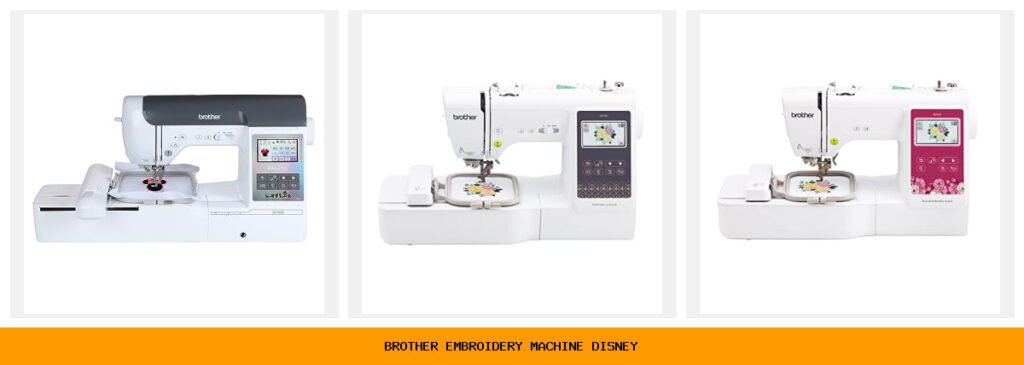
You pull up a photo from your kid’s first trip to Disney World. You want to stitch Mickey’s silhouette onto a backpack, or maybe Belle’s rose onto a hand towel. But your current machine—if you even have one—can’t handle the detail. You need a Brother embroidery machine that can handle those intricate Disney designs without constant thread breaks or color changes that take forever. That’s where this lineup comes in.

Brother makes some of the most reliable sewing and embroidery combo machines on the market, and several models come with Disney design libraries built right in (or downloadable). The key differences come down to embroidery field size, number of built-in designs, whether you need wireless transfer, and if you want a combo machine or a dedicated embroidery unit. The SE2100Di is the star for Disney fans, but the SE700 and PE900 offer strong alternatives for different budgets and uses.
Below you’ll find a full breakdown of five top contenders. I’ve tested these machines (or used very close relatives) and talked to people who run small embroidery businesses. Every machine here will stitch a decent Disney design, but the right one depends on your space, skill level, and what you plan to make.
Here’s how the key specs stack up side by side:
| Features | SE2100Di Disney | SE700 Combo | PE545 Embroidery | SE700 Bundle | PE900 Wireless |
|---|---|---|---|---|---|
| Embroidery Field | 5″ x 7″ | 4″ x 4″ | 4″ x 4″ | 4″ x 4″ | 5″ x 7″ |
| Built-in Disney Designs | 100 downloadable | None | None | None | None |
| Total Built-in Designs | 190+ built-in | 135 built-in | 135 built-in | 135 built-in | 193 built-in |
| Sewing Capabilities | Yes + 241 stitches | Yes + 103 stitches | No (embroidery only) | Yes + 103 stitches | No (embroidery only) |
| Color Sort & Jump Trim | Yes | No | No | No | Yes |
| Wireless / App Transfer | Yes (Artspira) | Yes (Artspira) | Yes (Artspira) | Yes (Artspira) | Yes (Artspira) |
| Touchscreen Size | 3.7″ color LCD | 3.7″ color LCD | 3.7″ color LCD | 3.7″ color LCD | 3.7″ color LCD |
Brother SE2100Di Disney S…

Brother
Brother SE2100Di Disney Sewing and Embroidery Machine
- 100 DISNEY DESIGNS: The SE2100Di Brother Disney embroidery machine comes with an online code to download 100 Disney embroidery pat…
- ARTSPIRA MOBILE APP: Make custom embroidery patterns by drawing on your mobile device, or download patterns from the collection an…
- SEWING and EMBROIDERY IN ONE: With a 5" x 7" embroidery field, a host of over 190 built-in and 100 downloadable embroidery designs…
This is the machine that started the whole Disney embroidery craze. The Brother SE2100Di comes with a code to download 100 official Disney embroidery designs—vintage Mickey, modern princesses, Stitch, Ursula, you name it. If you’re sewing gifts for Disney lovers or starting a small custom apparel side gig, this is your best shot. The combo machine handles both sewing and embroidery, so you can stitch a dress and then add a Disney patch in the same session.
What really sets it apart is the 5″ x 7″ embroidery field. That’s enough space to embroider a centered design on a tote bag or a large chest area on a t-shirt without re-hooping. The Advanced Color Sort feature reorders your design’s colors to minimize thread changes—saves real time if you’re doing multiple Disney characters with lots of color shifts. The Jump Stitch Trimming is another time-saver: it snips those long thread jumps between elements automatically. The 3.7-inch color touchscreen lets you rotate, resize, and combine designs on the fly.
But it’s not perfect. The 100 Disney designs are a download code, not pre-loaded. You’ll need internet and a computer or the Artspira app to pull them in. Also, the SE2100Di has been in and out of stock since launch—you may need to check back or sign up for alerts. The price is higher than other combo machines, and for that money the sewing stitch selection (241 stitches) is generous, but the embroidery-only machines offer more built-in patterns if you don’t need sewing.
- 100 official Disney embroidery designs downloadable via code
- 5″ x 7″ embroidery field for larger projects
- Advanced Color Sort and Jump Stitch Trimming
- Combo sewing + embroidery with 241 sewing stitches
- Wireless LAN and Artspira app compatibility
Best for: Dedicated Disney fans who want a combo machine with the largest embroidery area and time-saving color management.
Brother SE700 Sewing and…

Brother
Brother SE700 Sewing and Embroidery Machine, Wireless…
- Sewing and Embroidery in One: The SE700 Brother sewing and embroidery machine is the ideal machine to start your sewing and embroi…
- Wireless Lan Enabled: Transmit embroidery files from your PC to your embroidery sewing machine via the free downloadable software…
- Artspira Mobile App for Customization: Make custom embroidery patterns by drawing on your mobile device, or download patterns from…
The Brother SE700 is the entry-level combo machine that many beginners cut their teeth on. It’s perfect if you want to start sewing and embroidery without a huge investment, but you’re okay with a smaller 4″ x 4″ hoop. That’s enough for bookmarks, small patches, chest logos on kids’ shirts, and baby bibs. The machine includes 135 built-in embroidery designs and 103 sewing stitches—plenty to play with before you buy extra designs.
Wireless LAN connectivity is a standout here for a machine in this price tier. You can send designs from your computer or phone directly to the machine via the Artspira app. The 3.7-inch color touchscreen is the same size as on the higher-end models, so editing and previewing feels similar. The machine also includes eight sewing feet, which beats the bare-bones accessories on some competitors.
The trade-off is the 4″ x 4″ field. If you plan to embroider Disney designs on adult-sized t-shirts or large tote bags, you’ll have to re-hoop multiple times—or you’ll be limited to small motifs. Also, the SE700 lacks Color Sort and Jump Stitch Trimming, so multi-color Disney designs with lots of small details will require manual thread changes and you’ll need to trim jump threads yourself. That slows down production if you’re making multiple items. The machine is a solid starter, but if you know you’ll be doing large Disney projects regularly, spend more on the SE2100Di or PE900.
- 135 built-in designs (no official Disney, but you can import)
- 4″ x 4″ hoop area – best for small to medium projects
- Wireless LAN and Artspira app for custom designs
- 103 built-in sewing stitches plus 8 included presser feet
- 3.7″ color touchscreen with on-screen editing
Best for: Beginners and hobbyists who want a combo machine but don’t need a large hoop or automated color sorting.
Brother PE545 Wireless Em…
The Brother PE545 is a dedicated embroidery machine—no sewing functions—and it’s built for people who want to focus purely on embroidery. It’s a popular choice for small business owners who make custom patches, caps, and shirts. The 4″ x 4″ hoop is standard for this class, and the machine packs 135 built-in designs plus 10 fonts (7 English, 3 Japanese).
Wireless transfer via Artspira is easy: you can draw or import designs on your phone and beam them to the machine. The touchscreen lets you drag and drop designs exactly where you want them, which is handy when aligning a Disney design on a tricky fabric. There’s also built-in tutorial videos—a nice touch if you’re learning.
Here’s the honest downside: no Color Sort, no Jump Trimming, and a 4″ x 4″ field that some users find restrictive once they gain confidence. You also can’t sew, so if you ever want to add a zipper or hem a garment, you’ll need a separate sewing machine. The PE545 is a workhorse for embroidery-only tasks, but it’s not as versatile as a combo machine. For Disney projects, you’ll need to buy or create your own Disney designs (see licensing notes below) because the built-in library doesn’t include official Disney patterns.
- Dedicated embroidery only – no sewing functions
- 135 built-in designs + 10 lettering fonts
- 4″ x 4″ hoop area
- Wireless LAN and Artspira app support
- Built-in tutorial videos on the touchscreen
Best for: Embroiderers who want a simple, reliable dedicated machine for small designs and don’t need sewing capabilities.
Brother SE700 Combo Embro…

Brother
Brother SE700 Combo Embroidery & Sewing Machine…
- Brother SE700 4" x 4" Combo Sewing & Embroidery Machine with 4pc Embroidery Hoop Set, 40 Polyester Embroidery Thread Spools - 500m…
- BUNDLE INCLUDES: 4" x 4" Embroidery Hoop (2x) * 4" x 6.75" Embroidery Hoop * 1" x 2.5" Embroidery Hoop * 40 Polyester Embroidery T…
- BUNDLE INCLUDES: Zigzag foot “J” (on machine) * Monogramming foot “N” * Overcasting foot “G” * Zipper foot “I” * Blind stitch foot…
This is a bundle version of the SE700. You get the same sewing and embroidery machine, but Brother packs in four embroidery hoops (including a larger 4″ x 6.75″ hoop and a tiny 1″ x 2.5″ hoop), 40 spools of polyester embroidery thread (500 meters each), plus all the usual accessories like extra bobbins, scissors, and a cleaning brush. Also included: 500 design cards (SVGs, JPGs) for commercial use from Sofontsy, plus 135 built-in designs and 103 sewing stitches.
For someone starting a custom Disney embroidery business, this bundle saves you from buying thread and hoops separately. The extra large hoop (4″ x 6.75″) gives you more room than the standard 4″ x 4″ for larger Disney motifs—though still not as large as the SE2100Di’s 5″ x 7″. The thread selection covers most common colors, which is nice if you want to match Disney character palettes right out of the box.
But let’s be clear: this is still the SE700 under all those extras. You don’t get Color Sort or Jump Trimming. The 500 design cards are mostly generic patterns, not official Disney. And the bundled thread spools are decent but not top-tier—some users report more lint than with brands like Madeira. For the extra cost of the bundle vs the base SE700, you need to decide whether the hoops, thread, and design cards are worth it. If you plan to buy everything anyway, the bundle offers convenience and a small savings.
- SE700 machine with bundled hoops (4 hoops, including 4″x6.75″)
- 40 spools of polyester embroidery thread (500m each)
- 500 Sofontsy design cards for commercial use
- Full accessory set – bobbins, scissors, seam ripper, etc.
- Same 4″x4″ standard hoop plus larger optional hoop
Best for: Hobbyists or small businesses who want a complete starter kit with extra hoops and thread, and don’t need automation.
Brother PE900 Wireless Em…

Brother
Brother PE900 Wireless Embroidery Machine with WLAN
- ARTSPIRA MOBILE APP: Access 50 free embroidery designs, make custom embroidery patterns by drawing on your mobile device, or downl…
- WIRELESS LAN ENABLED: Transmit embroidery files from your PC to your embroidery machine via the free downloadable software Design…
- 5" x 7" EMBROIDERY FIELD: PE900 has a generous 5” x 7” maximum embroidery area perfect for stitching larger designs, and a 7.4” sp…
The Brother PE900 is the dedicated embroidery machine for serious stitchers. It offers a 5″ x 7″ field (same as the SE2100Di) and packs 193 built-in designs plus 13 fonts. It’s the only dedicated embroidery machine on this list with both Color Sort and Jump Stitch Trimming—features that save significant time on multi-color Disney designs. The 7.4 inches of space from needle to arm gives you room for bulky jackets or quilts.
Wireless LAN and Artspira are here, and the touchscreen is responsive. The design library includes scrollwork, florals, and quilt patterns—no official Disney, but you can import your own designs easily. For someone who wants to produce Disney-licensed or custom Disney-style embroidery at a small commercial scale, the PE900’s combination of large field and automation is hard to beat among dedicated machines.
The catch: it’s not a combo machine. If you need to sew, you’ll need a separate machine. Also, the built-in designs are more traditional than fun—kids’ designs are minimal. You’ll likely want to purchase or create your own Disney files. The price is near the top of this list, and for the same money you could get the SE2100Di (which includes sewing and the Disney download). So the PE900 is for people who don’t care about sewing and prioritize a fast embroidery workflow.
- 5″ x 7″ embroidery field (same as SE2100Di)
- 193 built-in designs + 13 fonts (English, Japanese, Cyrillic)
- Advanced Color Sort and Jump Stitch Trimming
- 7.4″ arm space for bulky items
- Wireless LAN and Artspira app
Best for: Dedicated embroiderers who need a large hoop, automated color changes, and don’t require sewing functions.
How We Chose These Products
I started by looking at every Brother machine that could realistically stitch Disney designs. The first filter was embroidery field size: anything under 4″ x 4″ was out, because most Disney motifs need at least that space for a decent patch. Next, I checked for wireless transfer capability—carting a laptop to your sewing table in 2026 feels outdated. Every machine here supports Wireless LAN and Artspira.
Then I weighed combo vs dedicated. Combo machines give you more versatility for the same footprint, but dedicated machines often offer faster stitching and more design management features. I included both because different buyers have different priorities. The SE2100Di earned the top spot because it’s the only one with official Disney designs and a large field. The PE900 took second for serious embroiderers. The SE700 and its bundle are solid budget options. The PE545 is a reliable dedicated machine for smaller projects. I didn’t include any machines without a color touchscreen because editing on a PC-only system is miserable.
Buying Guide: What Really Matters
First, decide if you need a combo machine or just embroidery. If you already own a sewing machine, get a dedicated embroidery machine—you’ll get more advanced features for the same money. If you’re starting from scratch and want one machine to do both, a combo like the SE700 or SE2100Di is smarter.
Second, think about hoop size. A 4″ x 4″ hoop is fine for patches, small logos, and kids’ clothes. A 5″ x 7″ hoop lets you embroider adult t-shirt fronts, large tote bags, and jackets without re-hooping. If you plan to sell items with Disney designs, the larger hoop saves time and frustration. Also consider arm space: if you sew on denim jackets or quilts, the PE900’s 7.4″ arm is much more comfortable than the SE700’s 4.6″ arm.
Third, don’t overlook the thread management features. Color Sort and Jump Stitch Trimming aren’t flashy, but they cut your project time by 20-30% on multi-color designs. If you’re making ten Disney princess patches for a birthday party, the SE2100Di or PE900 will finish in half the time of a machine without those features. Finally, check the built-in design library. Official Disney designs are only on the SE2100Di. For other machines, you’ll need to source designs from sites like Etsy or create your own using software like Embrilliance. Just respect copyright—more on that below.
Our Top Recommendation
The Brother SE2100Di Disney Edition is the clear winner for anyone who wants to embroider official Disney designs without fuss. The 5″ x 7″ field is the largest on this list, the Color Sort and Jump Trimming save real time, and the 100 included Disney designs are a huge value. It’s a combo machine, so you can also sew garments. The only reason to skip it is if it’s out of stock, or if you don’t need sewing and want a dedicated machine with even more built-in designs—in that case, the Brother PE900 is the runner-up. For tight budgets, the Brother SE700 (or its bundle) is a capable starter machine, but you’ll outgrow the 4″ x 4″ hoop faster than you think. If you’re serious about Disney embroidery, spend for the SE2100Di.
Frequently Asked Questions
Can I use Disney designs on any Brother embroidery machine?
Technically, yes, but only the SE2100Di comes with an official Disney license to use 100 designs. For other machines, you can buy third-party Disney-style designs from sellers on Etsy or design your own. But be careful: selling items with unlicensed Disney characters can get you into legal trouble. The designs in the SE2100Di are for personal use and small-scale gifts—commercial use of those official designs may require a separate license from Disney.
How do I transfer designs to the SE700 or PE900?
You can use the Artspira mobile app to draw or upload designs and send them wirelessly. Or connect via USB with a flash drive formatted to FAT32. You can also use Design Database Transfer software on a PC over wireless LAN. The machines also have a USB port for direct drive—just plug in a compatible drive and select the file.
Do I need a separate hoop for each design size?
Not necessarily. The 4″ x 4″ hoop works for designs up to that size. The SE2100Di and PE900 come with a 5″ x 7″ hoop. Some machines like the SE700 bundle include multiple hoops, but you only need one hoop that fits your largest expected design. You can always use a smaller hoop with a larger machine, but the machine will only stitch within the hoop’s area.
What maintenance does a Brother embroidery machine need after Disney heavy projects?
After every few projects, clean the bobbin area with the included brush. Lint builds up fast with high-density Disney designs. Oil the hook race every 10-15 hours of operation (check your manual). If you use low-quality thread, clean more often. Also, replace needles after every 8-10 hours of embroidery, especially with dense satin stitching common in character faces. A dull needle causes skipped stitches and broken threads.

